Custom software development can recover what is still recoverable from a data-loss incident — and more importantly, it can build the automated backup and disaster-recovery system that stops it from happening again. Yes: if your business lost data because nobody ever set up backups, a focused software engagement can inventory every system you have, put automated off-site backups in place, prove they restore, and hand you a written recovery runbook. But the honest first answer is uncomfortable: if the data is gone and there was never any backup, no software recovers it. What software does is make sure this is the last time.
This article covers the real anatomy of business data loss: how companies end up with no backups, what an incident actually costs, what a proper recovery system must do and never do alone, when not to build custom software, and how a 30-day pilot proves the concept.

Where do businesses actually lose their data?
Before discussing technology, it is worth naming the specific ways data disappears. In our experience working with growing businesses, data loss is almost never a dramatic hack. It is quiet, ordinary, and entirely preventable.
Why do backups never get set up in the first place?
Months or years pass. Then a laptop dies or an employee deletes the wrong folder, and the business discovers its entire data strategy was a hope and a subscription receipt.
Why does one failed drive take everything down?
Many small businesses keep everything — accounting, customer records, designs, contracts — on one server or one “main computer.” There is no second copy, or the second copy sits in the same building on the same power circuit. A disk failure, a fire, a burst water pipe, or a simple power surge removes the data and its only backup at the same time.
Why do backups exist but restores fail?
This is the most painful variant: the business did set up backups, years ago. Then it changed servers, upgraded software, added new folders — and the backup job kept running against the old paths. Or the backup completed but corrupted silently, or nobody can find the encryption password, or the backup software’s license lapsed. A backup that has never been tested by an actual restore is not a backup. It is a rumor.
Why does “it is on the cloud” not mean it is backed up?
Cloud storage syncs. Sync is not backup: delete a file locally and the deletion syncs to the cloud. Corrupt a database and the corrupted version syncs. Ransomware encrypts local files and the encrypted files sync. Without versioning, point-in-time recovery, and a separate immutable copy, cloud sync is a convenient copy of the disaster.
What does the math look like? An illustrative example
Data-loss cost estimates floating around the internet are usually vendor statistics with unclear provenance. So here is a clearly labeled illustrative example, built on stated assumptions you can adjust to your own business.
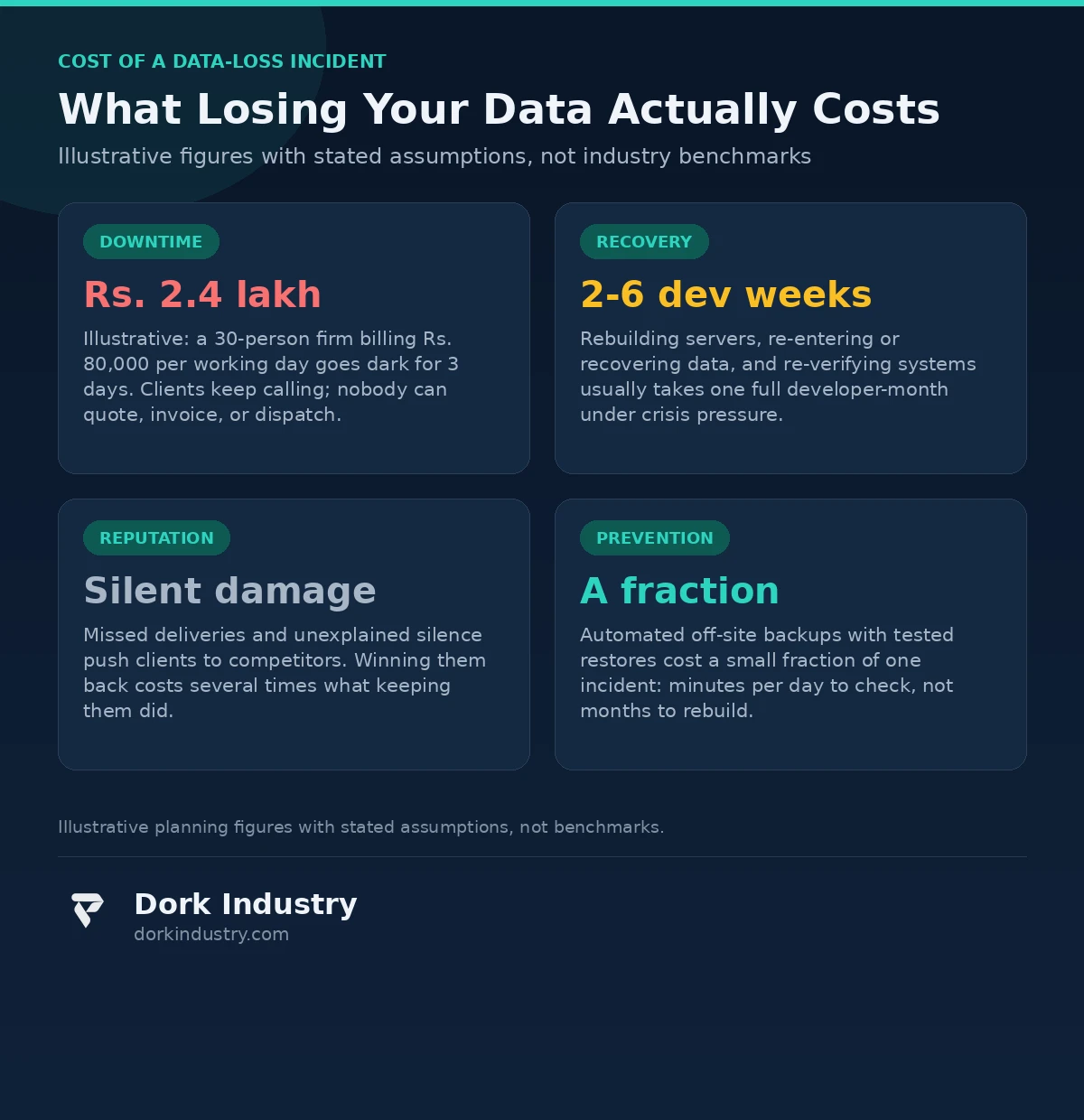
Assumptions: a 30-person services firm; daily billable output of Rs. 80,000 per working day; a three-day outage where nobody can quote, invoice, access client records, or dispatch work; no backup, so two weeks of developer/system-admin time are needed to rebuild from scratch; and ongoing client impact from missed deliveries.
| Cost line | Illustrative figure | How it is derived |
|---|---|---|
| Lost output (downtime) | Rs. 2,40,000 | Rs. 80,000/day x 3 days of dead operations |
| Emergency rebuild effort | 2-6 developer weeks | Rebuilding servers, re-entering data, re-verifying systems under crisis pressure |
| Client trust damage | Unpriced, but real | Missed deadlines push clients to competitors; re-acquiring a lost client costs several times retention |
| Prevention (automated backups) | A fraction of one incident | Automated off-site backups + tested restores: minutes of daily checking, not months of rebuilding |
The arithmetic is deliberately conservative. The point of the math is not precision — it is that prevention costs a fraction of any loss row.
What data do you already have — and what did you never collect?
Most businesses that “lost their data” actually have more than they think — and are missing the things they never recorded. Recovery and prevention both start with this honest inventory.
Data you usually still have: email histories (Gmail, Outlook) containing contracts, invoices and client threads; payment records in your gateway or bank statements; copies of documents sent to clients and vendors; exports or screenshots from old systems; chat histories with work instructions; spreadsheets saved on individual laptops.
Data you never collected and therefore cannot recover: fine-grained transaction history, approval audit trails, customer interaction history outside email, and operational metrics you never stored. Custom software development cannot resurrect data that was never recorded — it can only make sure the business starts recording it properly from today.
What must custom software development actually build for backup and recovery?
A proper backup and recovery system is not “an external hard drive plugged into the server.” It is four capabilities working together, and the software job is to make all four automatic and provable.
How should automated backups work?
Backups must run on a schedule the business defines (daily full, hourly incremental for critical databases), across every system in the inventory, without anyone remembering to press a button. The backup software reports success or failure every single run, and a failure triggers an alert, not a shrug. Silent failure is the cause of most “we thought it was backing up” disasters.
How does the 3-2-1 rule translate into actual software?
According to CISA’s #StopRansomware guidance, maintained and tested backups are a core defense against ransomware — which is why the classic 3-2-1 rule still matters: three copies of important data, on two different media, with one copy off-site and preferably offline or immutable. In software terms that means: versioned snapshots (not overwritten copies), encryption at rest, a copy in a different region or provider, and at least one immutable copy that nothing — not a compromised admin account, not ransomware — can alter or delete for its retention period. The software enforces the rule; humans are not required to remember it.
How do you know a backup is actually good?
Only one way: restore from it, regularly, on a schedule. The system should support point-in-time restores (recover the database as it was at 2 PM Tuesday, not just “the latest”) and the restore process must be tested against a staging environment on a cadence — monthly for critical systems is a reasonable starting point. According to NIST’s Contingency Planning Guide (SP 800-34 Rev. 1), a contingency plan is incomplete without tested recovery procedures and defined recovery time objectives — backup storage alone does not make a plan. The recovery time objective (RTO) for each system — how long the business can survive without it — determines how the restore must be engineered.
| Approach | What it covers | Where it falls short | Best for |
|---|---|---|---|
| Manual copies | One extra copy, when someone remembers | Forgotten, untested, no versions, dies during busy weeks | Nothing serious — a stopgap only |
| Scheduled scripts | Regular copies to a second drive | No alerting, no off-site copy, restore rarely tested | Small offices with simple file shares |
| Managed backup service | Scheduled, versioned, off-site, monitored | Generic config may miss custom databases and SaaS data | Standard businesses without unusual systems |
| Custom-engineered recovery | Every system inventoried, immutable off-site copies, tested restores, written runbook | Costs more than a managed service for standard needs | Businesses with custom software, multiple systems, or compliance needs |
What should the system never do alone?
Automation is the point of backup software — but there are decisions it must never make without a human.
- Deleting old backups to save space must never be fully automatic beyond a written retention policy. An automated purge that runs during a ransomware incident can delete your only clean copies.
- Declaring the incident over is a human decision. The system can say “restore completed successfully” — only a person can confirm the data is correct, complete, and that customers have been informed.
- Deciding what is worth backing up is a business judgment. The software can inventory everything; the owner must decide what gets the expensive immutable tier and what gets basic versioning.
- Restoring over production data must always require explicit human confirmation with a snapshot of the current state taken first. A mistaken restore is a second data-loss incident.
The boundary principle: automation handles the routine perfectly so humans are free to handle the judgment calls — and the system must be designed so a tired person clicking the wrong button cannot destroy the only good copy.
When should you not build custom software for this?
Honest build-vs-buy advice is part of any serious custom software development conversation. You should probably not build custom backup software when:
- Your data lives entirely in standard SaaS (Google Workspace, Microsoft 365, one accounting app). A managed backup service for those platforms, configured correctly with retention policies, covers you at a fraction of custom cost.
- You have one server and one database. Off-the-shelf backup tools (see Microsoft’s Azure Backup overview for what a cloud-native option covers) handle this without custom code.
- Your real problem is discipline, not tooling. No software fixes a business that refuses to define what “important data” means.
Custom development earns its cost when you have in-house software or databases that generic tools cannot quiesce, multiple systems that must be restored in a specific order, or compliance requirements that generic tools cannot express. If your systems are simpler than that, buy the managed service and spend the difference on testing the restores.
What does a 30-day backup-audit pilot look like?
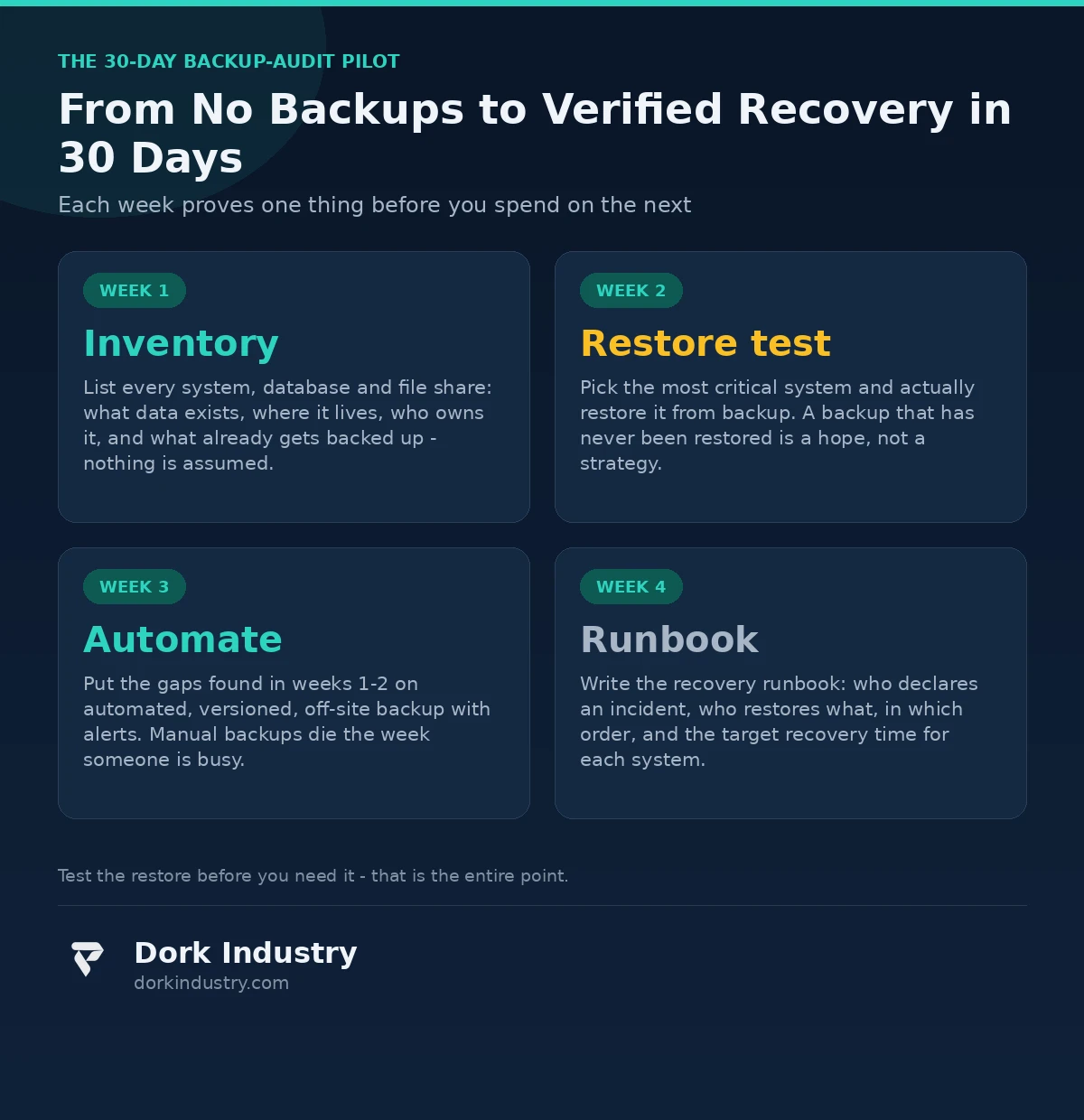
The fastest way to go from “no backups” to “verified recovery” is a focused 30-day pilot on your most critical systems — not a year-long enterprise program.
- Week 1 — Inventory: list every system, database, and file share. What data exists, where it lives, who owns it, and what already gets backed up. Nothing is assumed; everything is written down.
- Week 2 — Restore test: pick the single most critical system and actually restore it from whatever backup exists. If there is none, document that honestly. A backup that has never been restored is a hope, not a strategy.
- Week 3 — Automate: put the gaps found in weeks 1-2 on automated, versioned, off-site backup with failure alerting. Manual backups die the week someone is busy.
- Week 4 — Runbook: write the recovery runbook — who declares an incident, who restores what, in which order, with what target recovery time per system. One page per system, kept where people can find it at 2 AM.
If the inventory reveals your systems are all standard SaaS, the pilot’s honest conclusion is “buy the managed service” — still a successful pilot, because it cost four weeks instead of a failed six-month build.
What drives the cost of custom software development for backup and recovery?
Pricing varies with scope. The real cost drivers are:
- System count and variety: backing up one database costs little; backing up twelve systems with interdependencies costs proportionally more.
- Recovery targets: a 4-hour recovery target requires different engineering (hot standby, tested automation) than a 72-hour one.
- Retention and compliance: seven years of immutable, auditable retention costs more than 30 days of rolling versions.
- Cloud storage volume: terabytes of versioned snapshots have ongoing storage costs that must be modeled, not discovered later.
- Testing cadence: monthly automated restore drills and reporting add ongoing effort — but they are the entire point.
- Runbook and training: the system is worthless if the team cannot operate it under pressure; documentation and a practice drill are part of the build.
Anyone quoting a fixed price without asking which systems you have, what your recovery time targets are, and how much data you store is guessing.
Frequently asked questions
We already lost our data and had no backups. Can you recover it?
Sometimes partially: disk forensics can recover data from failed drives, and fragments often survive in email, payment records, and files sent to clients. What was never recorded anywhere cannot be recovered. The first step is an honest assessment of what copies still exist before anyone promises anything.
Is storing everything on the cloud not the same as having a backup?
No. Cloud sync mirrors your current state — including deletions, corruption, and ransomware-encrypted files. A real backup has versioning, point-in-time recovery, and a separate immutable copy that sync cannot touch.
How much does a backup system cost compared to one data-loss incident?
In our experience, a properly automated backup setup for a small-to-medium business costs a small fraction of a single incident’s bill — and it is a one-time build plus modest ongoing storage, versus days of downtime and weeks of rebuilding every time it happens.
How often should backups be tested by actually restoring?
Critical systems: monthly, on a schedule, against a staging environment. The rest: at least quarterly. An untested backup is a rumor — the restore test is what converts it into a strategy you can rely on at 2 AM.
Do we need custom software, or is an off-the-shelf backup tool enough?
If your data lives in standard SaaS and one database, off-the-shelf tools plus tested restores are enough and cheaper. Custom development earns its cost when you have in-house software, multiple interdependent systems, or compliance requirements that generic tools cannot express. Request a backup assessment and we will tell you honestly which camp you are in.
The bottom line
Custom software development cannot resurrect data that was never recorded. But it can do the two things that actually matter going forward: build automated, versioned, off-site backups that run whether or not anyone remembers, and prove — by restoring from them on a schedule — that they work. The expensive part of data loss was never the technology. It was the years of assuming everything was fine.
Get a Free Backup & Recovery Assessment Before the Next Incident
We inventory every system, database and file share you have, check what is actually being backed up (and whether it restores), and map the gaps against the 3-2-1 rule. You walk away with a written finding: what you would lose tomorrow, what a recovery would take, and exactly what needs to change — custom build, managed service, or both. No commitment, no disguised sales pitch.
Request your free backup & recovery assessment WhatsApp +91 8210792477
About Dork Industry
Dork Industry is a software development company building mobile apps, custom software, AI systems, and automation for businesses that need technology to work in the real world — on real devices, with real users, under real constraints. We diagnose and rescue struggling systems, build new products from scratch, and integrate AI and IoT where they earn their place. Evidence-first: measure the problem, fix the cause, and hand the business a dashboard it can read. Learn more at dorkindustry.com.