
When the WooCommerce no payment methods available error appears, at least one gateway may be enabled in the dashboard but unavailable for the shopper’s current checkout session. The cause can be gateway eligibility, country or currency restrictions, missing shipping data, cart conditions, Checkout Block compatibility, JavaScript failure, caching or a plugin/theme conflict. Diagnose the exact session before changing production code.

Contents
What does “no payment methods available” actually mean?
WooCommerce filters enabled gateways for the current cart and customer. A gateway can disappear because its own availability method rejects the currency, billing country, shipping country, order total, product type, login state or configuration. The block-based checkout adds a separate front-end registration requirement. The error is therefore a symptom, not proof that the gateway plugin is disabled.
Current search results include official WooCommerce documentation, developer guidance and recent support threads about gateways disappearing after updates or in the Checkout Block. That validates repair intent without proving traffic or blaming one plugin. According to WooCommerce’s official troubleshooting guidance, payment errors should be reproduced on staging and investigated with checkout configuration, order notes and gateway logs. Read the official guide.
Which nine checks isolate the WooCommerce no payment methods available error?
| Check | Question | Evidence |
|---|---|---|
| 1. Gateway status | Is it enabled and fully connected? | settings and account status |
| 2. Checkout type | Block or classic shortcode? | checkout page structure |
| 3. Country/currency | Does the gateway support this session? | two-address test |
| 4. Shipping | Is a valid method selected? | zone and rate result |
| 5. Cart conditions | Do total, product or coupon rules hide it? | controlled cart test |
| 6. Customer state | Guest, role or saved address difference? | fresh-session comparison |
| 7. Front end | Did JavaScript or AJAX fail? | console and network trace |
| 8. Cache/conflict | Is stale or conflicting code involved? | safe staging isolation |
| 9. Logs/regression | What changed and when? | gateway log and update timeline |
1. Is the gateway merely enabled, or actually ready?
Confirm that the gateway is enabled, its merchant connection is healthy, required keys or webhooks are present, test/live mode matches the credentials and no setup warning remains. Take screenshots of the state before reconnecting anything. Do not rotate credentials merely to “try a fix” without a rollback plan.
2. Is the store using Checkout Blocks or classic checkout?
Open the Checkout page in the editor. A Checkout block uses the block flow; [woocommerce_checkout] uses classic checkout. WooCommerce explains that a server-side gateway must also be registered on the front end to be compatible with Cart and Checkout Blocks. Review the official Checkout Block compatibility FAQ.
3. Do country and currency rules exclude the gateway?
Test one known-supported domestic address and one affected address with the same cart. Check store currency, merchant-account country, gateway-supported currencies and any country-filter plugin. Record the exact condition that removes the option; do not simply disable regional rules globally.
4. Is shipping complete before payment eligibility runs?
Some gateways depend on a valid address, shipping method or deliverable cart. Confirm that the customer’s zone resolves to a rate and that checkout updates totals after the address changes. A missing shipping method can indirectly leave no valid payment option.
5. Is a cart rule hiding every gateway?
Test a simple physical product with no coupon, subscription, pre-order, deposit, membership, gift card or zero-total condition. Then add one condition at a time. Conditional-payment extensions can intentionally hide gateways by address or order total; inspect rule order and fallback behaviour.
Is checkout accepting carts but showing no way to pay?
Share the checkout type, affected countries/currencies, enabled gateways, recent update timeline, test cart, screenshots and redacted logs. Dork Industry can reproduce the failure safely and scope a repair.
6. Does the problem affect guests, roles or saved addresses differently?
Use a private browser window and a test customer. Compare guest checkout, a new account and an existing account with a saved address. Role-based pricing, wholesale logic, B2B approval or a stale session can change gateway eligibility.
7. Are the checkout scripts and API requests completing?
Open the browser console and Network panel on staging. Reproduce the error and note failed JavaScript, blocked requests, Store API responses and timestamps. WooCommerce’s checkout-loading guide recommends checking console errors because checkout uses asynchronous requests to update totals and payment methods. See WooCommerce’s diagnostic guidance.
8. Could cache, optimisation or a plugin conflict be masking the gateway?
Exclude cart, checkout and account pages from full-page caching. Purge safely, test without browser extensions and reproduce on staging with a controlled conflict test. Keep the gateway, WooCommerce and a default theme where possible, then reintroduce components one at a time. Do not deactivate payment or security components on the live store as an experiment.
9. What changed immediately before the failure?
Record WooCommerce, gateway, theme and checkout-extension versions; deployment time; cache changes; PHP or hosting updates; and the first affected order or report. Enable the gateway’s supported logging, place one test order and correlate the log timestamp with the browser trace.
Where can the payment method disappear?
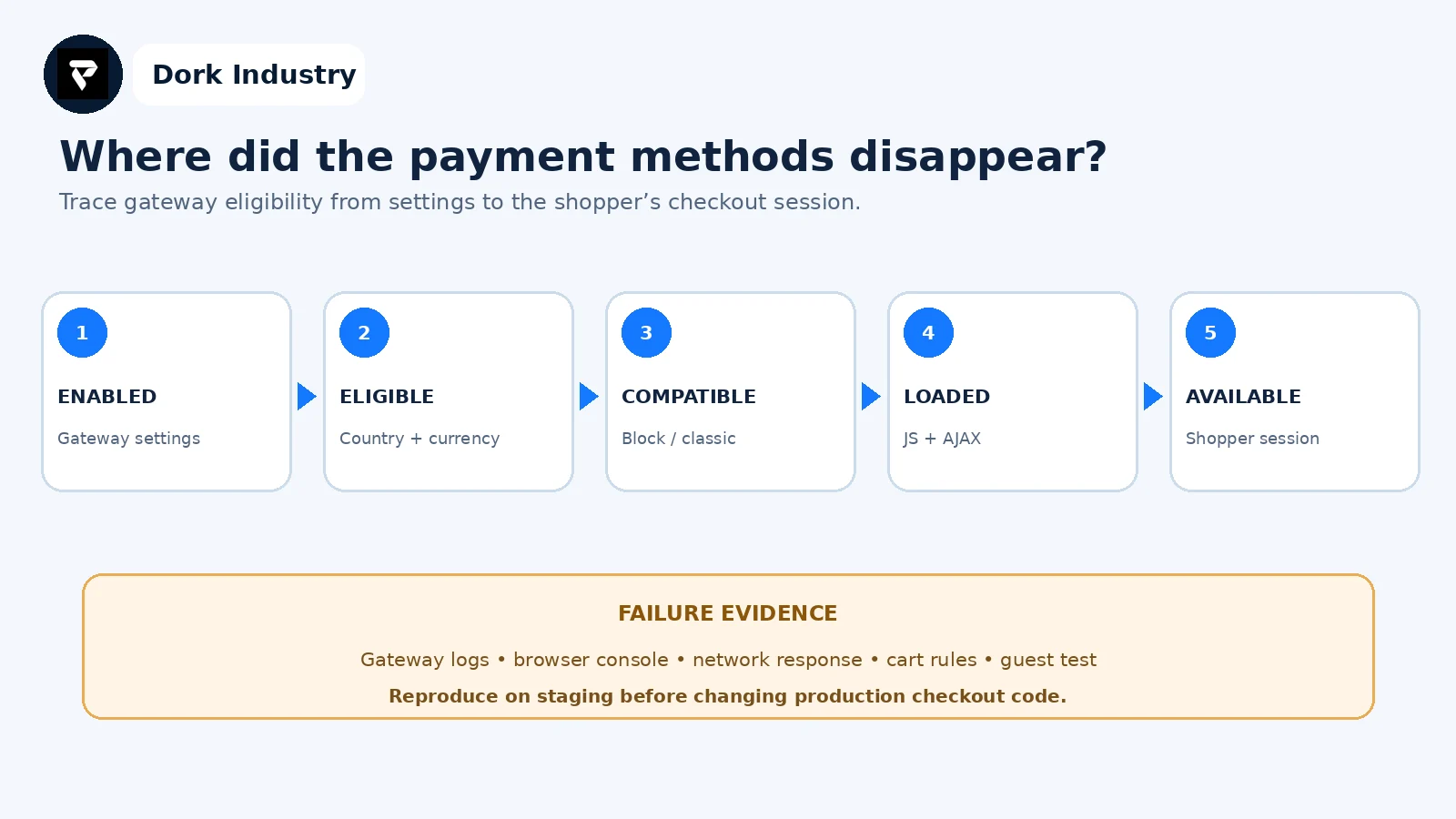
This sequence prevents random fixes. If the gateway is absent server-side, inspect eligibility. If present server-side but absent in the block front end, inspect integration and scripts. If it appears for one session only, compare cart, address, currency and customer state.
What should the repair test cover?
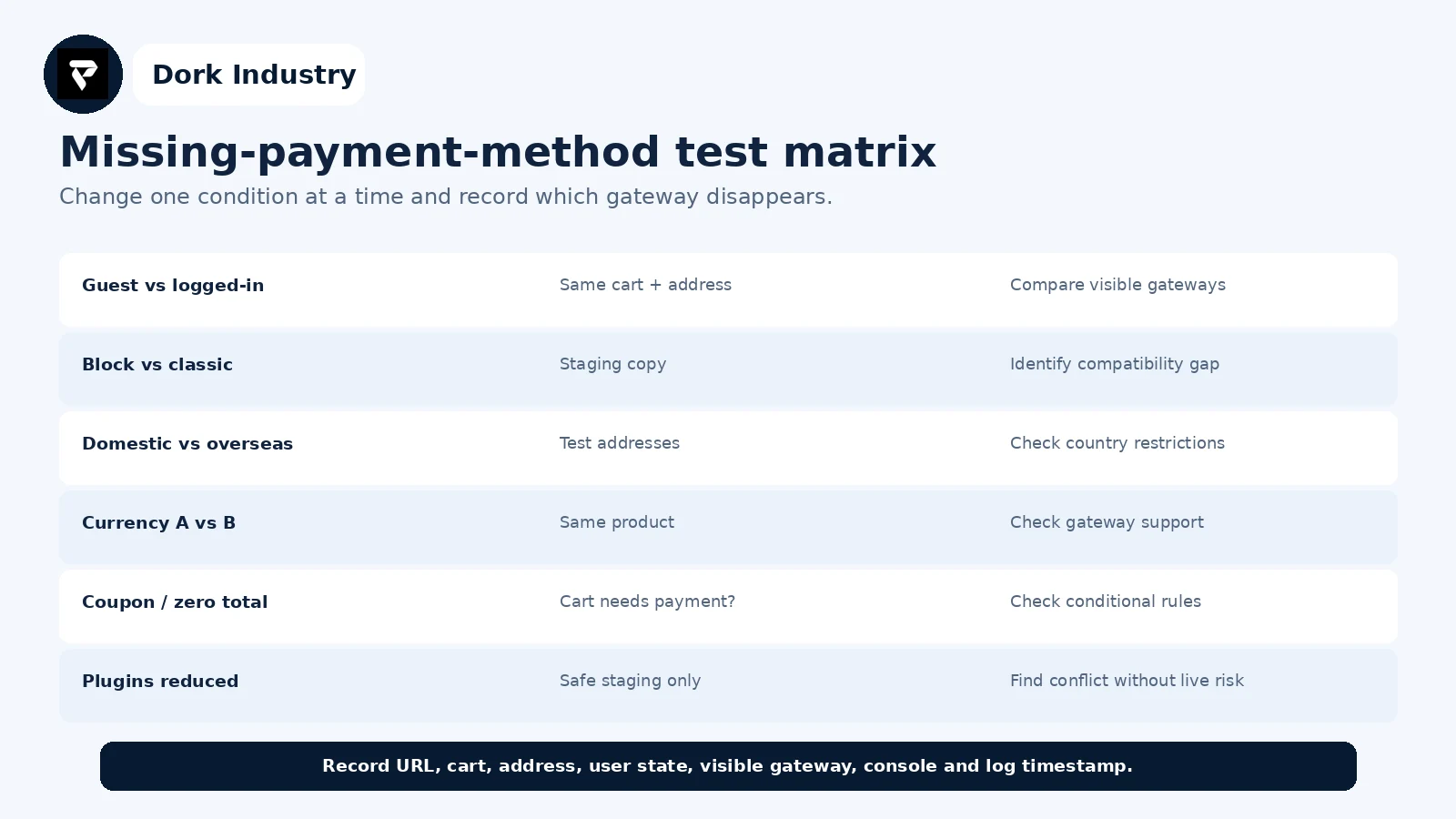
Run the matrix on staging with test credentials. Record URL, cart, address, currency, user state, visible gateway, console output and gateway-log timestamp. After the fix, test desktop and mobile plus one successful sandbox order, redirect or callback path as supported.
When is configuration enough, and when is professional work warranted?
| Situation | Likely response |
|---|---|
| single disabled or incomplete setting | configuration repair |
| unsupported Checkout Block gateway | compatible version, classic fallback or integration work |
| conflicting country/cart rules | rule redesign and regression tests |
| custom gateway absent in Blocks | front-end payment-method registration |
| intermittent production failure | logging, monitoring and reproducible test harness |
What can Dork Industry repair?
Dork Industry can reproduce checkout failures, audit gateway eligibility, diagnose Checkout Block compatibility, inspect JavaScript and Store API errors, repair PHP or front-end integration code, test regional conditions and build a regression checklist. Review Dork Industry’s WooCommerce development service, Razorpay pending-order guide, Shopify payment-method guide and web development service.
Restore payment choices without guessing on the live store
Send a redacted system-status report, affected test case, checkout type, update timeline, screenshots and relevant logs. Dork Industry can propose a focused repair or gateway-integration project.
Frequently asked questions
Why is a WooCommerce gateway enabled but not visible?
Enabled does not mean eligible for every session. The gateway can reject the current currency, address, cart, shipping state, customer role or checkout type, or fail to register or load in the block front end.
Can Checkout Blocks hide an older gateway?
Yes. WooCommerce requires payment methods to integrate with the block front end in addition to their server-side gateway class. Check the extension’s declared compatibility and test the same staging cart with classic checkout.
Should I deactivate plugins on the live store?
No. Create or use a staging environment, back it up and change one component at a time. Live deactivation can interrupt checkout, callbacks, subscriptions or other business-critical processes.
What evidence should I send a developer?
Provide the checkout URL and type, affected cart and address, guest/login state, enabled gateway settings, recent changes, browser console and network evidence, gateway logs and timestamps. Remove credentials and personal customer information.