When a PHP website 502 after AWS migration appears, identify which gateway produced the error before changing server settings. A 502 can originate at the Application Load Balancer, Nginx or another proxy when it cannot obtain a valid response from the next layer. The fastest safe diagnosis separates load-balancer errors from target-generated errors, then tests the target, Nginx and PHP-FPM in order.

Contents
What does a 502 after cloud migration mean for the business?
A 502 usually means a gateway or proxy received an invalid response from an upstream service. For a business website, portal or API, that can interrupt logins, checkouts, form submissions, integrations and internal operations. Repeated refreshes do not prove the application is healthy; one target may be working while another fails intermittently.
According to AWS documentation, an Application Load Balancer can produce a 502 when a target resets or closes a connection, returns a malformed response, exceeds response-header limits, encounters an SSL handshake error or is deregistered before a request finishes. Review AWS’s documented ALB 502 causes.
Which nine checks isolate a PHP website 502 after AWS migration?
| Check | Evidence | Decision |
|---|---|---|
| 1. Identify the 502 source | ALB metrics and access logs | load balancer or target investigation |
| 2. Inspect target health | target state and reason code | reachability, timeout or response mismatch |
| 3. Test the target directly | private IP, target port and Host header | bypass ALB and reproduce safely |
| 4. Verify listener routing | listener rule, target group and port | correct protocol and destination |
| 5. Read Nginx errors | upstream, socket and header messages | proxy or FastCGI repair |
| 6. Verify PHP-FPM | service, socket, pool and process state | restart only after evidence capture |
| 7. Compare migration differences | PHP version, extensions, paths and environment | correct missing runtime dependency |
| 8. Check capacity and timeouts | CPU, memory, disk, pool queue and latency | optimize the bottleneck before raising limits |
| 9. Validate deployment recovery | health check, drain and rollback test | prove stable service across every target |
Need the failing layer identified before more settings are changed?
Share the AWS architecture, one failing URL, approximate timestamps, ALB target-health result and redacted Nginx/PHP-FPM errors. Dork Industry can scope a focused PHP/AWS diagnosis and recommend repair, rollback or migration correction.
1. Did the Application Load Balancer or the target produce the 502?
Use CloudWatch metrics and ALB access logs to make the first split. AWS explains that data in HTTPCode_ELB_502_Count indicates the load balancer generated the response, while target-side 5xx metrics point toward the application target. In access logs, compare elb_status_code with target_status_code. See the AWS Support diagnostic method.
2. What does the target-health reason code say?
Do not rely only on a red “unhealthy” label. Target.ResponseCodeMismatch, Target.Timeout, Target.FailedHealthChecks and Target.NotInUse point to different causes. Confirm that the health path exists, returns an expected status without authentication and reaches the correct application port. Compare AWS target-health reason codes.
3. Can the application respond when the load balancer is bypassed?
From an authorised host inside the VPC, send a request directly to the target’s private address and port using the correct Host header. A failing direct request narrows the problem to the target, web server or application. A successful direct request shifts attention to listener rules, target registration, security-group paths, TLS or connection behaviour between the ALB and target.
4. Does the listener send traffic to the correct protocol and port?
Compare the listener action, target group protocol, target port, instance security group and Nginx listen directive. A migrated instance may serve Nginx on port 80 while the target group still expects another port, or the target may expect HTTPS without a compatible certificate and handshake configuration.
5. What does the Nginx error log report at the same timestamp?
Correlate one failing request with the Nginx error log. Messages such as connection refused, missing Unix socket, premature upstream close or oversized headers describe different repairs. The Nginx FastCGI module documents how requests are passed to a FastCGI server and how response buffering is configured. Review the official Nginx FastCGI reference.
6. Is PHP-FPM running on the endpoint Nginx actually uses?
Verify the service state and compare Nginx’s fastcgi_pass value with the PHP-FPM pool’s listen value. Migration can change the PHP version and therefore the socket filename. Also verify socket ownership and permissions. Restarting PHP-FPM may restore service temporarily, but it does not explain why the process stopped or saturated.
7. Which runtime assumptions changed during migration?
Build a difference list: PHP version, required extensions, environment variables, secret paths, writable directories, document root, Composer dependencies, system user, database endpoint and DNS resolution. A successful static health page does not prove the full PHP application can boot, connect to its dependencies or write sessions and cache.
8. Is the target overloaded, blocked or timing out?
Inspect CPU, memory pressure, disk space, PHP-FPM pool limits, database connection pools and slow external calls. Keep-alive and ALB idle-timeout alignment matters, but increasing every timeout can convert a fast failure into a longer outage. AWS notes that a target closing a connection while a request is outstanding can produce a 502.
9. Can the deployment remove and add targets without serving failures?
Test target registration, health-check readiness, connection draining and rollback in staging. New targets should become healthy only after PHP and required dependencies are ready. Old targets should have enough deregistration delay for legitimate requests to finish. Validate more than the homepage: include login, form submission, API and long-running routes relevant to the business.
What request path should be tested?
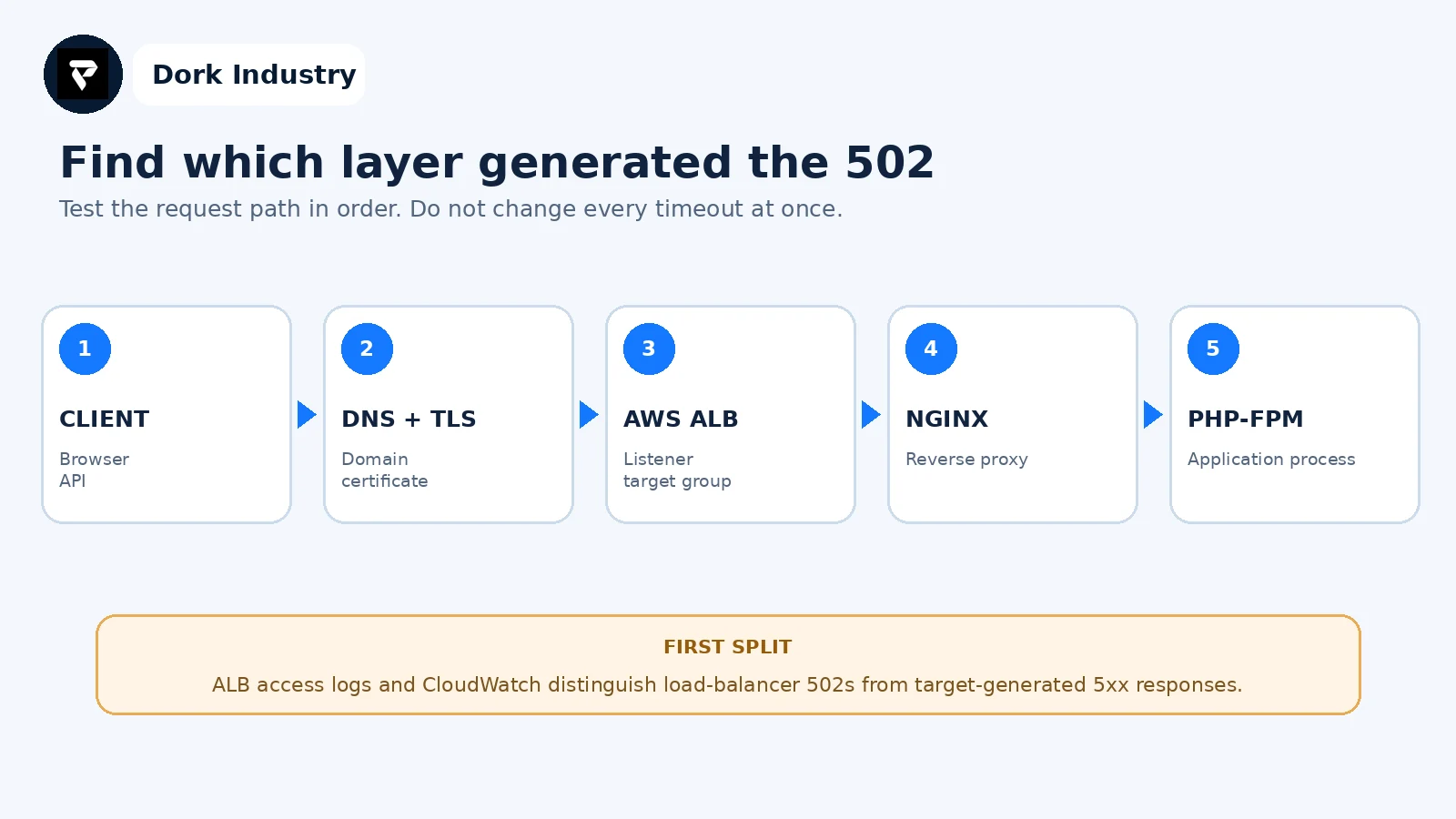
Start with the public failing request, then use logs and controlled direct tests to move one layer at a time. Preserve timestamps and request identifiers so evidence from the ALB, Nginx and PHP application can be correlated.
What evidence should be collected before repair?
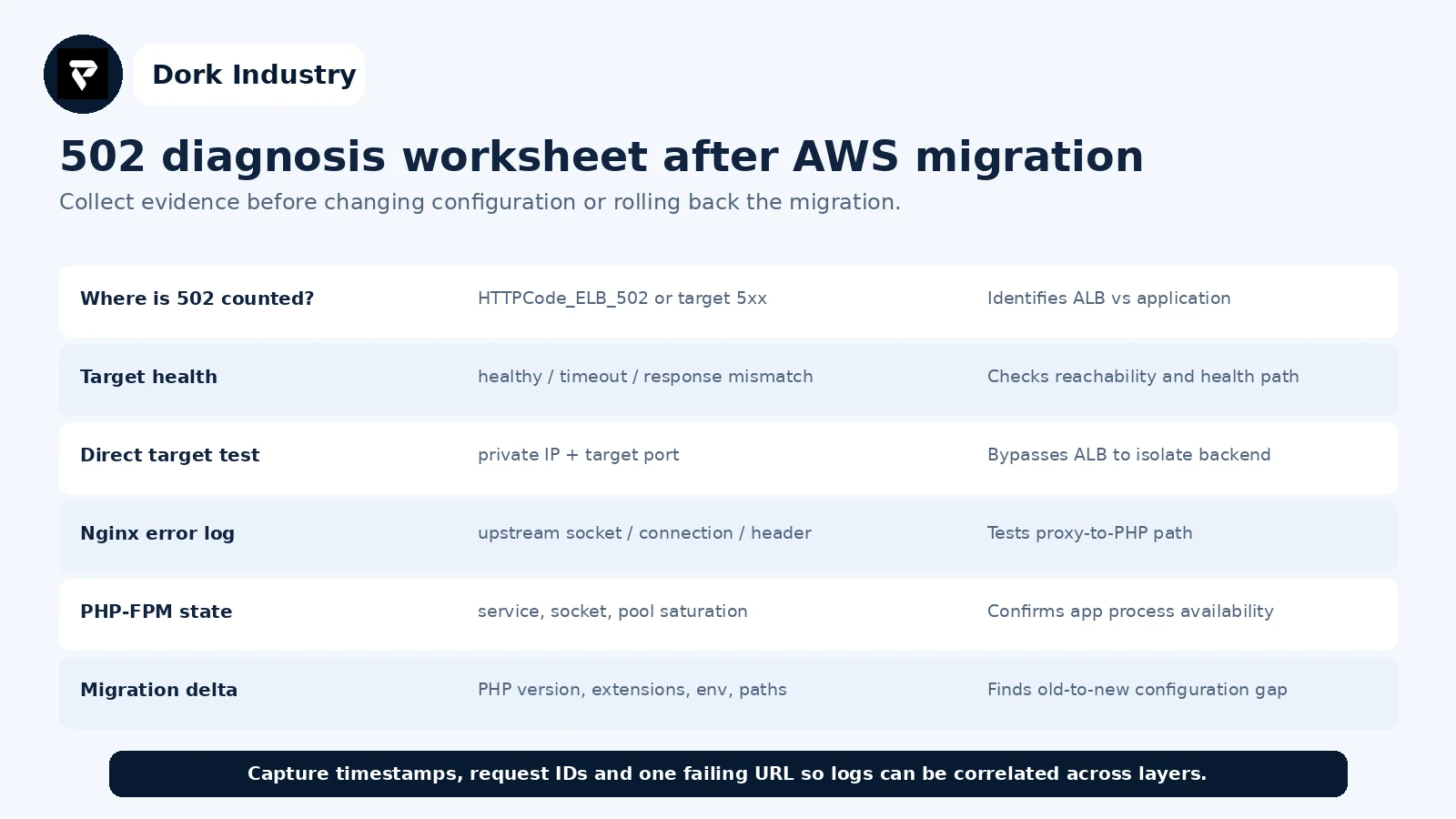
Record the first failure time, whether the error is constant or intermittent, affected paths, target IDs, deployment release, PHP version and the exact configuration delta. Redact credentials, tokens, cookies and personal data. This evidence prevents a repair team from repeating disruptive experiments already attempted.
When is this a quick repair versus a migration redesign?
| Situation | Likely scope | Professional work is warranted when |
|---|---|---|
| Wrong port, socket or health path | configuration repair | production traffic is affected or rollback is unclear |
| Missing extension or environment value | runtime/deployment repair | multiple servers must remain consistent |
| Intermittent target failures | capacity, pool or application diagnosis | one target fails under real load |
| Unsafe releases | deployment and health-check redesign | new releases repeatedly create downtime |
| Monolithic long requests | application/queue architecture review | timeouts hide slow dependencies or business jobs |
How can Dork Industry help with PHP and AWS migration failures?
Dork Industry can trace the request across the load balancer, Nginx and PHP-FPM; compare the old and new runtime; review health checks, target registration and deployment behaviour; repair application configuration; and help plan a safer migration or rollback. Work is scoped from the available evidence and authorised access.
Review Dork Industry’s application development services, industry solutions, cloud backup restore testing guide and Laravel queue diagnosis guide.
Stop treating the 502 as one server setting
Send the architecture diagram or server list, ALB target-health output, one failing timestamp, redacted logs and the changes made during migration. Dork Industry can propose a focused repair plan, migration correction or PHP/AWS developer-support scope.
Frequently asked questions
Is every AWS 502 caused by PHP-FPM?
No. The load balancer, target connection, Nginx, PHP-FPM or application response can generate or trigger the failure. Use ALB metrics and access logs first, then test the target and upstream path.
Should I increase the ALB idle timeout?
Only after evidence shows a legitimate request exceeds the current timeout and the application cannot respond sooner. A 502 may involve connection resets or malformed responses rather than an idle timeout; increasing limits can hide the bottleneck.
Why does the 502 happen only on some requests?
One target may be unhealthy, a PHP-FPM pool may saturate, or only routes that use a database, external API or larger headers may fail. Compare target IDs and request paths in the access logs.
What should be shared for a professional diagnosis?
Share the architecture, migration changes, PHP and Nginx versions, ALB listener and target configuration, health reason codes, timestamps and redacted logs. Do not share passwords, access keys, cookies or customer data.