
If Azure App Service showing old version after deployment is the symptom, prove which release reached the app, which slot is receiving traffic and whether the origin or a cache is serving the stale response. A green pipeline only confirms that its configured steps completed. It does not prove the intended artifact is running behind the public URL.

On this page
Why is Azure App Service showing old version after deployment?
The public response does not match the release you expected. The mismatch may be before deployment, at the selected app or slot, inside the active package, at an edge cache, or in a browser service worker. Treat those as separate layers. Repeatedly redeploying the same unknown artifact removes evidence and can make rollback harder.
What should you capture before changing production?
- The expected commit, build ID and artifact checksum.
- Azure subscription, resource group, app name and slot used by the pipeline.
- The App Service deployment ID, status, timestamp and deployment logs.
- A safe release marker from the origin and public hostname.
- Response headers, cache status and service-worker state.
- The last known good deployment and tested rollback route.
Microsoft documents deployment logs in the App Service Deployment Center and Kudu, including separate logs for a deployment step when available. Review Microsoft’s App Service deployment-log guidance.
Need to identify the stale layer before the next release?
Share the redacted pipeline target, expected build ID, deployment record, slot configuration and headers from the origin and public URL. Dork Industry can scope an Azure deployment diagnosis, application repair or release-pipeline correction.
Which nine checks find why Azure App Service shows the old version?
| Check | Evidence | Decision |
|---|---|---|
| 1. Verify pipeline target | subscription, app and slot | wrong destination or correct app |
| 2. Verify artifact identity | commit, build ID, checksum | old artifact or new artifact |
| 3. Read deployment logs | deployment ID and step logs | completed, partial or failed extraction |
| 4. Check active package | run-from-package setting and package marker | mounted package or copied files |
| 5. Compare slot traffic | production/staging hostnames and swap state | unswapped slot or wrong slot settings |
| 6. Compare every instance | release marker over repeated requests | consistent or mixed workers |
| 7. Test origin versus edge | origin marker and cache headers | runtime or CDN/Front Door cache |
| 8. Inspect client caching | private window and service worker | browser asset shell or server response |
| 9. Prove recovery | business-route tests and rollback drill | safe release or further repair |
1. Did the pipeline deploy to the intended app and slot?
Compare the pipeline’s Azure service connection, subscription ID, resource group, app name and slot with the resource receiving live traffic. Similar app names across development and production can produce a successful deployment to the wrong destination.
2. Does the deployed artifact contain the expected release?
Put a non-secret release marker in the build output: for example, a commit hash, build ID and UTC build time exposed through an authorised diagnostic endpoint or static file. Compare the marker inside the artifact with the pipeline source revision. Do not rely on a pipeline label alone.
3. What do the App Service deployment logs say?
Open the exact deployment record, not only the pipeline summary. Look for the deployment ID, artifact URL, extraction or build steps, warnings and completion time. A pipeline can finish while a later deployment operation targets unexpected content or leaves the previous release active.
4. Is App Service running the package you expect?
If the app uses WEBSITE_RUN_FROM_PACKAGE, verify the setting and the package that is actually mounted. Microsoft explains that run-from-package mounts the ZIP as a read-only wwwroot, while remote-package mode uses a URL and requires a restart when the referenced package changes. See Microsoft’s run-from-package behaviour.
5. Is traffic still reaching the wrong deployment slot?
Test the staging and production hostnames separately and record their release markers. Confirm whether the swap completed and which configuration values are slot-specific. Microsoft notes that App Service warms the source slot during a swap and applies settings in stages; a failed or incomplete swap should be diagnosed from slot state and logs. Review Microsoft’s deployment-slot guidance.
6. Do all running instances return the same release marker?
Send controlled requests and record the marker, instance information available to the authorised team and timestamp. Mixed responses point toward inconsistent runtime state, an incomplete restart or traffic reaching more than one origin. Avoid exposing host details publicly; capture them in protected diagnostics.
7. Does the origin serve the new release while Front Door or a CDN serves the old one?
Compare an authorised origin request with the public hostname. Inspect response headers, cache-control rules and cache status. Purge only the affected path after confirming the origin is correct; otherwise a purge can simply cache the wrong response again.
8. Is a browser cache or service worker preserving the previous app shell?
Compare a command-line request, a private browser session and a browser with the existing service worker. If HTML is current but JavaScript or CSS is old, inspect hashed asset references and service-worker update logic. Do not tell users to clear all data as the only fix; correct the cache versioning and activation behaviour.
9. Can the team prove the fix and roll back safely?
Validate the release marker plus the business paths affected: login, form submission, checkout, dashboard or API calls. Test the production hostname, every relevant slot and edge route. Keep the previous package or slot available until the new release is confirmed.
Where can an old Azure version be served?
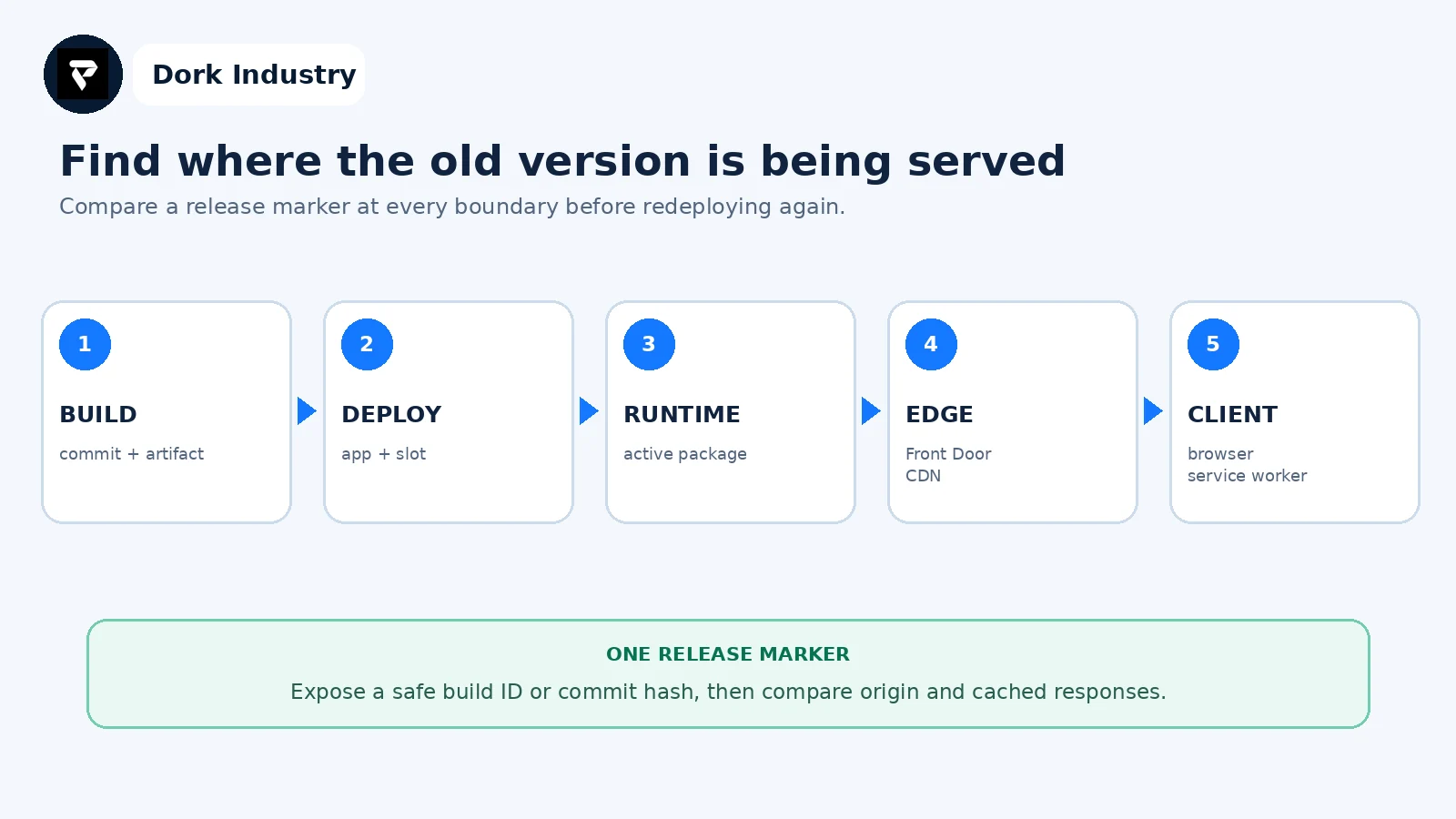
The first layer where the marker changes is the boundary to investigate. This is more reliable than changing slot settings, restarting the app and purging caches at the same time.
What evidence belongs in an Azure stale-version hand-off?
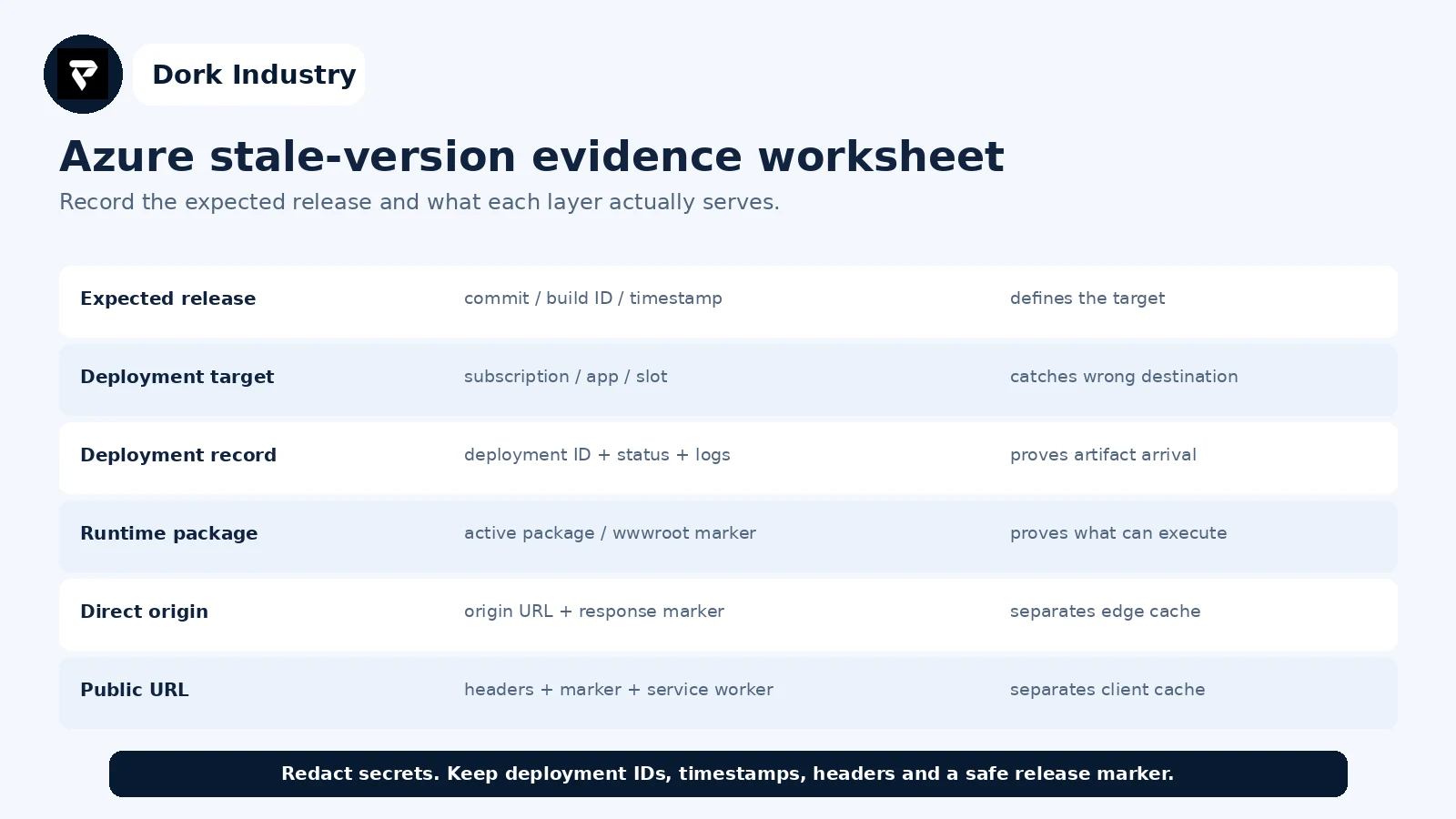
For each row, record expected, observed, timestamp and owner. Add one reproducible URL and the deployment action already attempted. This gives a developer enough context to distinguish build, Azure configuration, application caching and edge delivery work.
When is this a quick repair versus a deployment redesign?
| Finding | Likely work | Professional support is warranted when |
|---|---|---|
| Wrong app or slot | pipeline target correction | production credentials or release controls are involved |
| Old artifact built | build and artifact repair | the pipeline cannot prove source-to-artifact traceability |
| Wrong package mounted | App Service configuration repair | rollback and package state are uncertain |
| Slot mismatch | swap and slot-setting correction | zero-downtime releases are required |
| Edge or service-worker cache | cache/versioning repair | customers receive mixed releases |
| Recurring release ambiguity | deployment redesign | the team cannot identify or roll back a release quickly |
How can Dork Industry help with an Azure App Service deployment problem?
Dork Industry can trace the source revision through the build artifact, deployment record, App Service package, slot, edge layer and application cache; repair deployment or application configuration; add release markers and acceptance tests; and help redesign a repeatable Azure release process. Scope depends on authorised access and the evidence available.
Explore Dork Industry’s IT services and custom development scope, industry solutions, Next.js deployment 404 diagnostic guide and cloud backup restore testing guide.
Turn a green pipeline into a provable release
Send the expected build ID, Azure app and slot, deployment record, release markers and redacted headers. Dork Industry can propose a focused repair, pipeline correction or Azure developer-support scope.
Frequently asked questions
Why does App Service still show old code after a successful deployment?
The pipeline may have targeted another app or slot, built an older artifact, left a previous package active, skipped a slot swap, or served the response through an edge or browser cache. Compare a release marker at each layer.
Should I restart Azure App Service after every deployment?
A restart can be part of a supported deployment method, but it is not a diagnosis. First record the active package, deployment ID and release marker so the restart does not erase useful evidence.
Should I purge Front Door or CDN immediately?
Only after the authorised origin test proves the origin serves the expected release. Purging while the origin is still old can repopulate the cache with the same stale response.
What should I send to an Azure developer?
Send the redacted pipeline target, expected commit and build ID, artifact identity, deployment logs, slot state, active-package setting, release markers and headers from origin and public URLs. Never share access keys or customer data in a ticket.