
Manufacturing ERP software for the shop floor is rarely about the software itself — it is about whether the plant manager can trust the numbers they see at the end of the shift. Yes: a well-built shop-floor system can give you true production counts, defect data captured where the defect happens, and material traceability from stores to the line, provided it is designed for operators — not just for the management cabin — and piloted on one work center before any full rollout. Most factory floors already generate the raw material of that system: production slips, quality registers, material issue notes, downtime records. What is missing is not more data. It is data you can trust.
This article examines what manufacturing ERP software can and cannot do on the shop floor: where factories lose money to bad information, what a good system must do, what data you already have, what the software must never decide on its own, when you should not build custom at all, and how to test the idea in 30 days on a single work center before committing to anything bigger.
Where does the shop floor actually lose money?
Before discussing technology, it is worth naming the specific leaks. In our experience working with manufacturing businesses, the expensive problems are rarely about machine speed or labour cost. They are about information that arrives too late, too roughly, or not at all.
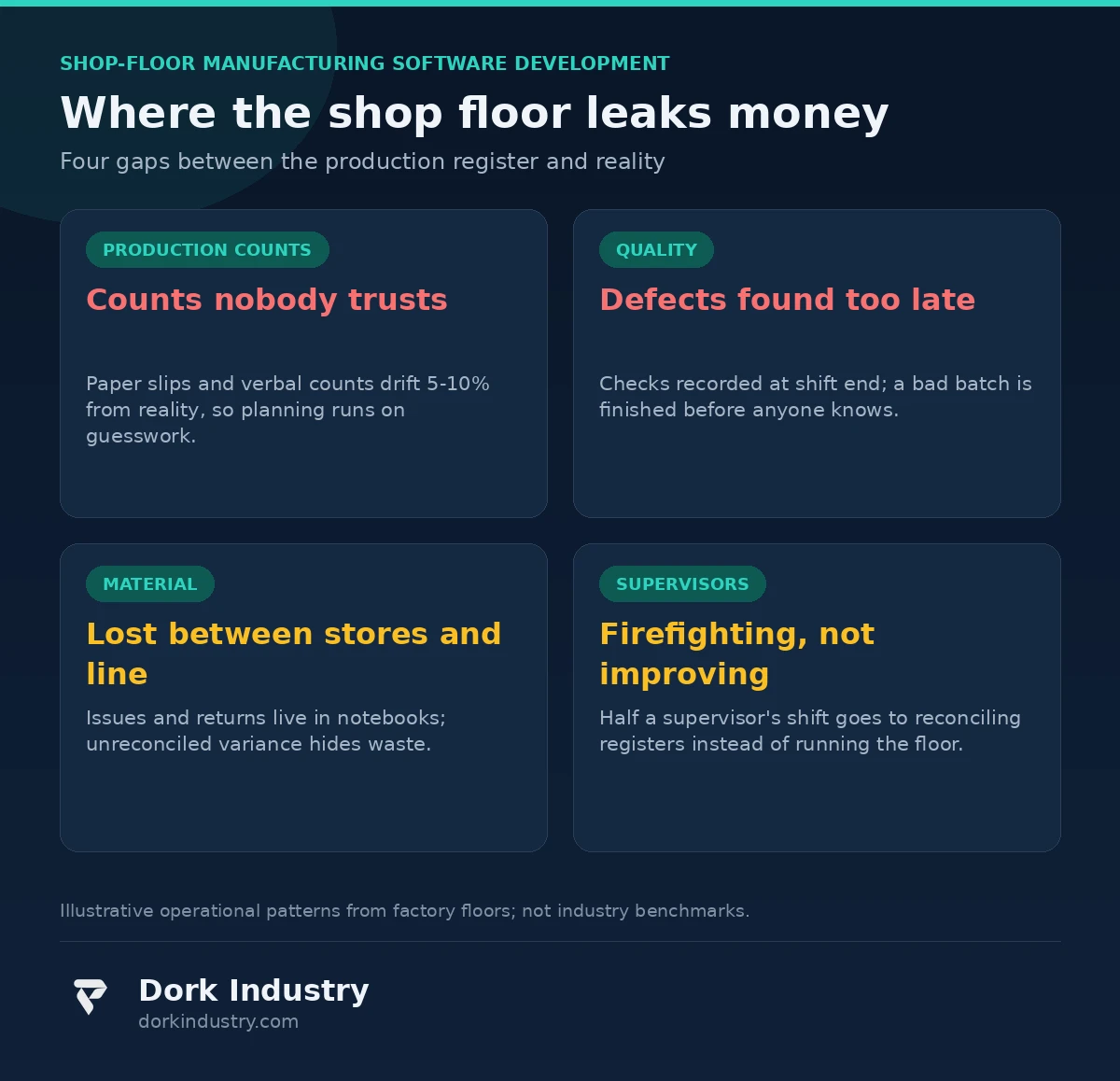
Why is production output always “approximately” right?
End-of-shift counts are collected from operator slips, verbal reports, or a supervisor’s best estimate. Nobody doubts the effort; everybody doubts the number. A count that drifts even a few percent from reality poisons everything downstream: tomorrow’s material staging, the dispatch plan, the customer’s delivery commitment, and the profitability picture of every job. When the count is approximate, the plan is approximate.
Why are defects discovered a shift too late?
Quality checks are recorded at the end of the shift — sometimes in a register, sometimes on loose sheets. By the time someone notices a dimension drifting out of tolerance or a surface defect pattern, the line has already produced hundreds more pieces of the same bad job. Rework cost multiplies with every hour of delay between the defect happening and the defect being known.
Why does material issued never match material consumed?
Stores issue raw material to the line; the line returns scrap, remnants, and unused stock; the records never reconcile cleanly. Over time the gap hardens into a standing “variance” that nobody can explain — some of it is real process loss, some of it is theft, some of it is simply unrecorded return. Without item-level tracking, nobody can say which.
Why do supervisors spend half their shift reconciling registers?
The supervisor’s real job — balancing the line, catching problems early, coaching operators — gets crowded out by paperwork archaeology: matching production slips to material issues, chasing missing quality entries, and rebuilding yesterday’s numbers for the morning meeting. The most expensive person on the floor spends their day being a human spreadsheet.
What should manufacturing ERP software actually deliver on a shop floor?
A generic “factory app” with a dashboard and a logo is not the answer. A shop-floor system that pays for itself needs to cover five operational areas — and it must work for operators first, managers second.
What should the plant manager see every morning?
- Yesterday’s true output per line and per job, counted at the source
- OEE-style availability and downtime reasons, without manual calculation
- Defects by type, machine, operator, and shift — captured at the point of origin
- Material issued vs consumed per job, with variance flagged immediately
- Work-in-progress location: which job is on which machine right now
- Jobs at risk of missing delivery, ranked by lateness
How should production counting work?
Counting must move from the end of the shift to the moment of production. Depending on the equipment, that means operator terminals or tablets at each work center for job start, job stop, count entry, and downtime reason codes; barcode or QR scanning on job cards and containers; and, where machines allow, direct signal capture from PLCs or counters through an industrial gateway. According to the Manufacturing execution system overview on Wikipedia, an MES tracks and documents the transformation of raw materials into finished goods in real time — the principle is the same whether the implementation is a full MES or a focused shop-floor app: capture at the point of activity, not after the fact.
How does quality capture move to the point of origin?
- Digital checklists replace paper registers: the operator records the measurement when they take it, not at shift end
- Defects are tagged with machine, tool, operator, shift, and material batch the moment they are found
- Repeat-defect patterns surface automatically: same defect, same machine, same shift
- Quality holds and containment actions are logged with timestamps and owners
- Traceability runs both ways: from a finished pallet back to the material batch, and from a material batch forward to every job it touched
How is material tracked from stores to the finished pallet?
Every issue, return, and scrap entry is scanned, not written. According to GS1’s global identification standards, standard barcodes and identifiers give each item, batch, or pallet a machine-readable identity — which is what makes scan-based tracking possible without exotic hardware. Containers get job-linked labels; operators scan material in and scrap out; variance per job is visible the same day, not at month-end stocktaking.
How do downtime and changeovers get honest numbers?
Downtime is recorded with a reason code at the moment it starts, by the operator — not reconstructed from memory the next morning. Changeover time is measured job-to-job, per machine, per shift. The first honest month of this data usually surprises management: the biggest losses are rarely the headline breakdowns. They are the ten-minute micro-stops that nobody used to record.
What data does your shop floor already have — and what is it missing?
Most factories already generate the raw material: production slips (even handwritten ones), quality registers, material issue notes, machine logbooks, maintenance records. What is missing is structure. The data is not connected, timestamped, or attributed to a specific machine, job, and shift — so it cannot answer the questions that matter.
A shop-floor system does not create new work for operators, and that principle should guide any manufacturing ERP software for factories: it captures the work they already do — counting pieces, recording measurements, noting downtime — in a form the plant can actually use. The most common implementation failure is designing for the management dashboard while making data entry painful for the operator. If entering data slows the operator down, the data will be incomplete within weeks and the system will die. Make the operator’s side faster than paper, and the data takes care of itself.
What does the math look like? An illustrative example
Consider a mid-size fabrication unit: 40 machines, two shifts, planned output of 6,000 components per day. None of the figures below are industry benchmarks — they are stated assumptions to show how the arithmetic of shop-floor data works.
Assume 4% of output needs rework and only half of that is formally recorded. That is roughly 240 reworked units per day. At an assumed rework cost of ₹120 per unit (labour, machine time, consumables), the plant spends about ₹28,800 per day on rework — roughly ₹86 lakh a year across 300 working days. If quality capture at the point of origin catches a drifting tool just two hours earlier, it can prevent an entire batch of defects from being finished. Preventing even one in five rework events would be worth around ₹17 lakh a year to this plant.
Counting drift carries its own cost. If output counts are off by even 3% — 180 units a day — material staging and dispatch planning are built on a false base. One late or wrong material delivery that starves a line for an hour costs more in idle machine time than a month of operator-terminal data entry. And material variance: a 1.5% unexplained variance on ₹8 crore of annual material spend is ₹12 lakh a year that nobody can account for — process loss, unrecorded returns, or worse. Scan-based issue and return tracking makes the variance explainable within weeks.
Should you build or buy? An honest breakdown
Not every factory needs custom manufacturing ERP software. The honest options, in order of investment:
| Approach | Best for | Relative investment | Where it breaks |
|---|---|---|---|
| Paper registers + Excel | A single small unit with one product family | Minimal | Breaks the moment you add a second shift or a second site |
| ERP manufacturing module | Planned vs actual at job level, integrated with accounts | Medium subscription + implementation | Weak at real-time capture; operators still feed it from paper |
| Packaged MES | Standard discrete manufacturing with supported machine protocols | High license + integration | Rigid workflows; customization is expensive or impossible |
| Custom shop-floor software | Unique processes, mixed machine generations, custom traceability needs | Highest | Overkill if a packaged tool already covers your workflow |
At Dork Industry, we regularly advise factories against custom builds when a packaged MES or an ERP module covers the need. The most honest sentence in this space is: “your ERP’s manufacturing module already does 80% of this.” A credible technology partner should be willing to tell you that you do not need custom development. If every consultation ends with a quotation for a custom build, get a second opinion.
What should the system never do on its own?
Technology boundaries in manufacturing ERP software matter as much as features — this is a floor with heavy machines, safety interlocks, and customer quality agreements.
- Never auto-reject or scrap a batch. The system can hold a batch and raise an alert; a human dispositions it. Software must not destroy inventory.
- Never alter a released work order silently. Any change to quantities, routing, or priority needs operator confirmation and an audit trail showing who approved what.
- Never override safety interlocks or lockout procedures. Production data systems are read-only to machine control. Full stop.
- Never hide or smooth quality data. Auditors, OEM customers, and regulators need the unfiltered record. A system that can quietly edit history is a liability.
- AI should flag anomalies, not run the floor. “These three machines show rising defect rates this week — consider checking tooling” is useful. Auto-reassigning operators or changing schedules without human sign-off is not.
How do you test it in 30 days without stopping production?
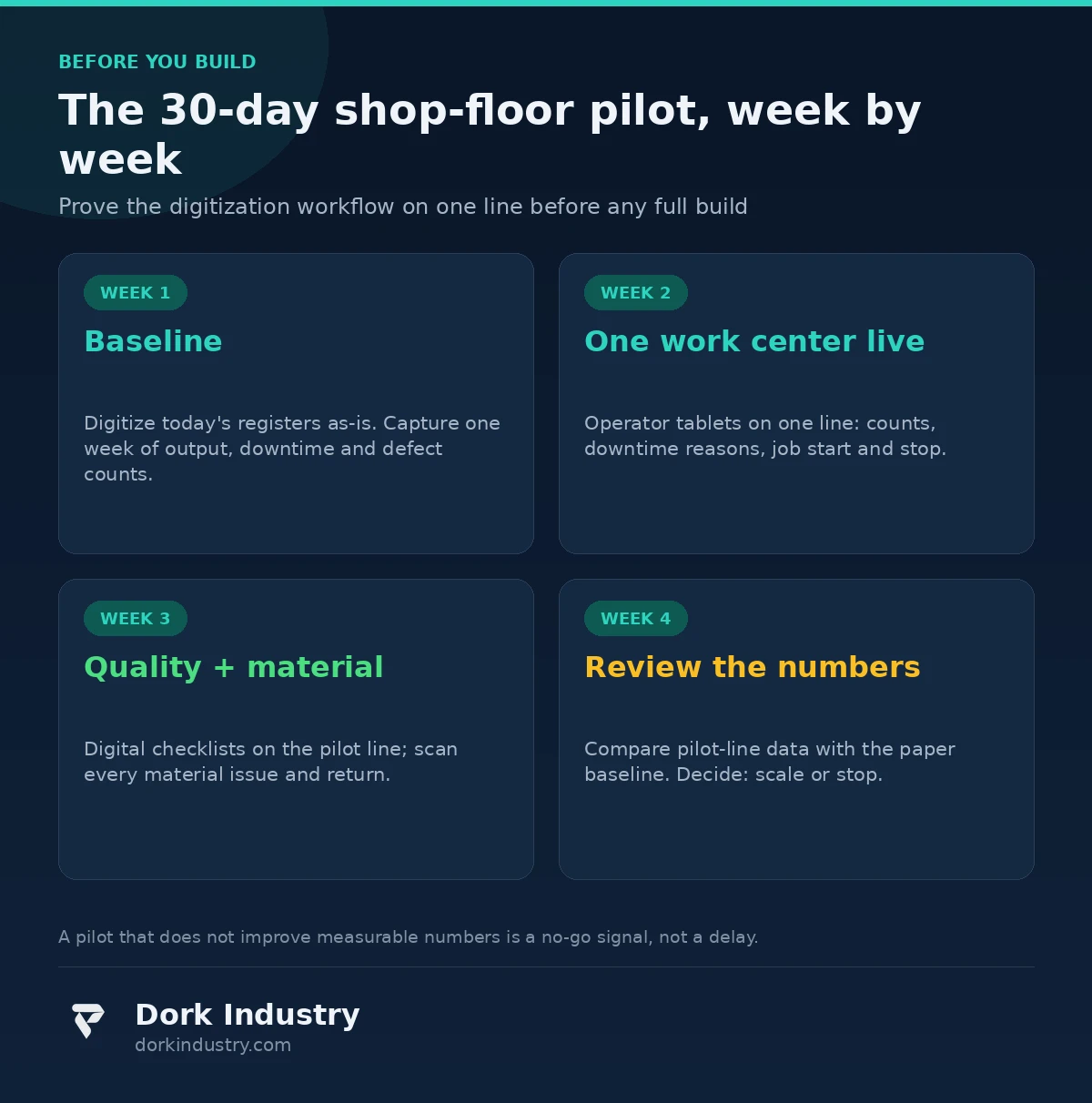
The lowest-risk path is a single-work-center pilot with a fixed scope and measurable outcomes. Production never stops; one line simply records its data differently:
- One work center, one product family, 10–20 operators
- Operator terminals or tablets: job start/stop, count entry, downtime reasons, digital quality checklists
- Scanned material issue and return on the pilot line
- Run for 30 days alongside the existing paper registers — do not switch them off yet
- Measure: pilot-line data vs paper-register data (accuracy gap), defect discovery lead time, material variance per job, supervisor hours spent reconciling
If the pilot line’s data does not measurably beat the paper registers in 30 days, a bigger manufacturing ERP software investment will not fix it either. The pilot validates the capture workflow, not just the software. This is the assessment Dork Industry runs before quoting any shop-floor project: map the current process, name the leaks, then decide what software earns its cost.
What actually drives the cost of manufacturing ERP software?
Shop-floor pricing varies widely because scope does. The real cost drivers are:
- Work centers and machines: 5 machines vs 50 changes the hardware and data model significantly
- Machine integration depth: manual operator entry vs PLC/OPC signal capture vs mixed generations of equipment — the mix is what costs
- Quality complexity: simple checklists vs measurement capture with tolerances, gauges, and calibration tracking
- Traceability granularity: batch-level vs serial-level tracking changes the data model and the scanning hardware
- Hardware: operator tablets, industrial terminals, barcode/RFID scanners, kiosk PCs
- Integrations: ERP, Tally, or SAP for jobs and inventory; payroll for shift attribution
- Analytics depth: basic daily reports vs downtime analytics, trend detection, and forecasting
Anyone quoting a fixed price without asking about your machine mix, quality process, and traceability requirements is guessing.
Frequently asked questions
Should we extend our current ERP or buy dedicated manufacturing ERP software?
Usually it should not. ERP handles planning, costing, and accounts; shop-floor software handles real-time capture at the machine. The two integrate: jobs flow down from ERP, actual counts flow back up. Replacing either with the other creates an expensive gap.
How long does a shop-floor pilot take to go live?
A single-work-center pilot with operator tablets, digital checklists, and scanned material tracking can be live in 4–6 weeks. A full multi-line rollout with machine integration typically runs 4–8 months depending on equipment variety.
Will operators actually use tablets instead of paper slips?
Adoption follows the operator’s incentive: if the terminal is faster than the slip — fewer fields, auto-filled job data, no end-of-shift rewriting — operators prefer it. If it is slower, the paper comes back within weeks. Design for the operator first.
What does a shop-floor pilot cost?
A single-work-center pilot with terminals, scanning, and an owner dashboard is a fraction of a full rollout. The pilot’s job is to prove that captured data beats paper data before larger investment. Request a pilot scoping call for a concrete estimate.
Can the system work alongside our existing machines?
Yes — mixed machine generations are the norm, not the exception. Older machines without digital outputs are captured through operator terminals; newer PLCs can feed signals directly. The system should be designed for that mix from day one.
About Dork Industry
Dork Industry (dorkindustry.com) is a custom software development company building mobile apps, AI automation, and IoT systems for businesses across India. Our team designs shop-floor digitization, field-service apps, and industrial IoT — from 30-day pilots to full multi-line rollouts.
The bottom line
The question is not whether a factory needs manufacturing ERP software. It is whether the plant manager can trust — from one screen — what was produced, what was rejected and why, where the material went, and which jobs are at risk. If the answer is no, the technology decision is really an operations decision wearing a software costume.
Start with the capture workflow, pilot it on one work center for 30 days against the existing paper registers, and let measured data accuracy and defect-discovery speed — not feature lists — decide whether to build further.
Running a plant and want to know what digitization would change in your specific operation?
We map your current production, quality, and material process and show you exactly what software would (and would not) fix, before any development is discussed.
Request a shop-floor digitization assessment WhatsApp +91 8210792477