
Mobile app development teams find the real cause of app crashes by reading the data the app already produces — not by guessing from symptoms. Yes: most crashes leave a precise trail — which screen, which device, which line of code — so a systematic stability diagnosis can identify the cause in days, not months. The reason most businesses never find the cause is not that it is unfindable. It is that nobody is looking at the right place.
This article explains why apps crash, what a crash costs your business, the data you already have sitting in your store accounts, how engineers trace a crash to its cause, and how to run a 30-day stability rescue before committing to a rebuild.

What does a crashing app actually cost your business?
An app that crashes reverses every investment made to acquire users: paid installs, app-store optimization, marketing — all of it feeds a funnel with a hole in the bottom.
How many users leave after a crash?
Users rarely complain first; they leave first. A crash during onboarding ends the user’s entire first impression in thirty seconds. Users who crash on day one almost never open the app again — your acquisition cost is spent on a user you never had.
What do crash reviews do to your app-store rating?
One-star reviews saying “keeps crashing” are read by every potential user — and written by your most engaged users. A rating drop from 4.5 to 4.0 measurably reduces install conversion, so the damage compounds: fewer installs at the top, faster churn at the bottom.
Why is “it works on my phone” the most expensive sentence in the room?
The developer’s phone is the newest, fastest device in the test lab. Your users’ phones are two to five years old, low on storage, running outdated OS versions. Crashes that never reproduce on the founder’s flagship happen daily on the devices that actually make up the user base. Until crashes are measured across the real device mix, the business is managing by anecdote.
Why do mobile apps actually crash?
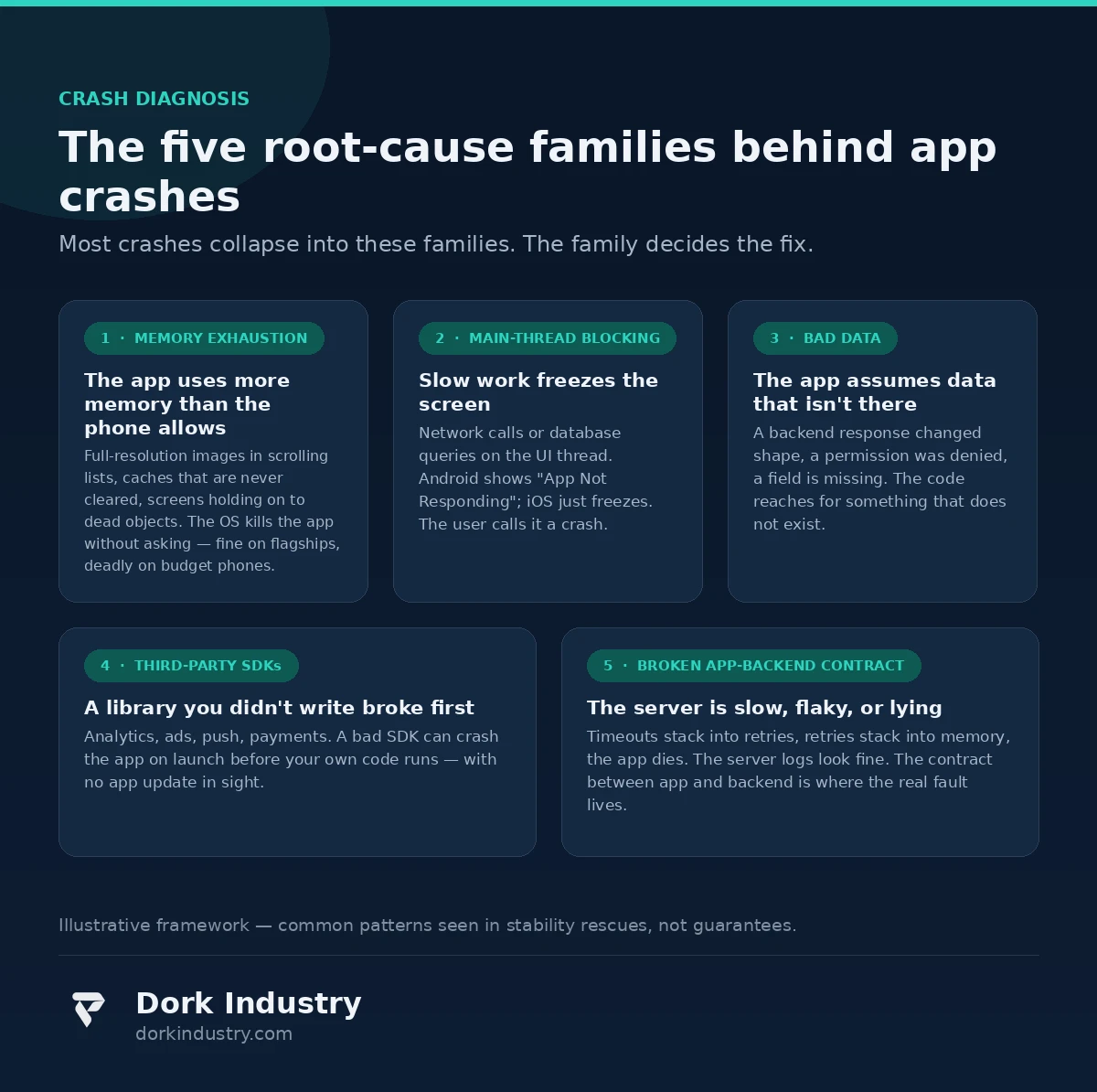
Crashes cluster into a handful of root-cause families. The family determines the fix — and whether it costs days or months.
Is the app running out of memory?
The most common family. Full-resolution images in scrolling lists, uncleared media caches, screens holding dead references — all push memory past the OS limit, which kills the app without asking. That is why an app works on a 12 GB flagship and crashes constantly on a 4 GB phone.
Is work happening on the wrong thread?
The main thread draws the screen and responds to taps. Network calls or database work on that thread freezes it — on Android, a long freeze shows an “App Not Responding” dialog, a crash in the user’s mind even if no error was thrown. Long operations must run in the background.
Is the app assuming data that isn’t there?
Apps crash when they trust their inputs. A backend sends an unexpected response format, an expected field is missing, a user denies an assumed permission — and the code reaches for something that does not exist. These crashes often appear right after a backend change or OS update.
Is a third-party SDK the culprit?
Analytics, advertising, push, payments: apps ship with a dozen libraries the team did not write. A misbehaving SDK can crash the app on startup before your own code runs — and crashes can appear overnight with no app update, from a server-side SDK change.
Is the problem the backend, not the app?
Slow or failing APIs cause timeouts, timeouts cause retries, retries stack in memory, and the app dies. From the user’s view the app “crashed”; from the server logs, the server looks fine. The real cause is the app-backend contract: how the app behaves when the network is slow or flaky.

What data do you already have about your crashes?
Most businesses chasing crash reports are sitting on answers they have not opened.
What do your store accounts already know?
According to Google Play Console’s Android vitals documentation, the Play Console records crash and freeze rates across your real user base, segmented by device and OS version, with no extra instrumentation. If nobody has opened these dashboards in months, the first step of the diagnosis is free and takes an hour.
Are crash reporters already inside your app?
According to Firebase’s Crashlytics documentation, crash reporting libraries capture the stack trace, device state, and breadcrumb trail leading up to a crash — which screen was open, what the user tapped. If the original developers installed one and never checked it, years of crash history may sit in a dashboard nobody opens.
What are your users already telling you?
One-star reviews, support tickets, and chat messages are noisy but honest: they tell you which action crashes the app, in the user’s own words. “Crashes when I upload a photo” is a reproducible case handed to you for free.
What does a crash problem cost? An illustrative example
This section is a deliberately simple illustration with stated assumptions — not industry statistics. Assume an app with 100,000 monthly active users, where 6% hit a crash in a given month, and 40% of those users uninstall afterwards: roughly 2,400 users lost per month. At a ₹150 acquisition cost, the business burns ₹43 lakh a year re-acquiring users that crashes pushed away — before the rating damage that makes every future install more expensive.
Flip it: if a stability rescue cuts crash-affected sessions from 6% to 1.5% — realistic when crashes cluster in one or two root-cause families — the monthly loss drops from 2,400 users to about 600. The math usually shows fixing crashes is cheaper than buying replacements, often by an order of magnitude.
How does mobile app development systematically find the real cause?
A proper stability diagnosis follows the same sequence regardless of the app:
How are crashes symbolized and grouped?
A raw crash report is a list of memory addresses; symbolication maps them back to file names and line numbers. Once symbolized, hundreds of reports usually collapse into a handful of distinct issues — and the largest cluster is where the money is.
How are crashes segmented by device and version?
According to Apple’s documentation on diagnosing crashes in Xcode, crash reports carry device model, OS version, and app version — which is what reveals patterns like “only on Android 12, only on devices with under 4 GB RAM.”
Why does reproduction come before fixing?
A fix that cannot be tested against a reproduced crash is a guess. Reproduce reliably, write the fix, confirm the crash is gone in the same conditions, then ship. Skipping reproduction is how “we fixed the crash” ends in the same one-star reviews.
What about crashes that never leave a report?
Some of the worst stability problems produce no crash report: the app freezes, the user force-quits, and the OS records nothing useful. Watchdog timers and freeze-detection instrumentation catch these — recording that the main thread was blocked even when no exception was thrown.
Crash symptoms, likely causes, and what fixes them
| What the user sees | Most likely root cause | Typical fix | Effort |
|---|---|---|---|
| App closes while scrolling images or video | Memory exhaustion from uncompressed media | Downsampling, image caching limits, list recycling | Days |
| “App not responding” on Android, frozen screen on iOS | Network or database work on the main thread | Move work to background threads, add loading states | Days to weeks |
| Crash on a specific action (upload, payment, login) | Unhandled missing data or denied permission | Defensive checks, graceful fallbacks for missing input | Days |
| Crash immediately on launch | Broken third-party SDK or corrupt local data from an update | Isolate the SDK, add safe migration for stored data | Days to weeks |
| Crashes started after a backend change | App trusting an API response format that changed | Version the API contract, validate responses defensively | Weeks |
| Crash only on old or cheap devices | Memory pressure plus OS-specific behavior | Reduce memory footprint, test on the real device mix | Weeks |
Should you rebuild the app or fix what’s there? An honest answer
Not every crashing app needs custom mobile app development from scratch. The honest options, in order of investment:
| Approach | Best for | Relative investment | Where it breaks |
|---|---|---|---|
| Configure what you have | Crashes from a misbehaving SDK or server setting | Minimal | Only works if the code is fundamentally sound |
| Targeted stability rescue | Crashes clustered in one or two root-cause families | Low to medium | Cannot fix an architecture that is wrong everywhere |
| Module-by-module rewrite | One rotten subsystem (e.g. the media layer) in an otherwise fine app | Medium | Needs clean boundaries between old and new code |
| Full rebuild | Crashes everywhere, no tests, original team gone, tech stack abandoned | Highest | Overkill for a fixable app; resets the clock on every unknown |
At Dork Industry, we regularly advise against a rebuild when a targeted rescue will do — and against a rescue when the codebase is beyond saving. A credible mobile app development partner should be willing to tell you your app does not need rebuilding. Sometimes the right call is a custom software rescue of the existing app; sometimes a web-based companion experience would serve the use case better than the native app at all.
What should the diagnostics and fixes never do alone?
- Never push a hotfix without a rollback path. A rushed crash fix that breaks login for everyone is how one bad week becomes two. Ship fixes behind feature flags or staged rollouts so they can be turned off in minutes.
- Never auto-delete user data to “fix” a crash. Corrupt local data sometimes causes launch crashes, but wiping a user’s saved work to make the crash stop is data loss disguised as a fix. Migrate safely or quarantine — never silently destroy.
- Never expand crash reporting into user surveillance. Breadcrumbs should record what the app was doing, not what the user was saying or typing. Crash diagnostics that capture keystrokes or message contents cross a line.
- Never let automation close crash issues without human review. AI triage can group and rank crashes brilliantly, but it should never mark one “resolved” on its own — one wrongly closed cluster hides a real problem behind a green dashboard.
- Never hide the crash data from the business owner. If the owner cannot see crash rates per release after the rescue, the business drifts back into blindness within a quarter. The dashboard belongs to the business, not the vendor.
How do you run a 30-day stability pilot before full investment?
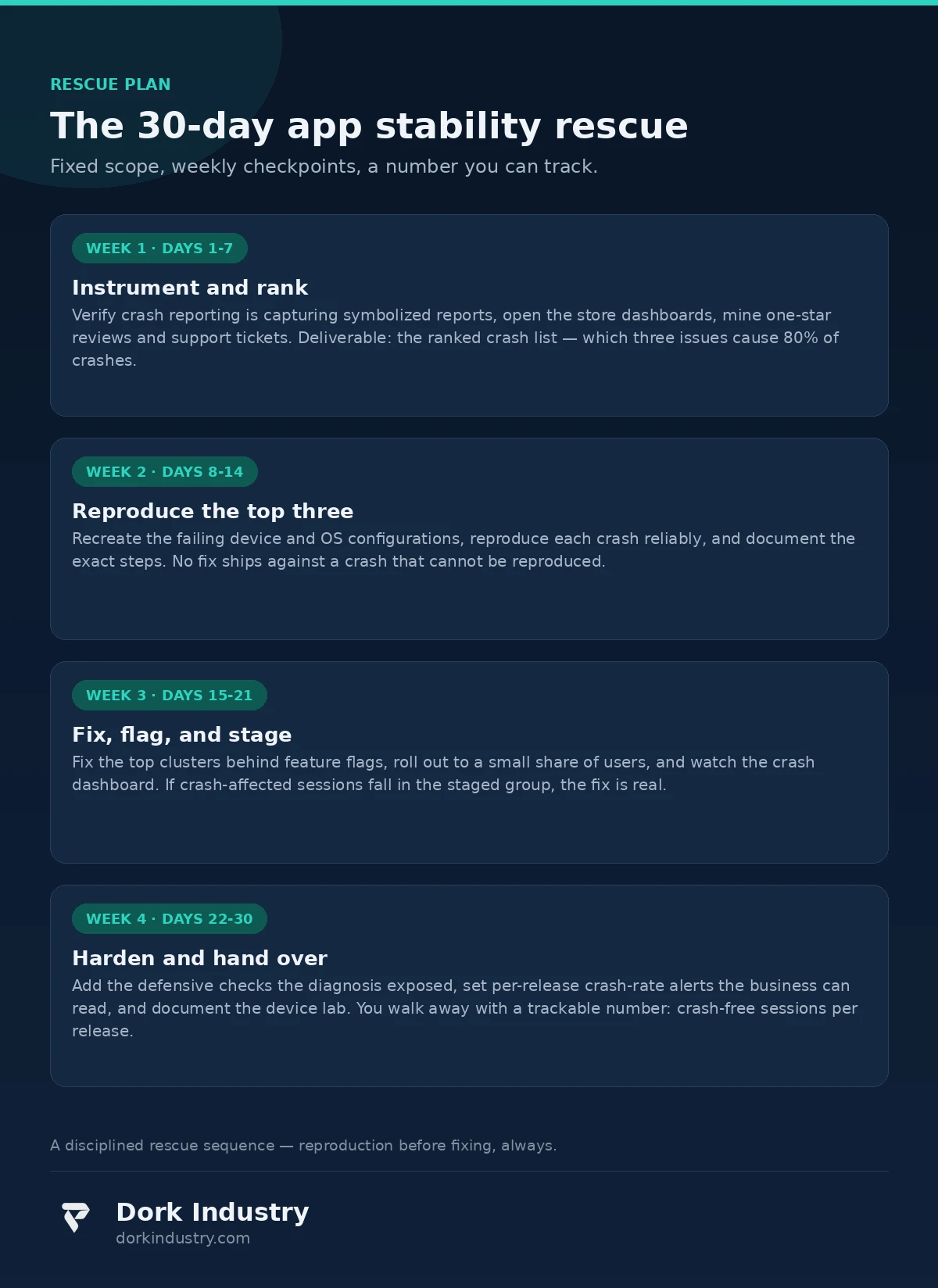
Thirty days is enough to prove value, because crashes are measurable from day one:
Days 1–7: Instrument and rank. Verify crash reporting captures symbolized reports, open the store dashboards, mine reviews and tickets. Deliverable: the ranked crash list — which three issues cause 80% of crashes.
Days 8–14: Reproduce the top three. Recreate the failing device and OS configurations and document exact reproduction steps. Anything that cannot be reproduced gets a monitoring hook, not a speculative fix.
Days 15–21: Fix, flag, and stage. Fix the top clusters behind feature flags and roll out to a small percentage of users. If crash-affected sessions fall in the staged group, the fix is real.
Days 22–30: Harden and hand over. Add the defensive checks the diagnosis exposed and set up per-release crash-rate alerts the business can read. You keep one trackable number: crash-free sessions per release.
What drives the cost of a stability rescue?
Four factors decide whether a rescue costs weeks or months:
Four factors decide whether a rescue costs weeks or months: crash concentration (three root causes is cheap; fifty unrelated ones may mean a rebuild), reproducibility (on-demand crashes fix in days; intermittent ones need device-lab time), code ownership (the original team makes diagnosis fast), and backend coupling (contract issues need changes on both sides).
Frequently asked questions
Why does my app crash on some phones but not others?
Phones differ in memory, processor, OS version, and manufacturer tweaks. An app that exceeds a budget phone’s memory gets killed there while running fine on a flagship. Segmenting crash reports by device model and OS version reveals this pattern.
Can crash reporting tools find the cause automatically?
Mostly: they show which line crashed, on which devices, and what the user was doing. But they report where the app died, not always why. The “why” still needs a human to reproduce the crash and read the surrounding code.
How long does it take to fix a crashing app?
A single well-understood crash can be fixed in days. A full rescue for clustered crashes typically runs 30 days: instrument and rank, reproduce, fix and stage, harden. Crashes spread across the whole codebase may need longer — or an honest rebuild conversation.
Do I need to rebuild my app to stop the crashes?
Usually not. Most crashes cluster in a few root causes — memory, threading, bad data — and a targeted rescue fixes them without touching the rest. A rebuild is right only when crashes are everywhere, the code is undocumented, and the original team is gone.
Will fixing crashes improve my app-store rating?
Fixing crashes stops the bleeding: new one-star “keeps crashing” reviews dry up within weeks of a stable release. Ratings recover more slowly since old reviews linger — pair the rescue with a prompt asking happy users to rate the app.
The bottom line
Mobile app development finds the cause of crashes through data, not guesswork: symbolized crash reports ranked by frequency, segmented by device and version, reproduced before fixing, shipped behind staged rollouts. Most crashing apps do not need a rebuild — they need someone to read the trail the app is already leaving.
Get a Free App Stability Audit Before Your Next Release
Send us your app and we’ll read your store crash dashboards, rank your top crash clusters, and identify your root-cause family — memory, threading, bad data, SDKs, or backend. You walk away with a written diagnosis: the ranked crash list, the likely fix for each cluster, and an honest verdict on rescue versus rebuild. No commitment, no disguised sales pitch.
Request your free app stability audit WhatsApp +91 8210792477
About Dork Industry
Dork Industry is a software development company building mobile apps, custom software, AI systems, and automation for businesses that need technology to work in the real world — on real devices, with real users, under real constraints. We diagnose and rescue struggling apps, build new products from scratch, and integrate AI and IoT where they earn their place. Evidence-first: measure the problem, fix the cause, and hand the business a dashboard it can read. Learn more at dorkindustry.com.