
Mobile app development for field service teams is not about going paperless for its own sake — it is about the jobs that go unbilled, the callbacks that cannot be resolved, and the two-day lag between a finished job and anyone knowing about it. Yes: mobile app development can replace paper job sheets with one offline form that works without a network connection, captures photos, signatures, time and parts at the point of work, and syncs when the signal returns — provided it is designed around how technicians actually work and piloted with one crew before full rollout. A field-service owner running ten technicians knows the paper problem by heart: job sheets arrive crumpled, handwriting is unreadable, parts used are “from memory,” and by the time the office reconstructs what happened on site, the customer has already been invoiced for the wrong thing or not invoiced at all.
This article examines whether a single mobile app can genuinely replace the paper job sheet: where paper actually loses money, what the replacement form must capture, how offline-first sync works, what the app must never do on its own, and how to test the idea in 30 days before committing to full development.
Where do paper job sheets actually lose money?
Before discussing technology, it is worth naming the specific leaks. Paper does not fail dramatically — it fails in small, daily, compounding ways that never appear on a single report.
Why do completed jobs go unbilled?
The most expensive paper failure is the job that happened but was never invoiced. A technician finishes a repair, the job sheet sits in a van for three days, then in a pile on the office desk for four more. Parts were replaced, extra hours were worked, a second visit was required — but the sheet only lists the base job. The office invoices what the paper says. Every unrecorded extra hour and every forgotten part is margin the business already earned and then gave away. Most field-service owners discover this leak the first week they compare app-recorded jobs against invoiced jobs.
Why is job data always two days old?
Paper creates a permanent reporting delay. The owner cannot see today’s completions, today’s rework rate, or today’s overtime until the sheets are transcribed — usually in batches, usually late, usually with errors introduced by re-keying. A supervisor who cannot see what happened today manages the business on last week’s assumptions. Pricing decisions, staffing decisions, and customer follow-ups all run on stale information.
What do illegible notes and missing photos cost?
Handwriting is the weakest link in the chain of evidence. “Replaced part” — which part? “Fixed leak” — where, with what, and does the photo exist? When a customer disputes a charge three weeks later, the paper sheet is the only witness, and it says almost nothing. Disputes that a timestamped photo and a structured form field would have settled in one call instead drag on, end in discounts the business should not have given, or become chargebacks.
Why do warranty and callback disputes never get resolved fairly?
Callbacks are the industry’s shadow metric. A customer calls saying the repair failed again. Without structured records, nobody can tell whether it is the same fault, a new fault, or customer misuse. The business absorbs the callback cost to protect the relationship, but without data it cannot tell whether callbacks cluster around one technician, one part type, or one job type — so it cannot fix the root cause either.
What must mobile app development deliver for a field team?
A generic “job app” with a login screen and a logo changes nothing. The replacement has to handle the full job lifecycle — assignment, execution, proof, and billing handoff — in conditions where the technician has greasy hands, no signal, and fifteen minutes before the next job.
How do jobs reach the technician?
- Jobs pushed to the technician’s queue with address, customer history, priority, and required parts
- Accept / start / on-my-way / arrived status that the office sees in real time
- Route order optimization for the day’s jobs
- Reassignment without phone calls when a technician runs over
What does the one offline form actually capture?
This is the heart of the system, and it has to be simpler than the paper it replaces. According to Google’s Android offline-first app guidance, the right architecture treats the on-device database as the source of truth: the technician’s entries are saved locally first, and synchronization with the server happens when connectivity allows. That means the form never “fails” in a basement or a rural site — it just queues.
- Job start and end times, captured with one tap (no manual time entry)
- Work performed, selected from structured options plus free notes
- Parts used, scanned or picked from the van stock list with quantities
- Before/after photos, stamped with time and location
- Customer signature on the device at completion
- Follow-up flags: “needs revisit,” “part to order,” “customer concern”
How do photos and signatures become proof?
Paper evidence is whatever survived the van. Digital evidence is automatic: every job carries a timestamped, geotagged record of what was done, what was replaced, and who signed off. This single change resolves most billing disputes before they start — the office can show the customer the photo, the signature, and the exact time, instead of reconstructing it from a crumpled sheet.
How do time, travel, and parts flow into billing?
- Actual hours and travel time calculated from tap timestamps, not remembered estimates
- Parts consumed deducted from van stock automatically, flagging restock needs
- Completed jobs converted to invoice drafts with all line items pre-filled
- Overtime and weekend premiums applied by rule, not by memory
What does the customer see?
- SMS or WhatsApp confirmation when the technician is en route, with a live window
- A digital service report emailed after completion — photos, parts, and signature included
- A payment link on the same report, so the job closes financially the same day
What data does your operation already have — and what is it missing?
Most field-service businesses already generate the raw material: job sheets, parts receipts, customer complaint calls, van stock counts. What is missing is structure and timing. The data exists, but it arrives days late, in unreadable form, and disconnected from the job it belongs to.
A mobile app does not create new work for technicians — and that principle should guide any mobile app development for field service. It captures the work they already do — arriving, fixing, photographing, signing — in a form the office can actually use the same day. The most common implementation failure is designing for the owner’s dashboard while making the technician’s form slower than paper. If the form takes longer than scribbling on a sheet, technicians will scribble and transcribe later, and the whole project fails at the point of capture.
What does the math look like? An illustrative example
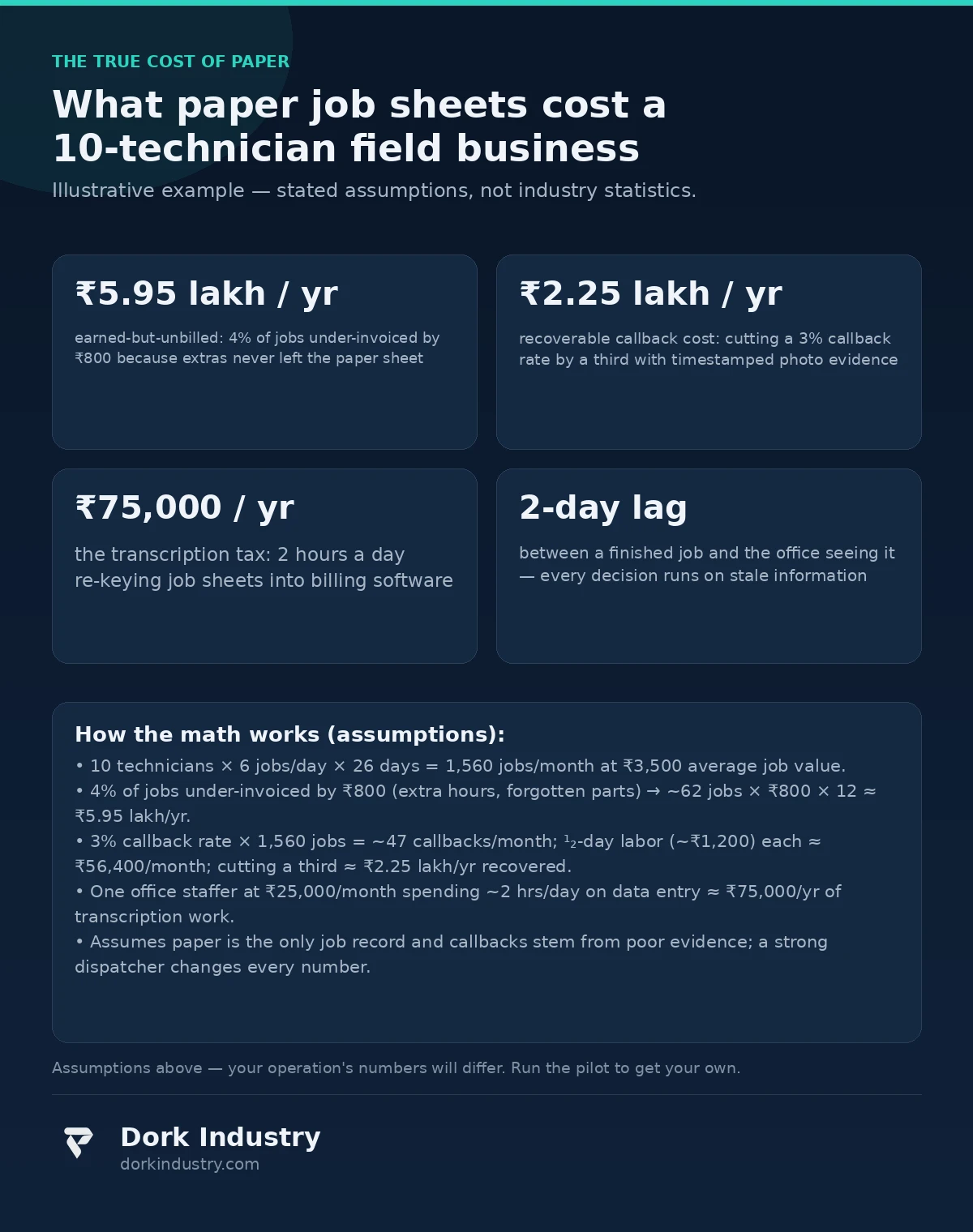
Consider a field-service business with 10 technicians, each completing 6 jobs a day, 26 days a month — 1,560 jobs a month. Assume an average job value of ₹3,500 and that just 4% of jobs are under-invoiced by an average of ₹800 because extra hours and parts never made it from the paper sheet to the invoice. That is 62 jobs a month leaking ₹800 each — roughly ₹49,600 a month, or about ₹5.95 lakh a year in earned-but-unbilled revenue. These are illustrative figures with stated assumptions, not industry benchmarks.
Callbacks carry a second cost. If 3% of jobs generate a callback and each callback costs one lost half-day of technician time (roughly ₹1,200 in loaded labor) plus fuel, that is 47 callbacks a month costing about ₹56,400 — most of it avoidable if the original job record had photos and structured notes. Cut callbacks by a third with better on-site evidence and the business recovers roughly ₹2.25 lakh a year.
Then there is the transcription tax: an office staffer spending 2 hours a day re-keying job sheets into billing software, at ₹25,000 a month loaded cost, is about ₹75,000 a year spent on data entry that an offline-syncing app eliminates entirely. Added together, the illustrative case finds over ₹9 lakh a year leaking through paper — before counting faster payment collection from same-day digital reports.
Should you build or buy? An honest breakdown
Not every field-service business needs custom mobile app development. The honest options, in order of investment:
| Approach | Best for | Relative investment | Where it breaks |
|---|---|---|---|
| Paper + spreadsheets | 1–3 technicians with simple jobs | Minimal | Breaks the moment jobs, callbacks, or billing disputes scale |
| Off-the-shelf field-service software | Standard dispatch, scheduling, and invoicing | Low subscription | Cannot model unusual job types or custom proof workflows |
| White-label technician app | Branded experience without building | Medium | You inherit their form design and offline limitations |
| Custom mobile app development | Multi-crew operations, custom job types, offline-first needs | Highest | Overkill if your jobs fit a packaged tool’s model |
At Dork Industry, we regularly advise field-service businesses against custom builds when packaged software fits. A credible technology partner should be willing to tell you that you do not need custom development. If every consultation ends with a quotation for a custom app, get a second opinion.
What should the app never do?
Technology boundaries in mobile app development matter as much as features — especially where the app watches people at work.
- Never auto-close or auto-bill a job without human review. The app can draft the invoice; a person approves it. Software should not decide what a customer owes.
- Never turn location tracking into surveillance. Track the technician during active jobs for dispatch and customer ETAs — not 24/7. Constant tracking destroys the trust the app needs to succeed.
- Never skip the customer’s acknowledgment. A job is not “done” in the system until the customer has seen the report and signed. The signature protects both sides.
- Never punish technicians with the data. Callback and timing data is a coaching and process-improvement tool, not an automated disciplinary feed.
- AI should assist the office, not judge the technician. “These 5 jobs look under-invoiced — please review” is useful. Automatically flagging technicians as underperforming is not.
How do you test it in 30 days before full investment?
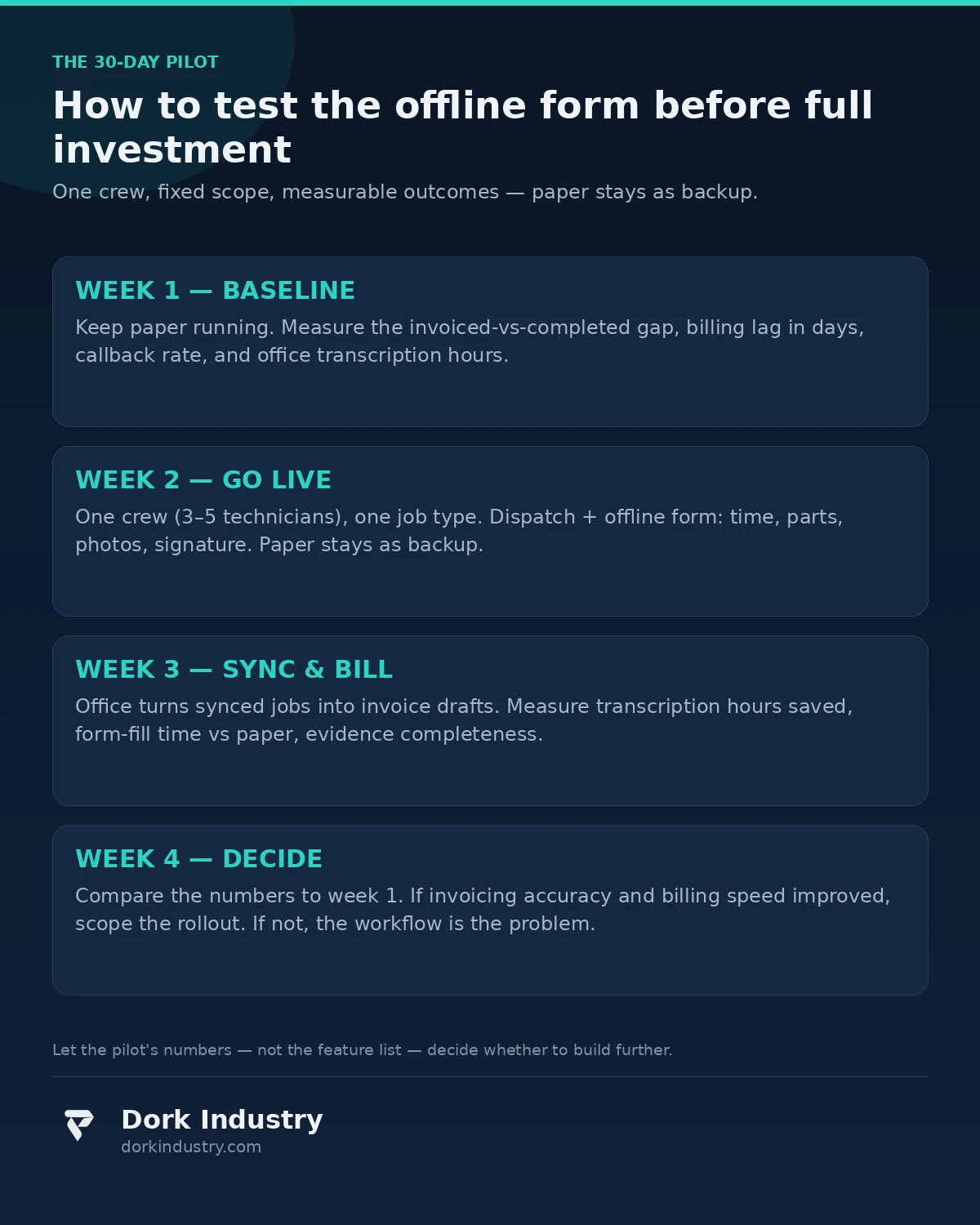
The lowest-risk path is a single-crew pilot with a fixed scope and measurable outcomes:
- One crew (3–5 technicians), one job type, one service area
- Job dispatch, the offline form (time, parts, photos, signature), sync, invoice drafts, owner dashboard
- Run for 30 days alongside paper as a backup — not instead of it, on day one
- Measure: invoiced-vs-completed gap, callback rate, billing lag in days, technician form-completion time vs paper, office transcription hours
If invoicing accuracy and billing speed do not measurably improve in the pilot, a bigger mobile app development investment will not fix it either. The pilot validates the workflow, not just the software. This is the assessment Dork Industry runs before quoting any field-service project: ride along with the process, name the leaks, then decide what software earns its cost.
What actually drives the cost of field-service mobile app development?
Field-app pricing varies widely because scope does. The real cost drivers are:
- Offline depth: simple queue-and-sync vs full offline editing with conflict resolution across devices
- Form complexity: one standard job type vs configurable forms for many job types with conditional fields
- Hardware integration: barcode/QR scanning, Bluetooth printers, payment terminals — each adds integration work
- Dispatch and routing: manual assignment vs automated scheduling with route optimization
- Back-office integration: syncing with existing accounting, ERP, or inventory software — according to MDN’s offline and background operation guidance, background sync and service-worker patterns handle the connectivity side, but mapping your existing billing workflows into the app is where the real effort goes
- Platforms: Android only (the field standard) vs Android + iOS vs cross-platform
Anyone quoting a fixed price without asking about your job types, offline coverage gaps, and billing software is guessing.
Frequently asked questions
Can technicians really use an app with no network on site?
Yes — that is what offline-first design is for. The form saves everything to the device immediately and syncs when a connection returns, automatically. Basements, rural sites, and dead zones are the normal case for field apps, so offline support is a core requirement, not an add-on.
Will technicians actually adopt it, or keep using paper?
Adoption follows speed: if the form is faster than paper — one tap for time, photos instead of descriptions, no re-writing at the office — technicians switch willingly. If the form is slower, they will keep paper. Pilot with the technicians, not just the office, and let their completion times decide.
Do we need iOS, or is Android enough?
For most field teams, Android-only is enough and roughly halves the build cost — businesses usually issue the devices. Add iOS only if technicians use personal phones and a meaningful share of them are iPhones. Cross-platform frameworks can cover both from one codebase when the offline requirements are standard.
How does the app handle parts used from van stock?
Parts are picked from a per-vehicle stock list on the job form (or scanned by barcode), quantities are recorded, and van inventory decrements automatically. Low-stock alerts tell the warehouse which van needs restocking before the next day’s jobs — replacing the end-of-day “I think I used two of those” guess.
What happens to our old paper records?
Nothing is lost. Completed paper sheets stay as your historical archive; the app starts building structured history from day one of the pilot. Most businesses stop referencing paper within a quarter because the app’s search — by customer, job, part, or technician — answers questions the paper pile never could.
About Dork Industry
Dork Industry (dorkindustry.com) is a custom software development company building mobile apps, AI automation, and IoT systems for businesses across India. Our team designs field-service apps, fleet telemetry, and industrial IoT — from 30-day pilots to full multi-crew rollouts.
The bottom line
The question is not whether your technicians can use an app. It is whether you can see — from one screen — which jobs were completed today, which are under-invoiced, which callbacks are trending, and which technician’s van needs restocking. If the answer is no, the paper job sheet is not a quaint habit; it is a daily tax on your revenue. Start with one crew, pilot for 30 days, and let invoicing accuracy — not feature lists — decide whether to build further.
Still losing jobs to crumpled paper job sheets?
Dork Industry maps your current job-sheet workflow, names exactly where revenue leaks, and scopes a 30-day offline-form pilot — before any development is discussed.
Request a free field-service digitization assessment WhatsApp +91 8210792477