
AI automation can keep a construction company’s material estimates accurate between bid day and buy day — not by predicting where steel or cement prices will go, but by refreshing every line-item rate from your live vendor quotes, flagging every change that breaks your margin, and rebuilding the bid worksheet before the estimate is already history. That is the direct answer: yes, the re-pricing loop can be automated; no, the system should never decide what goes into your tender — that stays with the estimator who signs it.
This article examines what an outdated estimate really costs, why estimates go stale even with good estimators, what pricing data you already own, what an automated rate-refresh system looks like in practice, what it must never do alone, when you should not automate at all, and how to test the idea on a 30-day pilot.

What does an outdated estimate actually cost on one project?
The failure is not that the estimate was wrong on day one. The failure is that nobody knows when it stopped being right. Between bid day and buy day, vendor prices move, and the estimate everyone is still building to quietly becomes fiction.
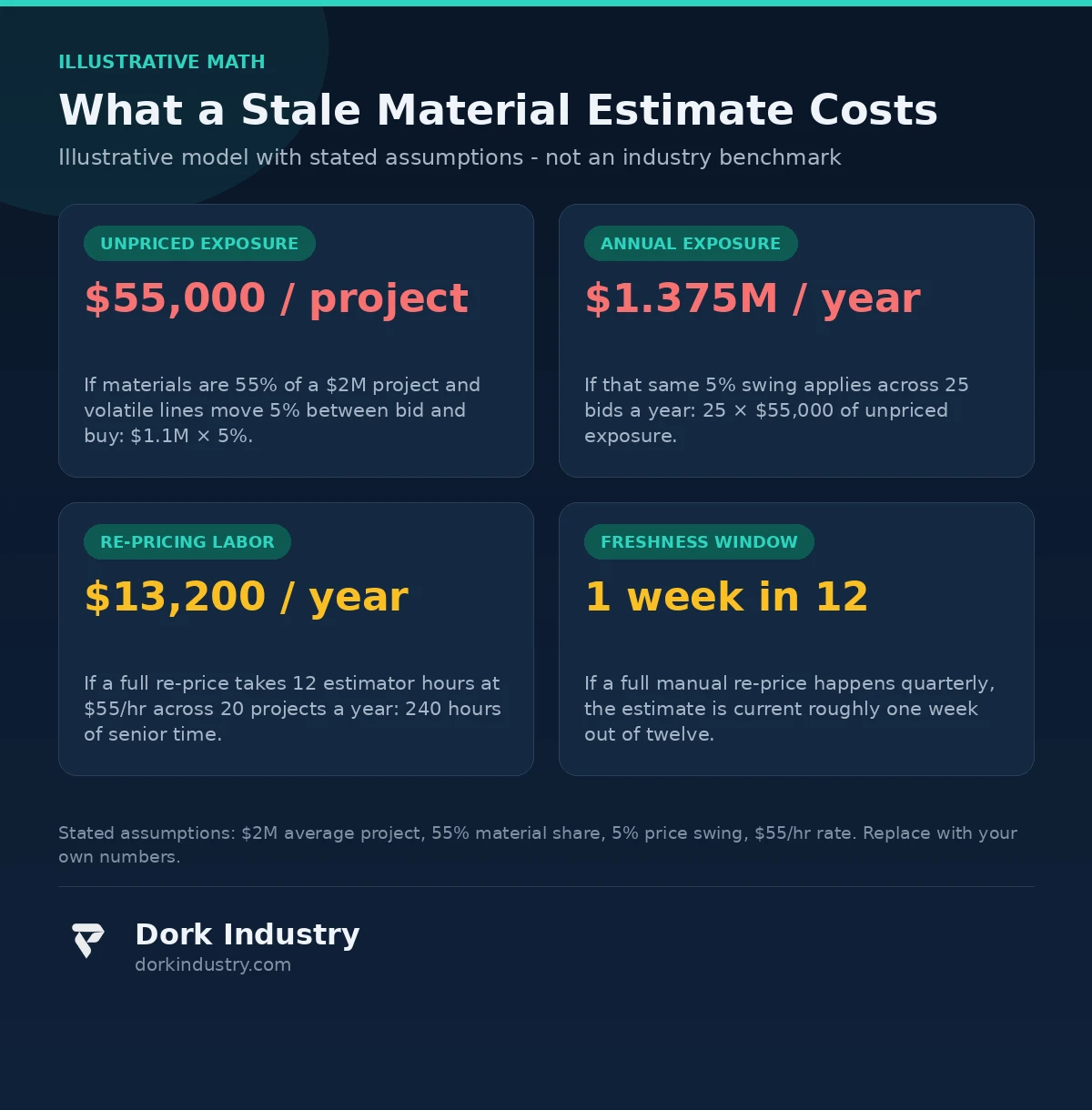
Consider the illustrative model below — stated assumptions, not industry statistics. A mid-size contractor bids 25 projects a year at an average $2 million project value. Assume materials are 55% of project cost, and the volatile lines (structural steel, copper wire, cement, imported finishes) move 5% on average in the 60–90 days between bid submission and procurement. The math: $2,000,000 × 0.55 = $1,100,000 in materials; 5% of that is $55,000 of unpriced exposure per project, or $1.375 million a year across 25 bids — before the re-pricing labor, roughly 240 estimator hours a year at $55 an hour, or $13,200 of senior time spent updating numbers instead of winning work.
That is the visible cost. The invisible one is the bid you lost without knowing why: a competitor whose rates were refreshed the week before submission came in 2% lower on materials and took the job, while your team told itself the loss was about relationships. Stale rates cost you on the jobs you win and the ones you never understood you lost.
Where do the bad numbers hide?
In the lines nobody re-checks. The big-ticket items get re-priced because they are visibly dangerous. The damage lives in the middle of the bill of quantities: hundreds of conduit, fastener, waterproofing and hardware lines that each moved 4–8% while the estimator negotiated the two lines that mattered most. Individually rounding errors; together, the margin. Plus version confusion — the March estimate sitting next to the May one, with nobody certain which the bid went out on.
Why do estimates go stale even with good estimators?
Most staleness is not an estimating problem. It is a maintenance problem. The original estimate was built carefully; what nobody built was the machinery to keep 800 rates current while the business moved on to the next tender.
Vendor quotes arrive as PDFs and messages, each in a different format and each valid for a different number of days. A full re-price means opening dozens of quotes, copying rates into the worksheet, — a full day or more of copy work on a big BOQ. So it happens quarterly, which means the estimate is current roughly one week out of twelve. The estimator is not lazy; the loop is manual, and manual loops get skipped under tender pressure.
Is the problem the prices or the plumbing?
It is the plumbing. Prices will always move; that is the market’s job. The problem is that the journey from “the supplier changed the rate” to “the estimate reflects the rate” runs through an inbox, a spreadsheet and someone’s memory. Fix the plumbing — make rate changes flow into the estimate automatically — and price movement becomes something you react to in minutes instead of discovering at procurement.
What pricing data do you already have?
You almost certainly own more pricing raw material than you think. The data is sitting in places nobody looks at twice.
Supplier quotes. Months of PDFs and email attachments from your regular vendors. Each carries item names, rates, validity dates and delivery terms — your entire recent price history, and the single most valuable dataset for a refresh system, because these are your real buying prices, not a market average.
Purchase history. Your accounting system or ERP holds what you actually paid, when, and to whom — the ground truth that turns “the market says” into “we paid $84 per bag last quarter.”
Rate cards and BOQ templates. Your standard templates already carry the master item list and your internal naming — the canonical catalog every quote gets mapped to.
Public market context. For sanity-checking quotes against the broader market, the US Census Bureau publishes construction statistics through census.gov/construction — a free second opinion when a quote looks wrong. It never replaces your vendor quotes.
What does an AI automation estimate-refresh system look like in practice?
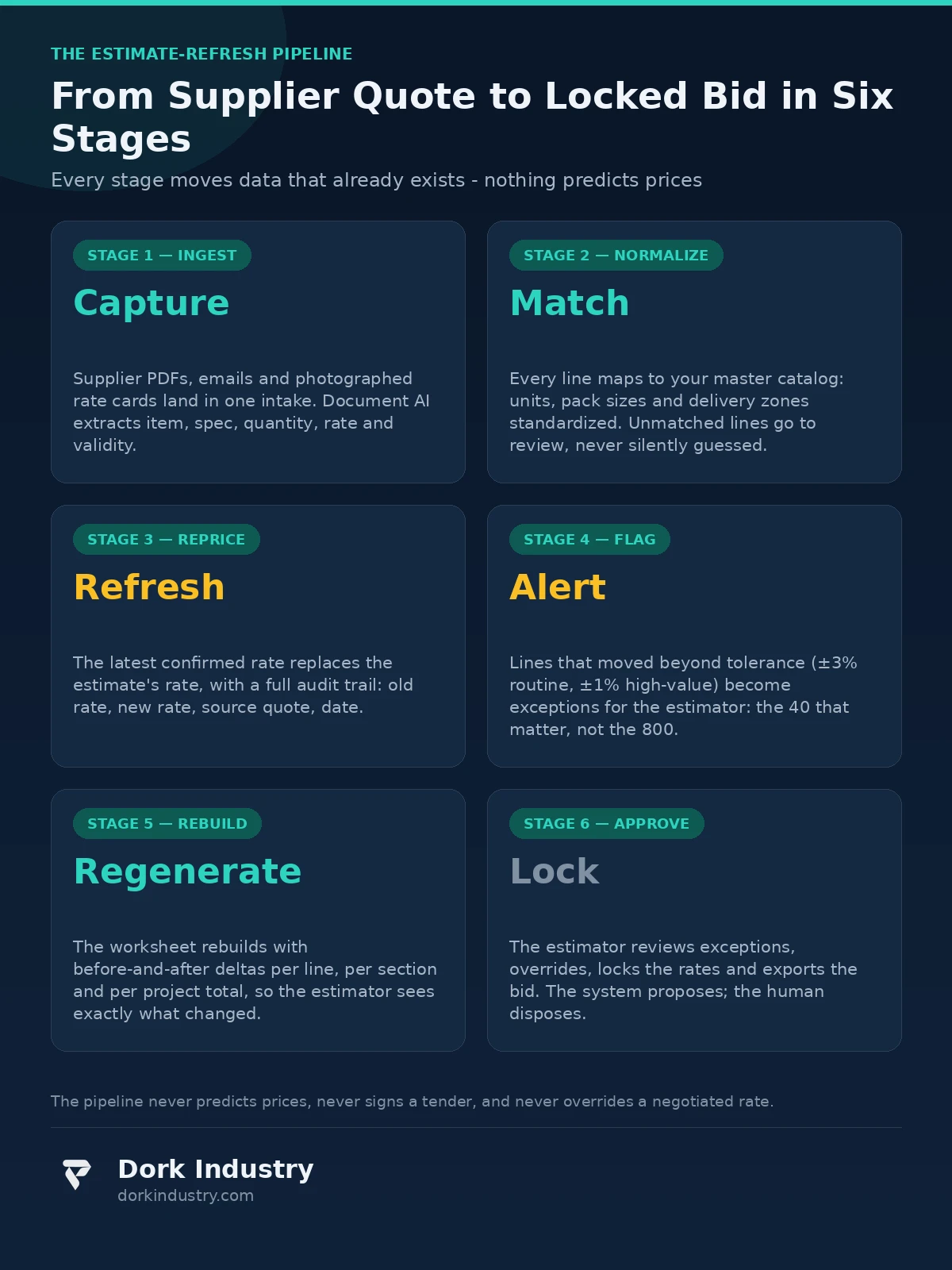
Concretely, in six stages. Nothing here predicts prices. Every stage moves data that already exists, faster and more reliably than the inbox-and-spreadsheet loop.
Stage 1 — Ingest. New supplier quotes are captured wherever they arrive: emailed PDFs, shared-folder scans, photographed rate cards. Document AI extracts the line items — item name, specification, quantity, rate, validity period. According to AWS’s Textract documentation, document-analysis services extract tables and key-value data from invoices and quotes — exactly the structure a supplier quote carries.
Stage 2 — Normalize. Each extracted line is mapped to your master catalog: “TMT rebar 25mm” from one supplier and “rebar, TMT Fe-550, 25 mm” from another become one item with one unit, with pack sizes and delivery zones normalized so rates are actually comparable. Anything the system cannot match with high confidence goes to a review queue — never silently guessed.
Stage 3 — Reprice. The latest confirmed rate replaces the estimate’s rate, with a full audit trail: old rate, new rate, source quote, date. Every estimate can be re-priced on demand or on schedule — weekly, or the day a key supplier sends a new card.
Stage 4 — Flag. Any line where the rate moved beyond your tolerance — say ±3% on routine items, ±1% on high-value lines — becomes an exception for the estimator. This is the stage that earns its keep: instead of re-checking 800 lines, the estimator reviews the 40 that actually moved.
Stage 5 — Rebuild. The worksheet regenerates with before-and-after deltas per line, per section and per project total, so the estimator sees exactly what changed and why the total moved.
Stage 6 — Approve. The estimator reviews the exceptions, overrides anything the market data got wrong, locks the rates, and exports the bid. The system proposes; the human disposes.
What must the system never do alone?
This is the boundary section, and it matters more than the technology. A refresh pipeline that runs unattended can do real damage if nobody draws lines around it.
Never set the final bid price on its own. Re-pricing the materials is the system’s job; deciding the margin, the contingency and the number that goes on the tender is the estimator’s. A pipeline that quietly “optimizes” the bid price is an agent with the company’s signature.
Never invent a rate for an item with no live quote. When there is no current quote for an item, the honest output is “no current rate — needs a quote,” not a blended guess from old data. Invented rates are how estimates become fiction with better formatting.
Never auto-send anything to a client or a vendor. Refreshed estimates and exception reports are internal drafts until a named person reviews and releases them. A rate that went out under your name because a scheduled job sent it is your liability, not the software’s.
Never silently override a negotiated rate. A negotiated rate with a preferred vendor is a commercial relationship, not a data error — it gets locked, not overwritten.
Never share vendor pricing across clients. In a multi-project setup, Supplier A’s rates for Project X must never leak into Project Y’s worksheet. This is plumbing, not philosophy, but it is where most DIY pipelines fail first — and in construction it is a commercial trust problem.
When should you NOT automate your estimating?
Honest answer: not every contractor should. Fewer than ten bids a year? Re-pricing by hand is an afternoon per tender — automation is a sledgehammer for a nail. Single-trade contractor buying from the same three suppliers? A phone call is faster than any pipeline. Rates living in one senior person’s head with no willingness to write them down? Automation has nothing to ingest — the problem is documentation, not software. And if nobody will own the exception queue, you simply replace a stale spreadsheet with a stale pipeline. We say this to prospects plainly, including when it costs us the project; the same honest lens applies to our custom software development work and the procurement automation we build for contractors.
What does a 30-day pilot look like?
Week 1 — Catalog and quotes. Pick one high-volume project type, such as mid-rise residential. Export your master item list and gather the last quarter’s supplier quotes. Map the top 100 material lines to one canonical naming. Unglamorous, and where pilots are won or lost.
Week 2 — One pipeline, one project type. Build the ingest-to-flag loop for those 100 lines only, running in parallel with the manual process. The estimator keeps pricing the old way; every difference between the two gets investigated.
Week 3 — Exceptions and tolerances. Tune the tolerance bands with the estimator: which variances are noise, which are real, which items deserve a tighter band. The exception queue should be short enough to read in one sitting.
Week 4 — Rebuild and review. Run a full bid rebuild from the pipeline and compare it against the manual bid line by line. If the manual re-price took a day and the review took an hour, the pilot has its number — and a concrete basis for the cost comparison behind our web development and platform work.
What drives the cost of an estimate-automation build?
Four cost drivers, in order of impact. Quote-format variety: three suppliers sending the same spreadsheet is a week; forty vendors with PDF, email-text and photographed rate cards is a month of extraction work. Catalog size and messiness: a clean 500-item master list is straightforward; a 4,000-line catalog with five naming conventions is a data project first. Exception and approval design: one estimator approving is trivial; multi-project approval chains with per-project tolerances are a product in themselves. ERP integration: reading purchase history back out of the ERP so the pipeline learns from what you actually paid multiplies the integration work. The 30-day pilot exists so you learn which shape you need before committing.
How do manual, spreadsheet-macro and AI automation estimating compare?
| Dimension | Manual re-pricing | Spreadsheet + macros | AI automation pipeline |
|---|---|---|---|
| Time per full re-price | 1–2 days of estimator time | Half a day, if the macros survive | Minutes (review takes under an hour) |
| Rate freshness | Current on bid day, then decays | Current when someone runs it | Refreshed on schedule or on quote arrival |
| Quote-format handling | Human reads anything | Breaks on every format change | Handles PDFs, scans, messages; unmatched lines go to review |
| Variance visibility | Only if someone checks | Only if someone checks | Exceptions flagged automatically each cycle |
| Audit trail | None — the file was just saved | Fragile | Every rate change logged with source and date |
The bottom line
AI automation does not predict material prices — any vendor who says theirs does is selling astrology. What it does is keep the estimate you already built connected to the prices your vendors are actually quoting: refreshing rates, flagging the moves that matter, and rebuilding the worksheet so the estimator reviews exceptions instead of copying numbers. If your last tender went out on two-month-old rates, the question is not whether the technology works — it is how much margin you want to leave to the gap between bid day and buy day.
Still rebuilding your estimate every time a supplier revises their quote?
Send Dork Industry one sample estimate and two recent supplier quotes. We will map every material line to a live-rate feed, name the variances a refresh pipeline would flag, and show you the 30-day pilot we would run on your highest-volume project type.
Request a free construction estimation automation assessment WhatsApp +91 8210792477
About Dork Industry
Dork Industry (dorkindustry.com) is a custom software development company building mobile apps, AI automation, and IoT systems for businesses across India. Our team designs estimate-refresh pipelines, procurement automation and exception-review workflows — from 30-day estimating pilots to full multi-project rate platforms, with the same automation discipline we apply to back-office operations like AI automation for business processes.
Frequently asked questions
Can AI automation predict construction material prices?
No — and distrust any system that claims to. The pipeline does not forecast where steel or cement prices will go; it refreshes your estimate from the quotes your suppliers are actually sending. Prediction is astrology with a spreadsheet; live-rate refresh is plumbing, and plumbing is what keeps estimates honest.
How often should material rates be refreshed?
Match the refresh to the volatility of the items. Structural steel and copper wire justify weekly refreshes, or updates when a new supplier quote arrives; low-volatility items like basic hardware can sit at monthly. The pilot teaches you the right cadence per category, and tolerance bands keep the exception queue readable.
Will the system work with supplier quotes as PDFs and messages?
Yes, with a boundary. Document AI extracts line items from PDFs, scans and photographed rate cards, and every unmatched line goes to a human review queue instead of being silently guessed. The system only learns from formats it has been shown — which is why the pilot starts with your real quote pile, not a demo file.
Does estimate automation replace the estimator?
No — it replaces the copying, not the judgment. The pipeline refreshes rates and flags variances; the estimator still decides tolerances, negotiates rates, sets margins and signs the tender. Teams that automate usually redeploy the freed hours into sharper bidding and vendor negotiation, work the pipeline cannot do.
What does a 30-day pilot need from my team?
Three things: your master item list (or the worksheet you actually bid from), one quarter of supplier quotes in whatever format you have them, and one estimator willing to spend a few hours a week owning the exception queue. With those, the pilot can price one project type in parallel with your manual process and prove the number in four weeks.