If your website says an enquiry was submitted but your team cannot find it, do not test only the inbox. A reliable lead path should prove five separate events: the form accepted the data, the website saved a record, the notification was delivered, the CRM created the correct lead, and a named person received a follow-up task.
This guide gives Delhi business owners and operations teams a practical way to test that complete path. It is useful for service companies, clinics, education providers, real-estate teams, retailers, logistics businesses, professional firms and other organisations that depend on website enquiries. It does not assume that every business needs a custom CRM; the right fix may be a configuration change, a dependable form record, an integration repair or a better ownership process.

Why is my website contact form not receiving emails?
A website contact form may accept a submission while the notification fails later. The address may be wrong, the message may be rejected or filtered, or the CRM connection may fail even though the page displays “success.” First confirm whether the enquiry was saved. Then test email delivery, CRM creation, assignment and follow-up as separate steps.
That separation matters. WordPress documents that a successful wp_mail() return value means the request was processed without an error; it does not prove the recipient received the message. In other words, a green message on the website is not end-to-end evidence.
What should happen after a visitor clicks Submit?
A dependable enquiry workflow creates evidence at each hand-off. The browser confirmation is only the first hand-off.
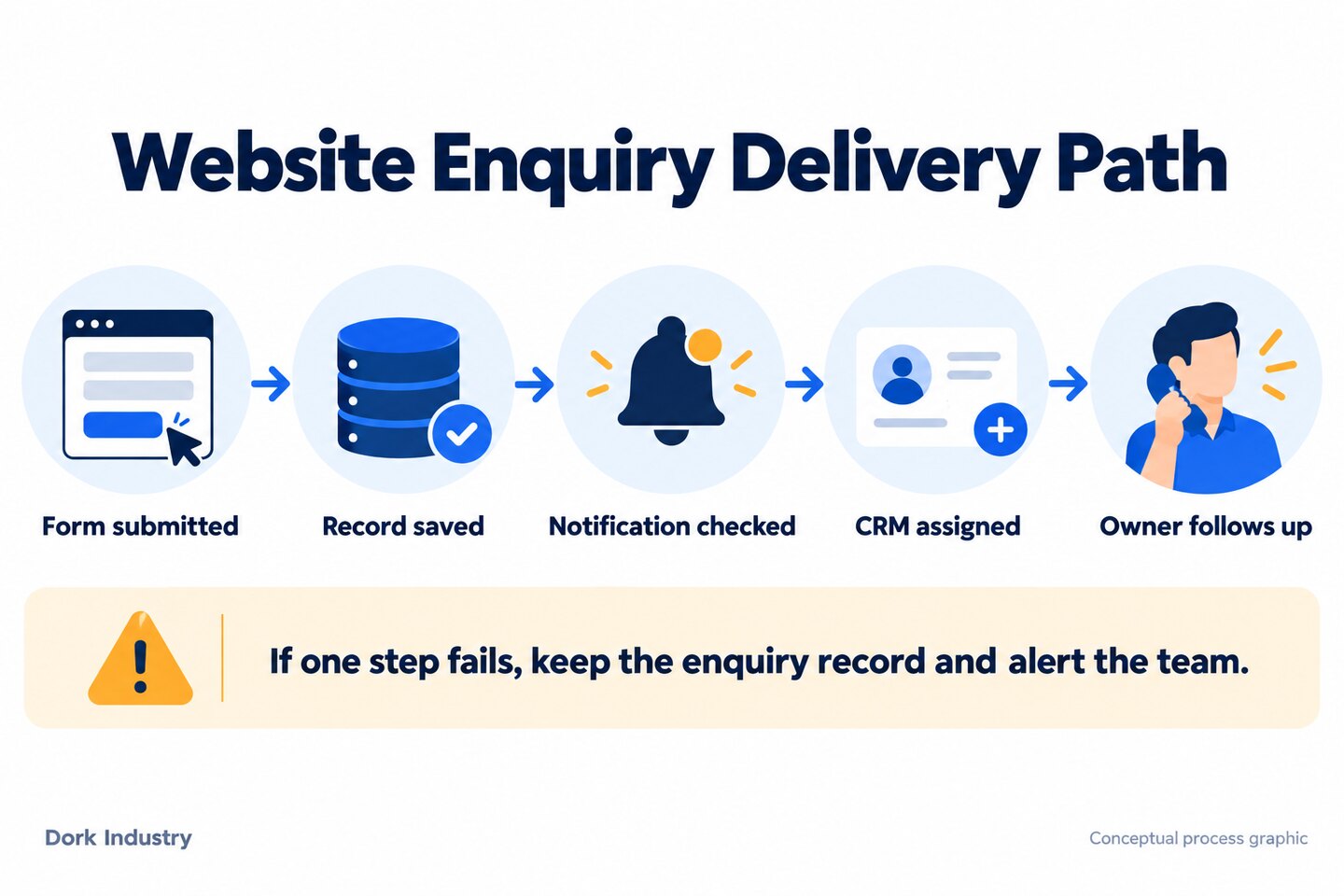
| Stage | Evidence to keep | Failure you are testing |
|---|---|---|
| 1. Form accepted | Timestamp, page URL and a safe test identifier | Validation, CAPTCHA, browser or server error |
| 2. Record saved | Database/form entry with submitted fields | The visitor sees success but no durable record exists |
| 3. Notification processed | Application or mail log entry | Template, recipient or sending failure |
| 4. Message delivered | Mailbox result or delivery trace | Authentication, filtering, rejection or routing issue |
| 5. CRM lead created | Lead ID, original source and mapped values | Webhook/API failure or incorrect field mapping |
| 6. Owner assigned | Named owner and due time | Lead exists but nobody is responsible |
The design principle is simple: email should be an alert, not the only copy of the enquiry. When possible, save the submission securely before triggering email or CRM automation. Access to stored enquiries should be limited, retention should match your business and legal needs, and sensitive information should not be collected unless it is genuinely required.
How do you test a website enquiry workflow?
Use a unique test identifier such as DORK-WEBFORM-TEST-01 in the message field. Do not use a real customer’s information. Record the time and test from both mobile data and a normal office connection so the result can be traced across the website, logs, mailbox and CRM.
1. Test the form on mobile and desktop
Submit the form on a phone and a desktop browser. Confirm that every required field can be completed, error messages are understandable, the submit button does not disappear below an overlay, and the visitor receives one clear success or failure response. If the button can be clicked repeatedly, check whether duplicate submissions are created.
2. Confirm that the submission is stored
Open the form-entry area, database record or connected storage and search for the exact test identifier. If the page reports success but no record exists, the problem occurs before email delivery. Fix this stage first; changing spam settings will not recover an entry that was never saved.
3. Check the recipient and sender configuration
Verify the destination mailbox, CC/BCC rules and routing conditions. The visible visitor email is normally more appropriate as a reply-to value than as an unauthorised sender for your domain. Confirm the sending identity and domain configuration with the team that manages your website and email; do not publish DNS values or administrative screenshots in a public support request.
4. Trace delivery beyond the website
Search spam, quarantine, rules, aliases and shared-mailbox folders. If your organisation uses Google Workspace, its administrator guidance includes a specific path for troubleshooting contact-form messages. Other mail providers have equivalent delivery and message-trace tools. The goal is to distinguish “the website did not create a notification” from “the receiving system did not place it in the expected inbox.”

5. Test CRM creation and field mapping
Search the CRM for the identifier, email address and submission time. Confirm that name, phone, service interest, message, page URL and consent values landed in the intended fields. A lead created with a blank phone number or the wrong service can be just as damaging as a missing lead because routing and prioritisation may depend on those fields.
6. Simulate an integration failure
In a safe staging or controlled test environment, ask the developer to simulate a rejected or unavailable CRM endpoint. The website should retain the enquiry, log the failure without exposing personal data, and alert the responsible team. An integration that silently discards the form during an outage is not resilient.
7. Check duplicate handling and retries
Submit the same test twice and review the result. The correct behaviour depends on your process: you may update an existing contact, create a separate enquiry or flag a possible duplicate. Automated retries should not generate multiple sales tasks or repeated customer acknowledgements. Document the intended rule instead of letting the integration decide by accident.
8. Verify ownership and response workflow
Confirm that the lead has a named owner, status and next-action time. Test what happens when the usual owner is absent. For a business serving customers across Delhi, a central queue can be more dependable than routing only to individual inboxes; location-based routing should be used only when different teams genuinely serve different areas.
9. Verify measurement without counting false success
Do not treat a click on the submit button as a completed enquiry. Trigger measurement only after the website confirms the intended success state, and reconcile the count against saved records. Google Analytics defines generate_lead for a generated lead and provides later-stage events such as qualified and converted leads. Use those stages only when your process can support them; never invent a lead value.
Website enquiry test worksheet
Copy this worksheet into your ticketing system or spreadsheet. Complete one row for each form, landing page and important routing rule. A home-page form and a service-page form may use different integrations, so a single successful test is not enough evidence for the entire website.
| Check | Test evidence | Pass rule | Owner |
|---|---|---|---|
| Form response | Device, browser, time, test ID | One clear response; no duplicate click | Web |
| Stored entry | Entry ID and timestamp | All required fields preserved | Web |
| Email delivery | Mail trace or received message | Expected mailbox receives it | IT/email |
| CRM record | Lead/contact ID | Correct fields and original source | CRM |
| Assignment | Owner and due time | Named person or monitored queue | Sales |
| Failure path | Alert/ticket and retained entry | No silent loss during an outage | Web + CRM |
| Measurement | Analytics event and stored record | Counts reconcile for the test | Marketing |
Worked example: at 11:00, submit test ID DORK-WEBFORM-TEST-01. At 11:02, record whether the form entry, notification, CRM lead and assignment exist. At 11:10, record whether the owner can see the message and next action. This timing is only a test procedure, not a promised response time or performance benchmark.
What should you fix first?
Prioritise the earliest broken hand-off. Later changes cannot repair missing evidence upstream.
- No form success and no saved record: inspect validation, CAPTCHA, browser errors and server handling.
- Success message but no saved record: make durable storage and safe error handling the immediate priority.
- Saved record but no email: inspect notification creation, sender configuration and recipient delivery.
- Email arrives but CRM lead is absent: inspect the webhook/API result, credentials, field mapping and retry policy.
- CRM lead exists but nobody acts: fix assignment, queue monitoring, escalation and absence coverage.
- Everything works but reporting disagrees: align the analytics success event with the saved enquiry and reconcile test records.
If your website is being redesigned, include these acceptance tests in the scope before launch. The cheapest quotation can become expensive when a form looks finished but the delivery, recovery and ownership path is not defined. Dork Industry’s guide to website development cost in Delhi explains why integrations and post-launch requirements should be compared as part of scope, not just page count.
What should a Delhi business measure after the fix?
Traffic is useful, but the commercial path matters more. Keep search visibility, answer coverage, enquiry quality and sales outcomes separate so one metric does not hide another.
| Layer | Useful measures | Question answered |
|---|---|---|
| Discovery | Search impressions, clicks, relevant landing pages | Are the right people finding Dork or your business? |
| Answer quality | Queries answered, useful page sections, observed citations | Does the content resolve the problem clearly? |
| Enquiry path | Saved forms, delivery failures, CRM creation, assignments | Did the website preserve and route the request? |
| Commercial outcome | Qualified enquiries, consultations, proposals, projects | Did the interaction become a genuine opportunity? |
Do not claim an AI citation or search ranking unless it has actually been observed. Do not report a qualified lead merely because a form was submitted. Define qualification with the sales team and preserve the original source through the CRM so the final project can be connected back to the content and enquiry path.
When should Dork Industry review the workflow?
A technical review is useful when forms fail intermittently, different landing pages route differently, the website and CRM disagree, multiple teams share a mailbox, or nobody can prove what happened after Submit. Dork Industry provides web development and tailored enterprise solutions across its industry practices. The review should begin with your actual enquiry path and current tools—not a forced rebuild.
Trace one real enquiry path before changing the whole system
Bring the form URL, destination mailbox, CRM name and one safe test result. Dork Industry can help identify the broken hand-off and define a repair or integration scope.
Frequently asked questions
Why does the form say sent when no email arrives?
The success message may confirm only that the website accepted or processed the request. It does not prove that the receiving mail system placed the notification in the intended inbox. Check the saved form record first, then the website’s notification log, mail delivery trace, spam/quarantine and routing rules.
Should contact-form enquiries be saved in WordPress?
A durable record is useful, but it must be protected. Limit access, collect only necessary information, define retention and deletion rules, and keep software updated. Depending on the workflow, the authoritative record may be in a secure form system or CRM rather than WordPress itself.
Can I rely only on email notifications?
Email is best treated as an alert, not the only evidence. If the message is filtered, rejected or routed incorrectly, the enquiry should still be available in a secure record or CRM with a visible failure alert.
What information should pass from the form to the CRM?
Map only fields needed for the sales or service process: contact details, enquiry text, service interest, source page, consent information and a submission time or identifier. Test blank, optional and special-character values so mapping errors are visible before launch.
How often should a business test its website forms?
Test before launch and after changes to the website, forms, email service, CRM, CAPTCHA, hosting or DNS. Add a recurring check based on how critical enquiries are to the business. The appropriate frequency depends on risk and volume; this article does not prescribe one universal interval.
Does every Delhi business need a custom CRM?
No. Many businesses can configure and integrate an existing CRM. Custom development becomes relevant when workflows, permissions, integrations or reporting requirements cannot be met safely and economically through configuration. Start with process discovery before choosing build versus buy.
Should I create different pages for every Delhi locality?
Only when each page provides genuinely local services, proof or useful information. Replacing one area name with another can create thin, repetitive pages and keyword cannibalisation. A strong city-level guide is often better when the troubleshooting process is the same across Delhi.
Can Dork Industry repair the form without rebuilding the website?
Possibly. The correct scope depends on where the hand-off fails and how the current site is built. A review may identify a configuration, delivery, integration or ownership issue that can be repaired without a full rebuild. A rebuild should be recommended only when the evidence supports it.