
AI document automation is a controlled workflow that converts business documents into validated, system-ready data. It uses OCR, machine learning and business rules to classify files, extract fields, route exceptions to people and send approved records to ERP, CRM or other systems. For Indian businesses, the safest buying decision starts with one measurable workflow, field-level acceptance tests and a controlled pilot.
This Dork Industry buying guide draws on 5 sources from official publishers and a review of current product capabilities. It focuses on the operating controls that determine whether document automation remains reliable after a demonstration.

Key takeaways
- Choose a document workflow by business impact, repeatability and exception risk—not by document volume alone.
- Measure classification and field extraction separately; a single headline “accuracy” number can hide costly errors.
- Route uncertain or high-risk fields to human review using thresholds tested on your own documents.
- Test ERP or CRM writes, duplicate prevention, reconciliation and recovery before approving a production rollout.
- Define security, retention, access and personal-data responsibilities before sending real documents to any platform.
What is AI document automation?
AI document automation is an end-to-end business workflow that turns unstructured or semi-structured documents into validated, traceable actions. It can receive files from email, portals, scanners or APIs; identify document types; read text and tables; apply business rules; request human review; and pass approved data to the system of record.
It is broader than OCR. OCR converts an image into machine-readable text. Intelligent document processing adds classification, field and table extraction, confidence signals, validation, routing and integrations. Automation becomes valuable only when those components reduce a real operating constraint such as delayed invoice posting, slow claims review, purchase-order mismatches or manual delivery-note entry.
Where can it create value?
Common candidates include supplier invoices, purchase orders, delivery documents, claims, onboarding forms, quality certificates, laboratory reports, freight paperwork and service records. Suitability depends on document variation, data quality, decision risk and the quality of the destination system—not merely whether the document is a PDF.
Which document workflow should you automate first?
Start with a workflow diagnosis. A high-volume process is not automatically a good pilot if every case is unique, source scans are unreadable or the team cannot define the correct output. A lower-volume process may produce a better return when delay, rework or missed controls are expensive.
| Candidate workflow | Good pilot signals | Important risk to test | Suggested business measure |
|---|---|---|---|
| Supplier invoices | Repeated suppliers, known fields, clear approval rules | Duplicate invoice, tax and purchase-order mismatch | Touch time, exception rate, posting lead time |
| Purchase orders | Consistent line items and defined fulfilment workflow | Units, quantities, dates and product-code mapping | Order-entry time and correction rate |
| Delivery notes | Known customers or carriers and a clear receipt process | Handwriting, stamps, damaged scans and split deliveries | Receipt-to-system delay and missing-record rate |
| Claims or service forms | Defined triage fields and repeatable evidence | Unsupported conclusions and personal-data exposure | Triage time and review backlog |
| Quality certificates | Known test fields, limits and product references | Table extraction, unit conversion and version control | Release delay and manual verification time |
Create a baseline before selecting software. Record monthly volume, document families, average handling time, rework, backlog, cost per case, downstream delay and the consequence of an incorrect value. Without that baseline, a pilot may demonstrate technology but not business value.
12 tests for AI document automation before you buy
1. Can the team define the business problem in measurable terms?
Replace “we process documents manually” with a testable statement. For example: the accounts team receives 8,000 invoices a month, manually enters eight fields, sends 22% for clarification and takes a median of two business days to post approved invoices. The pilot should specify which part of that delay or effort it will reduce and what must remain controlled.
Include the cost of exceptions and downstream corrections. Faster extraction is not an improvement if finance spends the saved time correcting supplier, tax or amount errors later.
2. Does the sample represent real document diversity?
A demonstration built from five clean files proves very little. Build a representative sample across suppliers, layouts, languages, page counts, tables, scan quality, rotations, stamps, handwriting, mobile photos and seasonal variations. Include difficult cases and documents the system should reject.
Separate samples for configuration and evaluation. If the same files are used to tune and test the workflow, the result may look stronger than it performs on unseen production documents.
3. Can it classify documents and split mixed files reliably?
Many inboxes contain attachments with multiple documents or the wrong file type. Test whether the solution can distinguish an invoice from a purchase order, identify a supporting page, split a combined scan and reject an unrelated file. Measure errors by class, because a rare but high-risk misclassification can matter more than the overall percentage.
4. Is extraction measured at field and line-item level?
Ask for field-level precision and recall or an equivalent error measure for the fields that drive decisions. Header fields such as invoice number may perform differently from line-item quantities, taxes or handwritten notes. Define normalization rules for dates, currency, decimal separators, addresses, units and identifiers.
A single document-level score can hide the exact errors your team must correct. The acceptance sheet should show results for every critical field, every document family and important edge cases.
5. Are confidence thresholds calibrated to the cost of error?
Confidence is a routing signal, not proof that a value is correct. Test several thresholds on unseen documents and observe the trade-off between straight-through processing and human review. A low-risk reference field may tolerate a different threshold from bank details, total amount, product quantity or a claim decision.
According to Microsoft Learn, document-processing confidence can be evaluated for individual fields and table cells. Google Cloud documentation similarly describes entity-level thresholds that can trigger manual review. Your workflow should therefore use field-specific controls rather than one arbitrary global threshold.
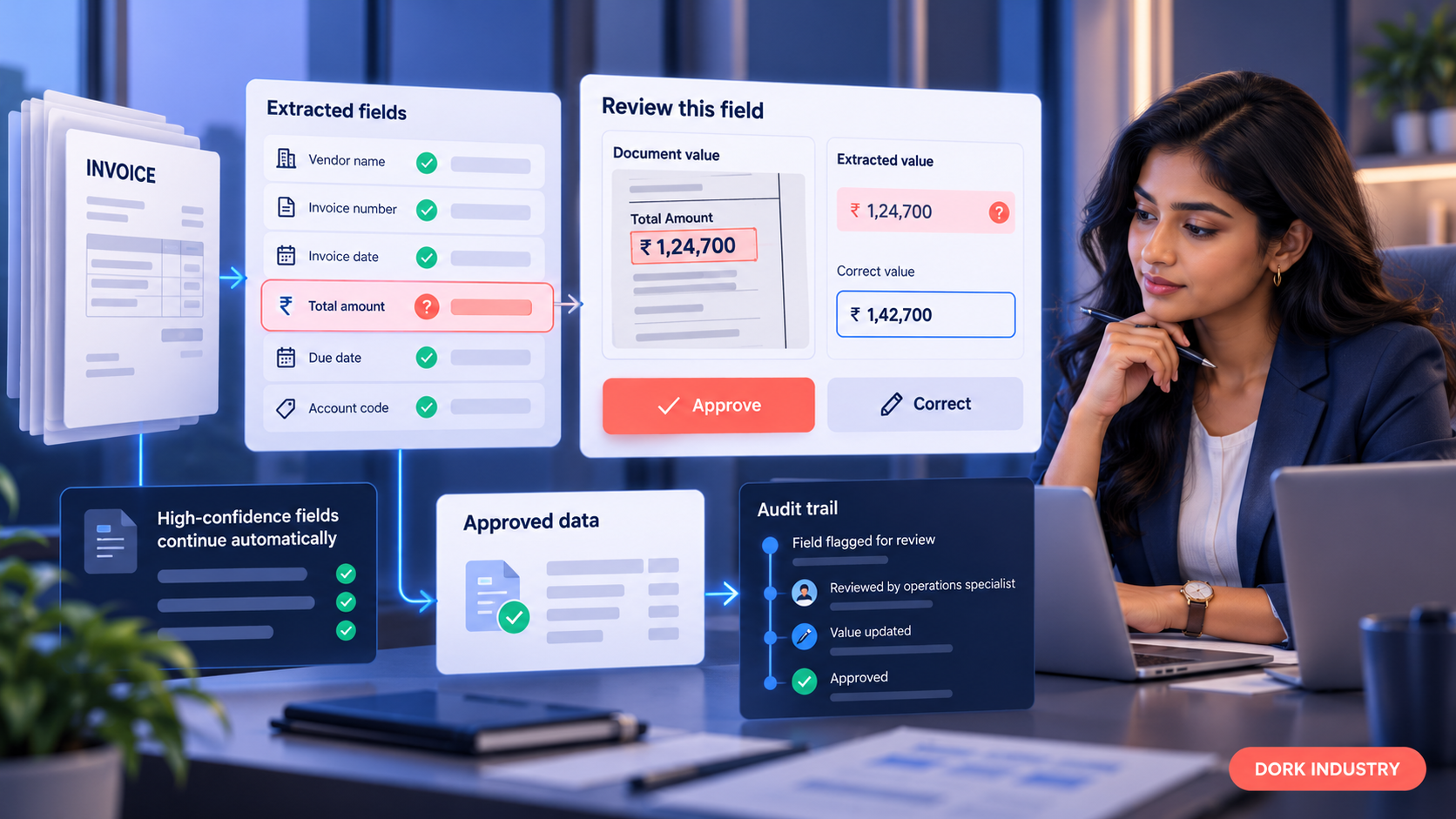
6. Does the human-review queue help people make safe decisions?
The reviewer should see the source region beside the extracted value, the validation failure, relevant system data and the allowed action. Capture who approved or corrected the value, when it happened and what changed. Define escalation paths for unreadable documents, missing evidence and conflicts that a reviewer cannot resolve.
Measure review time and reviewer agreement. If the queue sends too many easy cases to people, automation value collapses. If it sends too few risky cases, errors pass downstream.
7. Can business rules validate meaning, not just format?
Format validation asks whether a date or GSTIN looks valid. Business validation asks whether the supplier exists, the purchase order is open, quantities are within tolerance, totals reconcile and the document has not already been processed. List rules with an owner, action, evidence and override policy.
Keep deterministic rules separate from model predictions. This makes failures easier to diagnose and allows finance or operations owners to review policy changes without retraining a model.
8. Are integrations idempotent, reconciled and recoverable?
An API connection is not the same as a reliable business integration. Test authentication, rate limits, timeouts, duplicate prevention, partial failures, retries and version changes. Every write to ERP or CRM should have a stable transaction reference so the workflow can retry without creating a duplicate.
Reconcile the automation ledger against the destination system. A file marked “processed” must not be treated as successful until the target record is confirmed. Provide a recovery queue with enough context for an operator to replay or resolve the transaction safely.
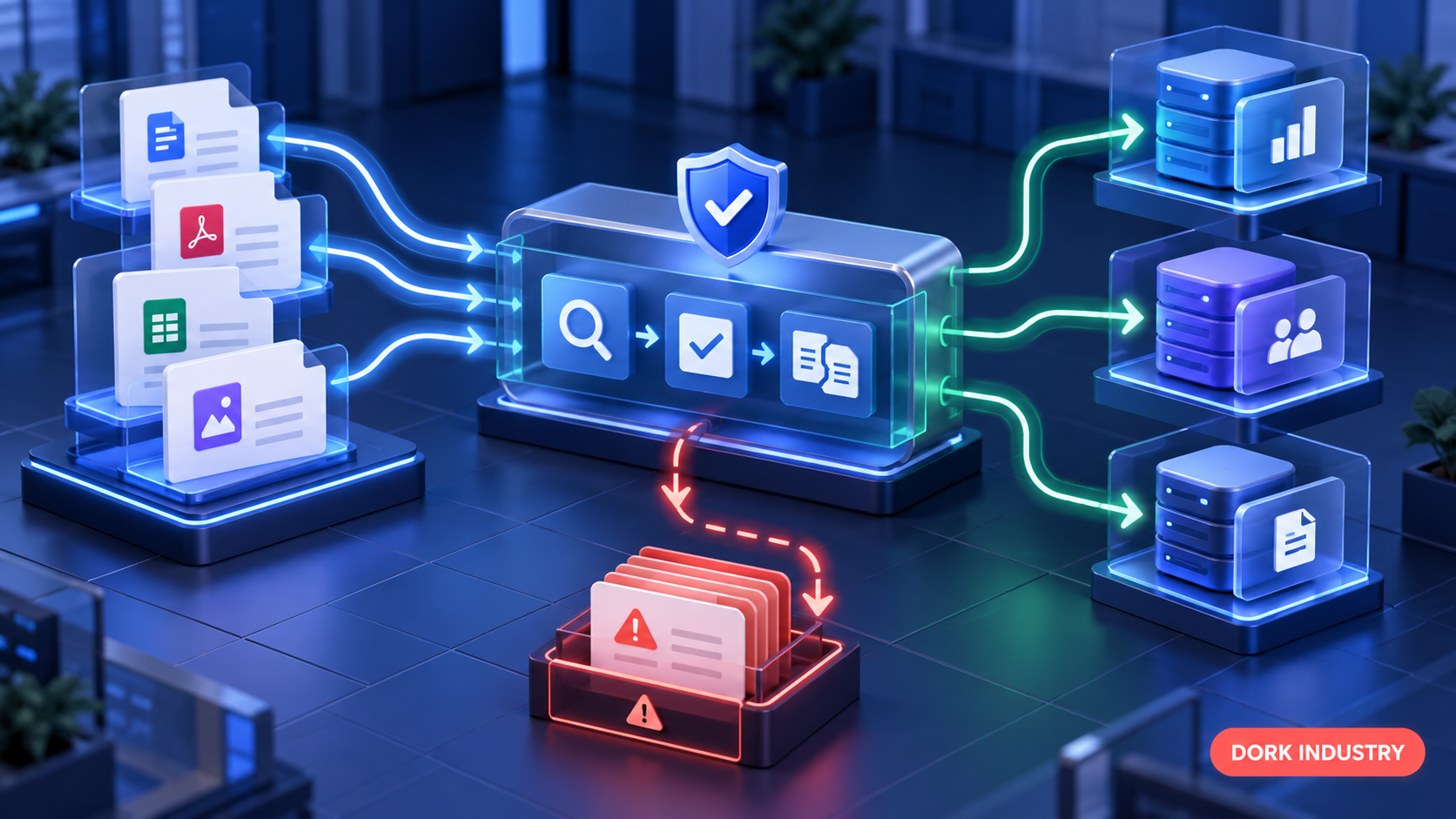
9. Are access, retention and personal-data controls defined?
Document repositories can contain names, addresses, financial details, signatures, identity information and confidential commercial data. Map what enters the workflow, where it is processed, how long source files and extracted fields are retained, who can access them and which subprocessors are involved.
Test role-based access, encryption, tenant separation, audit logs, deletion, backup handling and non-production data controls. Mask or synthesize sensitive data for development when practical. Contract and architecture reviews should cover data location, model-training use, breach responsibilities and secure disposal.
10. Does monitoring explain failures and operational drift?
Production monitoring should track volume, latency, classification failures, field corrections, straight-through rate, review backlog, integration failures and unresolved exceptions. Segment by document family and supplier or source; an overall average may conceal a new layout that is failing badly.
Define alert owners and response procedures. Keep a versioned record of model, prompts, rules and field mappings so a team can compare performance after a change and roll back when needed.
11. Is total cost linked to the workload?
Compare platform licences, pages or transactions, storage, model calls, integration work, human review, support, monitoring and change management. Include peak volumes, multi-page documents, reprocessing, development and test usage. A low per-page price can still produce a poor business case if review and integration costs remain high.
Model at least three scenarios: expected volume, peak volume and a lower automation rate. State assumptions instead of claiming a universal saving. The correct economic question is cost per safely completed transaction, not cost per OCR page.
12. Does the pilot have pass, revise and stop criteria?
Define acceptance criteria before the pilot starts. Include a representative unseen test set, critical-field targets, maximum severe errors, review workload, processing time, integration success, reconciliation and security evidence. Decide what result permits scale, what requires another iteration and what should stop the project.
A controlled pilot protects the business from scaling a convincing demo that cannot handle real exceptions. It also creates the evidence needed to compare vendors or justify a custom integration.
What does a production-ready architecture include?
A resilient workflow is normally a sequence of controlled stages rather than one model call:
- Capture: receive files from approved channels, scan for malware and assign a traceable identifier.
- Prepare: rotate, split, de-skew and verify supported formats without discarding the source.
- Classify: identify document type and route unknown or mixed files for resolution.
- Extract: read fields, tables and relevant evidence with confidence and source coordinates.
- Validate: normalize values and apply master-data, arithmetic and policy checks.
- Review: send uncertain or high-risk items to the right person with context.
- Integrate: write approved data through controlled APIs or queues using duplicate protection.
- Reconcile: confirm destination records and retain the transaction outcome.
- Monitor: track quality, backlog, cost, incidents and drift; feed verified corrections into improvement.
The source document, extracted output, validation result, human action and destination transaction should remain connected by one audit identifier. This makes an error investigable instead of merely visible.
Should you build, buy or integrate an AI document automation solution?
| Approach | Best fit | Main advantage | Main risk |
|---|---|---|---|
| Configure a packaged platform | Common document types and standard business applications | Faster setup and established operations | Licensing, platform limits and workflow lock-in |
| Integrate specialist document APIs | Custom workflows that need proven extraction components | Control over orchestration and user experience | Integration, monitoring and vendor-dependency work |
| Build custom models and workflow | Distinctive documents, proprietary rules or strict deployment boundaries | Maximum control and differentiation | Data, evaluation, MLOps and support burden |
| Hybrid | Most enterprise cases with standard extraction plus custom controls | Balances speed with business-specific validation | Architecture and ownership can become fragmented |
Do not decide from extraction alone. Compare review experience, rule management, integration design, auditability, security, observability, export options and exit cost. In many organisations, the most valuable engineering work sits around the model: validation, human workflow, system integration and operational control.
How should an AI document automation pilot be structured?
A useful pilot is small enough to control and complete, but real enough to expose production risks. A practical sequence is:
- Discover: map the current workflow, systems, roles, document families, baseline and failure consequences.
- Design: define fields, rules, thresholds, review actions, integrations, data controls and acceptance tests.
- Configure: build the smallest end-to-end path using representative documents and a safe test environment.
- Evaluate: run an unseen dataset, record field-level results and inspect every severe error.
- Operate in shadow mode: compare automation output with the existing process without allowing uncontrolled writes.
- Decide: scale, revise or stop based on the pre-agreed evidence.
The pilot deliverable should include the workflow map, data inventory, evaluation dataset definition, field-level results, exception taxonomy, security decisions, integration test results, operating runbook, cost model and backlog for production hardening.
What should Indian businesses consider for privacy and governance?
The Digital Personal Data Protection Act, 2023 and the Digital Personal Data Protection Rules, 2025 create obligations that may apply when documents contain digital personal data. A project should identify the data fiduciary and processors, the purpose for processing, notices or other lawful grounds, access controls, retention, deletion, grievance handling and incident responsibilities. The exact applicability depends on the organisation and use case, so legal counsel should review the proposed workflow.
Beyond legal compliance, adopt an AI risk process with named owners, testing evidence, human oversight and incident handling. The NIST AI Risk Management Framework is a useful voluntary reference for organising governance, measurement and ongoing management, but it does not replace Indian law or sector-specific requirements.
For multilingual or regional documents, test actual scripts, fonts and scan conditions used by the business. “Language supported” does not guarantee that key fields, tables, handwriting or mixed-language layouts will meet the workflow’s acceptance criteria.
What should a credible proposal include?
Ask every provider—platform vendor, integrator or custom development team—to state:
- the exact workflow boundary and what remains manual;
- supported document families, languages and failure conditions;
- the customer dataset and method used for evaluation;
- field-level acceptance criteria and severe-error limits;
- confidence, validation and human-review design;
- integration, duplicate prevention, reconciliation and rollback;
- data processing locations, retention and subprocessors;
- monitoring, support, change control and incident ownership;
- implementation, recurring and exception-handling costs;
- export, portability and exit arrangements.
A proposal that promises a universal accuracy percentage without your document sample, field definition and evaluation method is not decision-ready.
Frequently asked questions
What is the difference between OCR and AI document automation?
OCR converts text in an image or scanned file into machine-readable characters. AI document automation adds document classification, field and table extraction, validation, confidence-based routing, human review, system integration, reconciliation and monitoring. OCR may be one component; it is not the complete business workflow.
How accurate is AI document processing?
There is no responsible universal accuracy figure. Performance varies by document family, field, scan quality, language, layout and evaluation method. Test a representative unseen dataset, report critical fields separately and measure severe errors, reviewer workload and downstream correction—not only an averaged score.
Does AI document automation remove human review?
Not necessarily. A well-designed workflow reduces repetitive review and directs people to uncertain or high-risk fields. Human review remains important for low-confidence values, policy exceptions, unreadable evidence and decisions with material financial, legal or customer impact.
Can it integrate with an existing ERP or CRM?
Yes, when the target system exposes a supported API, import method or controlled integration layer. The design should cover authentication, field mapping, master-data validation, duplicate prevention, retries, reconciliation, monitoring and a recovery process for failed or partial transactions.
How long should a pilot take?
Duration depends on document diversity, data access, integrations and approval processes. Scope the pilot around one workflow and agree deliverables and acceptance criteria first. The goal is not a fixed number of weeks; it is enough representative evidence to make a safe scale, revise or stop decision.
What documents should be included in the pilot dataset?
Include normal and difficult examples across suppliers or sources, layouts, page counts, languages, image quality, tables, stamps, rotations and known exception types. Add documents the workflow must reject. Keep a representative unseen evaluation set separate from configuration data.
What is the best first step?
Choose one operational bottleneck and document its baseline: volume, handling time, exception rate, downstream delay and error consequence. Then define the fields, rules, systems and acceptance evidence required for a controlled pilot. This prevents the tool choice from defining the business problem.
Plan a measurable AI document automation pilot
Dork Industry starts with the workflow, document sample, system constraints and risk—not a predetermined platform. We can help define the pilot boundary, evaluation method, human review, integrations and production controls for a measurable decision.
Request an AI document automation assessment
For an invoice-specific example, see our guide to AI invoice data extraction. Explore the wider Dork Industry solutions catalogue for related AI, data, application and integration services.
Sources and further reading
- Ministry of Electronics and Information Technology: Digital Personal Data Protection Act, 2023
- Ministry of Electronics and Information Technology: Digital Personal Data Protection Rules, 2025
- NIST AI Risk Management Framework
- Microsoft Learn: interpreting document-processing confidence scores
- Google Cloud: custom extractor and confidence-threshold guidance
Last reviewed: 17 October 2026. This article provides operational guidance and is not legal advice.