Direct answer: Before buying AI invoice data extraction software, test it against your own difficult invoices and score every business-critical field separately. A useful pilot must catch duplicate invoices, tax and total mismatches, weak scans, multi-page documents and uncertain fields; low-confidence or failed validations should go to a named human reviewer before anything is posted to the ERP.

AI can remove repetitive retyping, but extraction is not the same as approval. An invoice may be readable while still containing an unknown supplier, an invalid purchase order, a duplicate number, an arithmetic inconsistency or a value that needs business judgement. The safe design is therefore extract, validate, review exceptions, then post—not “upload and trust.”
What is AI invoice data extraction?
AI invoice data extraction converts invoices from PDFs, scans, photos or email attachments into structured fields that software can validate and transfer. Typical fields include supplier name, invoice number, invoice date, tax values, totals and line items. Google’s current Invoice Parser documentation, for example, lists both header and line-item extraction rather than treating an invoice as plain text alone. Review the official Document AI processor field overview.
The complete business system usually contains five layers:
- Intake: receive documents from approved email addresses, upload screens, scanners or integrations.
- Extraction: detect text, layout, tables and expected invoice entities.
- Validation: apply arithmetic, master-data, duplicate and purchase-order rules.
- Exception review: show uncertain or inconsistent fields beside the original document.
- Posting: send approved data and the audit record to accounting or ERP software.
Dork Industry’s AI/ML implementation service explicitly includes entity extraction and document processing for invoices and other PDFs. Its automation practice and ERP solutions connect that extraction layer to the wider workflow rather than leaving finance teams with another isolated tool.
Ten tests for an AI invoice data extraction pilot
1. Test the exact header fields your team posts
Create a required-field list before selecting software. It may include supplier identity, invoice number, invoice and due dates, purchase-order reference, taxable value, tax components, freight, discount and final total. Compare extracted values with a manually verified answer key. Do not hide several fields inside one overall “accuracy” figure; an invoice number error has a different operational consequence from a formatting difference in the supplier address.
2. Test every important line-item field
Many demonstrations look strong because they stop at the invoice total. Your real workload may require item description, internal item code, quantity, unit, rate, discount, tax rate and line amount. Include invoices with wrapped descriptions, repeated headers, blank cells, merged columns and continued tables across pages. Score each line independently and confirm that the sum of accepted lines reconciles with the invoice-level values.
3. Test mixed document quality
Build a representative sample containing digital PDFs, ordinary scans, skewed pages, mobile photographs, faint printing, stamps, signatures and handwritten notes if those documents enter the process. Record the failure mode rather than simply marking the document wrong. A capture problem may need better scanning instructions, while a layout problem may require model training or a dedicated rule.
4. Test supplier and layout variation
Do not test fifty copies of the same template. Include high-volume suppliers, new suppliers and a “long tail” of uncommon formats. Delhi businesses often receive invoices from manufacturers, distributors, transporters, consultants and utilities with very different page structures. A pilot that learns only the cleanest recurring vendor does not prove it can handle the queue.
5. Test tax and total arithmetic
Extraction should be followed by arithmetic checks: do the line totals, adjustments, taxable amounts, tax values and invoice total reconcile according to the document? This is a validation problem, not just OCR. Do not let a model silently “correct” the source document; preserve the extracted value, calculated value and reviewer decision in the audit trail. Ask a qualified finance or tax professional to define company-specific compliance rules.
6. Test duplicate detection
Submit the same invoice twice, then try near-duplicates: a renamed file, another scan, a changed date format or the same supplier and invoice number with a conflicting amount. Define what should be blocked automatically and what should be sent for review. Duplicate logic should consider the supplier identity and business context rather than relying on the filename.
7. Test purchase-order and receipt matching
Where your process uses purchase orders, test exact matches, price variances, quantity variances, missing receipts, partial deliveries and one invoice covering several orders. The system should explain the exception in plain language and point the reviewer to the relevant fields. “Failed” without a reason merely moves manual work from data entry to investigation.
8. Test confidence thresholds and human review
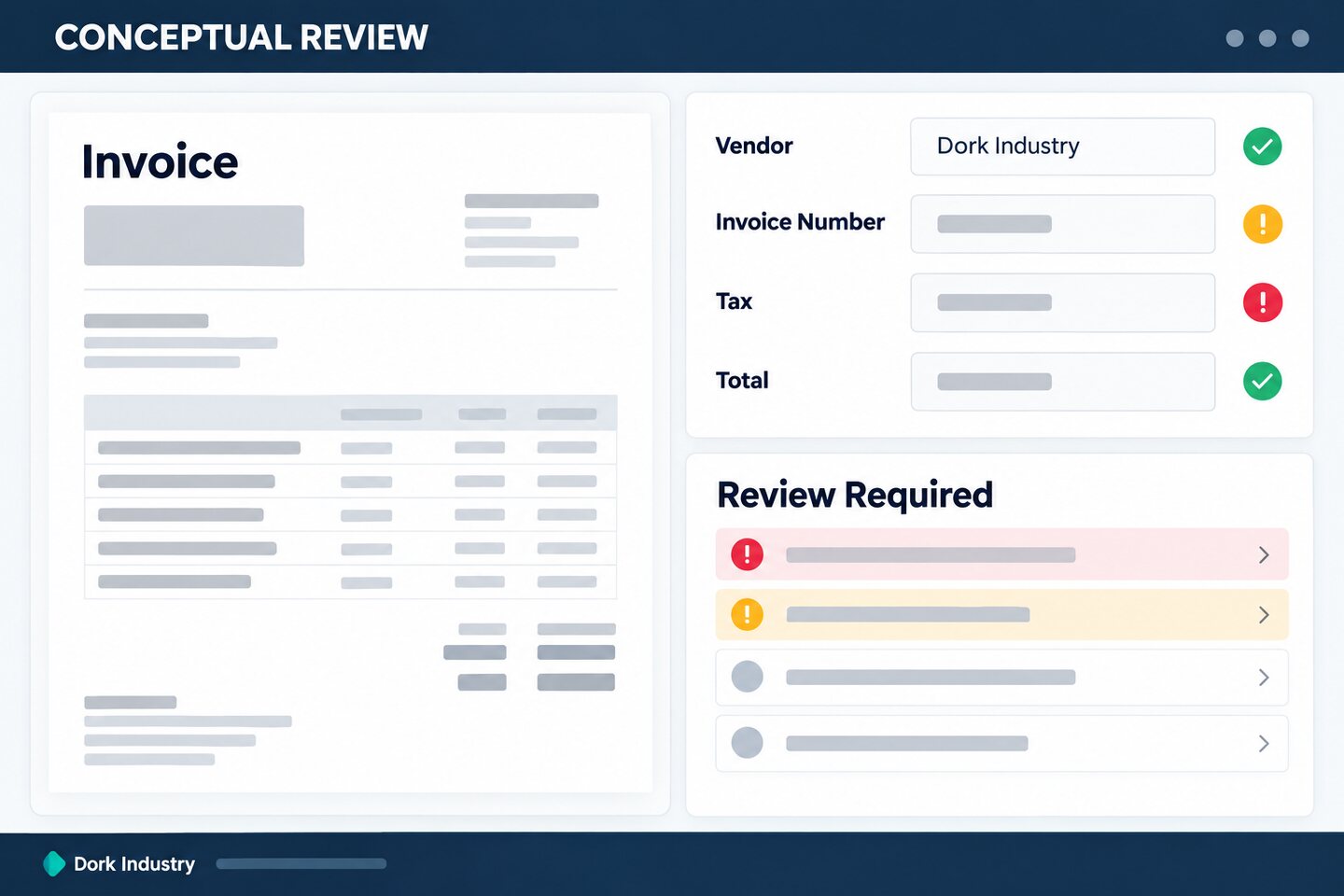
A confidence indicator is useful only when it changes the workflow. Define which fields require stricter review, what happens when a required field is missing and who owns the queue. Reviewers should see the original page and highlighted source region next to the extracted value. The conceptual interface below illustrates the principle; it is not a live client product or claimed implementation.
9. Test integration failures safely
Simulate an ERP outage, expired credential, rejected account code and duplicate API request. The workflow should keep the document and approval state, retry safely where appropriate, and avoid creating two entries. A reviewer needs to know whether an invoice is waiting, rejected or already posted. Logging should identify the event without exposing unnecessary invoice data.
10. Test permissions, audit history and deletion
Confirm who can upload, edit, approve, export, reprocess and delete invoices. Test that every material change records the user, timestamp, previous value and new value. Determine where documents are stored, how long they are retained, how backups work and how access is revoked. Sensitive financial documents should not be copied into uncontrolled test accounts or public AI tools.
What does a safe invoice automation workflow look like?
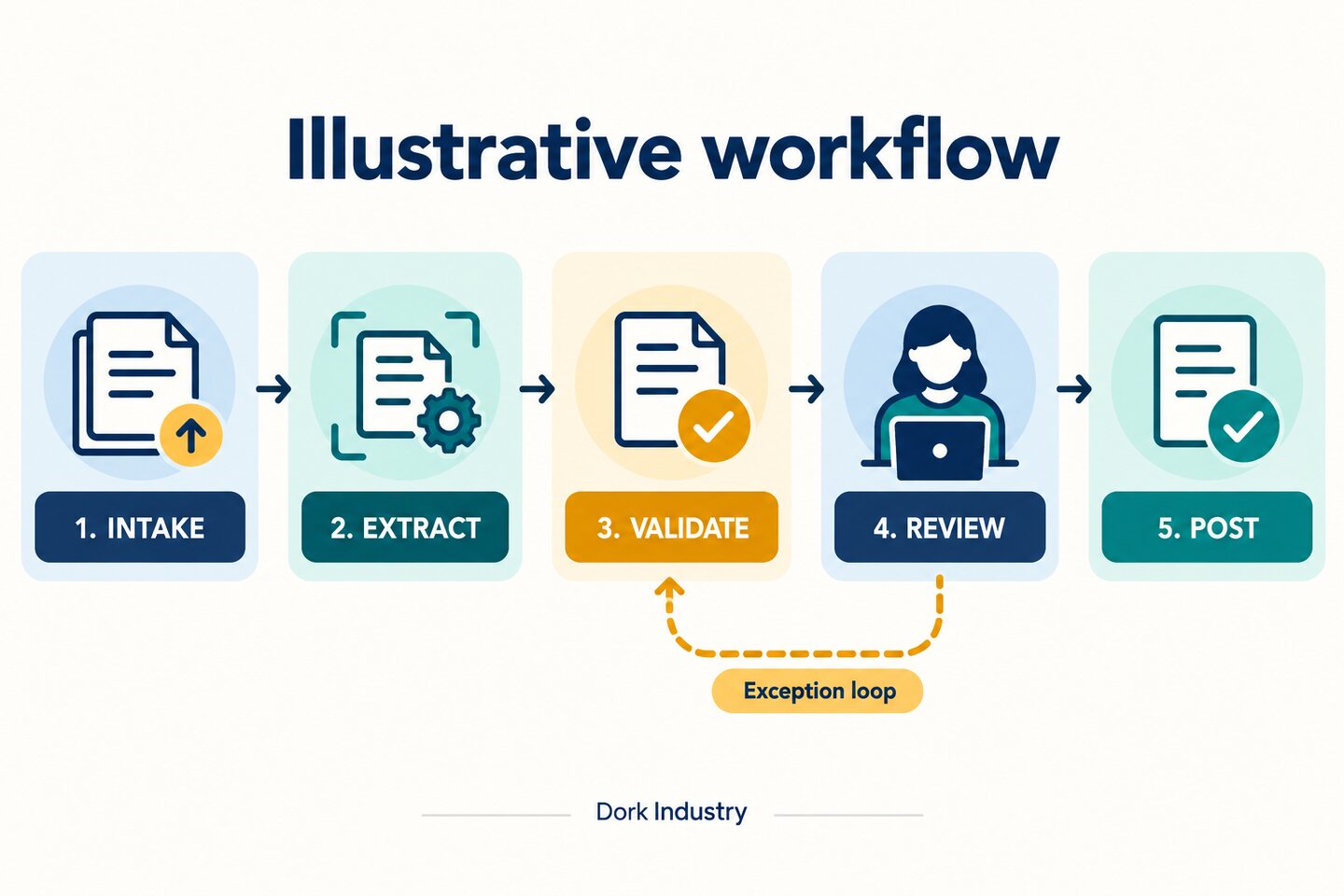
The safest default is straight-through processing only for documents that pass every required rule. Anything missing, uncertain or inconsistent moves to an exception queue. A reviewer corrects or rejects it, and the reason becomes feedback for better rules, supplier communication or model improvement.
| Stage | Automated action | Human control | Evidence retained |
|---|---|---|---|
| Intake | Identify file and source | Quarantine unsupported or suspicious files | Original file, channel, timestamp |
| Extract | Read fields and tables | Review unreadable pages | Raw text, field location, confidence |
| Validate | Run totals, duplicate and master-data rules | Own rule exceptions | Rule result and reason |
| Approve | Route by company policy | Approve, correct or reject | User, old value, new value, time |
| Post | Create approved ERP entry | Resolve rejected integrations | ERP reference and status |
Use this invoice extraction pilot scorecard
This original scorecard forces the pilot to expose where automation works and where controls are still needed. Build the answer key manually, remove sensitive data that is not needed for testing, and keep the sample representative.
| Test group | Sample to include | Pass evidence | Owner if failed |
|---|---|---|---|
| Header fields | Common and uncommon suppliers | Exact field comparison with answer key | Finance data owner |
| Line items | Single and multi-page tables | Row and field comparison; totals reconcile | Finance plus integration owner |
| Image quality | PDF, scan and phone photo | Readable extraction or correct exception | Intake-process owner |
| Duplicate control | Same file and near-duplicate | Blocked or routed with clear reason | Accounts payable owner |
| PO matching | Match, variance and missing receipt | Expected rule outcome | Procurement owner |
| ERP posting | Success, rejection and retry | One traceable entry, no duplicate | ERP owner |
| Access control | User, reviewer and administrator | Only authorized actions available | Security owner |
| Audit trail | Correction, approval and rejection | Complete before/after history | Compliance owner |
For each required field, record four counts: correct, wrong, missing and sent to review. Then calculate the field-level correct rate from your labelled sample, the exception rate, and the reviewer correction rate. Publish no broad accuracy claim unless the sample, definition and conditions are documented. The business decision should also consider the seriousness of each error and the time required to review exceptions.
Worked example: choosing the right pilot outcome
Hypothetical example: A Delhi distributor receives supplier invoices by email and at its Patparganj receiving desk. The pilot sample deliberately mixes clean PDFs, photographed delivery documents, multi-page invoices and two duplicate submissions. Header fields are usually correct, but tax values on faint photographs and line items split across pages frequently require correction. Purchase-order mismatches are identified, while the ERP rejects one account code.
The correct outcome is not “AI failed” or “AI passed.” The evidence suggests a limited first release: accept supported digital PDFs, validate totals and duplicates, route faint images and multi-page exceptions to review, and keep posting in a controlled approval step until the ERP mapping is stable. The team can improve intake instructions and expand the document set in the next test cycle. This is an illustrative scenario, not a customer result.
How should Delhi businesses choose a representative sample?
Use the real document mix produced by your operating model. An office in Okhla may process service invoices and supplier bills from nearby industrial operations; a Naraina distributor may receive transport and purchase documents alongside goods; a Patparganj warehouse may combine emailed PDFs with paperwork arriving at the receiving desk. Businesses in Bawana, Narela or Wazirpur may see varied supplier templates, stamps and photographed pages from shop-floor or dispatch teams.
Locality names should not substitute for evidence. Sample documents by supplier type, intake channel, layout, page count, scan quality and business rule. If a locality creates no meaningful workflow difference, it does not belong in the test plan. The goal is a system that fits how invoices enter, move through and leave your business.
What should you ask an invoice automation provider?
- Which header and line-item fields are supported, and how are custom fields added?
- Can we run a labelled pilot using our own representative invoices?
- How are field confidence, source highlights and exceptions shown to reviewers?
- Which validations are configurable without changing the extraction model?
- How are duplicate invoices, credit notes and multi-page tables handled?
- What happens when the ERP or accounting integration rejects a record?
- Can the workflow post to a draft or staging state before final approval?
- What roles, audit logs, retention controls and backup options are available?
- Where is document data processed and stored, and who can access it?
- Who owns model monitoring, supplier-layout changes and exception-rule updates after launch?
What should you measure after launch?
| Layer | Useful measures | Decision supported |
|---|---|---|
| Extraction quality | Correct, wrong, missing and reviewed by field | Which fields or suppliers need improvement? |
| Workflow control | Exception rate, correction reason, duplicate blocks, rejected posts | Are controls catching real risk? |
| Operations | Queue age, review time, unresolved exceptions | Is automation removing or relocating work? |
| Search/AEO | Relevant queries, impressions, clicks, extracted answers | Does this guide reach the problem? |
| Observed AI visibility | Brand mentions, cited URLs, referral sessions | Is Dork surfaced for the topic? |
| Commercial | CTA clicks, consultations, qualified leads, projects | Does the content create qualified demand? |
Frequently asked questions
What is the difference between invoice OCR and AI invoice extraction?
OCR primarily turns visible characters into machine-readable text. AI invoice extraction also identifies business entities and layout relationships such as supplier, invoice number, tax, total and line items. A complete automation workflow then validates those fields and routes exceptions.
Can AI invoice extraction be completely automatic?
Some well-controlled documents may pass straight through, but the workflow should retain a human-review route for uncertain fields, rule failures, new suppliers and integration errors. Automation should remove routine handling without removing accountability.
How do we measure invoice extraction accuracy?
Create a manually verified answer key and compare each required field. Record correct, wrong, missing and reviewed outcomes by field and document type. Avoid one overall percentage that hides critical-field failures or an unrepresentative sample.
How many invoices should be in a pilot?
There is no universal number. The sample must cover your meaningful variation: suppliers, layouts, page counts, intake channels, scan quality, line-item complexity and business rules. Add documents until each important scenario is represented and repeatable results can be observed.
Can invoice extraction connect with our ERP?
Yes, if the accounting or ERP system exposes a suitable import or integration method. Test successful posting, validation rejection, timeouts and safe retries. Start with draft or staging entries where possible so approved data can be checked before final posting.
What documents should not be used in a public AI tool?
Do not place sensitive invoices, personal data, banking details or confidential commercial information into an unapproved tool. Confirm the provider, storage location, retention, access controls and contractual terms with your security and legal owners before testing real documents.
Does the system need human approval for every invoice?
That depends on company policy and the risk of the transaction. A common design lets only documents that pass all required rules continue automatically, while exceptions and higher-risk cases require named approval. Finance owners should define the policy.
Can Dork Industry build a custom invoice extraction workflow in Delhi?
Dork Industry offers AI/ML implementation, automation, custom software and ERP solutions. A consultation can scope the sample set, extraction fields, validation rules, review experience, security controls and target integration for a measured proof of concept.
Next step: Select a redacted set of difficult invoices, define the answer key and decide which failures must block posting. A pilot becomes valuable when it exposes exceptions clearly—not when it produces the highest-looking demo score.