How can a marketing agency automate client reporting? Connect approved advertising, analytics and CRM sources to a governed metric model, validate every refresh, publish a role-based dashboard, and keep performance interpretation and next-action recommendations under human review. Automation should remove repeated data collection, not remove accountability.
The sales problem is larger than preparing a monthly deck. When campaign, website and lead data are copied into separate spreadsheets, account teams can spend reporting time resolving mismatched dates, definitions and attribution. A useful implementation creates one traceable reporting workflow while preserving client-specific context.

What is actually going wrong in manual client reporting?
The visible symptom is a late spreadsheet or presentation. The underlying causes are usually inconsistent KPI definitions, disconnected accounts, missing campaign labels, different date windows, CRM leads that cannot be connected to campaigns, expired credentials or no agreed owner for the final explanation.
Before selecting Power BI, Looker Studio or a custom portal, write down what the client has contracted to receive. “Leads” might mean form submissions in one report, qualified CRM records in another and sales opportunities in a third. Automation will repeat a bad definition more consistently unless the agency resolves it first.
What should and should not be automated?
Automate authenticated data retrieval, date normalization, campaign naming checks, metric calculations, dashboard refresh, missing-data alerts and delivery of an approved report. These are repeatable operations with observable evidence.
Keep people responsible for KPI approval, attribution assumptions, unusual-event interpretation, client commentary, budget recommendations and final release. A sudden metric change may reflect a tracking defect, campaign edit, CRM backlog or real performance change. A generated narrative should never be sent as fact without validation.
| Reporting task | Automation role | Human role |
|---|---|---|
| Collect platform data | Scheduled API retrieval | Authorize accounts and scopes |
| Calculate KPIs | Apply approved definitions | Approve formula and exclusions |
| Detect anomalies | Flag missing or unusual values | Determine the cause |
| Prepare commentary | Draft a structured summary | Verify context and next actions |
| Release report | Distribute after approval | Own the client communication |
Which data sources does the client report need?
Build the report from the client question backward. Advertising data can explain delivery and platform conversions. Web analytics can explain sessions and on-site actions. CRM data can show whether enquiries became qualified leads or opportunities. Finance or ecommerce data may be needed only where attribution and access rules permit it.
According to Google’s official Google Ads API reporting guide, reporting data can be queried from campaign-level resources down to keyword-level detail using selected attributes, segments and metrics. That flexibility also means the agency must lock the query, date range and segmentation used for each client KPI.
Do not combine sources merely because connectors exist. Record the source account, timezone, currency, attribution window, refresh frequency and owner. Preserve raw extracts or query evidence so a changed dashboard can be investigated later.
How can a marketing agency automate client reporting?
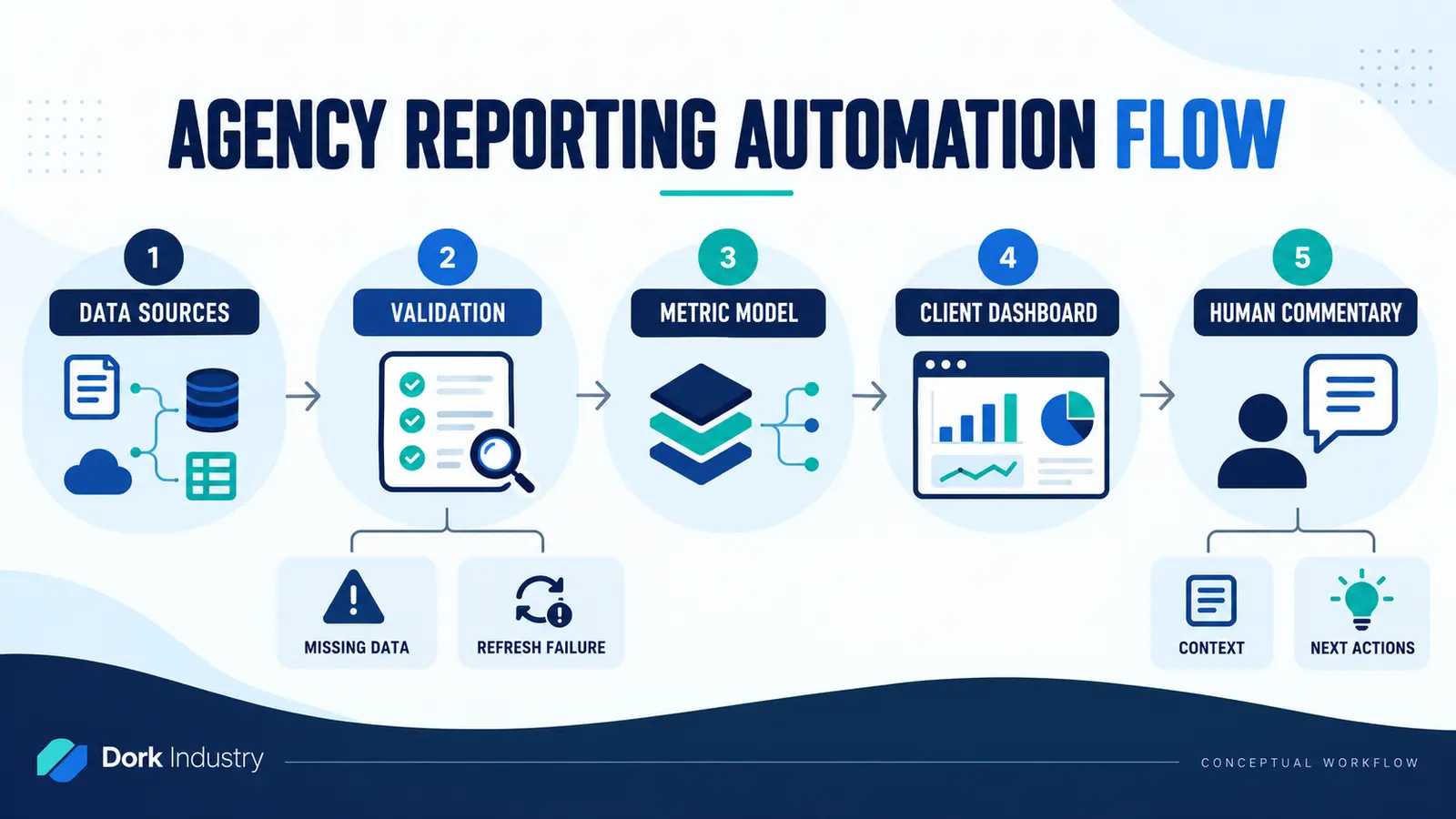
- Retrieve approved data. Use supported APIs, exports or connectors with minimum required access.
- Validate the refresh. Check credentials, completeness, date coverage, schema changes and source totals.
- Transform the data. Normalize identifiers, dates, currencies and agreed campaign groupings.
- Calculate governed metrics. Keep formula definitions and exclusions visible.
- Publish client views. Apply account-level access so one client cannot see another client’s information.
- Add human commentary. Explain context, limitations and agreed next actions.
- Approve and release. Record who reviewed the reporting period and when.
- Monitor failures. Alert an owner when data is stale or incomplete.
Microsoft’s current Power BI scheduled-refresh documentation makes credentials, gateway connections, schedules and refresh history explicit operating dependencies. According to Microsoft, repeated refresh failures can disable the schedule, so a dashboard needs an exception owner rather than an assumption that “automatic” means unattended forever.
Should the agency configure a tool, integrate systems or build software?
Configure an existing dashboard when supported connectors, standard KPIs and client-level sharing cover the requirement. Build an integration layer when the agency needs controlled extraction, validation, historical storage or joins across advertising, web and CRM systems. Build a client portal when reporting is part of a larger workflow involving approvals, requests, deliverables, commentary and account-specific actions.
Power BI can be appropriate where Microsoft-based analytics, semantic models and governed sharing fit. A custom web application may be appropriate where the agency needs a branded multi-client workflow beyond dashboarding. AI can assist classification and draft commentary, but it should operate on validated data with approval controls.
Dork Industry can connect this scope to its verified custom software development, AI/ML implementation and web development services. If the separate problem is duplicate follow-up after leads reach a CRM, see the lead-routing automation guide.
How should an agency assess reporting-automation readiness?
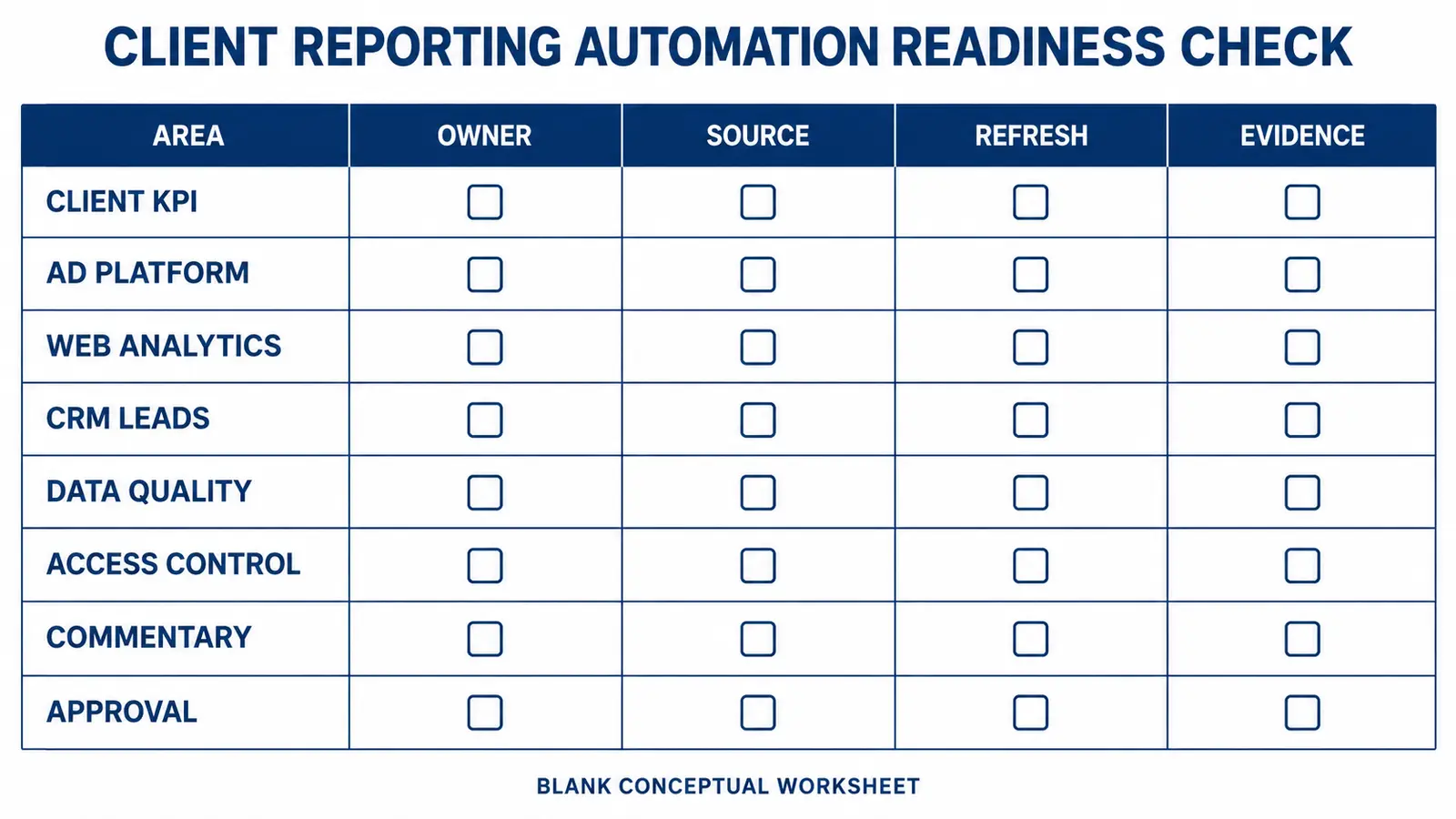
Complete the worksheet for one client before creating a reusable agency template. Each KPI needs an owner, authoritative source, refresh rule and acceptance evidence.
| Area | Decision | Evidence |
|---|---|---|
| Client KPIs | Definition, formula and reporting period | Approved KPI dictionary |
| Accounts | Source IDs and access scopes | Connection register |
| Data quality | Missing, duplicate and late-data rules | Validation checklist |
| Refresh | Frequency, failure owner and recovery | Refresh history test |
| Access | Client, team and administrator permissions | Role matrix |
| Commentary | Required context and approval owner | Reviewed sample report |
How should a reporting-automation pilot be accepted?
Select one client and one reporting period. Compare automated values against the approved source interfaces and existing signed-off report. Test an expired credential, an empty day, a renamed campaign, a late CRM import, a timezone boundary and an access attempt by the wrong client user.
Acceptance should require correct formulas, traceable sources, a successful refresh, visible failure alerts, role-based access and approved commentary. Do not claim productivity or reporting accuracy improvements until the agency measures them in its own workflow.
What do agency owners ask about client reporting automation?
Can an agency automate every client report?
It can automate repeatable collection, calculations, visualization and delivery controls. KPI approval, unusual-event interpretation, strategy recommendations and final client communication still require accountable people who understand the campaign and commercial context.
Does automated reporting require Power BI?
No. The right tool depends on sources, access model, client experience, data transformation and integration requirements. Power BI, another dashboard platform or a custom application can each be appropriate for different operating models.
Can AI write the monthly performance commentary?
AI can draft a structured summary from validated metrics and approved context. A knowledgeable account owner should verify causal language, anomalies, attribution limitations and recommended actions before anything is presented to the client.
Why does a dashboard show different values from the advertising platform?
Check date ranges, timezones, currencies, attribution windows, conversion definitions, filters, account IDs and refresh time. A dashboard must document these assumptions so a difference can be explained rather than manually overwritten.
How should multiple clients be separated?
Use a tested tenant and role model that restricts every query and view to the authorized client. Do not rely only on hidden pages or dashboard navigation. Test access with representative client and internal roles.
What should an agency provide for a development estimate?
Provide an anonymized current report, source systems, KPI dictionary, client count, refresh frequency, access roles, approval process and examples of reporting exceptions. Remove credentials and personal client information before sharing evidence.
Discuss this for your business?
Book a free consultation — we scope the problem, outline the approach, and give you an honest verdict before any development is discussed.