
Web development can stop your website from crashing every time traffic spikes — and the fix is rarely a bigger server on day one. Yes: most crash-on-spike failures trace back to a handful of fixable engineering causes: an origin server that cannot scale, a database that serializes every request, missing page and object caching, and third-party integrations with no timeouts. The honest sequence is a performance audit to find the real choke point, load testing to prove it, then targeted fixes — caching, autoscaling, and queueing — usually validated in a 30-day pilot on your highest-traffic pages before anyone quotes a full rebuild.
This article is for the business owner who has lived through the worst version of this problem: a sale, a festival, a press mention — and a website that died exactly when customers showed up. It covers why the crash happens, what one crash costs, how to find the real breaking point, what a proper web development fix looks like, and how to test it in 30 days before committing to larger investment.

Why does my website crash when traffic spikes?
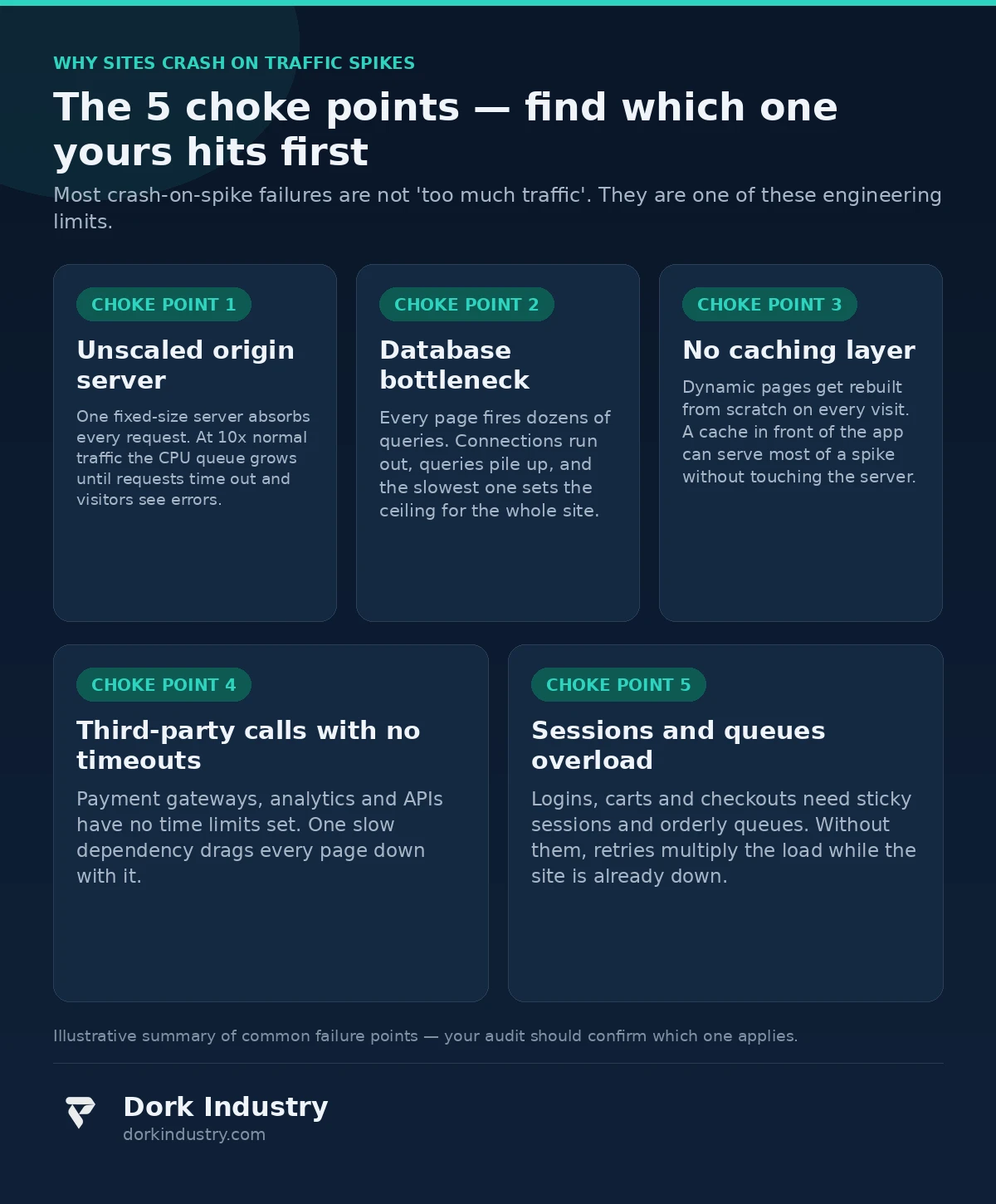
The painful part of a crash-on-spike is the timing: everything works fine at normal traffic, so the business assumes the website is healthy. It is not healthy — it is untested. A site that has never seen ten times its normal load has no proven capacity, only hope. The spike does not create the weakness; it reveals it, at the worst possible moment. Underneath, the chain is the same almost every time: requests arrive faster than the server can finish them, queues build up, response times climb from milliseconds to seconds, visitors hit refresh and add more load, and the server or database runs out of memory. The restart “fixes” it only because the traffic has passed.
Why didn’t my hosting plan save me?
Shared hosting and small fixed virtual servers are sized for average traffic, not peaks — and most business owners bought the plan years ago, when traffic was a fraction of today’s. Even on cloud hosting, a single fixed-size instance has a hard ceiling. Scaling is not automatic just because the word “cloud” is in the invoice. If nobody configured autoscaling, caching, and load testing, the hosting plan is a number on a dashboard, not a safety net.
How much does one crash actually cost?
Owners underestimate this because the crash feels like a technical incident, not a revenue event. It is both. Here is an illustrative example — stated assumptions, not industry statistics. Take a mid-size online store: 2,000 visitors a day, a 2% conversion rate, and an average order value of ₹1,800. Normal daily revenue is 2,000 × 0.02 × ₹1,800 = ₹72,000.
Now a festival-sale evening brings five times the normal traffic, and the site crashes for three hours at peak. Roughly 1,250 visitors arrive during those three hours. At the same 2% conversion and ₹1,800 average order, that is 1,250 × 0.02 × ₹1,800 = ₹45,000 in orders that simply never happened — in one evening, from a store doing ₹72,000 on a normal day. Add emergency developer hours at rush rates, ad spend that kept sending paid clicks to a dead page, and customers who skip your next sale because last time “the site didn’t work.”
For lead-generation and service businesses the math is different but the shape is the same: a press feature or viral post sends thousands of visitors, the site dies, and the highest-intent audience the business will ever get leaves with an error page as their first impression.
What is actually breaking — and how do I find out?
Guessing is how businesses end up buying a server three times the size and crashing again. The fix starts with evidence, from three sources.
What do the crash logs say?
Server error logs, application logs, and the hosting provider’s resource graphs from the last crash are the cheapest diagnostic available. They show which limit was hit first: CPU at 100%, memory exhausted, database connections maxed out, or disk I/O saturated. Whatever hit its ceiling first is the prime suspect.
What does real-time monitoring reveal?
An APM tool (application performance monitoring) traces each request through the code: which database queries are slow, which external API calls block the page, which page is the heaviest. According to Google’s Core Web Vitals documentation, the metrics that matter under load — how fast content renders, how quickly the page responds — degrade long before the server dies. A site that is slow at normal traffic will be dead at spike traffic.
Can I replay the spike before it happens again?
Tools like k6 or Artillery simulate hundreds or thousands of concurrent visitors against a staging copy of the site, ramping up until something breaks. A proper load test answers the only question that matters: at what traffic level does this site fail, and which component fails first? Without it, every fix is a guess.

What data do I already have when the crash happens?
The hosting control panel keeps CPU, memory, and bandwidth graphs. Google Analytics shows exactly when traffic spiked and which pages visitors hit. The payment gateway dashboard shows how many checkouts started and never finished. Server access logs show the request rate minute by minute.
What is usually missing is not data but correlation: nobody has put the traffic graph next to the server graph next to the checkout-abandonment numbers. A web development audit starts by assembling exactly that timeline — it is often possible to name the breaking point from data the business already owns, before writing new code.
What does a real fix look like?
A real fix is the right combination of layers, applied to the choke point the evidence named:
- Caching in front of the application. Page caching and object caching mean the server does the expensive work once and serves the stored result to the next thousand visitors. For content-heavy pages, a cache can absorb the majority of a spike without the application doing any extra work.
- A CDN for static assets. Images, stylesheets, and scripts should be served from a content delivery network close to the visitor, not from the origin server. According to Cloudflare’s caching documentation, offloading static content to the edge is one of the highest-leverage changes for absorbing surges.
- Database tuning. Missing indexes, unoptimized queries, and no connection pooling turn the database into the bottleneck. Slow-query logs name the offenders; indexes and query rewrites fix most of them without touching application logic.
- Autoscaling with limits. On cloud infrastructure, the application tier should add servers automatically as load rises — with configured minimums, maximums, and cooldowns. According to AWS’s Auto Scaling documentation, policies scale capacity to demand, but unbounded autoscaling without cost limits is how a traffic spike becomes a billing spike.
- Timeouts and circuit breakers on every external call. Payment gateways, shipping APIs, analytics, chat widgets — every third-party dependency needs a strict timeout and a graceful fallback. If the payment gateway is slow, the page should show a retry message, not hang until the server’s worker pool is exhausted.
- Queues for heavy work. Order processing, emails, PDF invoices, and notifications should go into a background queue instead of running inside the web request. The visitor gets an instant response; the heavy work finishes seconds later.
Notice what is not on this list: “buy a bigger server.” Vertical scaling has its place, but it raises the ceiling without fixing the shape of the problem — and the bill keeps rising with every spike.
What should my website never do during a spike?
Technology boundaries matter as much as the fixes — especially where automation enters the picture.
- Never silently drop checkouts or form submissions. If the system cannot process an order right now, it must queue it visibly and confirm receipt — never show a success message for an order that was lost, and never lose a payment without a clear failure state the customer can act on.
- Never autoscale without a cost ceiling. Autoscaling with no maximum instance count and no billing alert can turn a bot flood into a five-figure cloud bill overnight. Every scaling policy needs a cap and an alert before the cap is hit.
- Never test fixes on the live site during a sale. Load tests, cache configuration changes, and database migrations belong on staging first. A “quick fix” deployed mid-spike is how a partial outage becomes a total one.
- Never let an AI tool rewrite production code unsupervised. Automated code changes can plausibly “optimize” a query or a caching rule while breaking the business logic it sits next to. Every performance change gets a human review and a load-test result before it ships.
- Never hide the failure from the visitor. A clear “we’re experiencing high demand, your place in the queue is saved” page retains customers. A spinning loader followed by a generic error burns them.
Should I rebuild or repair? An honest breakdown
Not every crashing website needs custom web development. The honest options:
| Approach | Best for | Relative investment | Where it breaks |
|---|---|---|---|
| Bigger server (vertical scaling) | A site close to handling its peaks | Low | Raises the ceiling without fixing the bottleneck |
| Caching + CDN layer | Content-heavy sites and stores | Low to medium | Does not fix slow checkout logic or database-heavy features |
| Targeted web development repair | A diagnosed choke point: slow queries, missing queues | Medium | Overkill if the real problem is just an undersized plan |
| Managed platform / replatforming | Standard stores with no custom logic worth preserving | Medium | You inherit the platform’s limits and fees |
| Full custom rebuild | Legacy codebases where every fix reveals two new problems | Highest | Months of work; the old site must survive until launch |
At Dork Industry, we regularly advise businesses against rebuilds when caching, a CDN, and a hosting correction solve the problem. A credible technology partner should be willing to tell you that you do not need custom web development. Our web development services start with the audit, not the build — the evidence decides the scope.
How do I test a fix in 30 days before full investment?
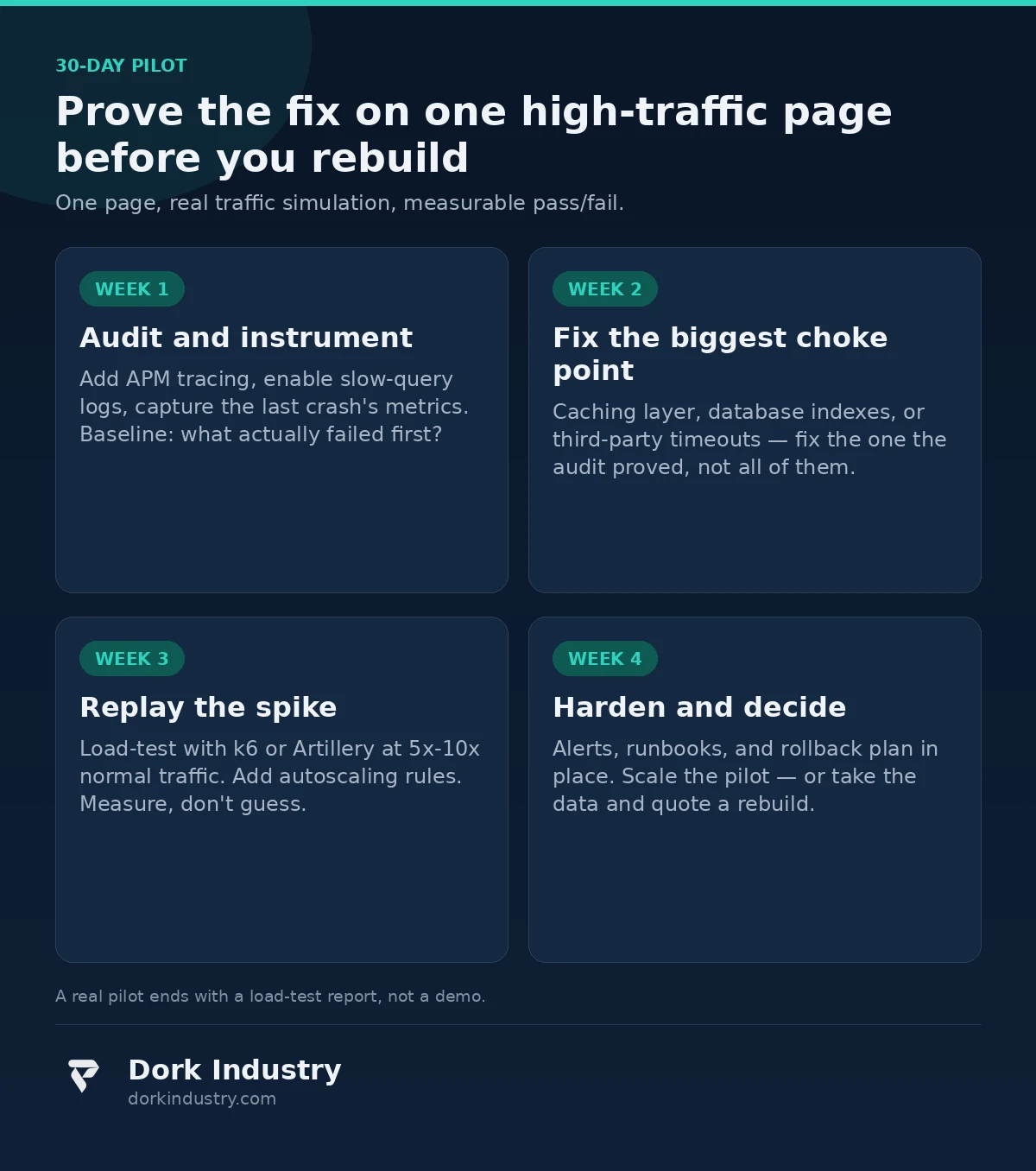
The lowest-risk path is a single high-traffic page pilot with a fixed scope and a pass/fail load test at the end:
- One page — the homepage or top product page, the one that crashed last time
- The diagnosed choke point fixed: caching, indexes, timeouts, or queueing
- Run for 30 days
- Measure: load-test results at 5x and 10x traffic vs the pre-fix baseline, real response times during any natural spike, and infrastructure cost per thousand visitors
If the pilot page survives the simulated spike at the target load, the same fixes roll out to the rest of the site with confidence. If it does not, a bigger web development investment would not have fixed it either — the pilot validates the diagnosis, not just the software.
What drives the cost of a web development fix?
Performance-fix pricing varies because the starting points do. The real cost drivers are:
- Traffic pattern: brief viral spikes need different engineering than sustained high traffic or predictable sale-day surges
- Codebase age: a clean modern application gets caching and queues in days; a decade-old custom build needs untangling first
- Database work: the number of slow queries and missing indexes, and whether restructuring is needed
- Third-party integrations: each payment gateway, ERP sync, and API dependency adds timeout, retry, and fallback work
- Hosting architecture: moving from a single server to autoscaled infrastructure involves networking, deployment, and session-handling changes
- What “fixed” means to you: surviving 5x traffic is a different project than surviving 50x — the target has to be named before the quote
Anyone quoting a fixed price without asking about your peak traffic numbers, your slowest pages, and your hosting setup is guessing.
Frequently asked questions
Will a bigger hosting plan stop my website from crashing?
Sometimes, if the site is only slightly under-provisioned. But most crash-on-spike failures are bottlenecks — database, caching, or third-party timeouts — that a bigger server does not remove. Upgrade only after a load test shows the server itself is the limit.
How long does it take to fix a website that crashes on traffic spikes?
A focused fix — caching, CDN, database indexes, timeouts — can be diagnosed and piloted in about 30 days. A full infrastructure overhaul with autoscaling and replatforming typically runs 2–4 months depending on the codebase.
Can I load-test my website without breaking it?
Yes, when done correctly: tests run against a staging copy or during off-peak hours with safeguards, ramping traffic gradually. Never point a load test at production during a sale or campaign — that is testing the crash by causing it.
What does a website performance audit cost?
An audit — logs, monitoring, and a baseline load test with a prioritized fix list — is a fraction of a rebuild. Its job is to name the choke point with evidence so you pay for the right fix, not the biggest one. Request a performance scoping call for a concrete estimate.
Does this apply to WordPress / WooCommerce / Shopify stores?
Yes — most small-business crash cases are exactly these platforms. Caching, a CDN, image optimization, and proper hosting resolve the majority of them; custom web development enters when custom themes, plugins, or integrations are the bottleneck.
The bottom line
The question is not whether your website needs web development. It is whether your site has a proven, measured capacity for the traffic your marketing is trying to create. If the last spike ended in an error page, the business problem is not “too much traffic.” It is an untested bottleneck wearing a hosting invoice as a disguise.
Start with the data you already have, run a load test to name the breaking point, pilot the fix on one page for 30 days, and let measured survival at 5x–10x traffic — not server size — decide whether to scale the web development further.
Get a free website performance and scaling audit
We examine your crash logs, hosting setup, and heaviest pages, run a baseline load test, and show you exactly which choke point is killing your site during spikes — with a prioritized fix list and a 30-day pilot scope. You walk away with the evidence, the numbers, and an honest repair-vs-rebuild recommendation.
Request your free performance and scaling audit WhatsApp +91 8210792477
About Dork Industry
Dork Industry (dorkindustry.com) is a custom software development company building web platforms, mobile apps, AI automation, and IoT systems for businesses across India. Our team handles performance audits, scaling fixes, and rebuilds for high-traffic websites — from 30-day pilots to full production rollouts.