Nuxt blank page after deployment: first determine whether the server failed to render the route or the browser received HTML but could not load, configure or hydrate the application. That single distinction prevents teams from treating every white screen as a hosting outage.
A blank page can stop product discovery, lead capture, account access or checkout while monitoring still reports an HTTP 200 response. Preserve the failing release and evidence before rebuilding or clearing caches; otherwise the first useful error may disappear.
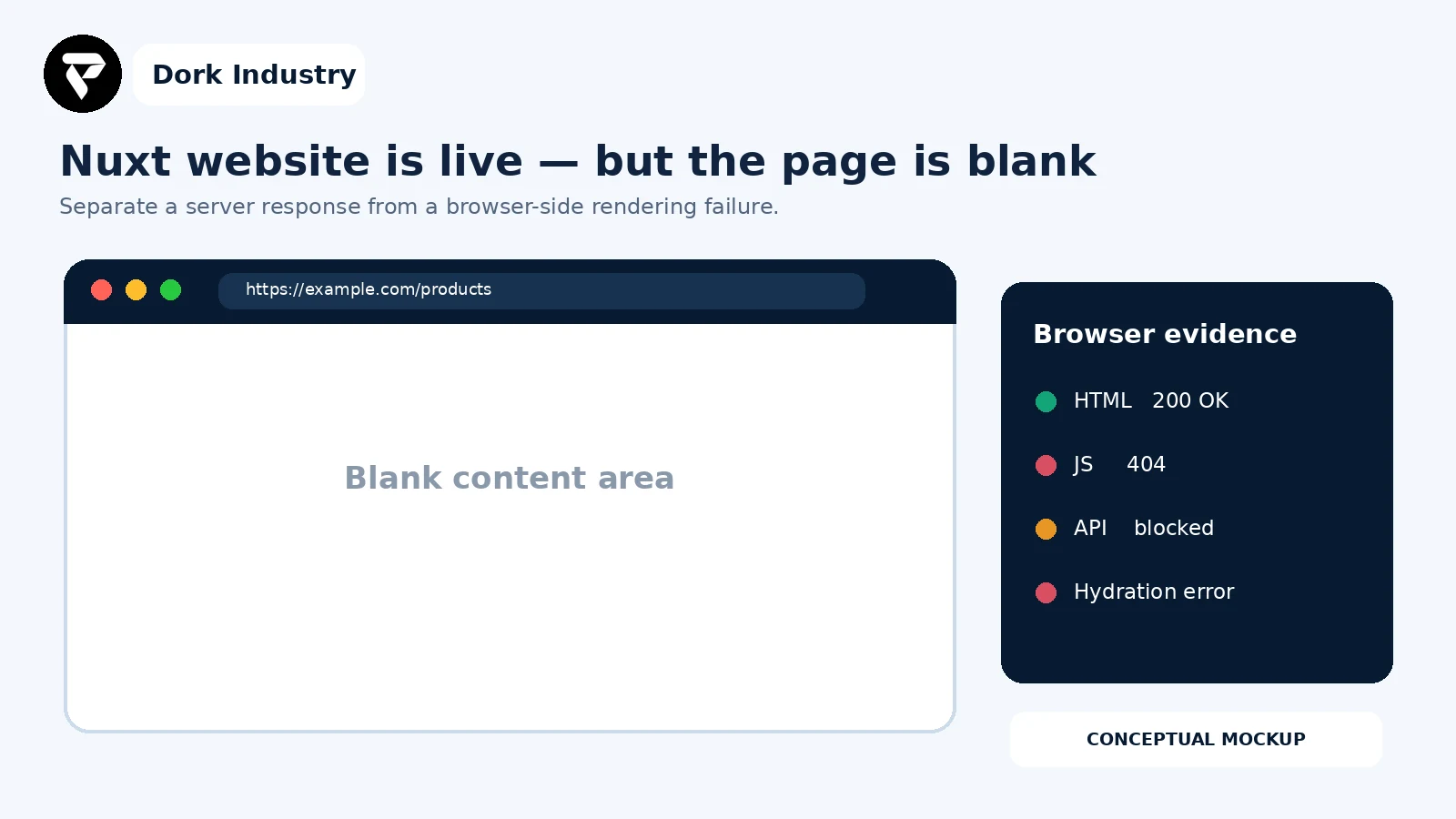
What does a Nuxt blank page after deployment actually mean?
The browser did not produce the expected usable interface. The cause may be an SSR process that cannot render, a static host missing a generated route, client assets requested from the wrong path, an invalid public runtime setting, an unhandled API/authentication failure, or browser code that cannot hydrate the server-rendered DOM.
Vue explains that an SSR application sends server-rendered HTML and then hydrates that markup in the browser by matching components and attaching event listeners. It also warns that server and client output can differ because of invalid HTML, random values or environment differences. Read Vue’s client-hydration explanation and hydration-mismatch guidance.
What should you capture before changing production?
- The exact failing URL, timestamp, browser and release or commit ID.
- The raw HTML response, HTTP status, response headers and visible release marker.
- The first failed JavaScript or CSS request in the network panel.
- The first uncaught browser-console error, including its source file.
- Server startup and request logs for the same timestamp.
- The deployment preset, start command and public runtime-variable names—never secret values.
- A known-good route and the last known-good release for comparison.
Need the blank page traced before another deployment?
Send the failing URL, release ID, redacted console and network evidence, hosting target and start command. Dork Industry can scope a focused Nuxt diagnosis, production repair or deployment correction.
Which nine checks find a Nuxt blank page after deployment?
| Check | Evidence | Decision |
|---|---|---|
| 1. Classify the response | status, HTML and server log | server render or browser failure |
| 2. Verify release identity | commit/build marker | expected or stale artifact |
| 3. Test deep links | home and direct route results | route/fallback or global startup |
| 4. Inspect assets | JS/CSS URLs and statuses | base path, cache or missing output |
| 5. Read first console error | stack and chunk | fatal client startup boundary |
| 6. Check public config | environment names and output | build-time/runtime mismatch |
| 7. Trace API/auth | URL, CORS and status | data failure or rendering failure |
| 8. Compare hydration | server DOM and client warning | deterministic or mismatched render |
| 9. Prove recovery | route/action matrix | safe release or deeper redesign |
1. Does the server return an error, empty shell or useful HTML?
Fetch the same URL without relying on the browser display. A 5xx response or failed Node process belongs to the server-rendering/runtime path. A 200 response containing meaningful page text shifts attention to assets, configuration, data calls and hydration. An HTML shell with no expected content may indicate SPA rendering, failed pre-rendering or a route rule that differs from the intended architecture.
2. Is the browser receiving the intended release?
Add a non-secret build marker such as a commit hash and UTC build time. Compare it in the built artifact, server response and browser. If the release marker is old, investigate the deployment target and cache path; that is closer to a stale-release problem than a Nuxt rendering defect.
3. Do the home page and direct deep links fail in the same way?
Open the home page, navigate internally, then load the failing route directly in a clean session. A direct-route failure with working client navigation suggests the host is not serving the generated route or forwarding requests to the SSR entry correctly. A blank result on every route points to a shared plugin, app layout, asset or public configuration problem.
4. Are the current JavaScript and CSS assets reachable?
Inspect requests referenced by the returned HTML. Record 404, blocked MIME type, CSP rejection and cached older chunks. Check whether the application is deployed under a subpath and whether its public asset base matches that location. Do not solve a missing-chunk problem by disabling cache globally; align immutable hashed assets, HTML caching and release cleanup.
5. What is the first uncaught browser error?
Start with the earliest fatal error, not the cascade that follows it. Map its minified file to the correct source map in an authorised environment. Common boundaries include a client-only library evaluated during SSR, a plugin that assumes window too early, a failed dynamic import, or application startup code that throws when a setting is absent.
6. Are public runtime settings available where the code expects them?
Compare variable names across local, preview and production environments. Public browser configuration and server-only secrets are different concerns: expose only values designed for the client. A missing API base URL can create requests to the wrong origin or cause startup code to throw. Record names and resolved non-secret destinations; never paste tokens into screenshots or tickets.
7. Does the page fail safely when an API or authentication request fails?
Trace the first business-data request, its origin, CORS result, cookies and response status. The UI should display an intentional error or fallback rather than disappear. A successful API does not rule out rendering failure, and a failed API should not automatically trigger infrastructure changes.
8. Is server-rendered markup different from the client render?
Compare the server HTML with the DOM at the first hydration warning. Remove nondeterministic values, invalid nesting and client/server timezone differences. Move browser-only behavior to an appropriate client lifecycle or component boundary. Vue notes that it may recover from a mismatch, but recovery can discard and rebuild nodes; the root cause should still be removed rather than hidden.
9. Can you prove the repair on business-critical paths?
Test more than the home page. Include direct deep links, hard refresh, login state, form submission, product or service detail, and one conversion path. Verify desktop and mobile browsers, then keep the previous release available until those checks pass.
Where should a Nuxt blank-page investigation start?
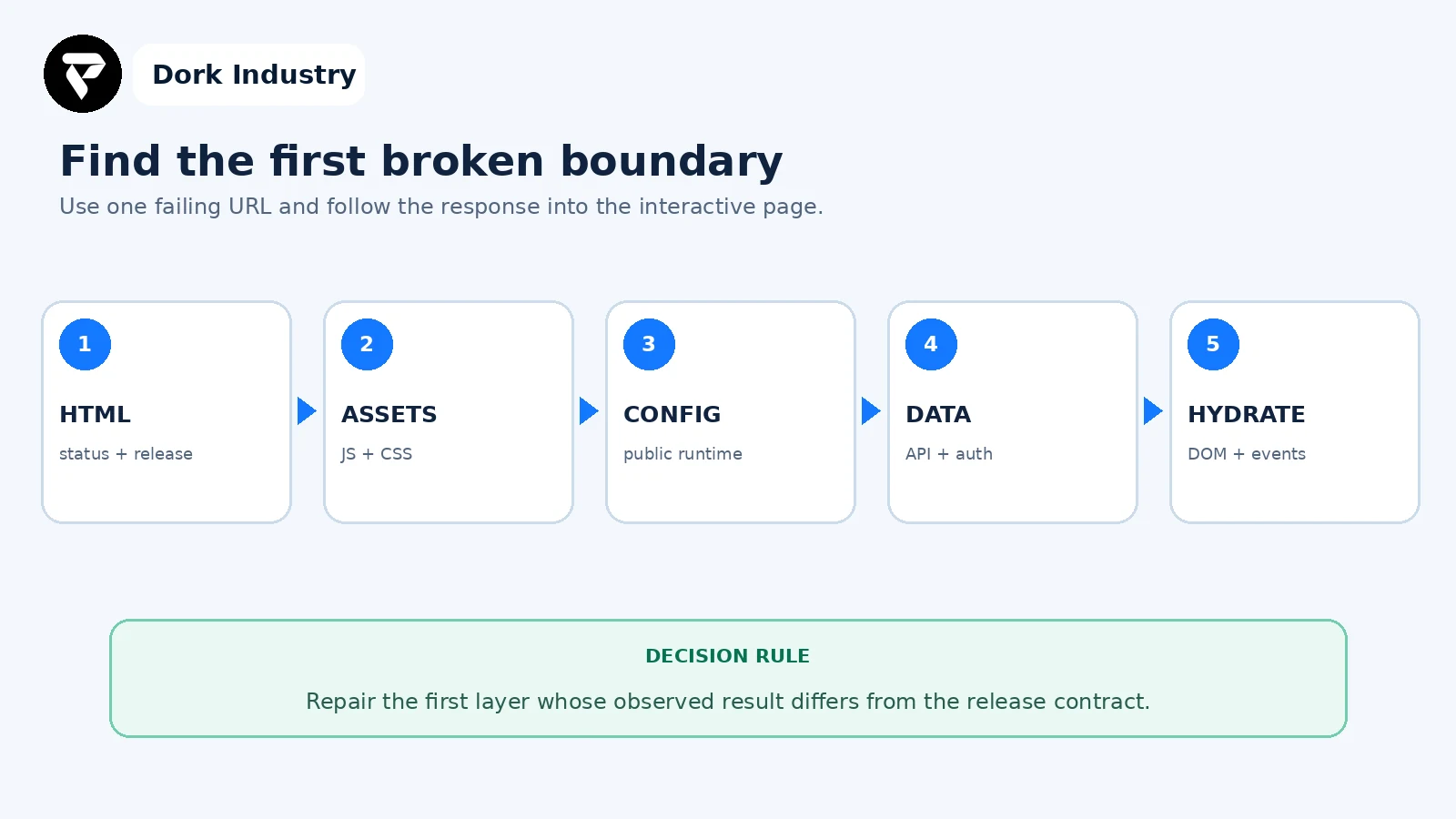
Change one boundary at a time. Redeploying, purging caches, changing environment variables and modifying API rules together may restore the page temporarily but prevents a defensible root-cause finding.
Worked example: HTML loads, then the product route goes blank
This is an illustrative diagnostic example, not a client result. A Nuxt product page returns HTTP 200 and its HTML contains the expected product heading. JavaScript chunks also return 200, but the browser console shows that application startup attempted to construct an API URL from an undefined public base. The product-data request never starts, and the layout’s error handler replaces the interface with an empty container.
- The team records the release ID, failing URL and first console error.
- They compare the production public runtime-variable name with the name used by the application.
- They correct the deployment configuration and add validation that renders a visible configuration error in non-production acceptance testing.
- They test a direct product URL, hard refresh, category navigation, login state and add-to-cart action.
- They retain the previous release until both server logs and browser tests confirm the repaired version.
The paid project is not “clear the cache.” It may include correcting the configuration contract, repairing error handling, adding release evidence and building repeatable acceptance checks across hosting environments.
What belongs in the production acceptance test?
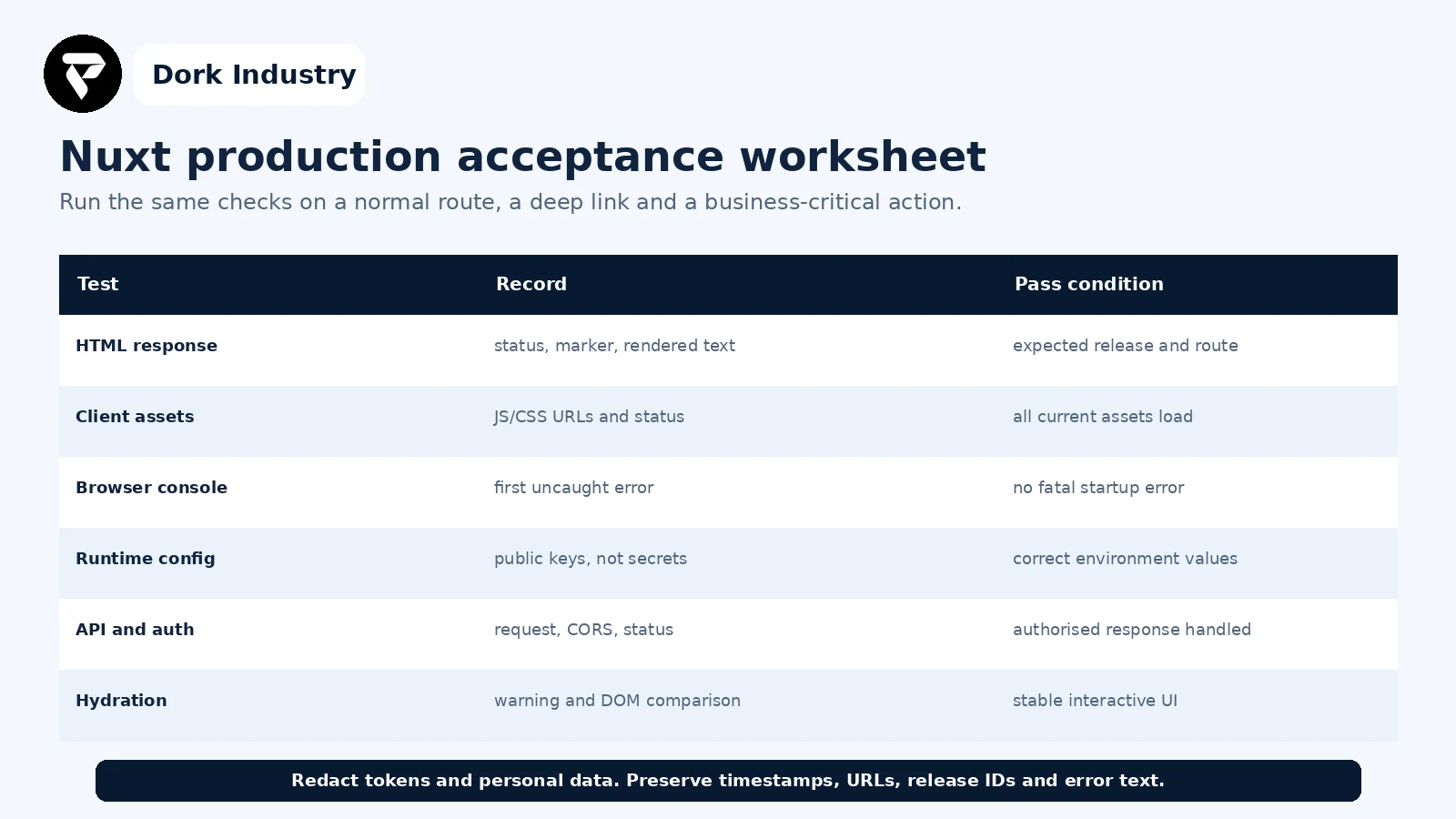
Give each failure an owner, timestamp and release ID. Save redacted evidence with the deployment record so a recurrence can be compared instead of rediscovered.
When is this a quick repair versus a deployment redesign?
| Finding | Likely work | Professional help is warranted when |
|---|---|---|
| One missing public variable | configuration correction and validation | multiple environments or secret boundaries are involved |
| Wrong asset/base path | Nuxt and host path repair | CDN, subdirectory or multi-site routing is involved |
| Client-only library crash | plugin/component boundary repair | the library is business-critical or affects SSR |
| Hydration mismatch | deterministic render correction | shared state, localisation or account data is involved |
| Recurring release failures | deployment and observability redesign | the team cannot identify, test or roll back a release |
How can Dork Industry help with a Nuxt production failure?
Dork Industry can inspect the Nuxt build and deployment contract, reproduce the failing route, trace server and browser evidence, repair asset paths, plugins, runtime configuration, API handling or hydration defects, and add release markers and acceptance tests. A new build may be appropriate when the current architecture cannot support the required hosting, content or integration workflow; a focused repair is preferable when the boundary is isolated.
Review Dork Industry’s IT services and custom development scope, application development services, industry solutions, and the related Next.js 404 after deployment guide. The Next.js article addresses route resolution and a 404 response; this guide addresses a Nuxt page that reaches the browser but fails during assets, public configuration, data handling or hydration.
Turn the white screen into a reproducible repair brief
Send the failing URL, release ID, hosting target, redacted first console error, failed network request and expected business action. Dork Industry can propose a focused Nuxt repair, deployment correction or developer-support scope.
Frequently asked questions
Why does a Nuxt site work locally but show a blank page in production?
Local and production builds can differ in route handling, asset base paths, public runtime variables, Node runtime, API origin, cookies and caching. Capture the production HTML, first failed asset or request and first console error before changing the deployment.
Is a hydration warning always the cause of a blank page?
No. Vue may recover from some hydration mismatches. A blank page can instead come from missing assets, a fatal plugin error, invalid public configuration or error handling that removes the interface. Correlate the first warning or error with the visible failure.
Should we disable SSR to make the page work?
Only after evaluating the application’s content, indexing, authentication and hosting requirements. Disabling SSR can hide an incompatible component but changes the rendering architecture; isolate the failing boundary before making that decision.
What should I send to a Nuxt developer?
Send the exact URL, release ID, hosting target, deployment mode, start command, raw response status, first failed asset/request, first console error and redacted runtime-variable names. Do not send tokens, cookies or customer data.
Stuck with this issue?
Send us the error and the setup — we diagnose the cause, fix it, and show you how to prevent it from coming back.