WhatsApp API template messages not delivered require evidence before retrying: do not treat a successful send request as proof that the customer received the message. Preserve the returned message ID, ingest the later status webhook, record the error details and reconcile the final state with the CRM, order or service workflow.
The business consequence is larger than a missing notification. A patient may miss a report alert, a COD order may remain on hold, a lead may appear followed up when no message arrived, or staff may retry manually without an audit trail. The repair must separate request acceptance, template validation, policy eligibility, recipient delivery and downstream system state.

What does “accepted but not delivered” mean?
The messages endpoint can return a message ID after accepting a request for processing. Delivery is established later through message-status events. Meta’s official WhatsApp Business Platform collection distinguishes sent, delivered, read and failed webhook states. Review Meta’s webhook payload reference.
A reliable integration therefore stores the provider message ID against the business record, verifies webhook signatures and subscriptions, processes repeated or out-of-order events idempotently, and exposes unresolved failures to a human. A dashboard label such as “sent” must not automatically advance an order, appointment, admission or collection workflow.
What should you capture before retrying?
- Business event ID, intended recipient and consent source—redacted in support evidence.
- Phone-number ID, template name, language code, category and parameter structure.
- HTTP response, returned message ID and request timestamp.
- Every webhook event for that message ID, including status, timestamp and error object.
- Template status and quality state at the time of sending.
- The CRM, order or application state before and after webhook processing.
- Retry attempts, idempotency key, owner and business deadline.
Messages accepted by the API but missing from the customer journey?
Send the redacted request, message ID, status webhook, template/locale, consent evidence and downstream record state. Dork Industry can scope an integration diagnosis, webhook repair or delivery-observability proof of concept.
Which nine checks diagnose WhatsApp API template messages not delivered?
| Check | Evidence | Decision |
|---|---|---|
| 1. Classify the send response | HTTP status, body, message ID | request rejected or accepted |
| 2. Match template and locale | name, language and components | approved version used |
| 3. Verify sender assets | phone-number ID and permissions | correct business sender |
| 4. Verify consent and category | opt-in, purpose and template type | eligible business message |
| 5. Ingest status webhooks | sent/delivered/read/failed | final state observable |
| 6. Store error details | code, title and details | actionable failure class |
| 7. Make processing idempotent | event/message keys | no duplicate action |
| 8. Control retries and fallback | policy, deadline and owner | safe next action |
| 9. Reconcile business state | CRM/order versus provider | workflow tells the truth |
1. Did the messages endpoint reject or accept the request?
Record the exact HTTP response and payload schema. A client error requires request correction, not a delivery retry. An accepted response should provide a message identifier that becomes the correlation key for later webhook events. Do not mark a lead “contacted” or an order “confirmed” from the initial response alone.
2. Does the request use the approved template name, language and structure?
Compare the submitted template name and locale with the approved version, including header, body and button parameters. A template can exist in one language but not another, and parameter counts or types can differ. Keep versioned mappings rather than copying strings into multiple workflows.
3. Are the token, phone-number ID and business assets aligned?
Verify that the credential has the required messaging permission and that the phone-number ID belongs to the intended WhatsApp Business Account and environment. Separate development and production identifiers. Rotate credentials through a secret manager without logging tokens in the CRM, screenshots or support tickets. According to Meta’s official Cloud API collection, requests require aligned sender assets and the messaging permission. See the official Cloud API collection.
4. Was consent captured for this recipient and purpose?
Store when, where and for what purpose the person opted in, plus the current opt-out state. Do not make an AI model decide whether consent exists. Human-approved policy should map each business event to an eligible template category and fallback channel. A technically valid payload is not a substitute for consent governance.
5. Is the webhook subscribed, reachable and verified?
Confirm the application is subscribed to the correct WhatsApp Business Account, the HTTPS endpoint is reachable and verification/signature checks succeed. Preserve delivery logs without personal message content. Alert when no status event arrives within the business deadline rather than assuming success.
6. Does the integration store the full failure classification?
Keep the message ID, status, timestamp and error code/title/details together. Convert known error classes into specific operator actions such as correcting template configuration, reviewing recipient eligibility or escalating a provider issue. Keep unknown errors visible; never collapse every failure into “number invalid.”
7. Can repeated or out-of-order webhooks change the business action twice?
Webhook delivery can be repeated, and systems should not create duplicate follow-ups, refunds, dispatch releases or tickets. Use provider event/message identifiers and monotonic state rules. Retain the raw event reference, processed timestamp and resulting transition for audit.
8. When should the system retry, wait or use another channel?
Retry only transient classes and use bounded backoff. Do not repeatedly send a policy-blocked or incorrectly configured template. Respect the business deadline: an appointment reminder arriving after the appointment is not recovery. Route unclear cases to a person with the relevant evidence and permitted alternatives.
9. Does the CRM or order system reflect the final provider state?
Run reconciliation for messages stuck in “accepted” or “sent,” webhook events that failed processing, and business records whose state conflicts with the provider event. Show operators the difference between attempted, sent, delivered, read, failed and manually resolved. Measure qualified conversations and completed business actions separately from API submissions.
Where should the delivery investigation start?

Change one boundary at a time. Editing the template, rotating the token, replaying webhooks and retrying the campaign together can obscure the root cause and create duplicate customer contact.
Worked example: appointment reminders are marked sent but patients report nothing
This is an illustrative implementation example, not a client result. A clinic system submits an approved utility template and receives message IDs, then immediately marks reminders as delivered. Its webhook endpoint is live but subscribed to a different WhatsApp Business Account after a production migration. Status events never reach the clinic application.
- The team correlates test appointments with message IDs and confirms the send response is accepted.
- They verify the webhook subscription and find the account mismatch.
- They correct the subscription, verify signatures and replay retained test events into a non-production queue.
- They add idempotent processing and distinguish attempted, sent, delivered and failed states.
- They create an exception when no final status arrives before the reminder deadline, with a human-approved fallback.
The paid project is not another broadcast tool. It is a reliable status pipeline, business-state reconciliation, exception handling and acceptance test across WhatsApp, the application and staff workflow.
What belongs in a delivery acceptance test?
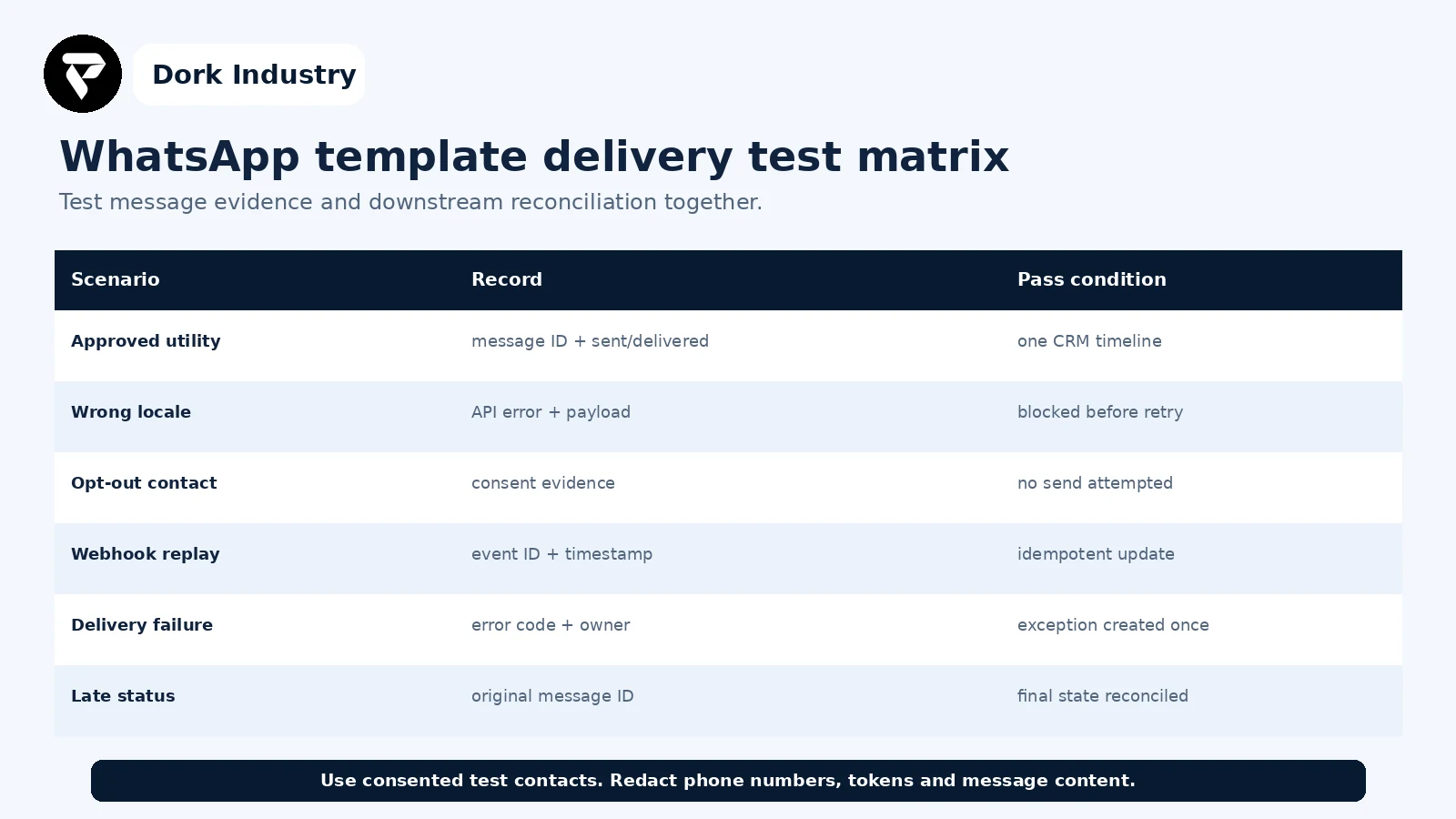
Use consented test recipients and synthetic business records. Redact phone numbers, tokens and message text from screenshots. Record the expected state transition before running each scenario, and confirm that one message failure produces one owned exception—not silent loss or duplicate contact.
When is professional integration work warranted?
| Finding | Likely work | Professional help is warranted when |
|---|---|---|
| Template mismatch | versioned template/locale mapping | many workflows or languages are involved |
| Missing status events | subscription, endpoint and queue repair | production evidence is incomplete |
| Duplicate actions | idempotency and state-machine correction | orders, payments or patient workflows change |
| Unsafe retries | error-class policy and exception queue | consent or customer experience is at risk |
| CRM mismatch | reconciliation job and operator dashboard | teams cannot trust communication status |
Dork Industry can inspect the API and webhook contract, repair queue and idempotency behaviour, connect provider states to CRM or order workflows, build exception handling and create an acceptance suite. Review Dork Industry’s custom software and integration services, industry solutions, the related admissions follow-up workflow, COD verification controls, and WordPress-to-CRM repair guide. Those articles address business routing and confirmation; this guide addresses provider delivery evidence and downstream reconciliation.
Turn missing delivery evidence into an owned exception
Send the redacted request/response, message ID, template and locale, webhook event or absence window, consent source and downstream record state. Dork Industry can propose a focused repair, integration proof of concept or developer-support scope.
Frequently asked questions
Does a WhatsApp API 200 response mean the message was delivered?
No. It means the request was accepted for processing. Store the returned message ID and wait for later webhook status events such as sent, delivered, read or failed before updating the business record.
Why is an approved template still not delivered?
Approval does not prove every recipient is eligible or reachable. Check the exact template/locale, sender assets, consent, webhook failure details and provider status rather than repeatedly resending.
Should failed template messages be retried automatically?
Only for approved transient error classes with bounded retries and a business deadline. Configuration, consent or policy failures need correction or human review, not automatic repetition.
What evidence should I send to an integration developer?
Provide the redacted request and response, message ID, template name and locale, sender phone-number ID, webhook status/error, timestamps, consent source, retry history and expected CRM or order transition. Never send access tokens.
Stuck with this issue?
Send us the error and the setup — we diagnose the cause, fix it, and show you how to prevent it from coming back.