Field service app development for field-service businesses is rarely about the app itself — it is about whether jobs, time and proof of work survive the distance between the office and the customer’s doorstep. Yes: a well-built field-service app can give you offline job cards that work in dead zones, GPS-verified site attendance, and photographic proof of service on every visit — provided it is designed around technicians’ real field conditions and piloted with one team before a full rollout. Without that grounding, another “technician app” just becomes a second screen the team ignores.
This article examines what field service app development must deliver for a service business with technicians in the field: where the money actually leaks, what data you already have, the math behind the investment, what the system must never do, and how to test the idea in 30 days before committing to full development.
Where do field-service businesses actually lose money?
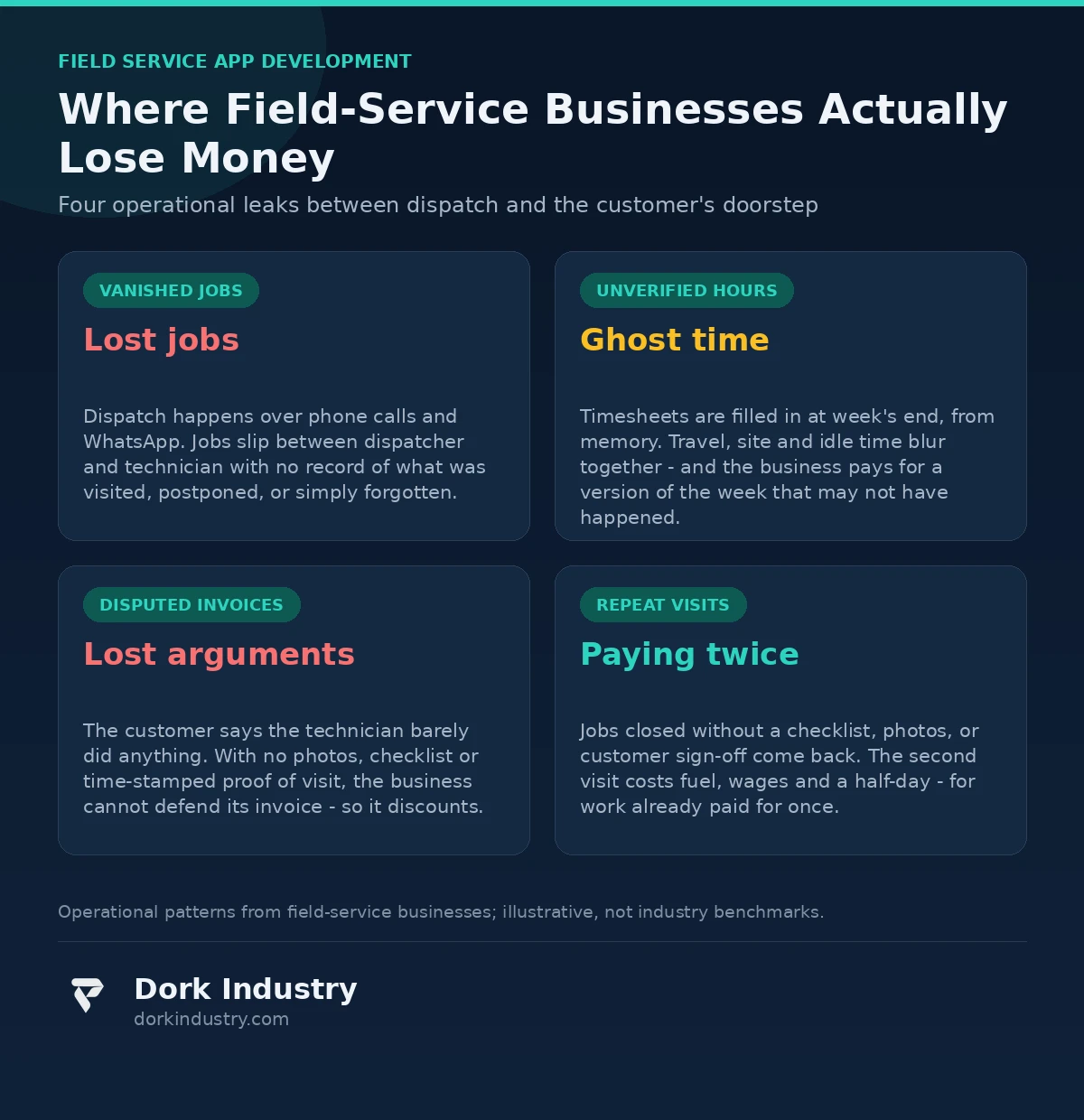
Before discussing technology, it is worth naming the specific leaks. In our experience working with service businesses, the expensive problems are rarely about tools or vehicles. They are about work that happens without a record — jobs done but not documented, hours worked but not verified, promises made at the doorstep but never captured.
Why do jobs slip through the cracks?
Dispatch happens over phone calls and WhatsApp messages. Job sheets are paper, verbal, or a photo of a whiteboard. Nobody can say with certainty which jobs were visited, which were postponed, and which simply vanished between the dispatcher and the technician. When a customer calls to complain that “nobody came,” the business has no record to check against — only the technician’s word.
Why do you pay for hours you cannot verify?
Timesheets are filled in at the end of the week, from memory. Travel time, site time, and idle time blur together. Some technicians inflate hours; others under-report billable work because nobody is watching. The business ends up paying for a version of the week that may or may not have happened.
Why do invoices get disputed — and why do you lose the argument?
The customer says the technician “barely did anything.” The technician says the job took two hours. With no photos, no checklist, and no time-stamped proof of visit, the business cannot defend its invoice, so discounts are given to end the argument. Repeat this across hundreds of jobs and the margin quietly erodes.
Why do technicians revisit jobs that were already marked done?
A job is closed without a checklist, without photos, and without the customer’s sign-off. Two weeks later the customer calls: the problem persists. A second visit costs fuel, wages, and a technician’s half-day — for a job the business already paid for once. Rework is the most expensive leak of all, because it is paid for twice.
What must field service app development deliver for your operation?
A generic “technician app” with a login screen and a logo is not the answer. An app that survives the field needs to cover five operational areas — and the first one is non-negotiable.
How do job cards work when there is no internet?
Basements, industrial sheds, rural sites — technicians spend much of their day where mobile data is unreliable or absent. The app must store the full day’s job cards on the device, capture everything offline (notes, photos, signatures, checklists), and sync automatically when connectivity returns. According to Google’s official Android documentation on WorkManager, background work can be scheduled with network constraints so uploads happen when connectivity returns instead of failing mid-upload. That pattern — queue offline, sync on reconnect — is the technical backbone of any credible field service app development.
- Today’s job list cached on the device, not fetched on demand
- Offline capture of photos, checklists, signatures, and parts used
- Conflict handling when dispatch changes a job mid-day
- Battery-conscious sync that does not drain the phone by noon
What does GPS tracking actually prove?
GPS does not prove work — it proves presence. Used honestly, it verifies that a technician was at the customer’s site when the job was marked complete, and it gives dispatch a live view of who is near which site when an urgent job comes in. According to GPS.gov, the official US government source for GPS information, consumer GPS positioning is typically accurate to within a few metres under open sky, and degrades indoors and underground. That is enough to confirm a site visit; it is not enough to track which room someone stood in — and any vendor who promises more is overselling.
How is proof of service captured?
- Time-stamped, GPS-tagged photos before and after the work
- Digital checklists the customer can see and initial
- Customer signature captured on the device
- An automatic job summary the customer receives by SMS or WhatsApp
How do parts stop disappearing from the van?
Every spare part a technician carries is money sitting in a van. Without tracking, parts are used but never billed, or billed from memory weeks later. The app should log parts against the job at the moment of use — barcode scan or quick selection — so consumption reconciles with stock and the invoice carries every part automatically.
How does dispatch stop being a phone-call relay?
The dispatcher assigns jobs to a queue the technician sees on the device, with priority, customer history, and site notes attached. Urgent jobs go to the nearest available technician — GPS shows who is actually nearby, not who claims to be. The customer gets an arrival window by SMS instead of calling the office every hour. The same discipline of capturing operational work at its source applies beyond field teams — see how one mobile app gave a multi-location gym owner centralized control over branches, renewals, and trainer operations.
What data does your operation already have — and what is it missing?
Most field-service businesses already generate the raw material: paper job sheets, WhatsApp photos from technicians, invoices, customer complaints on the phone. What is missing is structure. The data is not connected, timestamped, or owned by the business — it lives in individual phones and memories.
Field service app development does not create new work for technicians — and that principle should guide any build. It captures the work they already do — the visit, the photos, the parts used — in a form the office can actually use. The most common implementation failure is designing for the owner’s dashboard while making field data entry painful. If closing a job takes a technician ten minutes on site, the data will be incomplete within weeks.
What does the math look like? An illustrative example
Consider a service business with 12 technicians, each handling 6 jobs a day over 26 working days a month — about 1,872 jobs a month. Assume a modest 4% of jobs generate a repeat visit because the first visit was incomplete: 75 repeat visits a month. If each repeat visit costs roughly ₹1,500 in fuel, wages, and lost capacity, that is about ₹1.1 lakh a month, or ₹13.5 lakh a year, paid twice for work already done.
Now take disputed invoices: if 3% of invoices (about 56 a month) are discounted by an average of ₹800 to end an argument the business cannot win, that is another ₹45,000 a month — ₹5.4 lakh a year. These are illustrative figures with stated assumptions, not industry benchmarks. But they show why proof of service is usually the first problem worth fixing: eliminating even half the rework and disputes is worth close to ₹10 lakh a year to this business.
Should you build or buy? An honest breakdown
Not every field-service business needs custom field service app development. The honest options, in order of investment:
| Approach | Best for | Relative investment | Where it breaks |
|---|---|---|---|
| Paper + WhatsApp | Under 5 technicians, simple repeat jobs | Minimal | Breaks the moment you need proof or scale |
| Off-the-shelf field-service SaaS | Standard scheduling, dispatch, and invoicing | Low subscription | Cannot model unusual workflows; per-technician fees add up |
| White-label technician app | Branded experience without building | Medium | You inherit their roadmap and limitations |
| Custom field service app development | Offline-first needs, unusual workflows, ERP/accounting integration | Highest | Overkill for a small team with standard jobs |
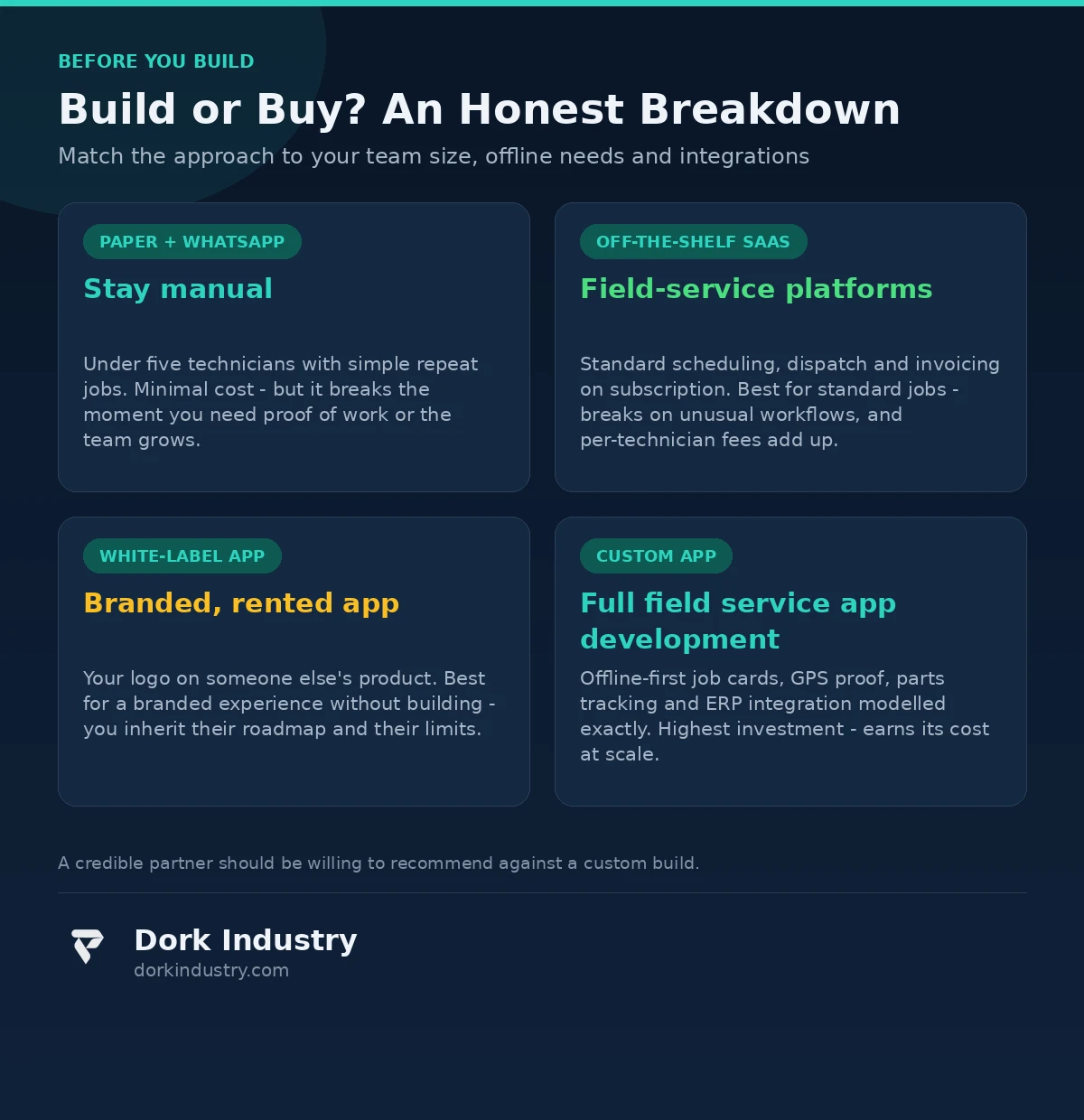
At Dork Industry, we regularly advise service businesses against custom builds when packaged software fits. A credible technology partner should be willing to tell you that you do not need custom development. If every consultation ends with a quotation for a custom app, get a second opinion.
What should the app never do?
Technology boundaries in field service app development matter as much as features — especially where location tracking and worker monitoring enter the picture.
- Never track technicians outside working hours. GPS is a job-verification tool during the working day, not a 24-hour surveillance system. Anything else destroys trust — and in many jurisdictions crosses legal lines.
- Never auto-penalize based on GPS or time data. Flag anomalies for human review. Do not let software decide someone’s wages or employment.
- Never let the app delete or hide history. Job records, photos, and signatures are the business’s evidence; they must be immutable and exportable.
- Never make the technician’s day harder to make the dashboard prettier. Every field action should take seconds, not minutes.
- AI should prioritize dispatch, not rate technicians. “These two technicians are closest to the urgent job” is useful. Scoring workers as “underperformers” on an algorithm is not.
How do you test it in 30 days before full investment?
The lowest-risk path is a single-team pilot with a fixed scope and measurable outcomes:
- One team of 3–5 technicians, real jobs, real customers
- Offline job cards, GPS check-in, photo proof, customer signature
- Run for 30 days
- Measure: repeat-visit rate vs the previous 30 days, invoice dispute rate, dispatcher phone-call volume, technician data-entry time per job
If repeat visits and disputes do not measurably improve in the pilot, a bigger field service app development investment will not fix it either. The pilot validates the workflow, not just the software. This is the assessment Dork Industry runs before quoting any field-service project: map the current dispatch process, name the leaks, then decide what software earns its cost.
What actually drives the cost of field service app development?
Field-service app pricing varies widely because scope does. The real cost drivers are:
- Offline depth: view-only offline vs full offline capture with conflict resolution changes the architecture significantly
- Platforms: Android only (most field teams) vs Android + iOS vs cross-platform
- GPS and mapping: live tracking, geofencing, route history, and map licensing
- Integrations: accounting/ERP, payment collection, SMS/WhatsApp notification setup
- Hardware: barcode scanners or thermal printers for on-site receipts, if required
- Analytics depth: basic job reports vs utilization modeling and demand forecasting
Anyone quoting a fixed price without asking about offline requirements, team size, and dispatch workflows is guessing.
Frequently asked questions
Do we need a custom app, or is off-the-shelf field-service software enough?
For a small team with standard scheduling and invoicing needs, configured field-service SaaS is usually enough and far cheaper. Custom development earns its cost when you need true offline-first operation, unusual workflows, or deep integration with your accounting or ERP — or when per-technician SaaS fees are approaching the cost of a build.
How long does field service app development take?
A focused pilot (one team, offline job cards, proof of service) can be live in 4–6 weeks. A full platform with dispatch, GPS tracking, inventory, and ERP integration typically runs 3–6 months depending on scope.
Will technicians actually use the app?
Adoption follows value: if the app gives technicians their day’s jobs, customer history, and site notes in one place — and works offline — they use it. If it adds ten minutes of data entry per job for the owner’s dashboard, they will not. Design around their field reality first.
How does offline mode actually work?
The day’s job cards download to the phone overnight or on Wi-Fi. Everything captured on site — photos, checklists, signatures, parts — is stored on the device and synced automatically when connectivity returns, with conflicts flagged to the dispatcher instead of being silently overwritten.
What does a field-service app pilot cost?
A single-team pilot with core workflows (offline job cards, GPS check-in, proof of service, dispatch queue) is a fraction of a full build. The pilot’s job is to prove measurable drops in repeat visits and invoice disputes before larger investment. Request a field-service workflow assessment for a concrete estimate.
About Dork Industry
Dork Industry (dorkindustry.com) is a custom software development company building mobile apps, AI automation, and IoT systems for businesses across India. Our team designs field-service platforms, gym management systems, and industrial IoT — from 30-day pilots to full multi-team rollouts.
The bottom line
The question is not whether your operation needs field service app development. It is whether you can prove — for every job, every day — who went where, what was done, and what the customer agreed to. If the answer is no, the technology decision is really an operations decision wearing a software costume.
Start with the workflow, pilot it with one team for 30 days, and only then scale the field service app development — and let measured repeat-visit and dispute numbers, not feature lists, decide whether to build further.
Running a service business with technicians in the field and want to know what a field app would change in your operation?
We map your current dispatch, job-tracking, and billing process and show you exactly what software would (and would not) fix, before any development is discussed.
Request a field-service workflow assessment WhatsApp +91 8210792477