
Website development done properly keeps a page loading in under two seconds — and when your website takes 8 seconds to load, targeted development work can usually cut that to under 3 seconds within weeks, without a full rebuild. An 8-second load is not a design problem; it is a revenue problem, and it is almost always fixable with a combination of image optimization, caching, code cleanup, and hosting upgrades rather than a ground-up redesign.
This article breaks down what an 8-second load is actually costing you, why it happens, what data you already have to diagnose it, what website development should (and should not) do about it, and how to run a 30-day fix program that measures the payoff before you spend more.

What is an 8-second load actually costing your business?
Start with the buyer behavior. According to Google’s mobile page-speed research, 53% of mobile site visits are abandoned if a page takes longer than 3 seconds to load. And according to Google’s own Web Vitals guidance, the Largest Contentful Paint — the moment the main content becomes visible — should happen within 2.5 seconds. Your site takes 8 seconds. That is not slightly slow; it is more than triple the threshold Google itself recommends, and past the point where a majority of mobile visitors have already given up.
Search visibility compounds the damage. Google’s Core Web Vitals are a ranking signal, which means slow pages can rank lower even when the content is better than a competitor’s. You pay twice: fewer visitors arrive from search, and fewer of those who arrive stay long enough to buy.
What does the math look like? An illustrative example
Take a service business getting 10,000 monthly visitors, with 60% of them on mobile. Assume a baseline conversion rate of 2% and an average deal value of ₹50,000 for illustration — these are illustrative figures with stated assumptions, not industry benchmarks.
At 8 seconds, using Google’s published abandonment figure as a rough guide, suppose the site loses roughly half its mobile visitors before the page renders. That is 3,000 visitors gone before they ever see an offer. At a 2% conversion rate and ₹50,000 average value, those 3,000 lost visitors represent about 60 lost conversions — ₹30 lakh in pipeline per month — that never existed in any report because abandoned visitors do not show up as leads.
Now suppose targeted website development cuts the load to 2.5 seconds and recovers even a quarter of those abandoned visitors — 750 visitors back, 15 conversions, ₹7.5 lakh in monthly pipeline recovered. The fix costs a fraction of one month’s recovered revenue. That is why speed work almost always pays for itself: the leak is enormous, and the fix is surgical.
Why does a website take 8 seconds to load?
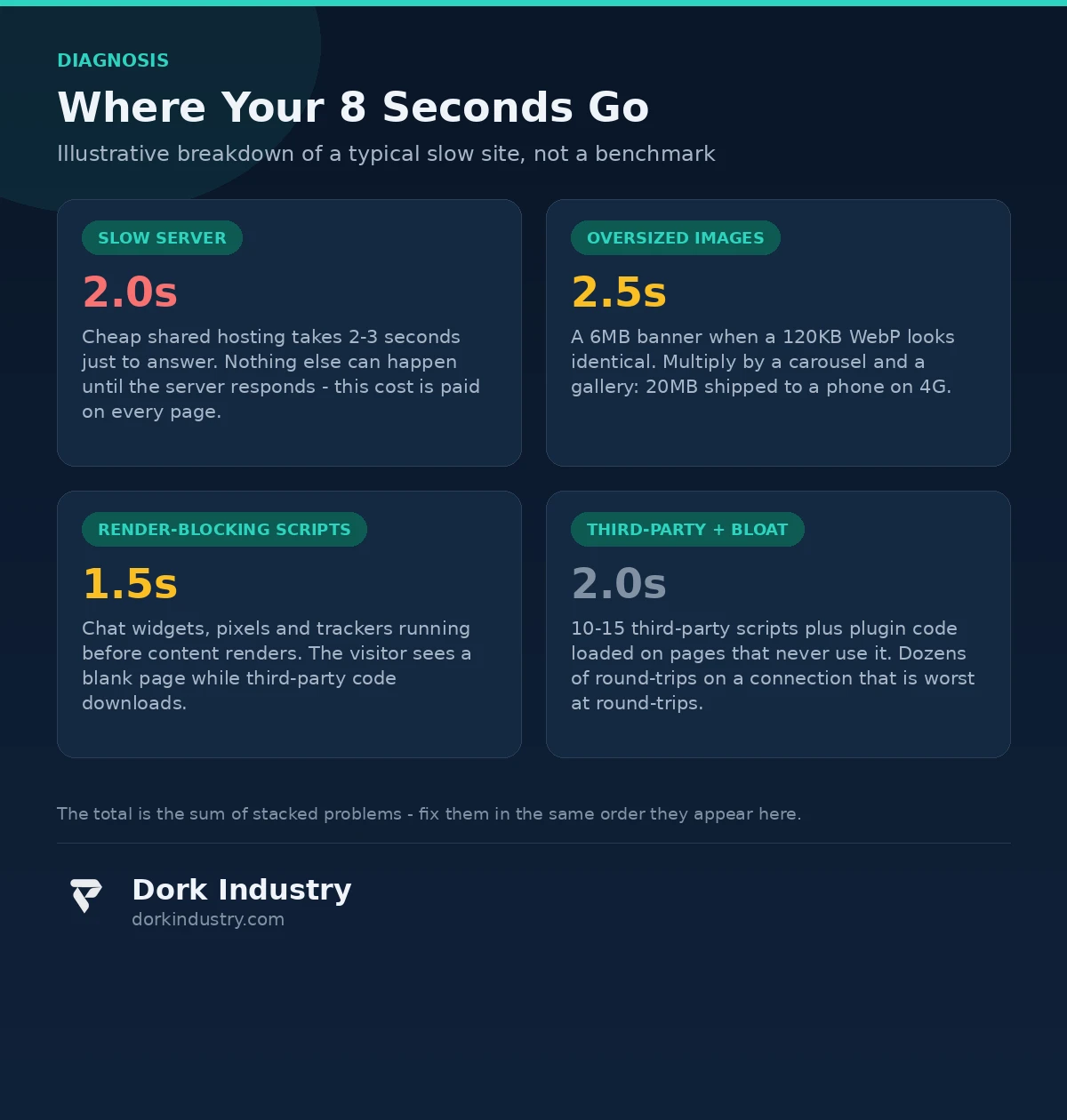
Slow sites are rarely slow for one reason. In our experience, an 8-second load usually means four or five of these problems are stacked on top of each other. Each one alone might cost a second or two; together they cost eight.
Are your images bigger than they need to be?
The single most common cause. A homepage banner saved as a 6MB PNG when a 120KB WebP version would look identical. Multiply that by a carousel, a gallery, and three staff photos, and the page is shipping 20MB of images to a phone on a 4G connection. Every megabyte costs roughly half a second to a full second on mobile data. Images are the first thing to check because they are the easiest to fix.
Is JavaScript blocking the page from rendering?
Many sites load chat widgets, analytics trackers, marketing pixels, social embeds, and slider libraries before the actual content. If these scripts sit in the page’s head and run before the content renders, the browser waits — showing a blank white page — while third-party code downloads. This is called render-blocking JavaScript, and it is why some sites feel slow even on fast connections.
Is your hosting holding the site back?
Time to First Byte (TTFB) measures how long the server takes to respond before anything renders. Cheap shared hosting routinely takes 2–3 seconds just to answer, and nothing can happen until it does. No amount of front-end optimization fixes a server that responds slowly; the bottleneck is upstream of every other improvement.
Are third-party scripts loading before your content?
Heatmap tools, live-chat widgets, cookie-consent managers, ad retargeting pixels, and social-media embeds each add network requests to servers you do not control. When one of those servers is slow, your page waits. Sites routinely carry 10–15 third-party scripts, each adding 100–500ms, and a few slow ones can account for 2–3 seconds on their own.
Is the site making requests it does not need?
WordPress sites in particular accumulate plugins, each loading its own CSS and JavaScript files on every page — including pages that never use the plugin’s features. A contact-form plugin’s scripts loading on the homepage, a slider plugin’s styles on a blog post: these invisible extras add dozens of HTTP requests and megabytes of unused code. More requests mean more round-trips, and round-trips are what mobile connections are worst at.
What data do you already have about the problem?
You do not need to guess where the 8 seconds go — the measurement tools are free and you probably already have the data.
- PageSpeed Insights (pagespeed.web.dev) shows your real-world Core Web Vitals from the Chrome User Experience Report, plus a lab diagnosis that names the specific offenders: oversized images, render-blocking resources, unused JavaScript, slow server response.
- Your own analytics tell you the business cost. Compare bounce rate on mobile vs desktop. Look at the pages with the highest exit rates and cross-reference with load times. The pages where visitors leave fastest are the pages where speed work pays the most.
- Server logs and hosting dashboards show Time to First Byte. If TTFB is above 800ms, the hosting is part of the problem regardless of what the front end looks like.
The principle that should guide any website development for speed: measure first, fix second, measure again. The 30-day pilot in this article works because every change is verified against the same numbers, not against opinions.
What should website development actually do about it?
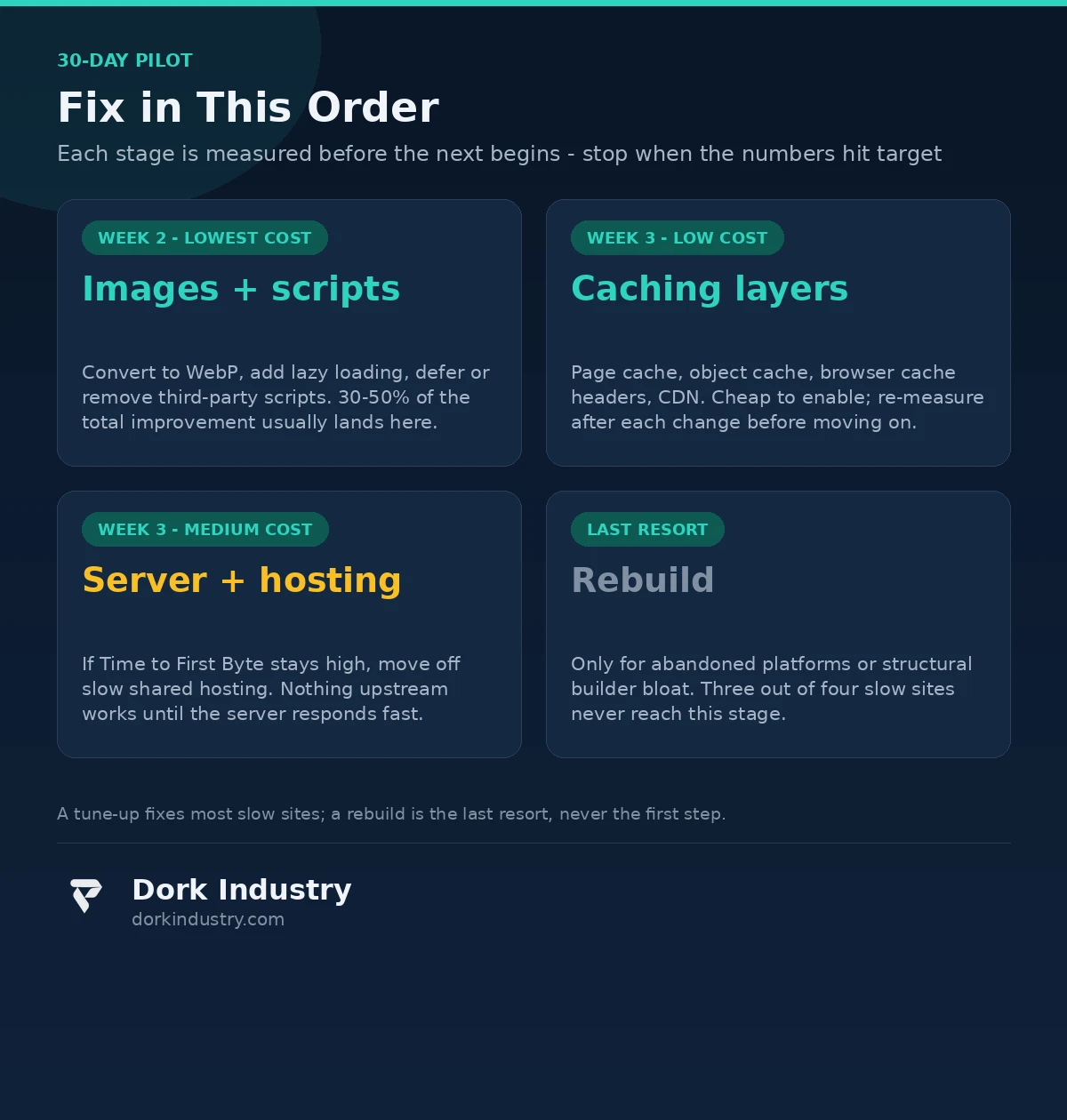
The fixes are concrete and ranked by effort. Most 8-second sites do not need a rebuild; they need this sequence, in this order.
How do you fix images properly?
- Convert large images to WebP or AVIF — typically 60–80% smaller at the same visual quality.
- Serve responsive sizes: a phone should never download the 2400px desktop hero.
- Lazy-load below-the-fold images so they only download when the visitor scrolls to them.
- Set explicit width and height attributes to prevent layout shift while images load.
How does caching cut load time?
- Browser caching: returning visitors should not re-download unchanged files.
- Page caching: the server should serve a stored copy of the page instead of rebuilding it on every visit.
- Object caching: database query results get stored in memory instead of re-queried hundreds of times per page load.
- CDN: static assets served from servers near the visitor, cutting round-trip time.
How do you stop scripts from blocking the page?
- Defer non-critical JavaScript so it runs after the content renders.
- Remove or consolidate third-party scripts — audit every pixel, widget, and embed and ask what revenue it earns its milliseconds.
- Inline critical CSS for above-the-fold content so the page paints before stylesheets finish downloading.
When does the server itself need to change?
If Time to First Byte stays above 800ms after optimization, the answer is infrastructure: move off oversold shared hosting to a VPS or managed host, enable server-level caching, use a newer PHP/runtime version, and put a CDN in front. This is the fix people avoid because it sounds expensive, but it is often cheaper than the front-end work — and nothing else works until the server responds quickly.
Should you rebuild or repair? An honest breakdown
Not every slow site needs new website development from scratch. In our experience, roughly three out of four slow sites are fixed with a tune-up. Here is how to decide:
| Situation | Right move | Relative investment | Why |
|---|---|---|---|
| Site is 1–3 years old, built on a standard platform | Performance tune-up | Lowest | The architecture is fine; the bloat is the problem |
| Site is on outdated, unsupported platform versions | Platform upgrade, not redesign | Low–medium | Security and speed both improve; design stays |
| Site is 7+ years old with a custom legacy stack nobody maintains | Rebuild | Highest | Tune-ups on abandoned codebases do not hold |
| Slow because of 30 plugins and page-builder bloat | Rebuild on a lean stack | Medium–high | Removing bloat from a builder site usually breaks it; a clean rebuild is cheaper |
| Slow only on mobile, fine on desktop | Mobile-focused optimization | Low | Responsive images and script deferral fix most of this |
At Dork Industry, we regularly advise businesses against rebuilds when a tune-up will do — a credible development partner should be willing to tell you the site you have is worth keeping. If every audit ends with a quotation for a full rebuild, get a second opinion. (For the related case where the site is crashing under load rather than just loading slowly, see our guide on website development for traffic-spike resilience.)
What should the fix never do alone?
Speed work involves judgment calls that automation should never make by itself:
- Never let a caching plugin break functionality to win a speed score. Aggressive minification and deferred scripts routinely break checkout flows, contact forms, and interactive widgets. Every optimization must be tested against real user journeys, not just a green PageSpeed number.
- Never compress images below the point where your product looks bad. An 80% size saving is worthless if your product photography looks pixelated. A human reviews the trade-off; the tool does not get the final say.
- Never remove a script without knowing what it does. That tracking pixel might be the only source of your ad attribution data. Audit scripts against business value, then remove — not the other way around.
- Never chase a perfect score at the expense of the business. A PageSpeed score of 100 with a broken checkout is worse than a score of 85 with a working one. Speed is a means to revenue, and any fix that risks revenue needs a human decision.
- AI-generated “optimizations” need review. Automated tools can suggest image compression, code changes, and plugin removals, but they cannot tell you which form drives your leads. Let tools find the candidates; let humans approve the changes.
How do you fix it in 30 days?
The lowest-risk path is a measured pilot with a fixed scope: one site, one set of metrics, weekly checkpoints.
Week 1 — Measure. Run PageSpeed Insights on the 10 highest-traffic pages. Record Core Web Vitals, Time to First Byte, total page weight, and request count. Pull mobile vs desktop bounce rates from analytics. This baseline is what every later change is judged against.
Week 2 — Images and scripts. Convert hero and content images to WebP, add lazy loading, and defer or remove third-party scripts. These are the highest-leverage, lowest-risk changes. Re-measure: most sites see 30–50% of their total improvement here.
Week 3 — Caching and server. Enable page caching, object caching, and browser cache headers. If Time to First Byte is still high, address hosting: enable server-level caching or migrate to a better plan. Re-measure after each change.
Week 4 — Validate and lock in. Test every conversion path (forms, checkout, booking) after all optimizations. Compare the final numbers against the Week 1 baseline and the analytics: has mobile bounce rate moved? Then decide whether a deeper rebuild is warranted — with data, not hunches.
What drives the cost of a speed fix?
The investment depends on where the slowness lives, not on the size of the site:
- Image and front-end optimization — the cheapest work, usually days of effort on a standard site.
- Plugin and code cleanup — grows with the number of plugins and customizations; a site with 40 plugins costs more to untangle than one with 8.
- Hosting migration — the migration itself is quick, but testing every integration on the new server takes time.
- Custom-code rebuilds — only needed for legacy or builder-bloated sites, and priced like the development project it is.
The honest way to price it: fix in the priority order above, measure after each stage, and stop when the numbers hit the target. Most businesses never reach the expensive stages.
The bottom line
An 8-second website load is a revenue leak you can measure, a technical problem you can diagnose with free tools, and a fix you can verify in 30 days. The sequence that works: measure the baseline, fix images and scripts first, add caching, address the server, and only rebuild if the numbers say the architecture cannot be saved. Every stage gets tested against real user journeys — because a fast site that breaks checkout is worse than a slow one that works.
Get a Free Website Speed Audit for Your Slow Site
We will run a full Core Web Vitals and server-response analysis on your 10 highest-traffic pages, identify exactly where your seconds are going, and give you a prioritized fix list with the expected impact of each change. You walk away with the diagnosis and the sequence — whether you hire us to implement it or hand it to your own team.
Request your free website speed audit WhatsApp +91 8210792477
About Dork Industry
Dork Industry is a software development company building custom web applications, mobile apps, and AI-powered business systems. We work with businesses that need technology to solve expensive operational problems — from performance audits and platform rebuilds to automation and AI agents — and we start every engagement by measuring the problem before proposing the fix.
Frequently asked questions
What is a good website load time in 2026?
Google’s Web Vitals guidance sets Largest Contentful Paint at 2.5 seconds or less for a good experience. In practice, aim for under 3 seconds on mobile for the full page to become interactive. Anything past 5 seconds is costing you a meaningful share of visitors.
Can website development really fix an 8-second load without a rebuild?
Usually, yes. In most cases the slowness comes from oversized images, render-blocking scripts, missing caching, and slow hosting — all fixable without touching the design or platform. A rebuild is only necessary when the underlying platform is abandoned or the bloat is structural.
How long does it take to fix a slow website?
A focused 30-day program — measure in week one, images and scripts in week two, caching and server in week three, validation in week four — resolves most cases. Hosting migrations can add a week of testing. Full rebuilds are the exception and take months, which is why you measure first.
Will fixing speed hurt my search rankings?
No — it helps them. Core Web Vitals are a ranking signal, so faster pages can rank better. The risk is only in careless implementation: breaking pages, removing content, or blocking crawlers during the work. That is why every change is tested before it goes live.
How much does a website speed optimization cost?
It depends on where the slowness lives. Image and front-end optimization is the cheapest stage; plugin cleanup and hosting migration cost more; a full rebuild is the most expensive and is rarely needed. A free speed audit tells you which stages your site actually needs before you spend anything.



[…] Theme code rarely controls the core hosted payment-method list, but custom carts, checkout extensions, payment customizations and apps can influence the journey or eligibility. If the cart itself is broken, use the Shopify Add to Cart repair guide. If a promotion changes the outcome, compare the Shopify discount diagnosis. […]