
A Shopify discount code not working at checkout is usually caused by cart eligibility, customer or market restrictions, an active automatic discount, incompatible combination settings, or app and Shopify Function logic. Reproduce the exact cart before changing the promotion. The error may be expected configuration—or a custom development defect affecting revenue.
Dork Industry can diagnose the checkout path, repair theme or app integrations, develop controlled Shopify Functions and provide ecommerce developers. The objective is not to force every code to apply. It is to make the advertised promotion work for eligible customers without unintended discount stacking.

Why does a Shopify discount code not working at checkout matter?
A promotion can attract an eligible shopper and still fail at the final buying step. The customer sees “not valid,” “couldn’t be used” or a different saving from the campaign promise. Support then receives screenshots that cannot be reproduced because product, customer, market, subscription or automatic-discount conditions are missing.
Record the advertised offer, exact code, cart items, quantities, customer state, market, currency, device and error message. Also note whether the cart came from the online store, an external checkout, POS or a custom storefront. This evidence separates configuration from theme, app or backend logic.
What should a merchant check before editing code?
- Schedule: confirm the discount is active for the store’s timezone.
- Eligibility: check customer segment, market, product, collection, subscription and usage rules.
- Minimum requirement: calculate the eligible subtotal after product exclusions.
- Automatic discounts: identify another offer already applied to the same cart.
- Combinations: confirm each discount class permits the intended combination.
- Channel: reproduce the issue through the same storefront and checkout path.
- Recent changes: list new apps, Functions, theme code or checkout migrations.
According to Shopify’s discount-combination documentation, product, order and shipping discounts have different classes and apply in a defined order. If discounts cannot combine, Shopify can select the best eligible discount instead. Shopify also recommends testing the exact combination in checkout.
Which Shopify discount conflicts are common?
| Observed behaviour | Likely cause | Repair decision |
|---|---|---|
| Code works for one product only | Collection, variant or product exclusion | Correct targeting or campaign copy |
| Code fails below an unexpected amount | Minimum based on eligible subtotal | Validate calculation after exclusions |
| Automatic offer replaces the code | Non-combinable discount classes | Change combination design or create one governed offer |
| Only some customers fail | Segment, usage limit, login or market rule | Test customer context and market |
| Admin discount works but app offer fails | App configuration or Function output | Inspect app logs and backend rule |
| Cart message differs from checkout | Theme preview logic is not authoritative | Align storefront messaging with checkout result |
Shopify explains that automatic discounts apply only when the cart and customer satisfy their requirements. According to Shopify’s automatic-discount guidance, qualifying items must be present and some checkout stages have specific limitations.
How should a developer diagnose a Shopify discount failure?
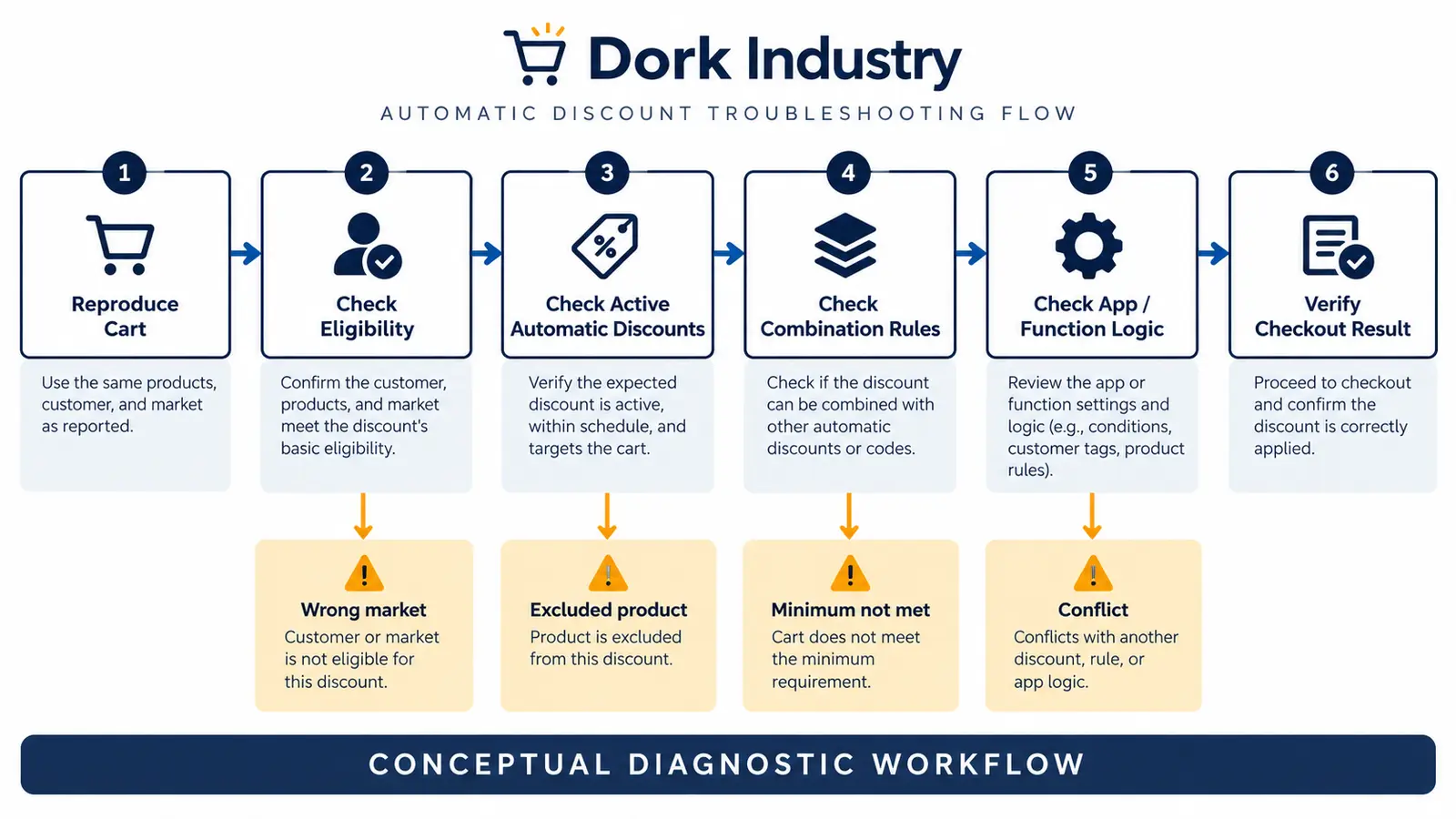
Create a clean reproduction matrix before disabling apps. Start with one eligible product and customer. Capture the discount response at cart and checkout, then add one condition at a time: customer segment, market, subscription item, automatic promotion and secondary code. This shows which condition changes the outcome.
For app-based logic, inspect the discount node, Function input and Function output. Shopify’s official Discount Function API documentation states that functions can produce product, order and shipping savings. Functions run concurrently and do not know each other’s output, so combination rules still control how candidates interact.
Do not display a guaranteed saving in theme JavaScript unless the checkout will apply the same rule. A storefront badge can estimate eligibility, but backend checkout logic remains authoritative. Dork Industry’s web development service can repair theme presentation, while custom software development supports governed app and integration logic.
How should Shopify discount behaviour be acceptance-tested?
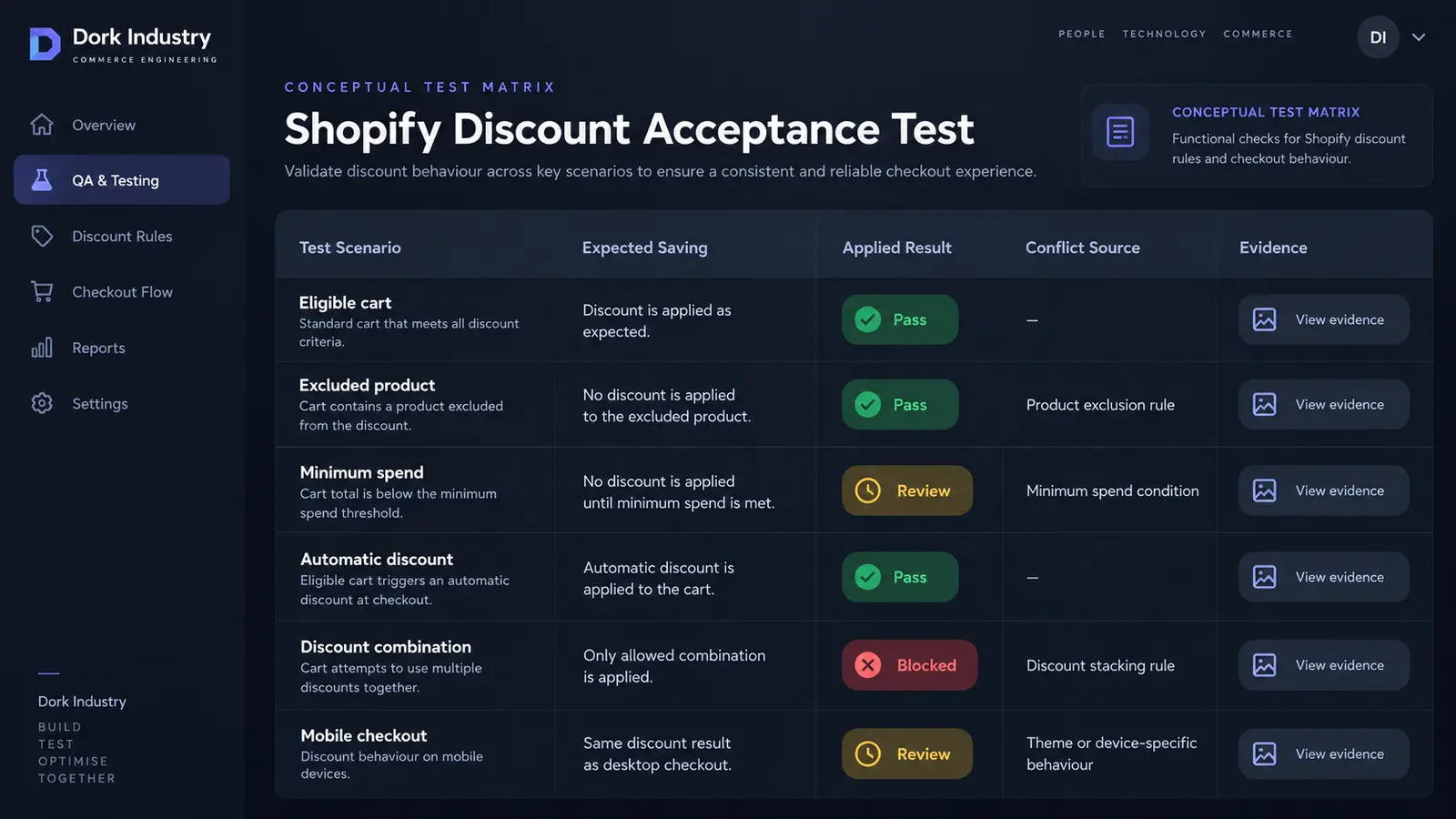
| Scenario | Expected result | Evidence |
|---|---|---|
| Eligible cart | Advertised saving applies once | Cart contents and checkout total |
| Excluded product | No saving; clear accurate message | Variant and exclusion rule |
| Below minimum | Code rejected without changing other offers | Eligible subtotal calculation |
| Automatic discount active | Documented combination or best offer applies | Both discount settings |
| Customer segment mismatch | Ineligible customer is rejected | Customer context without personal data |
| Mobile checkout | Same backend result as desktop | Device, browser and final total |
| Function retry/change | Rule remains deterministic | Function input/output and version |
Use a test product and test checkout where possible. Do not expose real customer details or promotion secrets in an ordinary support ticket. If the cart itself is failing before the discount step, use the related guide for a Shopify Add to Cart button that is not working.
When is custom Shopify development justified?
Use native configuration when one discount with standard eligibility and combinations meets the campaign. Use an app when a maintained product covers the rule and provides adequate testing and support. Build a Shopify Function or custom app when pricing depends on controlled business rules that native discounts cannot express.
Custom development may be justified for tiered B2B offers, market-specific exclusions, bundles, loyalty entitlements or product properties. It should include versioned requirements, deterministic calculations, rollback and checkout acceptance tests. If you need delivery capacity, Dork Industry offers developer staff augmentation.
What do merchants ask about Shopify discount repair?
Why does the code say it is not valid?
Read the answer
The code may be inactive, expired, restricted to a customer or market, limited by usage, or ineligible for the cart’s products and subtotal. Reproduce the same cart and account context before changing the discount.
Why does an automatic discount replace my code?
Read the answer
The offers might not permit their discount classes to combine. Shopify can choose the best eligible discount or combination. Review both discounts, product eligibility and combination settings rather than assuming one disappeared.
Can a theme prevent a Shopify discount from applying?
Read the answer
The checkout decides the actual discount. Theme code can create misleading messages, prefill a code incorrectly or build the wrong cart. Test a direct clean checkout and compare it with the customized storefront journey.
When do we need a Shopify Function?
Read the answer
Use a Function when a governed product, order or shipping rule cannot be represented safely with native discounts. Define expected inputs, exclusions, combinations and test cases before development begins.
What should we send a Shopify developer?
Read the answer
Send the expected promotion, code, products, quantities, market, customer eligibility, active automatic offers, exact error, checkout path and recent changes. Use anonymized test data and avoid sharing customer payment details.
How should a repaired discount be released?
Read the answer
Test eligible and ineligible carts, combinations, markets, customer states, mobile checkout and cancellation. Document the configuration or code version, deploy under change control and monitor support reports during the campaign.
Stuck with this issue?
Send us the error and the setup — we diagnose the cause, fix it, and show you how to prevent it from coming back.

[…] Theme code rarely controls the core hosted payment-method list, but custom carts, checkout extensions, payment customizations and apps can influence the journey or eligibility. If the cart itself is broken, use the Shopify Add to Cart repair guide. If a promotion changes the outcome, compare the Shopify discount diagnosis. […]