If Power BI scheduled refresh failed after a MySQL or PostgreSQL change, preserve the exact error and identify whether the break is in the database schema, permissions, gateway, connector, Power Query steps or semantic model. A dashboard that still opens can display yesterday’s figures, so the business risk is silent stale data rather than only a visible error.
On this page
Why has Power BI scheduled refresh failed after a database change?
A renamed or removed column, changed data type, moved database, reduced account permission or updated connector path can break a query that previously refreshed. Gateway and capacity problems can create similar symptoms. The repair starts with the refresh history and exact failing query, not with rebuilding every visual.
Microsoft’s current guidance says to verify the gateway version and gateway selection first, and notes that scheduled refresh can be disabled after four consecutive failures. It also documents credentials, type mismatch, time-out, capacity and incremental-refresh scenarios. Review Microsoft’s refresh troubleshooting guidance.
What should be captured before republishing the report?
- Semantic model, workspace, refresh attempt time and full error details.
- Last successful refresh and the database release/change ticket after it.
- Source type, server, database and gateway cluster—without secrets.
- Changed tables, views, columns, data types or permissions.
- The Power Query step and table where evaluation stops.
- Expected row count, business total and freshness timestamp for acceptance.
Need the failed layer identified before another report is republished?
Share the redacted refresh error, data-source and gateway mapping, recent database change and affected business totals. Dork Industry can scope a focused Power BI, MySQL/PostgreSQL or integration repair.
Which nine checks isolate a Power BI scheduled refresh failure?
| Check | Evidence | Likely owner |
|---|---|---|
| 1. Read refresh history | error, activity ID, time, duration | BI support |
| 2. Compare database change | DDL/view/permission release | database team |
| 3. Test schema contract | tables, columns and types | BI + database |
| 4. Verify service identity | credentials and grants | admin/database |
| 5. Verify gateway mapping | server, database, connector | gateway admin |
| 6. Verify connector/driver | gateway version and provider | platform support |
| 7. Isolate M step | first failing Power Query step | BI developer |
| 8. Check limits/performance | duration, rows, memory, folding | BI + database |
| 9. Prove dashboard freshness | row count, totals, timestamp | business owner |
1. What does the Power BI refresh history actually report?
Record the complete message, semantic model, start time, duration, activity ID and request ID. Separate authentication, gateway, source, query and capacity errors. Do not paraphrase “refresh failed” in a support ticket; the original text often identifies the failed boundary.
2. What changed in MySQL or PostgreSQL since the last successful refresh?
Compare database migrations, view definitions, renamed fields, type changes, moved schemas, server names and account grants. A new nullable column usually differs from a removed field referenced by Power Query. Treat the database release as evidence, not proof, until the failing query is reproduced.
3. Does the source still satisfy the report’s schema contract?
List the tables, views, columns and types the semantic model requires. Run read-only checks using the scheduled-refresh identity. If a column was intentionally renamed, decide whether to restore a compatibility view or update and regression-test downstream queries. Avoid silently substituting a different business field.
4. Can the scheduled-refresh identity still read every required object?
Power BI Desktop may work under a developer’s account while the service fails under gateway credentials. Test the same authentication method and minimum database grants used by the service. According to Microsoft, teams should verify credentials, the database name and permissions when the gateway reaches a server but cannot open the database. See Microsoft’s gateway troubleshooting guidance.
5. Does the gateway mapping match the semantic model?
Compare server and database values in Power BI Desktop with the configured gateway data source. Microsoft notes that matching definitions are required for the gateway to appear for scheduled refresh. Check every on-premises source in a composite model, not only the first database.
6. Is the gateway and database connector supported and current?
Confirm gateway version, connector choice and required provider on the gateway machine. The MySQL and PostgreSQL connectors have product-specific prerequisites and supported capabilities. Review the current MySQL connector documentation or PostgreSQL connector documentation before changing drivers.
7. Which Power Query step fails first?
Evaluate queries step by step in a safe development copy. Common failures follow renamed columns, changed types, expanded nested tables, merges, privacy boundaries or native SQL assumptions. Fix the earliest broken step; later visual errors may be consequences rather than separate defects.
8. Did the database change make refresh exceed a service or capacity limit?
Compare refresh duration, rows processed, query plan and folding before and after the change. A view rewrite or lost index can turn a previously folded query into a large transfer. Microsoft documents time-outs and capacity pressure, but increasing a timeout should follow query and source diagnosis—not replace it.
9. Does one green refresh prove the dashboard is correct?
No. Validate row counts, date boundaries, null/type rules, key business totals and the visible freshness timestamp. Run at least one scheduled refresh under the service identity. Ask the business owner to sign off the figures that drive operational decisions.
Where can a Power BI refresh break?
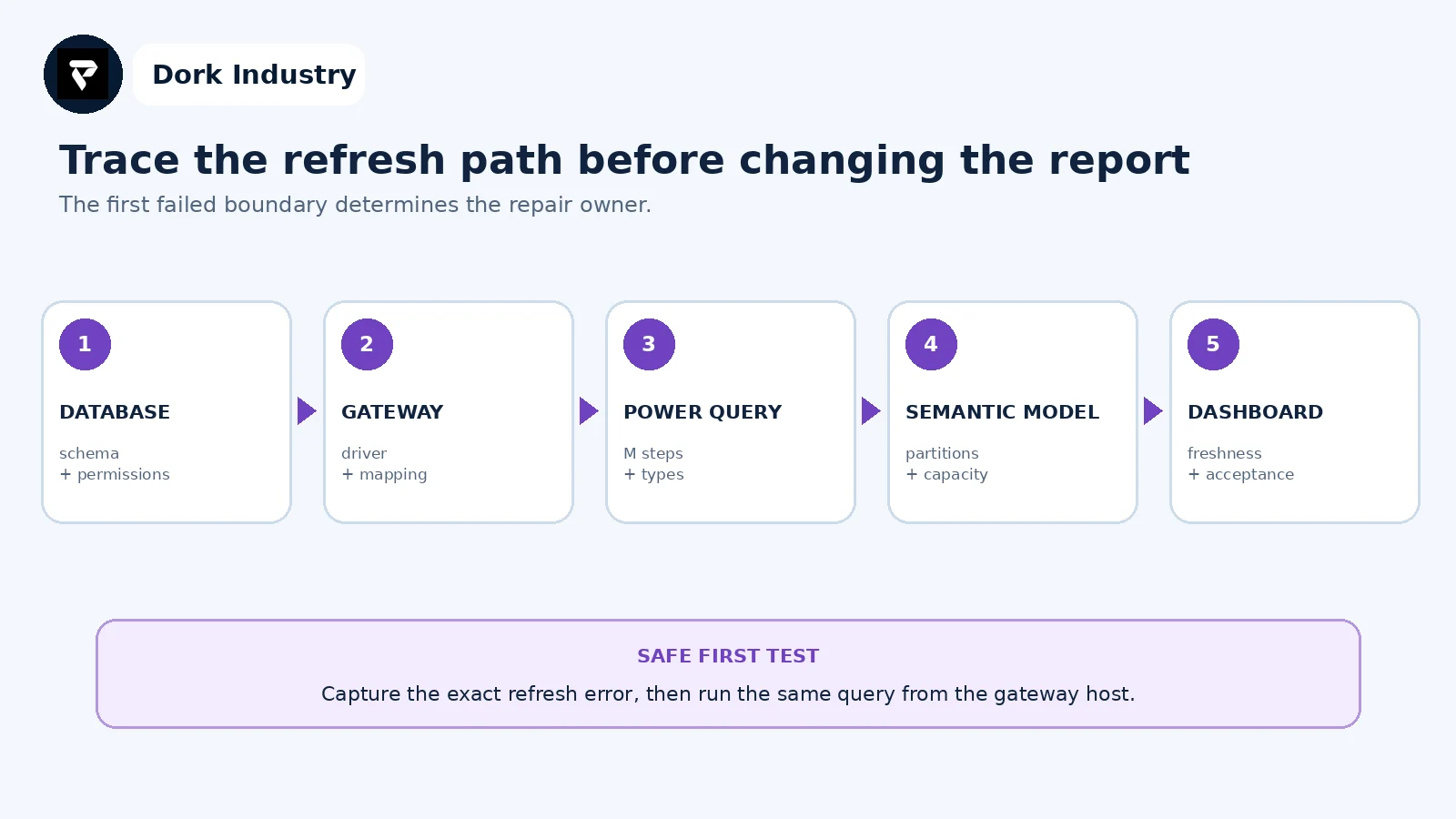
Testing from the gateway host helps distinguish database access from Power BI service configuration. A successful source query still needs the Power Query transformations, semantic model and dashboard acceptance checks to pass.
How should the repaired refresh be accepted?
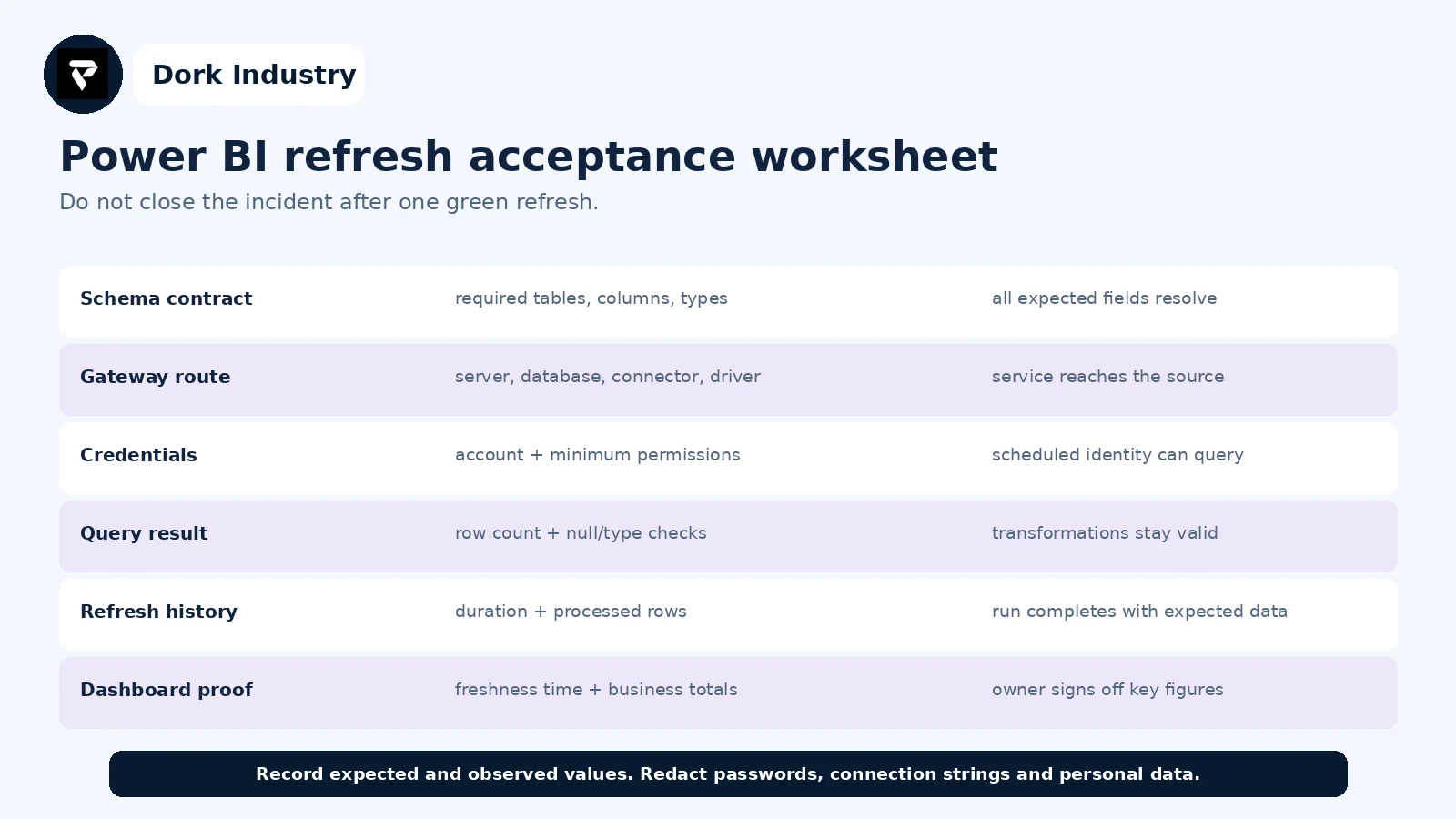
Use the worksheet for the failure and the post-repair run. It creates a small audit trail connecting the database change, technical correction and business validation. It is also a reusable test for the next schema release.
When is this a quick repair versus a reporting redesign?
| Finding | Likely scope | Professional work is warranted when |
|---|---|---|
| Renamed field or view | query or compatibility-view repair | multiple reports share the source |
| Expired or reduced permissions | credential/grant correction | production access must remain least-privilege |
| Gateway mismatch | mapping and driver repair | several sources or clusters are involved |
| Slow query after schema release | query, model and database tuning | timeouts recur or refresh windows are missed |
| Uncontrolled source changes | schema contract and release test | dashboards repeatedly break after deployments |
| Many inconsistent reports | governed data model redesign | teams disagree on definitions and totals |
How can Dork Industry help with Power BI and database refresh failures?
Dork Industry can inspect the refresh history, gateway mapping, MySQL or PostgreSQL changes, permissions, connector prerequisites, Power Query logic and model performance; repair the failing integration; add schema-change checks and acceptance tests; or scope a more reliable reporting pipeline. Work begins with authorised access and redacted evidence.
Explore Dork Industry’s IT and custom software services, industry solutions, marketing reporting automation guide and PostgreSQL operating-model comparison.
Restore trusted figures—not only a green refresh icon
Send the redacted error, last successful refresh, database change, gateway mapping and the totals that must be validated. Dork Industry can propose a repair, integration hardening or Power BI developer-support scope.
Frequently asked questions
Why does Power BI Desktop refresh while the Power BI service fails?
Desktop may use a developer’s local driver and credentials, while the service uses gateway mapping and stored credentials. Compare the identity, connector, server and database in both environments.
Can a database column change break scheduled refresh?
Yes. Removing, renaming or changing the type of a field referenced by an M step can fail evaluation. Validate the schema contract and repair the earliest broken step.
Should we republish the PBIX to fix a gateway error?
Not automatically. First verify the gateway cluster, matching data-source definition, credentials and connector. Republishing can introduce another model version without resolving source connectivity.
What evidence should be sent to a Power BI developer?
Send the full redacted refresh error, IDs and timestamp, last success, database change, source/gateway mapping, first failing query step and expected business totals. Do not send passwords or unrestricted connection strings.
Stuck with this issue?
Send us the error and the setup — we diagnose the cause, fix it, and show you how to prevent it from coming back.