
A Shopify Add to Cart button not working usually means the selected variant, product form, cart request or cart-interface update has broken. The product can appear available and the button can remain clickable while no valid variant reaches Shopify’s cart endpoint, a JavaScript error stops submission, or an app/theme conflict prevents the returned cart from appearing. Repair the failed stage rather than repeatedly replacing the button.
This is a direct sales-path failure. Paid traffic can reach a product page, select a size and still be unable to start checkout. The useful project is therefore not a cosmetic redesign: it is to reproduce the failure, locate the broken state transition, protect existing theme behaviour and prove that valid products reach the cart across the affected devices and merchandising paths.

Why is the Shopify Add to Cart button not working?
The button is only the visible trigger. A Shopify product form must submit the correct purchasable variant, quantity and selling-plan data. Many themes intercept that submission with JavaScript, call Shopify’s cart API, then refresh a cart drawer or cart count. A defect at any stage can make the click appear ineffective.
According to Shopify’s Ajax Cart API documentation, themes can add one or more variants with a locale-aware /cart/add.js request. According to Shopify theme-development documentation, product forms and variant selection are theme responsibilities. That does not prove every failure is custom code: inventory, publication, markets, selling plans and app blocks must also be checked.
Why does a broken Add to Cart flow affect revenue immediately?
- The buyer cannot progress: an available product never enters the cart.
- The failure can be partial: only one variant, quick-view modal, language, market or mobile browser may fail.
- Analytics can mislead: product views continue while cart additions drop for a technical reason.
- Support lacks evidence: “it works for me” hides device- or path-specific JavaScript errors.
If the issue is a navigation or mobile-menu problem rather than the product form, see our guide to repairing a Shopify header that is not updating. Stores with duplicate downstream orders should instead review the Shopify duplicate-order integration guide.
What can a Shopify merchant check safely before hiring a developer?
- Record the exact product URL, variant combination, device, browser, market and customer state.
- Confirm that the variant is active, available and published to the Online Store sales channel.
- Test the live theme and an unmodified theme preview without publishing the preview.
- Compare the normal product page, quick view, featured-product section and direct variant URL.
- Capture the visible error, browser console error and failed network request without sharing private tokens.
- List the theme, app or custom-code changes made immediately before the failure.
Shopify’s official theme troubleshooting guidance recommends isolating the source by comparing themes and devices. Use previews and backups; do not disable production apps blindly during active sales.
Where can the Shopify product-to-cart flow break?
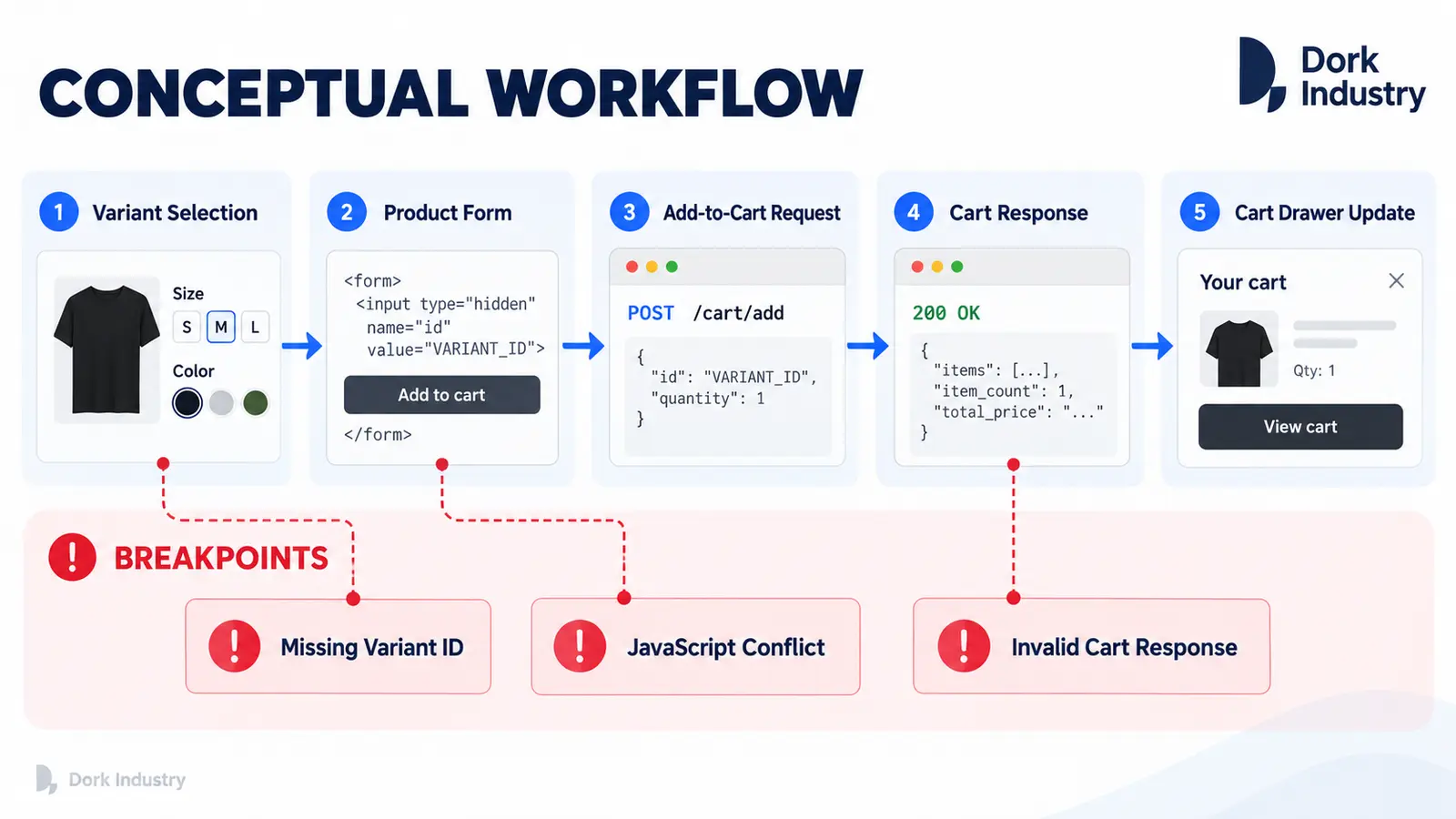
| Breakpoint | Evidence | Professional repair |
|---|---|---|
| Variant selection | URL and hidden variant ID disagree | Repair option-to-variant state and unavailable combinations |
| Product form | Missing ID, duplicate form or invalid selling-plan data | Restore valid semantic form submission |
| JavaScript handler | Console error or click listener replaced | Resolve theme/app conflict without global workarounds |
| Cart request | Failed /cart/add.js response |
Handle Shopify’s response and show a useful customer error |
| Cart drawer | Item added but UI count/drawer stays stale | Refresh the correct sections or use the theme’s cart events |
| App block | Failure only with bundles, subscriptions or upsells | Align the extension with the theme’s product-form contract |
What should a Shopify Add to Cart repair include?
A repair should start with a reproducible failure matrix and an untouched theme copy. Dork Industry can handle this as a Shopify storefront development project, extend the cart through custom software and integration development, or provide a dedicated engineer through developer staff augmentation.
The developer should trace option selection, the submitted variant ID, product-form events, the cart request, returned error/success payload and cart UI update. The scope must also preserve accessibility, localization, Shopify Markets, subscriptions, bundles, inventory rules and theme-editor compatibility where those features are in use.
When is a configuration change enough?
Configuration may be enough when the product is unpublished, the selected variant is unavailable, or an app block is enabled incorrectly. Theme development is warranted when the form emits the wrong state, an error prevents submission, a custom cart fails to render Shopify’s response, or multiple storefront components implement incompatible cart logic.
How should the repaired Add to Cart flow be acceptance-tested?
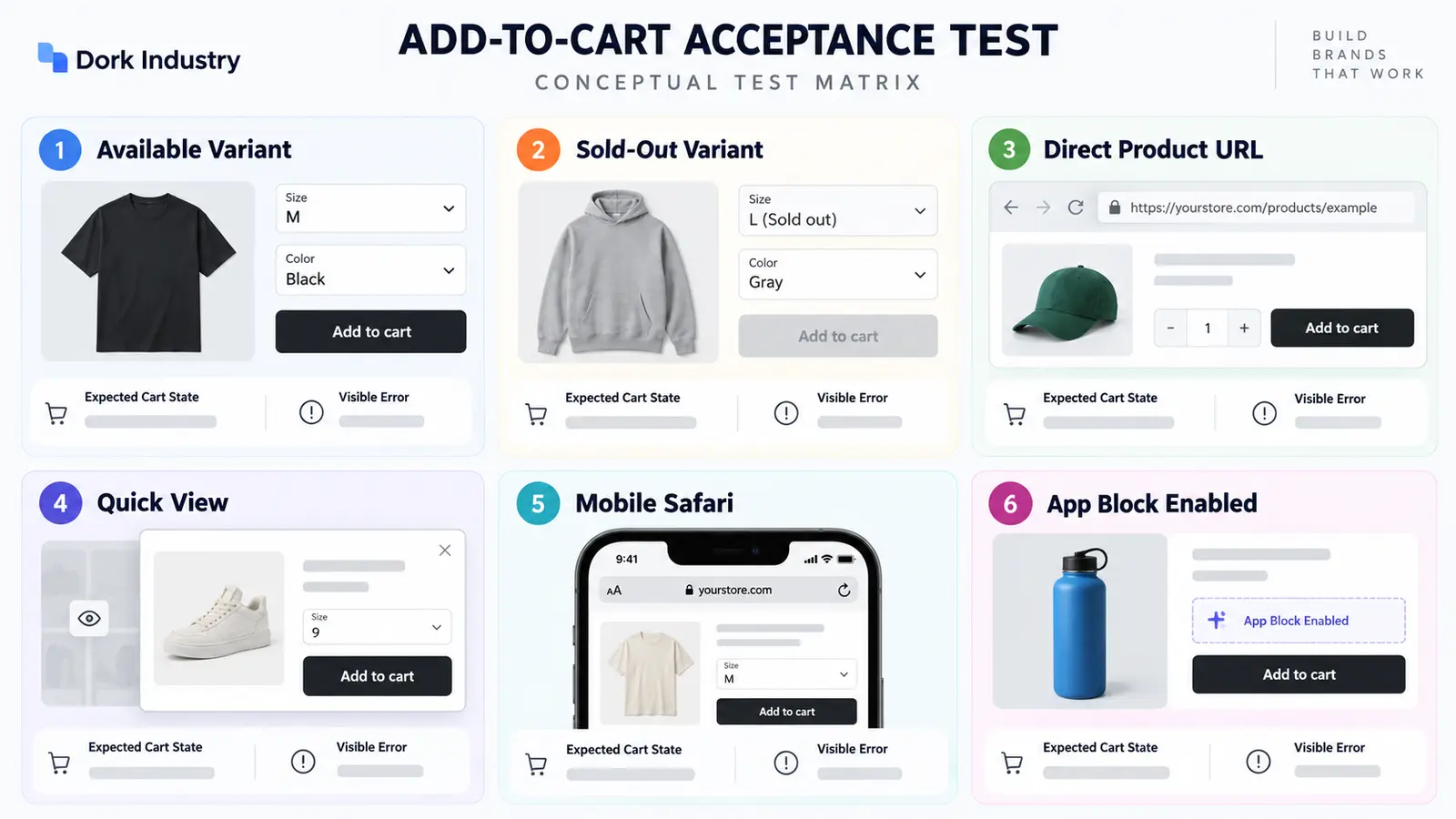
| Scenario | Expected outcome | Evidence |
|---|---|---|
| Available variant | Correct variant and quantity enter cart once | Cart line ID, title, options and quantity |
| Sold-out variant | Add action is disabled or returns a clear message | Visible accessible state |
| Direct variant URL | Selector and submitted ID agree | URL, chosen options and form data |
| Quick view | Modal uses its own correct product form | No duplicate handler or stale variant |
| Mobile Safari | Tap adds once and cart UI updates | Network response and visible cart state |
| App block enabled | Bundle/subscription data remains valid | Expected attributes or selling plan |
Run the matrix in a preview theme first. After controlled publication, monitor cart requests and customer reports across the priority devices. A repair is complete only when the chosen product state, Shopify response and visible cart state agree.
Need a Shopify cart failure diagnosed?
Send Dork Industry the affected product URL, variant combination, theme name, device/browser and approximate time the issue appeared. Dork Industry can assess the theme and app interaction, scope a contained repair, implement a custom product workflow or provide a Shopify developer resource.
Frequently asked questions
Why does Add to Cart work for some products only?
The affected products may use different option combinations, selling plans, templates, app blocks or availability rules. Compare one working and one failing product to find the first difference in submitted form data.
Why is the button clickable but nothing happens?
A JavaScript error may stop the handler before the request, or the request may fail without a visible error. Inspect both the browser console and network response.
Can a Shopify app break the product form?
Yes. Bundle, subscription, personalization, upsell and tracking apps can add fields or listeners. Reproduce the issue in a safe theme preview before changing a production app.
Why does the item add but the cart drawer stay empty?
The cart request may succeed while the theme fails to refresh the drawer sections. Confirm the returned cart, then repair the theme’s section-rendering or cart-event logic.
Should I publish a fresh theme to fix it?
Not before testing. A fresh theme can remove important customization and app behaviour. Use a preview to isolate the defect, then port or repair only the required changes.
What should I send a Shopify developer?
Provide the product URL, variant, market, device/browser, theme version, recent changes, reproduction steps, screenshot and sanitised console/network errors. Never send passwords or private app tokens in an enquiry.
Stuck with this issue?
Send us the error and the setup — we diagnose the cause, fix it, and show you how to prevent it from coming back.

[…] Theme code rarely controls the core hosted payment-method list, but custom carts, checkout extensions, payment customizations and apps can influence the journey or eligibility. If the cart itself is broken, use the Shopify Add to Cart repair guide. If a promotion changes the outcome, compare the Shopify discount diagnosis. […]