Direct answer: If an employee clicked a phishing link, ask them to stop interacting with the message and report exactly what happened. Preserve the email and time of the click. If they entered credentials, reset the affected password from a trusted device and revoke active sessions. If they opened a file or installed software, isolate the device and begin an incident investigation.

The click is only the starting fact. The response depends on whether the employee merely opened a web page, entered a password, approved a sign-in, downloaded a file, ran software, shared payment details or completed a transfer. Treat those as different incident paths. Do not shame the employee: delayed reporting removes evidence and gives an attacker more time.
Employee clicked a phishing link: what should you do immediately?
Stop, report and preserve. Do not keep testing the link, reply to the sender or delete the evidence. Tell the internal IT or security contact what was clicked, on which device, at what time and what happened next. A fast, accurate report is more useful than guessing whether the message was malicious.
- Stop interacting: close the page or document without entering more information.
- Report through a trusted channel: call the helpdesk or use the company’s known incident channel, not contact details inside the suspicious message.
- Describe the action: clicked only, entered credentials, approved MFA, opened a file, installed software, or made a payment.
- Preserve details: keep the original email, sender, subject, link, attachment name and approximate time.
- Follow containment instructions: the response team may ask for a password reset, session revocation or network isolation.
According to NIST, businesses should follow their incident-response plan. NIST advises businesses to change affected passwords, contact the financial institution if an account was compromised, notify the right people internally and follow the organisation’s incident-response plan. Its guidance also recommends multifactor authentication, email filtering and employee reporting procedures. Read NIST’s small-business phishing guidance.
What happened after the employee clicked?
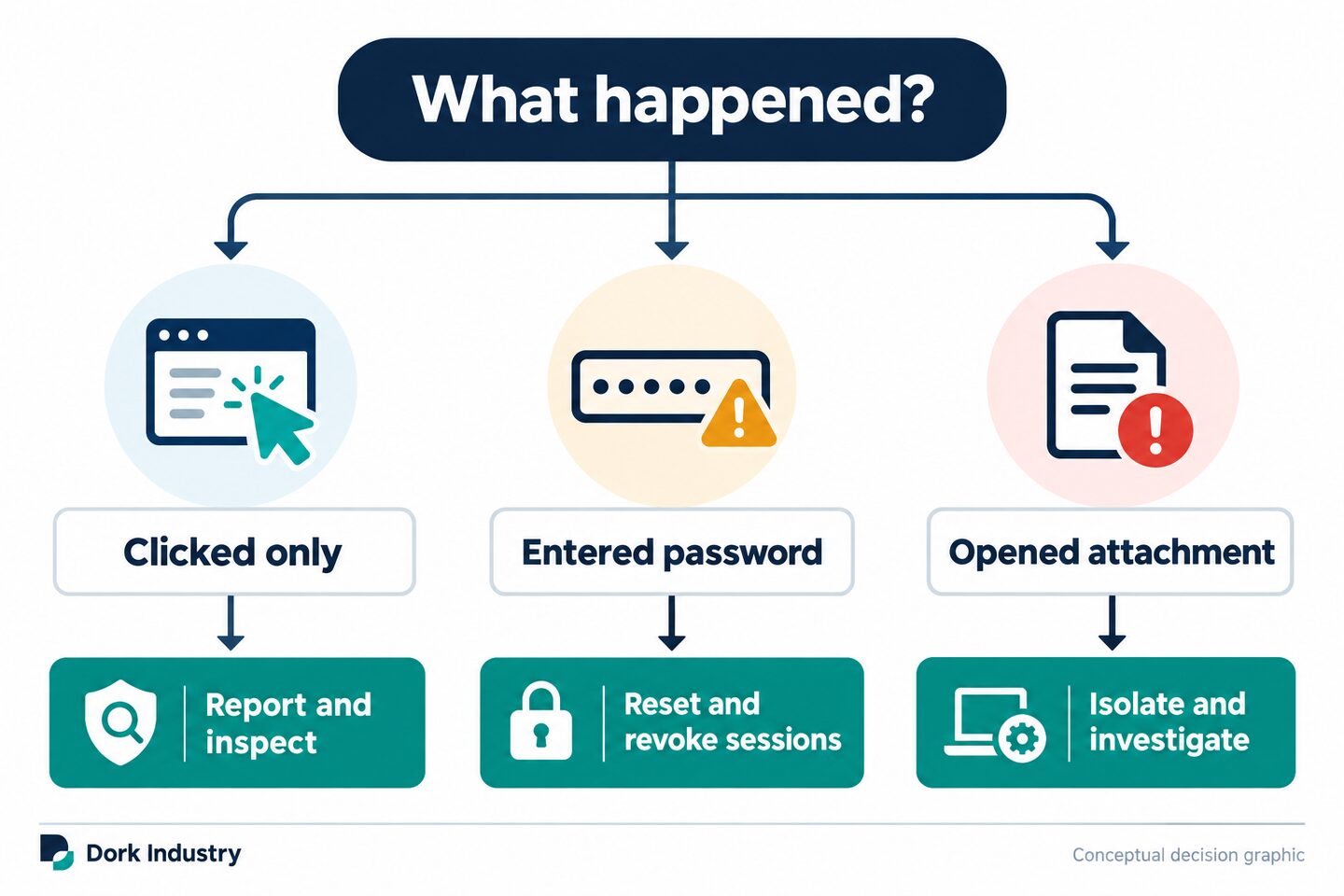
| Observed action | Immediate priority | What the response team should verify |
|---|---|---|
| Link clicked; nothing entered | Report and inspect | URL, redirects, browser downloads, endpoint events and other recipients |
| Password or OTP entered | Reset and revoke | Sign-ins, sessions, MFA changes, app consent and password reuse |
| MFA prompt approved | Revoke access | New devices, tokens, authentication methods and active sessions |
| Attachment opened or macro/software run | Isolate and investigate | Processes, persistence, endpoint alerts, network connections and file activity |
| Bank or supplier details changed | Call known contacts | Payment status, mailbox compromise, altered invoices and affected counterparties |
What if the employee only opened the link?
A click alone does not prove compromise, but it still deserves review. Capture the destination URL and time, check whether a file downloaded, inspect browser and endpoint telemetry, and find other recipients of the same message. Do not ask employees to revisit the link to reproduce the problem.
What if credentials were entered?
Use a known clean device to reset the password for the affected account and any other account where the same password was reused. Revoke active sessions and refresh tokens, review recent sign-ins, and verify that no new MFA method, forwarding rule, delegate, application consent or recovery option was added. A password change by itself may not end an existing attacker session.
What if an attachment or program was opened?
Disconnect the device from Wi-Fi, Ethernet and other networks if instructed by the incident lead, but avoid wiping or casually reimaging it before useful evidence is collected. Record what opened and whether the employee enabled macros, entered an administrator password or installed an application. The containment plan should protect shared drives and business systems without destroying the investigation trail.
How do you organise a first-hour phishing response?
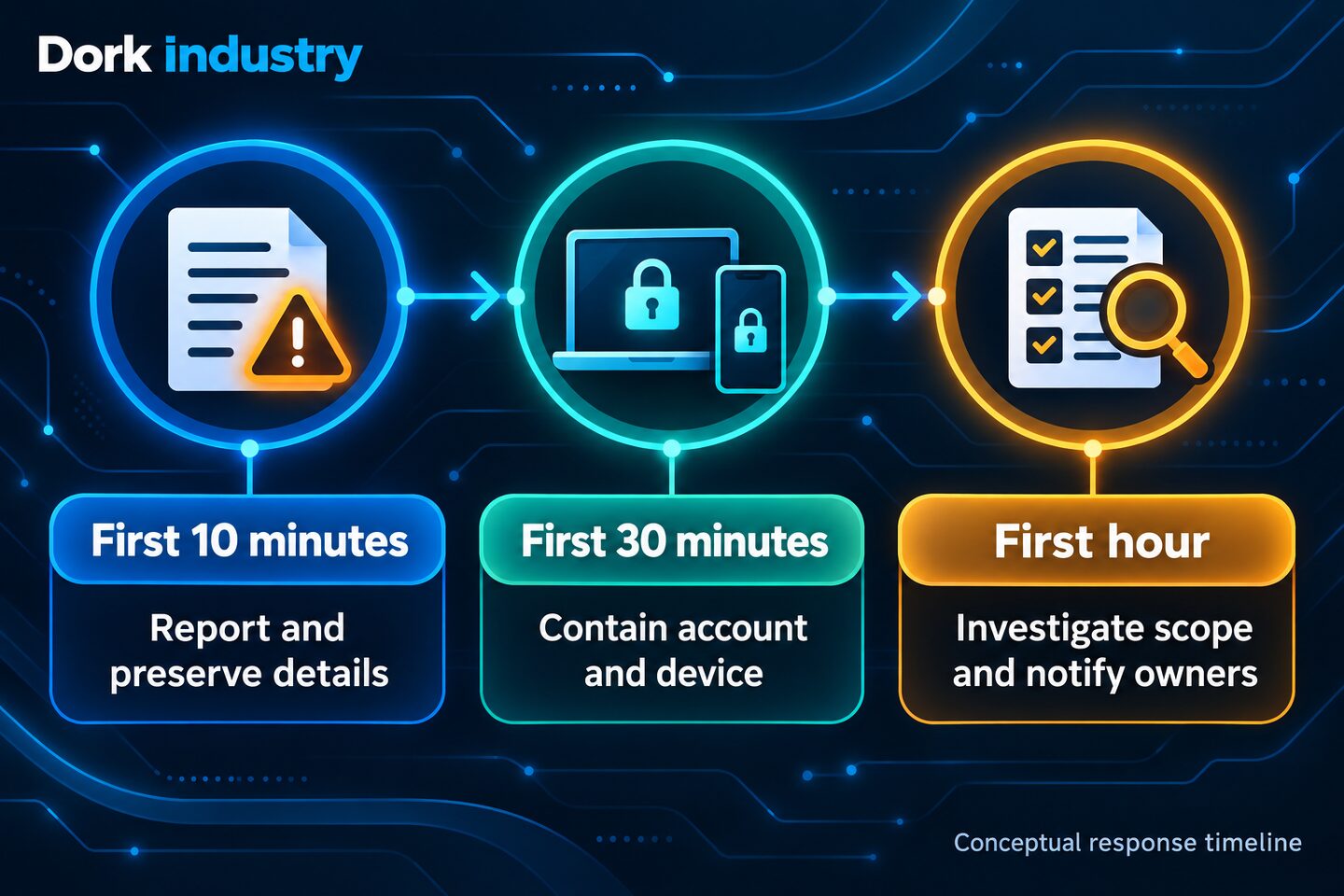
What should you record in the first 10 minutes?
- Assign an incident owner and open an incident record.
- Record the employee, device, account, time, message and observed action.
- Preserve the original message and headers where available.
- Determine whether money, credentials, sensitive data or executable content is involved.
- Use a trusted channel to warn the employee not to continue interacting.
How should you contain the incident in the first 30 minutes?
- Reset affected credentials from a trusted device and revoke sessions where required.
- Isolate a device when file execution or malware is suspected.
- Search for the message across other mailboxes and prevent further interaction.
- Contact the bank through a verified number when a financial transaction is involved.
- Preserve audit logs before short retention windows or routine cleanup remove evidence.
What should you investigate during the first hour?
- Review sign-ins, mailbox rules, delegates, authentication changes and application consent.
- Review the device, downloads, processes and security alerts around the click time.
- Identify all recipients and anyone who took similar action.
- Decide whether customers, suppliers, insurers, counsel, regulators or law enforcement must be engaged.
- Document every containment action, owner, timestamp and outcome.
Microsoft’s phishing investigation playbook similarly begins by reviewing the original message, finding all recipients, examining links and attachments, identifying the endpoint and checking sign-in and audit activity. Review Microsoft’s phishing investigation workflow.
Why should credential exposure receive immediate attention?
According to Verizon, its 2025 Data Breach Investigations Report analysed more than 22,000 security incidents, including 12,195 confirmed data breaches. The report found credential abuse was an initial attack vector in 22% of the breaches studied. These historical, global findings are not a Delhi-specific rate or the probability that a particular click caused a breach. They explain why entered passwords, active sessions and authentication changes deserve investigation alongside the device.
What should a phishing incident worksheet contain?
This original worksheet gives a small business one shared record while the response is moving. Do not put passwords, OTPs or copied sensitive customer data into it.
| Field | What to record | Owner |
|---|---|---|
| Detection | Reporter, time, channel, email subject and sender | Helpdesk |
| User action | Clicked, typed password, approved MFA, opened file or paid | Incident lead |
| Assets | Account, device, mailbox, business application and data involved | IT/security |
| Containment | Password reset, sessions revoked, device isolated, message removed | Assigned technician |
| Scope | Other recipients, suspicious sign-ins, changed rules and endpoint findings | Investigator |
| External actions | Bank, insurer, counsel, affected party or authority contacted | Management |
| Closure | Root cause, recovery evidence, monitoring and prevention tasks | Incident owner |
Hypothetical example: At 10:12, an accounts employee reports entering a Microsoft 365 password on a page reached through a supplier-themed email. IT resets the password from a managed device, revokes sessions, verifies MFA methods, checks sign-ins and searches for the same message. A previously unseen forwarding rule is found and removed, then the finance lead calls the supplier through a known telephone number. This is an illustrative test case, not a Dork Industry customer result.
What should the technical investigation check?
The exact tools vary, but the questions stay consistent:
- Message: Who sent it, how was it authenticated, what URL or attachment did it contain and who else received it?
- Identity: Were there unusual sign-ins, impossible travel, new devices, changed MFA, token use or added application consent?
- Mailbox: Were forwarding rules, delegates, inbox rules or sent messages changed?
- Endpoint: What browser, process, file or network activity occurred around the event?
- Business workflow: Did the attacker see invoices, supplier conversations, payroll data or payment instructions?
- Spread: Did other employees receive or act on the same lure?
- Recovery: Is access restored, persistence removed, monitoring enabled and evidence retained?
Dork Industry states that its wider service network includes specialised security and compliance advisory and a 24/7 helpdesk. Those capabilities are relevant when a business needs a repeatable reporting path, managed support and a security improvement plan rather than a one-time password reset. Learn more about Dork Industry’s service approach and managed IT services.
What is specifically relevant for Delhi businesses?
Delhi businesses often coordinate payments and operations across offices, clinics, warehouses, field teams and external accountants. A compromised mailbox can therefore affect more than one location. For example, an accounts team in Naraina may exchange supplier documents with a warehouse in Wazirpur, while an operations team in Okhla uses the same cloud identity platform. That makes identity logs, shared-mailbox review and verified supplier callbacks more useful than treating the click as an isolated laptop issue.
Delhi Police’s cybercrime information includes email fraud, business email compromise and phishing-vishing among the incident types handled through its cyber-safety and reporting ecosystem. Businesses should preserve records and use official reporting channels where appropriate. Visit the Delhi Police cybercrime portal. Reporting and notification decisions can depend on facts and applicable obligations, so involve qualified legal and incident-response professionals rather than relying on a generic deadline.
How do you prevent the next phishing incident?
- Create one reporting method that employees can use without fear of blame.
- Use phishing-resistant MFA where appropriate and reduce password reuse.
- Configure email authentication, filtering and impersonation protections.
- Keep endpoint protection, browser and operating systems managed and updated.
- Protect finance changes with a known-number callback and two-person approval.
- Retain the identity, email and endpoint logs needed for an investigation.
- Run tabletop exercises using real roles and a safe simulated message.
- Turn each incident into assigned fixes with owners and due dates.
For prevention-focused controls, also review Dork Industry’s guide to solving common email-security problems.
Measure preparedness, visibility and commercial outcomes separately
| Layer | Useful measures | What it answers |
|---|---|---|
| Incident readiness | Report time, containment time, exercise completion, unresolved actions | Can the team respond consistently? |
| Search/AEO | Relevant queries, impressions, clicks and extracted answers | Does this guide reach the right problem? |
| Observed AI visibility | Brand mentions, cited URLs and AI referral sessions | Is Dork surfaced for the topic? |
| Commercial | CTA clicks, consultations, qualified leads and projects | Does useful guidance create business? |
Frequently asked questions
Is clicking a phishing link always a security breach?
No. A click may lead to a harmless, blocked or malicious destination. The business should still record and inspect it because redirects, downloads, browser activity and follow-on authentication determine the actual risk.
Should the employee delete the phishing email?
Not before it is reported and preserved through the organisation’s process. The original message, headers, sender, URL and attachment information can help investigators find other recipients and understand what happened.
Should we disconnect the computer immediately?
If a file ran, malware is suspected or the incident lead directs it, disconnecting network access can help containment. Avoid wiping or reimaging the device before evidence is collected. For a link-only event, the response team should make the decision based on observed activity.
Is changing the password enough after credentials were entered?
Not necessarily. Revoke active sessions and tokens, review sign-ins, verify MFA and recovery methods, and check mailbox rules, delegates and application consent. Also change reused passwords on other services.
What if the employee approved an MFA prompt?
Treat it as possible account access. Revoke sessions, verify authentication methods, review sign-ins and investigate what the account could access. Reset credentials through a trusted path according to the organisation’s identity procedure.
What if supplier bank details were changed?
Stop pending payments and call the bank and supplier using independently verified contact details. Preserve the email chain and involve finance leadership and incident-response contacts. Do not rely on reply email or phone details contained in the suspicious message.
Who should own a phishing incident?
Assign one incident owner who coordinates IT or security, the affected business team, management and any external specialists. Financial, legal, insurance and notification decisions need named owners rather than being left to the reporting employee.
Can Dork Industry help a Delhi business prepare for phishing incidents?
Dork Industry provides security and compliance advisory and managed support capabilities. A consultation can map the reporting path, identity and endpoint controls, investigation evidence and response responsibilities for the business’s actual environment.
Next step: Run a 30-minute tabletop exercise using the worksheet above. Give the team a hypothetical phishing email, decide which path applies and record who performs every action. The gaps found in rehearsal are safer and cheaper to fix than gaps discovered during a live incident.