
WooCommerce stock not reducing after order is usually an order-state, product-data, custom-hook or external-sync failure—not simply a wrong stock number. A paid order can remain pending, a variation can manage stock differently from its parent, custom code can bypass the normal reduction event, or an ERP can write an older quantity back into WooCommerce.
The commercial risk is immediate: the storefront can keep selling inventory that operations has already allocated. Dork Industry can diagnose the order lifecycle, repair WooCommerce customisation, integrate inventory systems and provide a WooCommerce developer for controlled remediation.

Why does WooCommerce stock not reducing after order matter?
If an order is accepted but sellable stock remains unchanged, the same units may be promised again. Warehouse staff then discover the shortage after payment, support handles substitutions or cancellations, and marketplace or ERP quantities can drift further. The first objective is to identify which system owns the quantity and which event failed—not to manually subtract stock and hide the cause.
Record one affected order ID, product and variation IDs, quantity before and after, payment method, order-status history, order notes, timestamps, and any external inventory messages. Use test data and remove customer payment details before sharing evidence.
What should you check before changing WooCommerce code?
- Product setting: confirm stock management is enabled at the correct simple product or variation.
- Order state: compare payment confirmation with the status and order notes.
- Variation ownership: check whether the variation or parent product manages the quantity.
- One-order scope: determine whether every gateway fails or only one payment path.
- Recent changes: list plugin updates, custom snippets, checkout work and ERP/WMS releases.
- External writes: check whether another system restores an older number after WooCommerce reduces it.
Do not bulk-edit inventory until you preserve evidence. A manual correction may protect sales temporarily, but it can erase the sequence needed to repair the integration.
Which failures cause WooCommerce stock not to reduce?
| Observed behaviour | Likely failure area | Commercial repair |
|---|---|---|
| Only pending orders fail | Gateway callback or status transition | Repair payment confirmation and idempotent status handling |
| Simple products work; variations fail | Variation stock ownership or imported data | Correct product data and migration mapping |
| Stock drops, then returns | Cancellation, failed status or external write-back | Trace status history and sync ownership |
| Only API-created orders fail | Custom integration bypasses expected lifecycle | Use supported order APIs and explicit stock workflow |
| Quantity differs across channels | ERP, WMS or marketplace race condition | Define source of truth, versioning and reconciliation |
| Some orders reduce twice | Duplicate webhook or non-idempotent custom code | Add event keys and duplicate protection |
WooCommerce’s official code reference documents that wc_reduce_stock_levels() reduces items only when stock has not already been reduced for that order. This idempotency is important: custom code should not blindly subtract quantity on every callback.
If a Razorpay order remains pending even after payment, diagnose the payment callback first using our related guide on a WooCommerce Razorpay order stuck in pending payment. If the checkout itself never finishes, review the WooCommerce checkout loading repair guide.
How should a developer diagnose the stock reduction workflow?
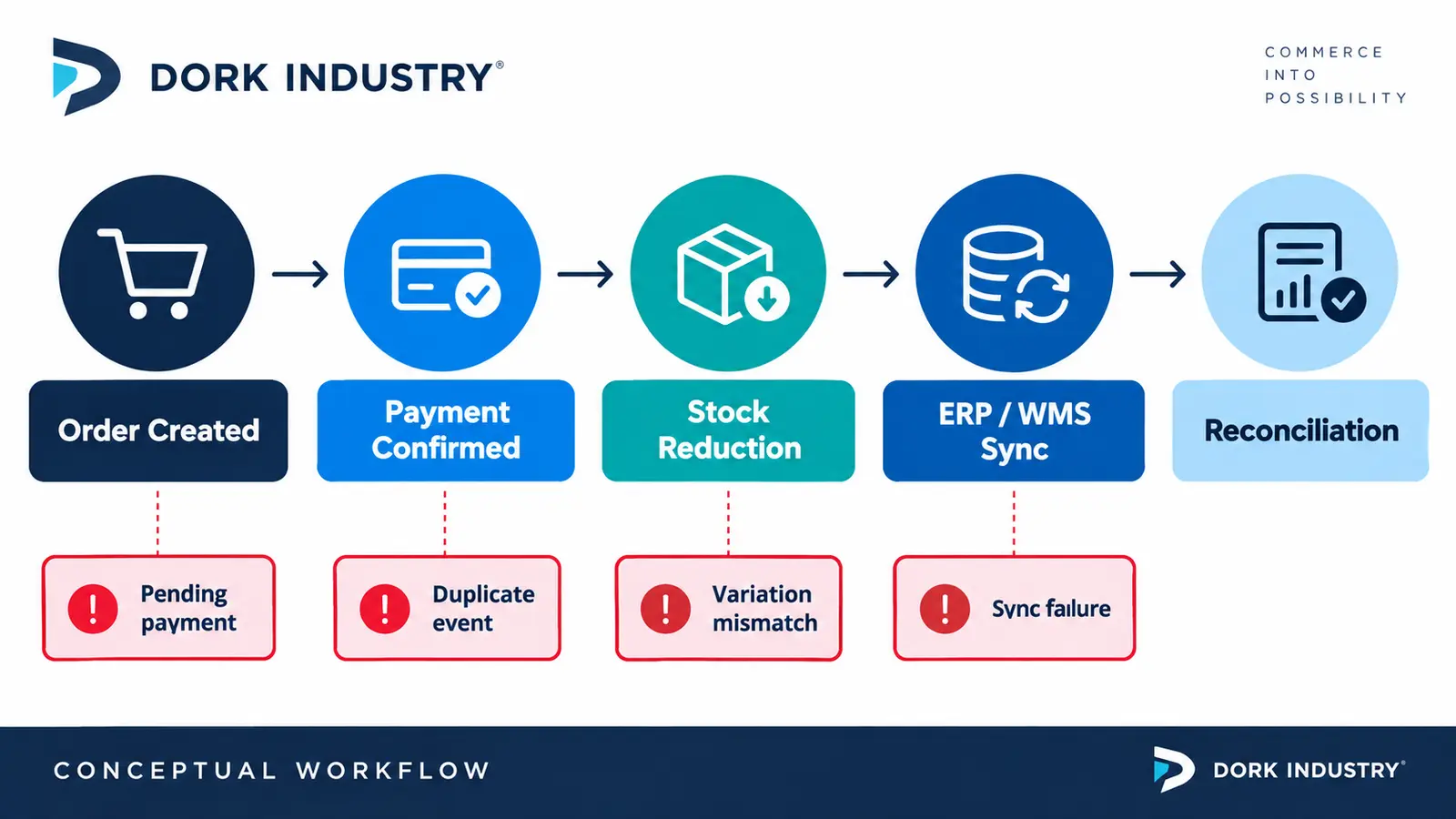
Build a timeline for one controlled order: cart quantity, order creation, gateway acknowledgement, payment-complete event, status transition, stock-change order note, product lookup-table update, webhook dispatch and external acknowledgement. Each step should have one timestamp and correlation identifier.
Then compare a working gateway with the failing gateway using the same product. If both fail, isolate product configuration and custom hooks. If only one fails, inspect the gateway callback, signature validation, delayed notifications and status mapping. Review logs before disabling plugins on a live store.
Dork Industry’s web development service covers WooCommerce diagnosis and customisation. Where stock must coordinate with an ERP, WMS or marketplace, our custom software development service can scope the integration, audit trail and reconciliation workflow.
How should WooCommerce ERP or WMS stock sync work?
Choose an explicit source of truth for each quantity. WooCommerce may own online available-to-sell while an ERP owns physical inventory, but the transformation and timing must be documented. Every event needs an order or movement ID, product/variation mapping, quantity delta, timestamp, version and outcome.
Use idempotent consumers so a retried payment or webhook does not subtract twice. Reject stale absolute-quantity updates or reconcile them against a newer version. Queue temporary failures and expose exceptions for human review instead of silently discarding them. Schedule a reconciliation report comparing WooCommerce, ERP/WMS and allocated orders.
A Shopify integration has similar ownership risks; see the related analysis of Shopify ERP inventory sync and overselling. The implementation differs, but the need for source-of-truth rules and idempotency remains.
How should a WooCommerce stock repair be acceptance-tested?
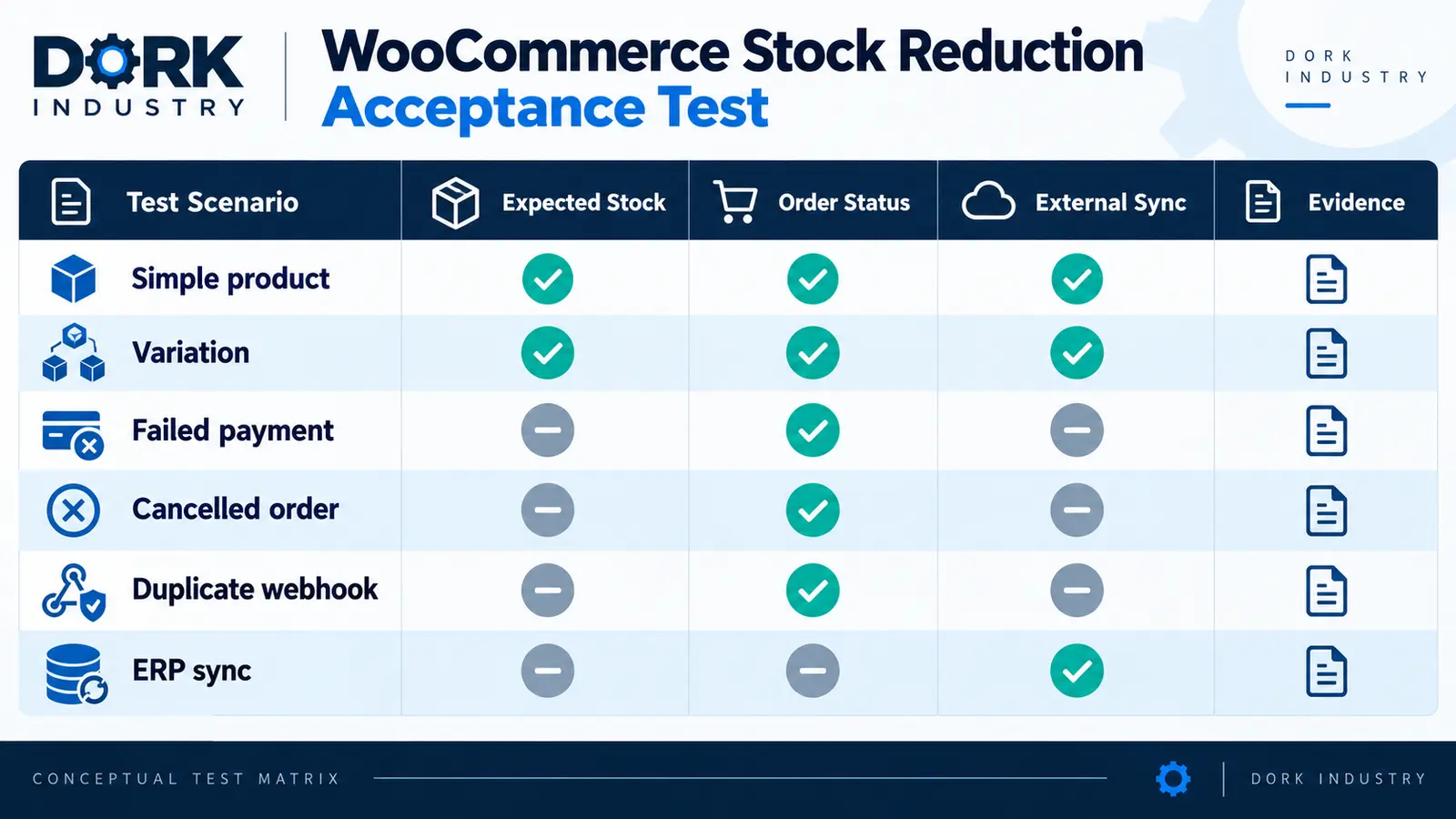
| Test case | Expected inventory behaviour | Required evidence |
|---|---|---|
| Paid simple product | Reduce once at the designed lifecycle point | Order note, before/after quantity and event ID |
| Paid variation | Reduce the correct stock-owning record | Variation and parent IDs |
| Failed payment | No permanent reduction | Status history and gateway message |
| Cancelled order | Restock only under the approved policy | Cancellation and restock note |
| Duplicate webhook | No second reduction | Repeated event ID and unchanged second result |
| ERP/WMS retry | Converge without stale overwrite | Queue, version and reconciliation result |
Run tests in staging with the same plugin versions and representative integrations. After release, place a controlled production order, verify the audit trail and monitor stock exceptions. Keep rollback steps for custom hooks, gateway changes and connector deployments.
When should you hire a WooCommerce developer?
Use internal configuration checks when the issue is limited to a disabled stock option or incorrect variation data. Hire a developer when paid orders remain in the wrong status, custom code creates orders, stock reduces twice, integrations overwrite values, or the failure spans multiple systems.
A professional repair should deliver a reproducible test, root-cause evidence, the smallest safe change, acceptance results and rollback. If you need temporary delivery capacity, Dork Industry’s staff augmentation service provides a route to hire development resources for WooCommerce and integration work.
What do store teams ask about WooCommerce stock repair?
When does WooCommerce normally reduce stock?
Read the answer
Reduction depends on the order lifecycle and the payment path. Diagnose the actual payment confirmation, status transition and order notes for the affected gateway instead of relying only on what the customer-facing page displayed.
Why did stock reduce and then increase again?
Read the answer
The order may have moved to a status that releases stock, or an ERP, WMS or import may have written an older quantity back. Compare the order timeline with product updates and external integration logs.
Can a product variation cause the wrong stock result?
Read the answer
Yes. A variation can manage its own stock or rely on another product record. Confirm which record owns inventory and whether imported SKUs map each variation to the correct external item.
Should we call the WooCommerce stock function manually?
Read the answer
Not as a blind fix. First identify why the expected lifecycle did not run. Any custom invocation needs duplicate protection, order-level evidence, compatible status handling and tests for retries, failures and cancellations.
How do we prevent duplicate webhooks reducing stock twice?
Read the answer
Store the provider event ID or another idempotency key and return the prior result for a retry. Also use the order’s stock-reduction state and test delayed, duplicated and out-of-order callbacks.
What should we send a WooCommerce developer?
Read the answer
Provide an anonymized order ID, product and variation IDs, payment method, status and notes, stock before/after, exact timestamps, recent changes and relevant connector logs. Do not send card details or customer secrets.
Need help with your store?
Book a free consultation — we find the cause, fix it, and make sure it stays fixed through your next campaign.

[…] Theme code rarely controls the core hosted payment-method list, but custom carts, checkout extensions, payment customizations and apps can influence the journey or eligibility. If the cart itself is broken, use the Shopify Add to Cart repair guide. If a promotion changes the outcome, compare the Shopify discount diagnosis. […]