
Next.js 404 after deployment means the production request cannot reach a route or file that the deployed application can serve. The cause may be a missing dynamic path, the wrong project root or output directory, a basePath mismatch, an incompatible static export, a proxy rewrite, or an intentional notFound() result. Protect campaigns and customer journeys by collecting the exact failing URL, response headers, deployment ID and logs before changing routing code.

On this page
- Why does a production 404 matter?
- What evidence should be captured first?
- Which failures cause a Next.js 404?
- How should developers isolate the layer?
- Static export or server runtime?
- Repair, reconfigure or rebuild?
- How should the fix be tested?
- When should you hire a developer?
- Frequently asked questions
Why does a Next.js 404 after deployment become a business problem?
A homepage can work while campaign landing pages, product details, account routes, translated paths or API endpoints return 404. That can waste paid traffic, interrupt onboarding, hide inventory or prevent search engines from retrieving previously valid URLs. Do not define the incident as “the website is down.” Define the affected route pattern, audience, deployment and business journey.
A successful build only confirms that the build command completed. Vercel’s current guidance notes that a deployment can still show 404 when the project root, output directory or framework configuration points to content that does not contain the expected paths. See its deployed-project 404 guidance.
What evidence should you capture before repairing a production 404?
- Exact URL: preserve case, query, locale, trailing slash and sub-path.
- HTTP evidence: save status, response headers, redirect chain and a HAR file.
- Scope: compare homepage, direct URL, client navigation, refresh, dynamic route and API route.
- Deployment identity: record commit, build ID, target environment, domain alias and rollback candidate.
- Runtime evidence: capture build, function, proxy and application logs for the same timestamp.
- Route inventory: compare the repository structure and generated output with the expected URL pattern.
Do not paste environment values, tokens, customer identifiers or full logs into a public ticket. A useful repair brief contains sanitized evidence, reproduction steps and the last known working deployment.
Which failures commonly cause a Next.js 404 after deployment?
| Observed pattern | Likely layer | Controlled response |
|---|---|---|
| Every route returns 404 | Wrong project root, output directory, domain or missing deployment | Verify deployment contents and domain alias before editing application routes |
| Homepage works; direct nested URL fails | Route generation, static hosting or proxy fallback | Compare generated paths, runtime model and rewrite rules |
| Only new dynamic slugs fail | generateStaticParams, dynamicParams or data lookup |
Trace the param and confirm whether runtime generation is supported |
| App works at root but not under /portal | basePath, asset prefix or reverse-proxy mismatch |
Align build-time prefix, links, assets and upstream routing |
| Page loads; JS/CSS return 404 | CDN path, asset prefix or stale deployment HTML | Compare asset URLs to the active build and purge only the affected cache |
Application deliberately calls notFound() |
Missing data or access branch in application logic | Validate the data contract and expected 404 behaviour |
According to the Next.js documentation, when dynamicParams = false, dynamic segments not returned by generateStaticParams will return 404. That is expected behaviour, not a hosting failure. Review the official generateStaticParams documentation before widening route behaviour.
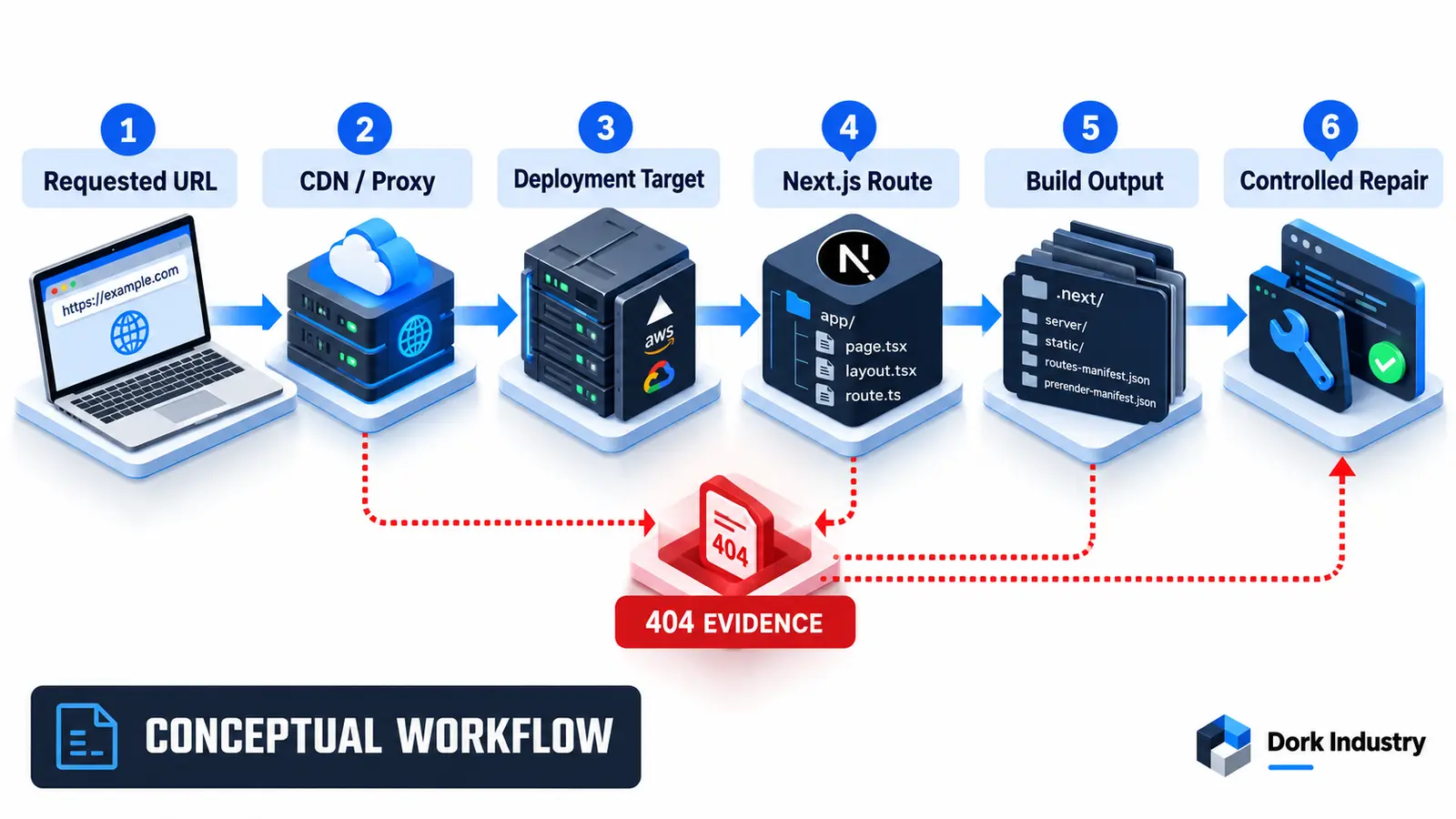
How should developers isolate the failing layer?
Start from the requested URL and move inward. Confirm DNS and the active deployment, then inspect CDN/proxy rewrites, hosting target, Next.js route structure, build output and runtime data. Reproduce the failure against both the provider deployment URL and the custom domain. Change one layer at a time on a preview or staging deployment and retain the before/after HTTP evidence.
A blind catch-all rewrite can mask a missing route, return the wrong status to search engines or break API endpoints. A custom 404 page can improve the visitor experience but does not repair an absent business route. The smallest fix should address the layer that first diverges from the expected request path.
Should the application use static export or a Next.js server runtime?
Use static export only when the required routes and features can be produced as static files. According to Next.js deployment guidance, output: 'export' creates HTML output for static hosting, while features requiring a server need a compatible runtime. The official deployment guidance distinguishes server, Docker and static-export options.
| Requirement | Static export fit | Server runtime fit |
|---|---|---|
| Finite routes known at build time | Usually suitable | Also supported |
| New dynamic paths after deployment | Requires a new build or compatible design | Can generate or render at request time when configured |
| Route handlers or request-time logic | Limited by export support | Use a compatible Next.js runtime |
| Hosting under a sub-path | Align exported paths and basePath | Align basePath and reverse proxy |
Should you repair routing, reconfigure hosting or rebuild the application?
| Option | Best when | Expected deliverable |
|---|---|---|
| Route repair | One route family or data branch is wrong | Code fix, tests and preview deployment |
| Hosting reconfiguration | Build output exists but provider/proxy serves the wrong target | Root, output, rewrite and domain corrections |
| Deployment hardening | Incidents recur across releases | Route manifest checks, preview tests and rollback process |
| Architecture change | Static hosting cannot support required runtime behaviour | Migration plan and production-ready runtime |
Dork Industry’s web development service can diagnose deployment and routing failures, while custom software development can address deeper application and integration problems. For planning a replacement project, review our website development cost guide; do not treat repair evidence as proof that a full rebuild is necessary.
How should a Next.js deployment repair be acceptance-tested?
Test routes through the production-equivalent domain and proxy, not only localhost. Include client navigation and a direct browser refresh because they can exercise different paths. Verify the intended HTTP status, page content, assets, logs and canonical URL for every critical route family.
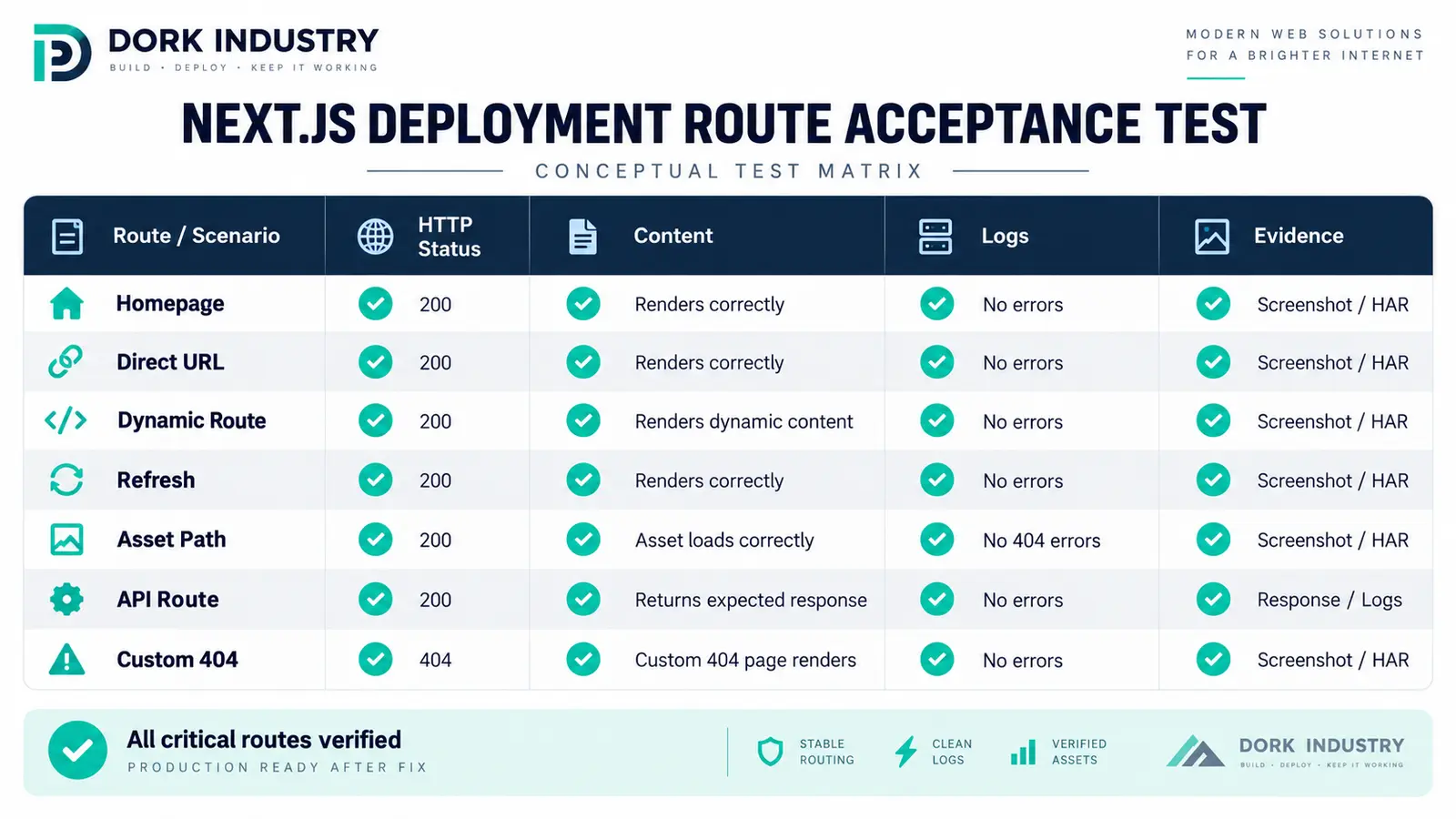
| Test | Expected result | Evidence |
|---|---|---|
| Homepage and health route | Correct deployment responds | Deployment ID and headers |
| Known static route | HTTP 200 with expected content | Screenshot and HAR |
| Known dynamic route | Correct record renders | Param, data trace and response |
| Unknown dynamic route | Intentional 404 with noindex | Status and rendered 404 |
| Direct refresh | Same result as client navigation | Two request traces |
| Assets and API routes | No unintended 404 or cross-build files | Network log and build reference |
If the route loads but the business form fails, use our separate guide for a website contact form not receiving emails to test submission and delivery rather than treating every failure as routing.
When should you hire a Next.js developer?
Hire specialist support when the incident spans CDN/proxy and application layers, dynamic routes depend on external data, the site is moving from static export to a server runtime, or rollback and route testing are missing. Ask for root-cause evidence, the smallest maintainable repair, preview verification, production release notes and rollback instructions.
For temporary delivery capacity, Dork Industry offers staff augmentation. A repair enquiry should include the failing URL pattern, repository framework/version, deployment provider, build command, output mode, sanitized logs and last known working commit.
Request a Next.js deployment repair assessment
Dork Industry can trace the production request, identify the failing layer, prepare a preview repair and validate critical routes before release.
Frequently asked questions
Why does Next.js work locally but return 404 after deployment?
Local development may use runtime route generation, local files and different environment values. Production may use static output, a different root, proxy rules or missing data. Compare the same URL through each production layer.
Can a successful build still deploy a 404?
Yes. The build can complete while the hosting project serves the wrong directory, the expected route was not generated, the domain points elsewhere or production data triggers an intentional not-found branch.
Why do only dynamic routes return 404?
Check the dynamic segment name, generated parameters, dynamicParams setting, data lookup and runtime capability. Unspecified parameters intentionally return 404 when dynamic parameters are disabled.
Will adding a rewrite fix every refresh 404?
No. A broad rewrite can hide the actual missing route, change HTTP semantics or intercept API and asset requests. Trace the failing layer first and test the smallest specific rule.
Does a custom 404 page solve the deployment problem?
No. It improves the response for genuinely missing pages. It does not restore a campaign, product or account route that should return successful content.
What should we send a Next.js developer?
Send the failing URLs, expected route patterns, framework version, deployment provider, build command, output configuration, sanitized logs, response headers, relevant proxy rules and the last working commit.
Discuss this for your business?
Book a free consultation — we scope the problem, outline the approach, and give you an honest verdict before any development is discussed.



[…] Theme code rarely controls the core hosted payment-method list, but custom carts, checkout extensions, payment customizations and apps can influence the journey or eligibility. If the cart itself is broken, use the Shopify Add to Cart repair guide. If a promotion changes the outcome, compare the Shopify discount diagnosis. […]