
Flutter app 16 KB page size support depends on the Android release artifact and every native library bundled by Flutter plugins or third-party SDKs—not only the Dart source code. If Google Play reports a compatibility warning, identify the exact .so file, its owner and its alignment before upgrading packages at random.
This warning can block a planned Android release or expose a runtime crash on 16 KB devices. It is a build, dependency and native compatibility project: the app may work on current 4 KB test devices while an older analytics, payment, camera, mapping or security SDK remains incompatible.
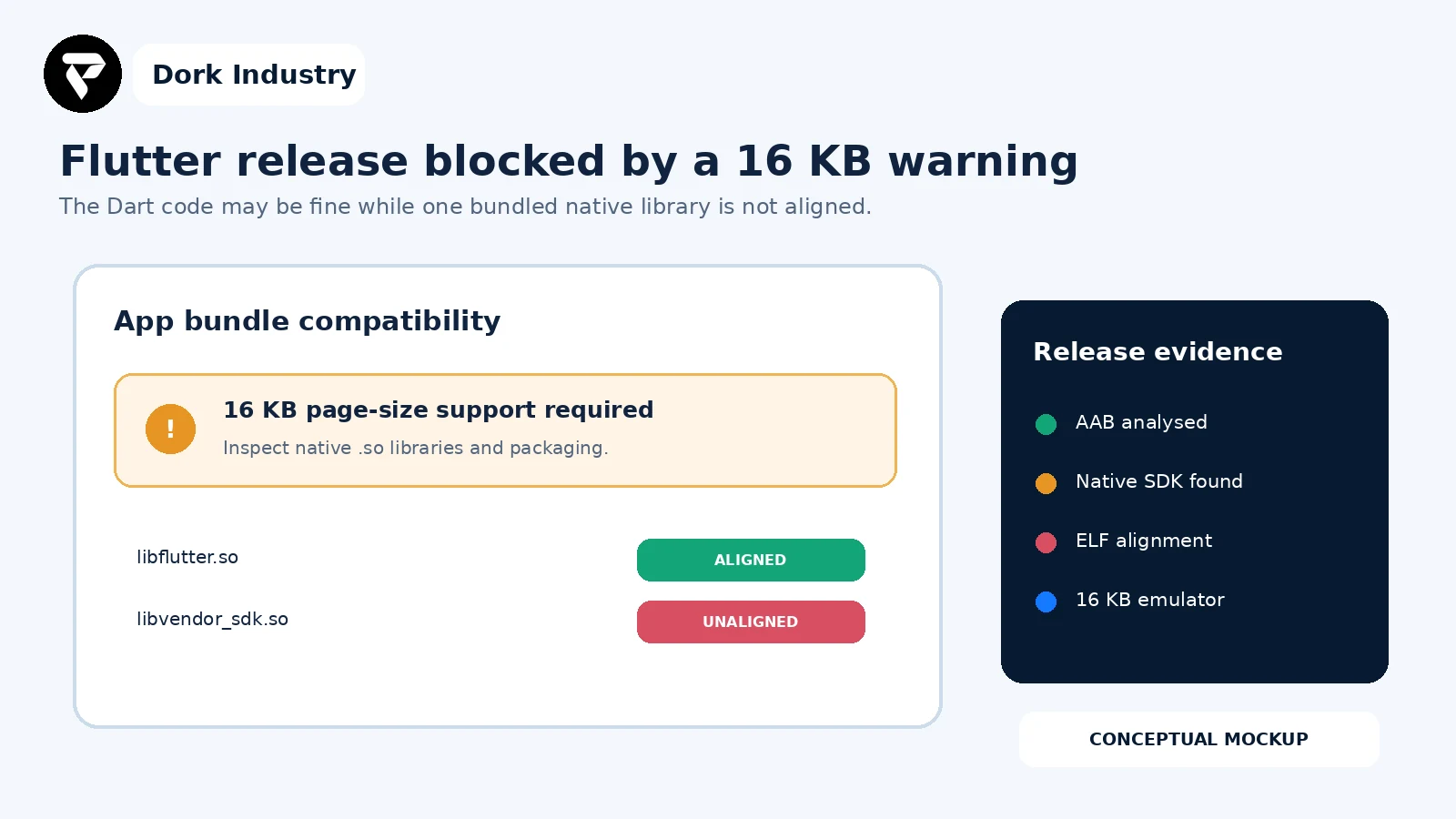
What does the Flutter 16 KB page-size warning mean?
Android 15 supports devices configured with 16 KB memory pages. Android’s documentation says an app that uses native code—directly or through an SDK—must be rebuilt with compatible native libraries. In a Flutter project, native code can enter through the engine, a plugin, a vendor SDK or custom Android code.
The warning is not evidence that every Flutter screen must be rewritten. First separate package alignment, ELF segment alignment and runtime assumptions. A build can pass one layer and still fail another.
What is the current Google Play requirement?
Android’s current compatibility guidance states that apps targeting Android 15 (API level 35) and higher must support 16 KB page sizes on 64-bit devices, and that starting February 1, 2027, incompatible updates cannot be released through Google Play. Check Android’s current 16 KB page-size guidance. This date should be rechecked before release because platform policies can change.
What should you capture before changing the project?
- The exact AAB version code, commit and checksum that produced the warning.
- Flutter, Dart, Gradle, Android Gradle Plugin, NDK and Build Tools versions.
- The dependency lockfile and all plugins or vendor SDK versions.
- The list of
.sofiles by ABI and the package that contributed each one. - ELF segment and APK/AAB packaging-alignment results.
- Play Console warning text and the tested 16 KB emulator/device image.
- Critical flows using native plugins: login, camera, maps, payments, files and notifications.
Need a release-ready Flutter compatibility assessment?
Share the warning, redacted dependency list, build-tool versions and one release AAB. Dork Industry can identify the incompatible native library and scope a plugin upgrade, SDK replacement, native rebuild or controlled Flutter migration.
Flutter app 16 KB page size: which nine checks identify the blocker?
| Check | Evidence | Decision |
|---|---|---|
| 1. Freeze release identity | AAB checksum and version | right artifact or wrong upload |
| 2. Inventory native code | ABI folders and .so files | native impact confirmed |
| 3. Map library ownership | plugin/SDK dependency tree | upgrade target identified |
| 4. Check toolchain | AGP, NDK and Build Tools | packaging/build capability |
| 5. Check ELF alignment | segments for each .so | aligned or rebuild required |
| 6. Check bundle packaging | bundletool/zipalign result | 16 KB packaging requested |
| 7. Upgrade safely | changelog and compatibility | plugin update or SDK replacement |
| 8. Test 16 KB runtime | emulator/device and crash logs | launch and workflows pass |
| 9. Verify release candidate | Play check and matrix | warning resolved for final AAB |
1. Are you analysing the exact uploaded release?
Record the version code, commit and checksum. A locally rebuilt APK is not proof that the Play-uploaded AAB has the same dependency and packaging state.
2. Which native libraries are inside the generated artifact?
Use APK Analyzer or the extracted APKs generated from the bundle. Android recommends checking the lib folder; shared objects show that native code is present. Review each relevant ABI rather than only the developer’s test architecture.
3. Which Flutter plugin or SDK owns each .so file?
Map the filename back to the Flutter plugin, Android dependency, vendor SDK or custom native module. That ownership determines whether the repair is a package upgrade, vendor escalation, SDK replacement or source rebuild.
4. Can the Android toolchain produce a compliant build?
Android currently recommends Android Gradle Plugin 8.5.1 or higher, NDK r28 or higher and compatible prebuilt dependencies for the simplest path. Treat those versions as project migration inputs, not blind upgrades: review compile SDK, Kotlin, Java, Gradle and plugin compatibility together. Use Flutter’s official SDK upgrade guidance when changing the Flutter toolchain.
5. Are every native library’s ELF load segments aligned?
Android provides an alignment script and command-line checks for shared libraries. The relevant 64-bit libraries must not contain load-segment alignment below 2**14. Record the failing filename and ABI so a later build can prove the change.
6. Does the app bundle request correct packaging alignment?
Use bundletool dump config for the AAB and Android’s documented zipalign -P 16 verification for an APK. ELF alignment and ZIP packaging alignment are related but separate checks; do not stop after only one succeeds.
7. Can the incompatible dependency be upgraded without breaking business features?
Review plugin and vendor release notes, minimum Android versions, API changes and licensing. Test the feature that depends on the SDK. Replacing a payment, identity, camera or mapping SDK can require Dart changes, native configuration, server callbacks and privacy review.
8. Does the app run on a real 16 KB environment?
Android documents 16 KB Android 15 emulator images and recommends verifying the environment with adb shell getconf PAGE_SIZE, which should return 16384. Test cold start, background/resume and every native integration. A package-level pass does not rule out code that assumes a 4 KB page size.
9. Did the exact release candidate pass both functional and Play checks?
Rebuild the signed candidate from a controlled environment, repeat the native inventory and alignment checks, run the acceptance matrix and upload to the appropriate Play test track. Keep the previous production artifact and rollback plan until the new release is verified.
How do you find the native dependency causing the warning?
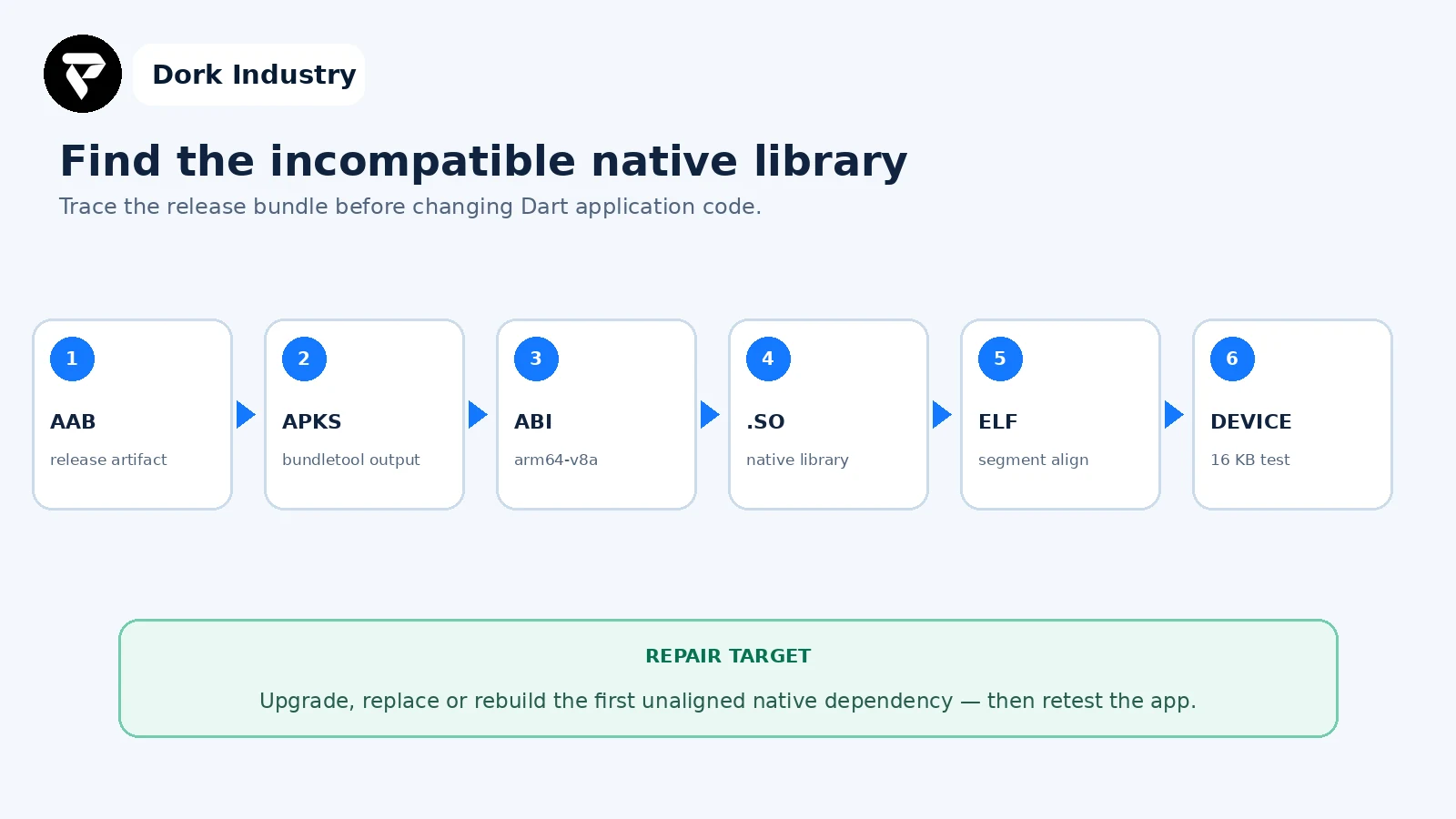
Do not begin by editing screens or state management. The useful hand-off names the artifact, ABI, native file, owning dependency and failed alignment test.
Worked example: an older scanning SDK blocks the release
This is an illustrative example, not a client result. A Flutter app’s AAB shows a 16 KB warning. APK Analyzer finds multiple ARM64 libraries; the Flutter engine is aligned, but a prebuilt library supplied by an older document-scanning plugin is not. The plugin’s newer version replaces that SDK but changes its camera API.
- The team records the failing library and maps it to the scanning plugin.
- It upgrades the plugin on a branch and updates the affected Dart and Android configuration.
- The new release passes ELF and packaging checks.
- A 16 KB emulator test covers install, cold launch, camera permission, scanning, upload and background resume.
- The exact signed AAB is uploaded to a Play test track and its compatibility result is preserved.
The paid work includes dependency forensics, controlled migration and regression testing—not simply changing a Gradle number.
What should a Flutter 16 KB acceptance matrix contain?
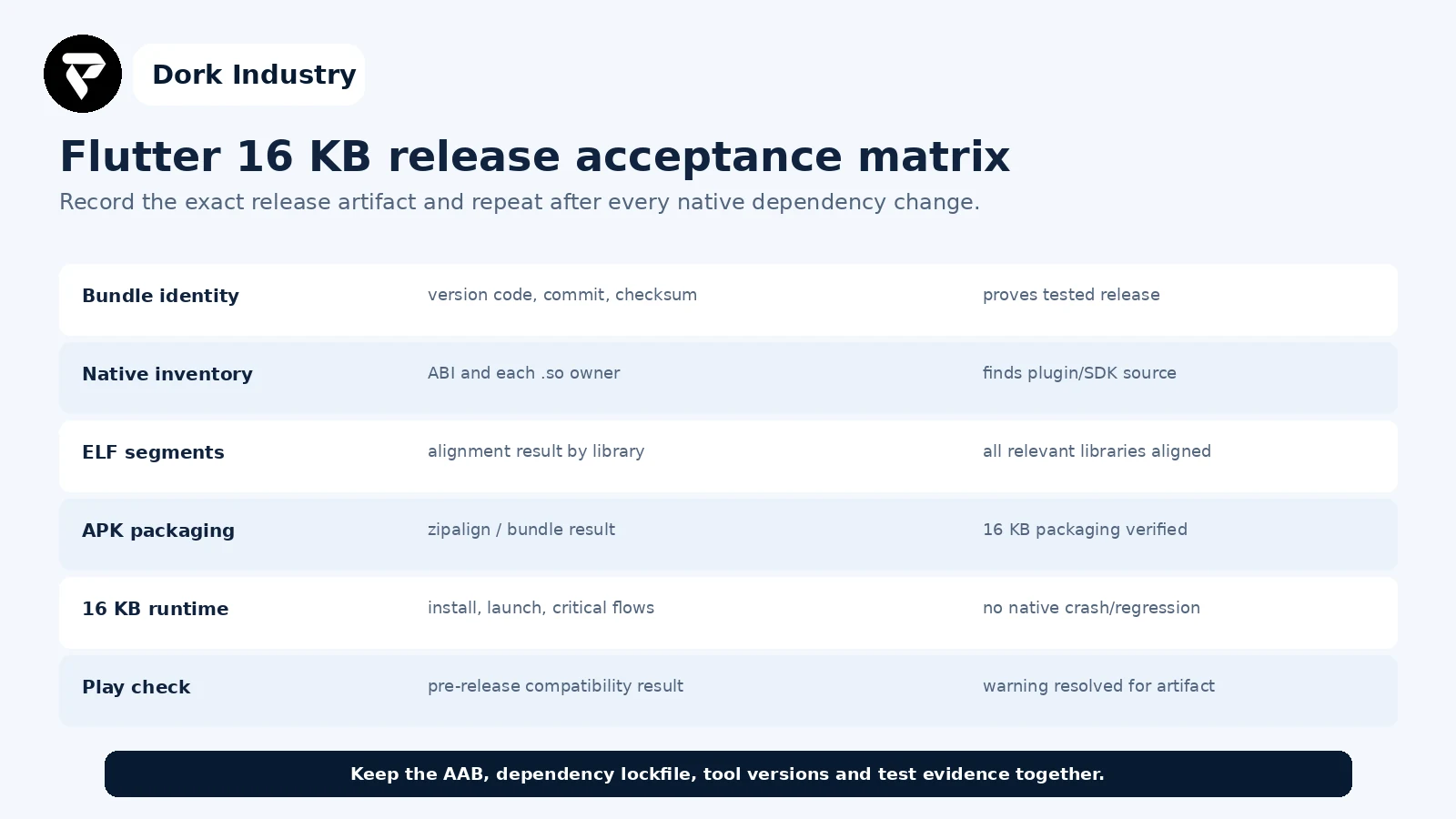
How can Dork Industry help?
Dork Industry can inspect the Flutter Android bundle, map native libraries to plugins and SDKs, modernise the Android build toolchain, upgrade or replace incompatible dependencies, correct native build configuration and test critical flows on a 16 KB environment. Scope depends on source access and third-party SDK support.
Review Dork Industry’s app development services, IT services and custom development scope, industry solutions, Flutter release API troubleshooting guide and Flutter release notification guide. Those articles cover runtime configuration and notification delivery; this article covers native binary alignment and release compatibility.
Turn the Play warning into a precise upgrade plan
Send the warning, Flutter and Android tool versions, dependency lockfile and exact AAB. Dork Industry can propose a focused plugin upgrade, native SDK replacement or Flutter migration scope.
Frequently asked questions
Does every Flutter app need Dart code changes for 16 KB support?
No. The blocker may be an Android packaging tool or prebuilt native library. Dart changes are needed only when a plugin upgrade or SDK replacement changes the app-facing API or behaviour.
Why does the app work on my current phone?
Your device may use 4 KB pages, and the installed artifact may differ from the Play-generated APK. Test the exact release on a verified 16 KB environment.
Can we fix the warning by upgrading Flutter only?
Sometimes a newer Flutter/toolchain resolves compatible engine and packaging pieces, but every third-party native library must also be checked. One older SDK can keep the bundle incompatible.
What should I send a Flutter developer?
Send the Play warning, AAB identity, Flutter/Dart/Gradle/AGP/NDK versions, dependency lockfile, native-library inventory, failing alignment output and the critical native-plugin flows. Do not send signing keys or secrets.
Stuck with this issue?
Send us the error and the setup — we diagnose the cause, fix it, and show you how to prevent it from coming back.

[…] Theme code rarely controls the core hosted payment-method list, but custom carts, checkout extensions, payment customizations and apps can influence the journey or eligibility. If the cart itself is broken, use the Shopify Add to Cart repair guide. If a promotion changes the outcome, compare the Shopify discount diagnosis. […]