If WordPress redirects to old domain after migration, capture the complete redirect chain before editing the database or clearing every cache. The first response that returns a wrong Location header usually identifies whether the redirect belongs to an edge service, web server, WordPress setting, plugin, theme or browser cache.
This is a business-critical migration defect when customers land on an expired brand domain, lose a login session, reach the wrong checkout, submit forms to the old host or encounter a redirect loop. Treat it as a controlled recovery: preserve a database backup, record evidence, change one owning layer, and retest the same URLs and actions.
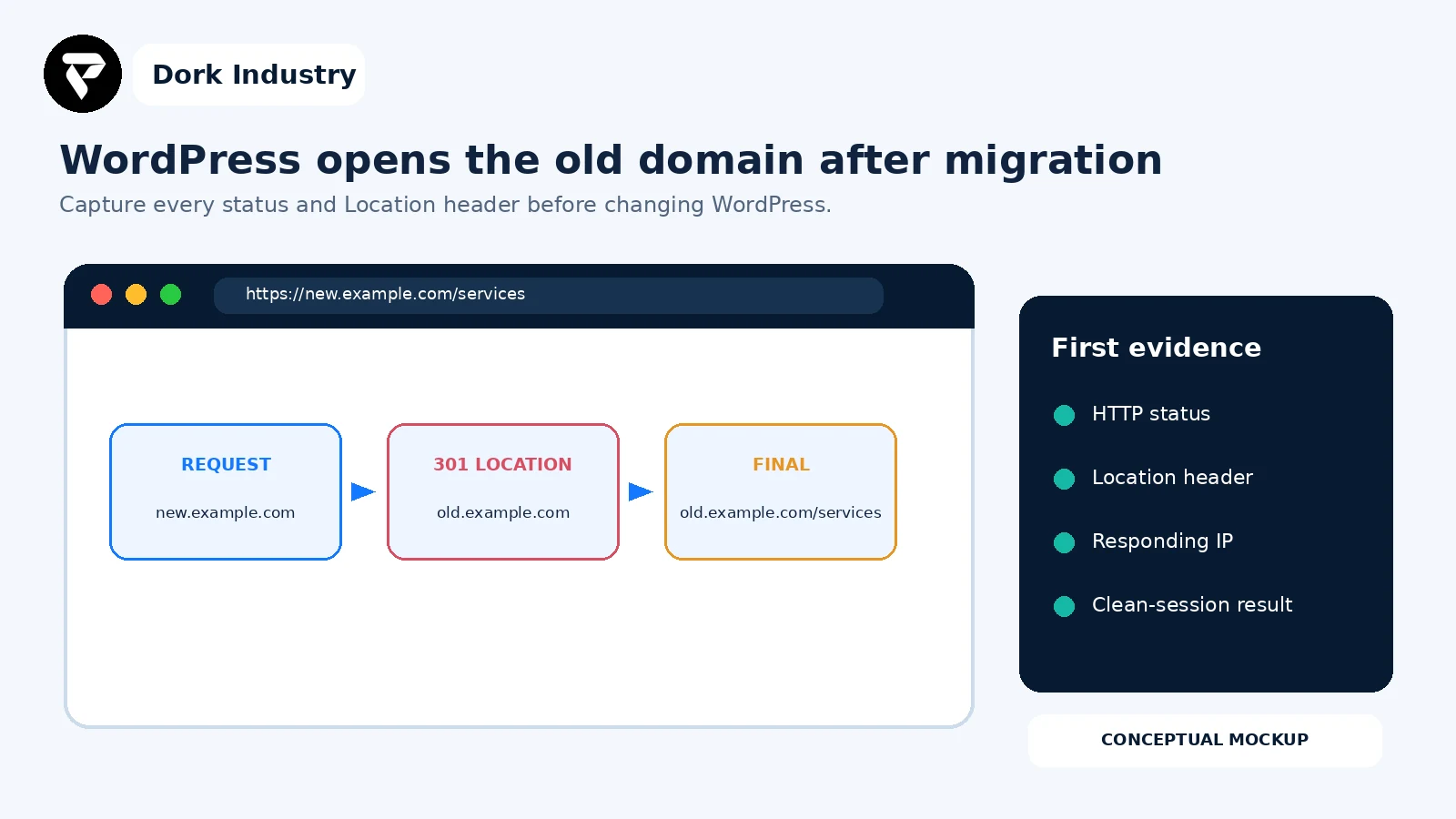
Why WordPress redirects to old domain after migration
A redirect is an instruction, not merely a cached page. With an HTTP redirect, a server returns a 3xx status and a Location header; the browser then requests that target. A WordPress migration can leave the old host in core URL options, plugin settings, theme code, content, web-server rules, CDN rules or multisite tables. The final browser address does not identify which layer issued the instruction.
WordPress documents home and siteurl as important settings used by both administration and the front end. Its migration handbook also warns that old-domain references can remain in the database and that indiscriminate replacement can break serialized data. Review the WordPress migration guidance.
What should you capture before changing production?
- The exact starting URL, timestamp, browser and whether the user is logged in.
- Every status code and
Locationheader until the final response. - The responding IP or edge identifier and whether bypassing the CDN changes the result.
- The current
homeandsiteurlvalues, including constants that may override them. - Relevant redirect rules in the edge, hosting panel, Apache, NGINX, plugins and custom code.
- A database backup stored outside the production database before any replacement.
- Tests for the home page, a deep URL, login, form submission and any checkout or account action.
Need the redirect owner identified before another migration change?
Send the starting URL, redacted redirect chain, hosting/CDN setup, migration method and the business action that fails. Dork Industry can scope a focused WordPress migration diagnosis and repair.
Which nine checks find why WordPress redirects to the old domain?
| Check | Evidence | Decision |
|---|---|---|
| 1. Map the redirect chain | statuses and Location headers | first wrong response |
| 2. Compare clean clients | curl, private browser, another network | server or client cache |
| 3. Verify edge rules | CDN and host redirects | edge or origin ownership |
| 4. Inspect server config | .htaccess / NGINX / vhost | rule precedence |
| 5. Verify WordPress URLs | home, siteurl, constants | core URL mismatch |
| 6. Search safely | dry-run match counts | database scope |
| 7. Inspect plugins and code | redirect hooks and settings | conditional application redirect |
| 8. Review multisite | network and site tables | domain mapping mismatch |
| 9. Prove recovery | path and action matrix | release or rollback |
1. Which response first names the old domain?
Request the new URL without automatically following redirects, then follow each hop deliberately. Record whether the first wrong target is returned by the new domain, an HTTP-to-HTTPS rule, a www/non-www rule, a login route or WordPress itself. If the response is already wrong before WordPress runs, database editing is unlikely to be the first repair.
2. Does the same redirect happen in a clean client?
Compare a command-line request, a private browser window and another network. A previously cached permanent redirect can keep one browser going to the old host after the server is fixed. Do not conclude “browser cache” until a clean HTTP request returns the correct response, and avoid asking all users to clear everything as the primary fix.
3. Is the edge or hosting layer issuing the redirect?
Inspect CDN redirect rules, page rules, bulk redirects, load balancer listeners and hosting-panel domain forwarding. Compare the edge response with an authorised origin test that preserves the intended Host header. Record the owner and purpose of every canonical-host or HTTPS rule; duplicated rules across the edge and origin can create chains or loops.
4. Does the web server still contain the old host?
Review Apache virtual hosts and .htaccess, or the relevant NGINX server blocks and rewrite rules. Check rule order, inherited configuration and separate HTTP/HTTPS hosts. Google’s redirect guidance recommends permanent server-side redirects when a URL has permanently moved, but the target must be the intended canonical URL. See Google’s redirect documentation.
5. Do home, siteurl or wp-config constants point to the old domain?
Compare the saved home and siteurl options with WP_HOME and WP_SITEURL constants. A constant can override what an administrator expects from the database. Preserve the exact scheme, host and path; do not add or remove a subdirectory casually. If temporary relocation code was used, remove it after recovery as WordPress instructs.
6. Where does a safe dry run find the old domain?
Search first and review tables and match counts before replacing anything. WP-CLI documents that wp search-replace handles PHP serialized data and offers --dry-run, which reports without saving changes. Read the official WP-CLI command documentation. Keep a restorable backup and avoid a blanket raw-SQL replacement that can corrupt serialized lengths.
7. Is a plugin, theme or custom integration redirecting conditionally?
Search redirect plugins, SEO settings, multilingual/domain-mapping configuration, membership/login flows, ecommerce return URLs, theme code and must-use plugins. Reproduce the failing condition: logged in versus logged out, desktop versus mobile, a specific path, referral source or cookie. Disable or alter components only in a controlled staging or maintenance plan.
8. Is this a multisite or mapped-domain migration?
A multisite move has more domain references than a single site. WordPress advises reviewing network/site records, individual options tables and configuration such as SUBDOMAIN_INSTALL. Identify the affected site and network scope before using a network-wide replacement; a correction for one site must not rewrite unrelated mapped domains.
9. Can you prove the migration works beyond the home page?
Retest both old and new domains, HTTP/HTTPS and www/non-www variants, representative deep paths, login/logout, password reset, forms, checkout, webhooks and email links. Inspect canonical URLs and XML sitemaps. The intended old-domain redirect should preserve equivalent paths where appropriate, while the new domain should not bounce back.
How do you identify who owns the redirect?
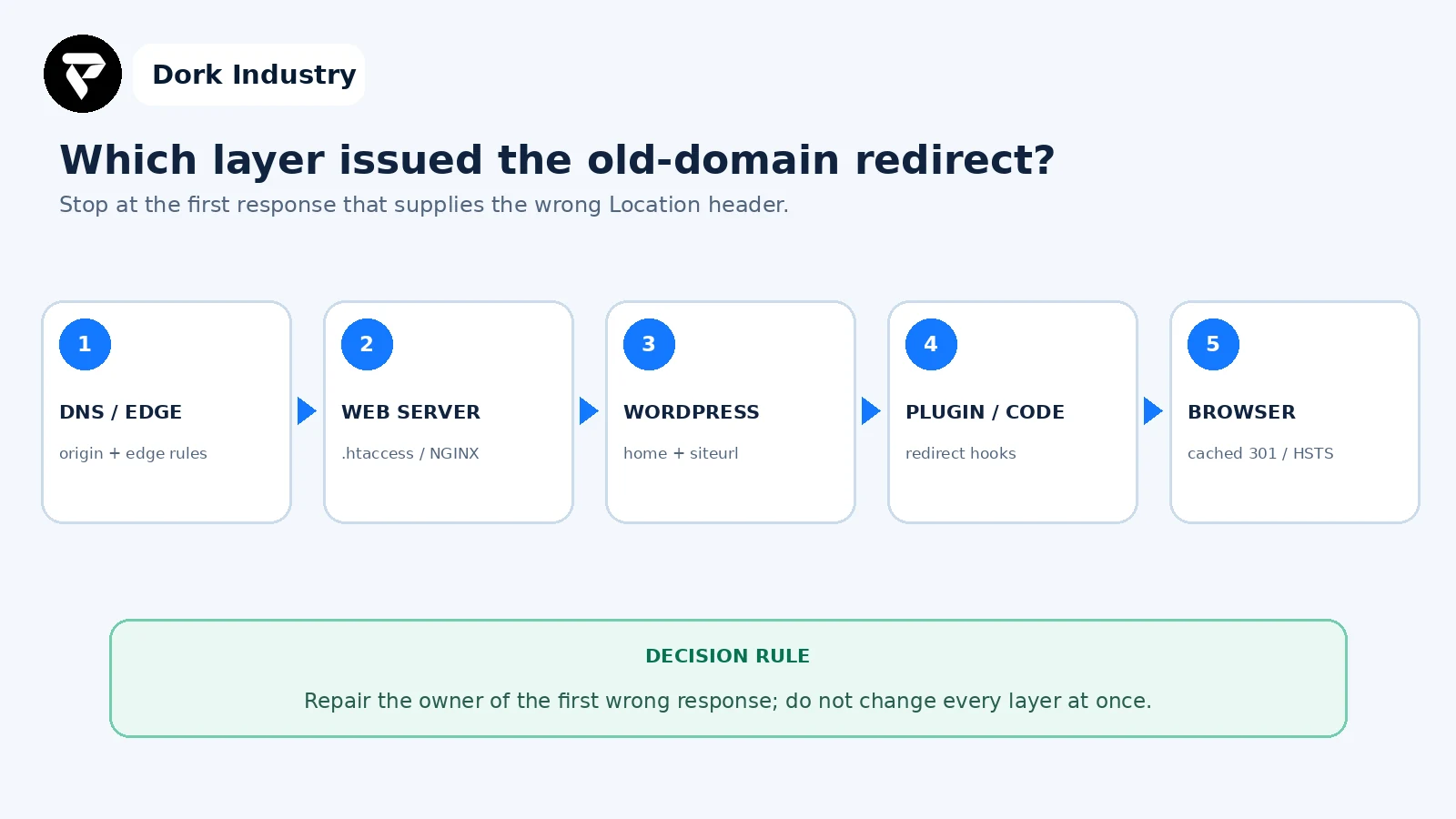
HTTP redirects run before page HTML, while JavaScript and meta-refresh redirects require content to reach the browser. That order helps separate an infrastructure or WordPress response from a front-end redirect. MDN explains the response status and Location mechanism and warns that multiple redirect methods can conflict. Review MDN’s HTTP redirection guide.
Worked example: only login returns users to the old domain
This is an illustrative diagnostic example, not a client result. The new home page returns 200, public deep links stay on the new host, but submitting the login form returns a 302 to an old-domain account URL. A clean request confirms the redirect is not browser-cached. The CDN and web server have no matching rule, and WordPress home and siteurl are correct.
- The team preserves the 302 response, request path, cookie scope and timestamp.
- A dry-run database search finds the old host in a membership plugin option and an email/login return URL.
- They update only the owning settings using a serialization-aware method and keep the backup.
- They test login, logout, password reset, account pages and both domain variants in a clean session.
- They confirm canonical and sitemap URLs remain on the new domain and retain the previous configuration for rollback.
The paid project is not a generic cache clear. It can involve redirect-chain tracing, plugin/integration repair, serialization-safe data correction, session-domain review and a migration acceptance suite.
What belongs in a WordPress migration acceptance worksheet?
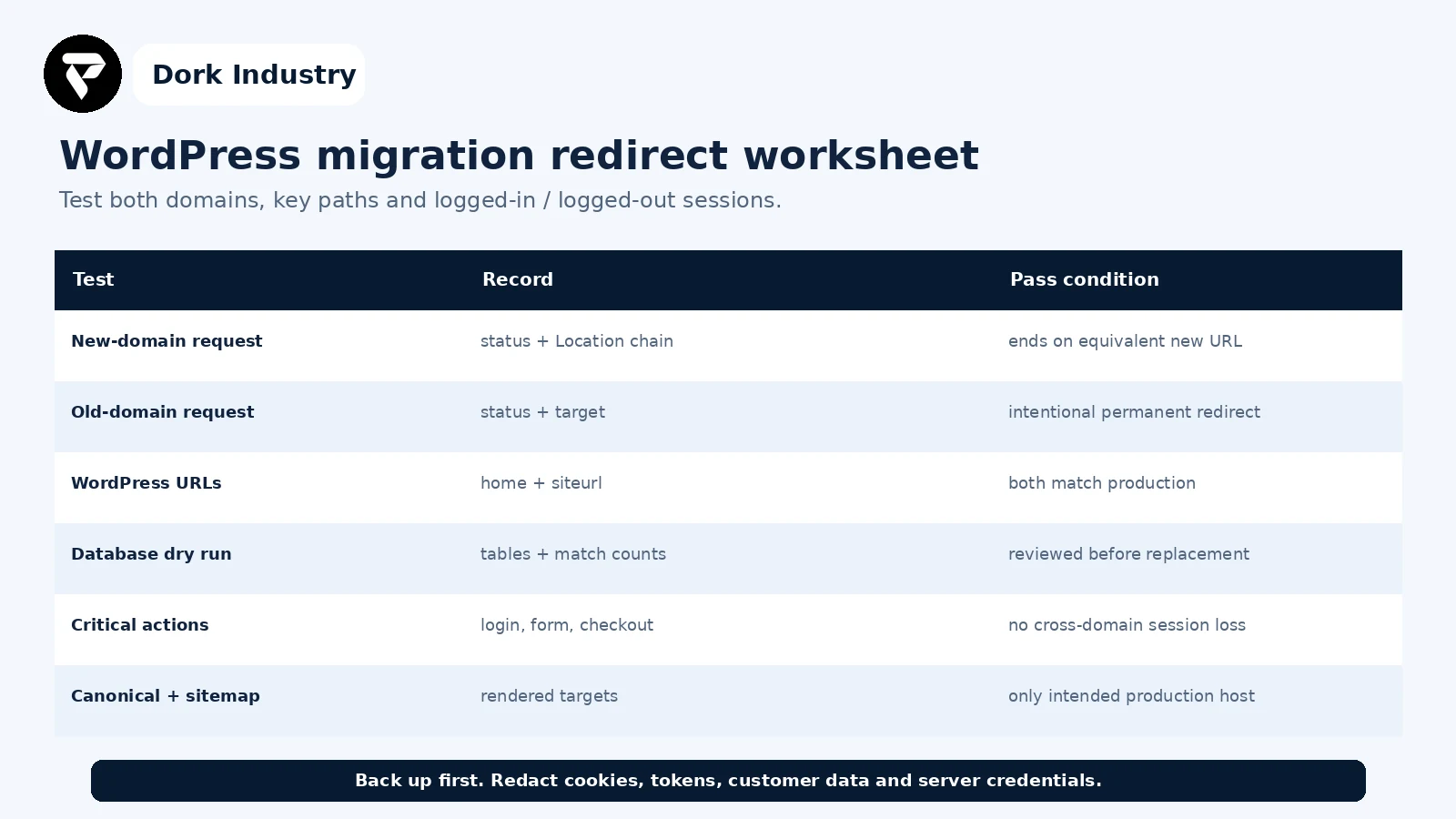
Record the expected result before testing. Give each failure an owner, environment, timestamp and release/configuration reference. Store redacted evidence with the migration record so a recurrence can be compared instead of rediscovered.
When is professional WordPress migration help warranted?
| Finding | Likely repair | Professional help is warranted when |
|---|---|---|
| One wrong core URL | correct and verify home/siteurl | admin access or overrides are unclear |
| Old URLs across data | backup, dry run, scoped replacement | serialized/plugin data or large tables are involved |
| Edge/server conflict | consolidate canonical redirect rules | CDN, load balancer and origin disagree |
| Login or checkout bounce | session, callback and plugin repair | customer accounts or payments are affected |
| Multisite mapping | network-aware domain correction | multiple sites, paths or mapped domains are affected |
Dork Industry can inspect the redirect chain, WordPress configuration, server and edge rules, plugin/integration settings and migration data; perform a backed-up serialization-aware correction; and validate forms, login, account or ecommerce journeys. Review Dork Industry’s IT services and website-development scope, industry solutions, the related PHP 502 after AWS migration guide, and the WordPress PHP-update recovery guide. Those articles address runtime availability and version compatibility; this guide addresses redirect ownership and domain-migration data.
Turn the redirect chain into a repair brief
Send the starting URL, redacted status/Location chain, hosting and CDN setup, migration method, WordPress topology and the affected business action. Dork Industry can propose a focused repair, migration hardening or developer-support scope.
Frequently asked questions
Why does WordPress keep redirecting to the old domain?
The old host may still exist in WordPress URL options, configuration constants, serialized plugin data, multisite tables, CDN/hosting redirects, web-server rules, custom code or a cached permanent redirect. Capture the first wrong Location header to identify the owning layer.
Can I replace the old domain directly in MySQL?
A blanket raw-SQL replacement can damage PHP serialized values. Back up first, run a scoped dry run, review matches and use a serialization-aware method such as the documented WP-CLI search-replace command when appropriate.
Why does the redirect happen only after login?
Login return URLs, membership/ecommerce settings, cookie domains, proxy headers or custom redirect hooks may differ from public-page behavior. Preserve the login response chain and compare the condition with a logged-out request.
Should the old domain still redirect after migration?
Usually an intentional old-to-new permanent redirect helps users and search engines reach equivalent new URLs. The defect is the new domain redirecting backward, a loop, a wrong target, or business-critical paths losing their equivalent destination.
Want this automated for your business?
Book a free assessment — we map the workflow, check data readiness, and outline a pilot you can measure.