Construction invoice approval automation is a controlled workflow that captures a subcontractor invoice, matches it to the contract or purchase order, verifies project evidence, applies retention and tax rules, routes exceptions to the right approver, and posts an approved transaction to the ERP. The objective is not to let AI approve every bill. It is to remove avoidable handoffs while preserving commercial and financial control.
When invoices arrive through email, messaging apps and site offices, finance may see the document before the project team confirms work. A generic OCR tool can extract an amount, but it cannot decide whether a variation was authorised, retention applies, the billed quantity matches progress, or the same invoice was submitted twice. Those decisions define the real software scope.

Which construction invoice problem should automation solve?
The commercial problem is incomplete evidence moving between procurement, project teams and accounts payable. One invoice may need a purchase order, contract schedule, measurement sheet, goods receipt, approved change order, tax validation and budget owner approval. If these records live in different tools, staff chase documents instead of resolving exceptions.
Choose one measurable workflow boundary for a paid project: subcontractor invoices for one business unit, one ERP and one approval policy. Do not begin with “automate all finance.” The first assessment should identify entry channels, document types, matching keys, exception owners and the event that authorises ERP posting.
| Observed business problem | Software requirement | Human decision retained |
|---|---|---|
| Same invoice arrives twice | Vendor, invoice number, amount and document fingerprint checks | Confirm a suspected duplicate |
| No valid PO or contract line | Exception queue linked to procurement | Create or reject commercial authority |
| Quantity differs from site evidence | Match invoice lines to receipt or measurement data | Approve actual progress |
| Retention or tax differs | Versioned calculation rules and audit trail | Approve non-standard treatment |
| ERP posting fails | Retry controls, error details and reconciliation | Resolve master-data or period issues |
What should construction invoice approval automation include?
A useful workflow starts when the document enters an approved channel. It records the original file and sender, identifies the project and supplier, extracts structured fields, validates mandatory data, checks duplicates, then matches the invoice against the commercial record. Only a clean match follows the straight-through path. Every uncertainty must create a visible exception with an owner and deadline.
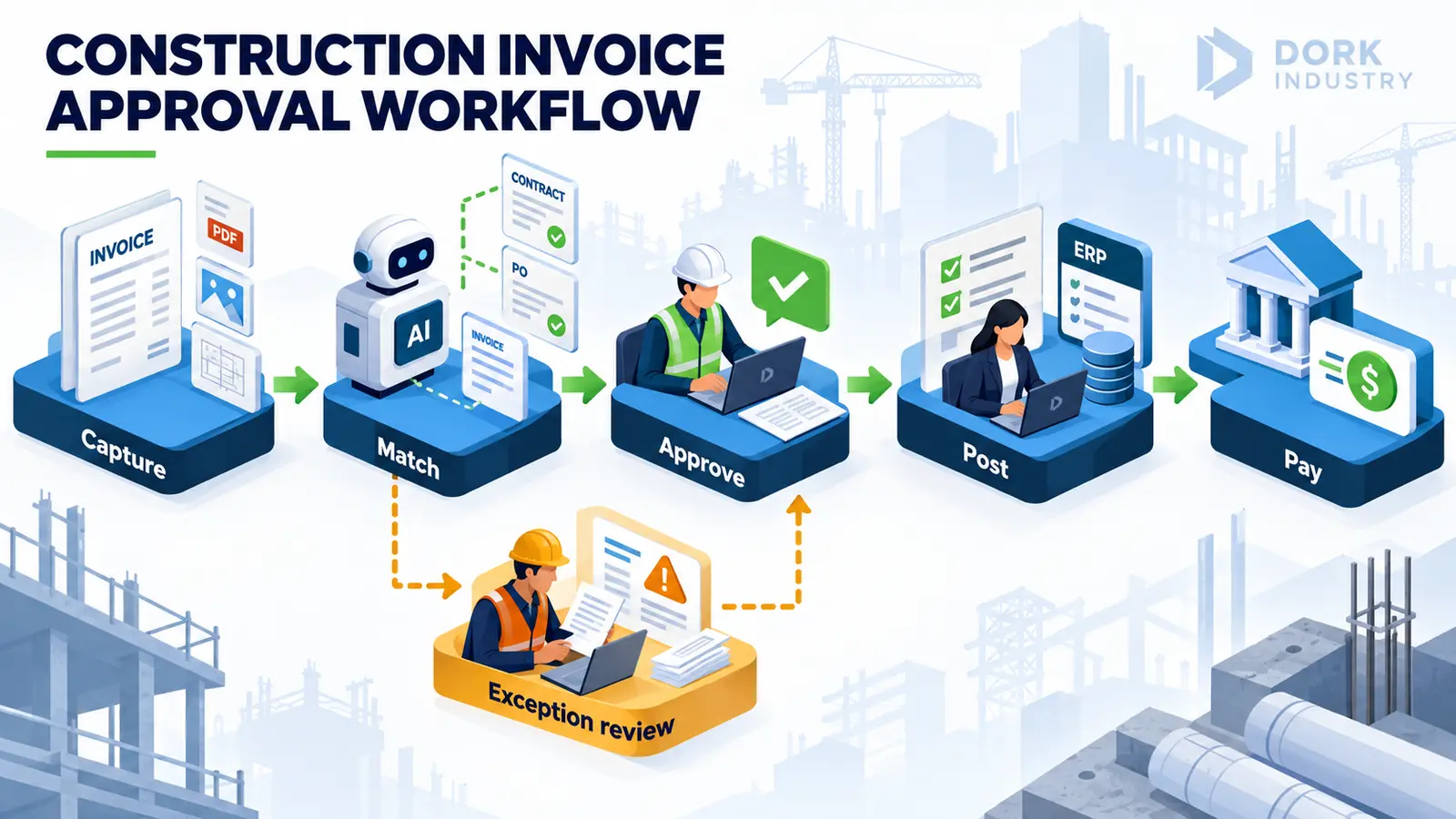
- Capture: retain the original invoice and supporting documents.
- Classify and extract: identify supplier, project, invoice number, dates, tax fields, lines and totals.
- Validate: check vendor status, duplicates, required fields and arithmetic.
- Match: compare contract or PO lines, receipts, certified progress, retention and change orders.
- Route: send variances to procurement, project, commercial, tax or finance owners.
- Approve: enforce role and value limits with delegation and audit history.
- Post and reconcile: create the ERP transaction once, record its identifier and surface failures.
The U.S. Treasury’s Invoice Processing Platform describes an invoice process spanning purchase order through payment notification. That public example supports the need for end-to-end status visibility, although a private construction company will require its own systems and policies.
What should and should not be automated?
Use AI for document classification, field extraction and suggesting a likely match when the source is unstructured. Use deterministic rules for duplicate keys, arithmetic, approval limits, tax codes, retention calculations and ERP posting permissions. AI confidence should guide routing; it should not silently turn uncertainty into approval.
Keep human approval for missing commercial authority, change orders, disputed quantities, non-standard retention, bank-detail changes, tax exceptions and overrides above tolerance. The software should show the invoice, supporting evidence, rule outcome and prior decisions together so the approver can act without searching across inboxes.
According to a 2025 peer-reviewed preprint on corporate expense processing, the evaluated design combined intelligent document processing, policy classification, AI-assisted exception handling and human final decisions. That study concerns corporate expenses rather than construction invoices, so it supports the workflow pattern—not a performance forecast for a contractor.
Which systems and data are required?
The project normally connects document capture, vendor master data, contracts or purchase orders, project-cost codes, goods receipts or measurement certificates, approval identities and the ERP. A construction firm may also need links to project management, document control and mobile site workflows. Integration ownership matters: one system should own vendor, contract, approval and posting status for each step.
Before development, sample invoices from several subcontractors. Include scans, native PDFs, credit notes, tax variations, multiple projects, duplicate documents and invoices with supporting sheets. Remove sensitive data from demonstrations unless a secure project environment is in place.
How should you test an invoice automation pilot?
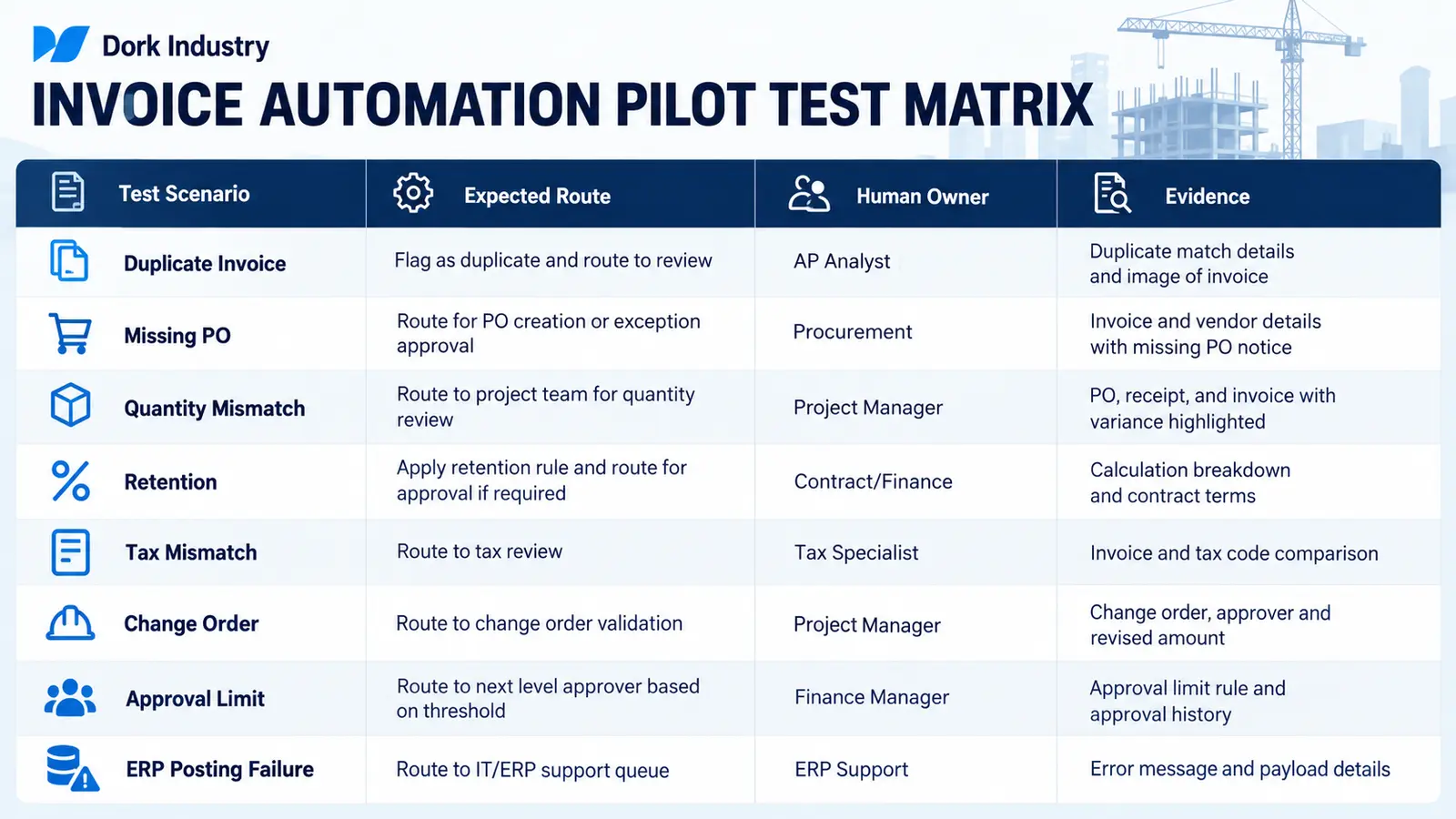
Test normal and exception paths: a valid invoice, duplicate, missing PO, quantity mismatch, retention, tax mismatch, unapproved change order, approval-limit escalation and ERP posting failure. Each case needs an expected owner, evidence set, final status and audit record. Also test resubmission after correction so a rejected document does not become a new duplicate.
Evaluate the pilot using the company’s own controlled results: extraction corrections, match outcomes, exception reasons, approval traceability and posting reconciliation. Do not adopt a vendor’s generic productivity claim as a forecast. First-party pilot evidence should determine whether the workflow expands.
Should you buy a tool, integrate existing software or build a custom workflow?
Buy when standard invoice capture and approval rules match the organisation and the ERP connector is supported. Integrate when the company already has document capture, project and finance systems but lacks a consistent workflow between them. Build a custom layer when contract structures, measurement certificates, retention, project cost allocation, approval routing or multi-ERP requirements are not represented safely by an off-the-shelf product.
Dork Industry’s related guide on AI invoice data extraction covers document-field validation. The construction ERP buyer guide covers budgets, commitments and running bills. A new automation project can connect those concerns through Dork Industry’s AI/ML implementation service and custom software development.
How can Dork Industry help implement the workflow?
Dork Industry can map the existing invoice path, identify integration and control gaps, prepare a proof of concept, and build the capture, exception, approval and ERP-integration components. The engagement can begin with one project type and one ERP company code, then expand only after acceptance tests pass.
If an internal architect already owns the design, review Dork Industry’s staff augmentation and developer hiring option. Bring sample documents, approval limits, exception categories, ERP interfaces and one failed or delayed invoice path to the consultation.
Turn invoice chasing into a controlled implementation project
Request a workflow assessment or discuss a focused proof of concept covering capture, matching, approvals, human exceptions and ERP posting.
Schedule an automation consultation Hire automation developers
Frequently asked questions
Can AI approve construction invoices automatically?
AI can classify documents, extract fields and suggest matches. Final approval should follow deterministic business rules and human authority, especially for missing POs, change orders, quantity disputes, retention, tax exceptions and bank-detail changes.
What is the safest first construction invoice automation pilot?
Start with one invoice type, one ERP, one approval policy and a representative exception set. Keep posting controlled until duplicate, mismatch, approval-limit and integration-failure tests have passed.
Does OCR alone solve invoice approval delays?
No. OCR extracts text. The workflow still needs vendor and project identification, commercial matching, exception ownership, approval controls, ERP posting and reconciliation.
How should duplicate invoices be handled?
Flag the suspected duplicate using several identifiers and route it for review. Preserve both documents and the decision trail rather than deleting financial evidence automatically.
Can the workflow integrate with an existing ERP?
Yes, if the ERP exposes supported interfaces or a controlled import route. The proposal should define field mappings, posting keys, idempotency, error handling and reconciliation.
What should we provide for a consultation?
Provide anonymised sample invoices, contract or PO formats, approval roles, exception examples, ERP interface details and one end-to-end invoice history. That evidence helps separate configuration, integration and custom-development work.
Want this automated for your business?
Book a free assessment — we map the workflow, check data readiness, and outline a pilot you can measure.