Direct answer: Construction ERP software for contractors should connect the approved BOQ, project budget, indents, purchase and work orders, site receipts, measurements, contractor bills, client billing and forecast. Before implementation, test whether every commitment and certified cost can be traced to the correct project, cost code and approval.
Prepared by Dork Industry. This guide provides an eight-test evaluation framework and a fictional project-control worksheet. The examples explain a buying method; they are not customer results, market averages or claims about a particular software product.
For a Delhi construction company coordinating a head office, multiple sites, vendors and subcontractors, the high-value question is not whether software can produce a dashboard. It is whether management can see a cost risk while there is still time to approve, reject, re-source or reforecast it.
Construction ERP decision guide
What problem should construction ERP software for contractors solve?
A construction ERP should provide a controlled line from the commercial baseline to site execution and finance. A budget can look healthy even after teams have issued purchase orders and work orders that have not yet become invoices. Management therefore needs to distinguish the original budget, approved changes, commitments, certified actuals and forecast-to-complete.
| Business question | Required control | Evidence |
|---|---|---|
| Which BOQ version governs the project? | Approved baseline with controlled revisions | Version, approver, date and change reason |
| What spend is already committed? | PO and work-order commitments by cost code | Open, partially consumed, closed and cancelled values |
| Did the site receive what was ordered? | Receipt and measurement workflow | Quantity, location, date, user and supporting record |
| Which change affects cost or revenue? | Change request and approval control | Scope, value, budget impact and status |
| What is the likely final cost? | Forecast using actuals, commitments and remaining work | Assumption owner, revision date and variance explanation |
How should the BOQ-to-budget control workflow operate?
The workflow should preserve the approved commercial baseline while recording execution against it. According to Oracle’s Primavera Unifier project-controls documentation, connected controls can bring budgets, commitments, actuals, forecasts and change management into the project-cost view. Separately, Autodesk’s budget and contract table guidance documents budget and contract views that distinguish approved, pending and uncommitted changes. These are useful evaluation references even when a contractor selects another platform.
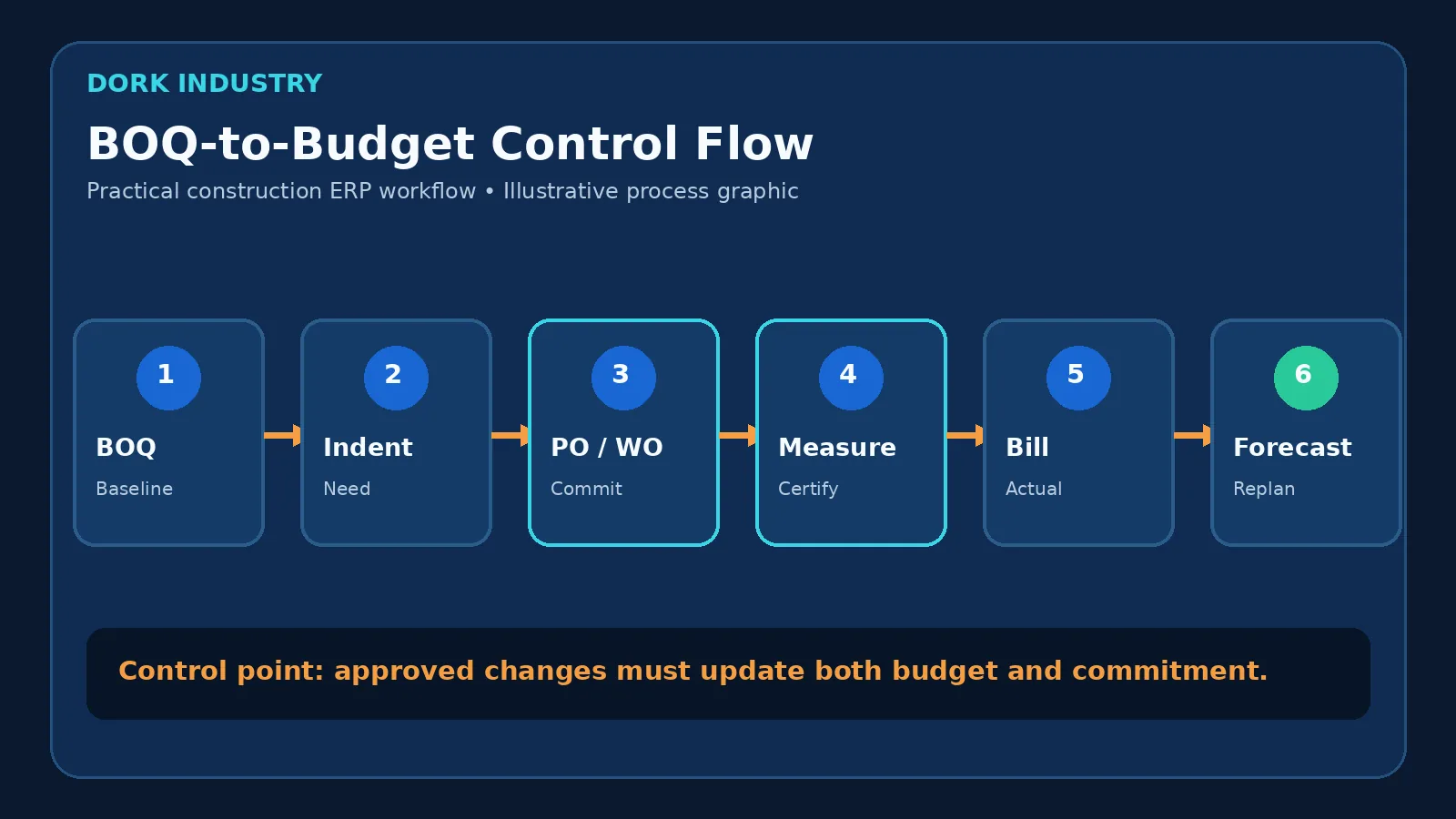
- BOQ and budget establish the baseline. Cost codes, quantities, rates and responsible packages must use a controlled version.
- Indent records the site need. The request identifies project, location, quantity, required date and budget reference.
- PO or work order creates a commitment. Approval should consider budget availability and existing commitments—not only posted invoices.
- Receipt or measurement confirms performance. Materials and subcontract work need distinct evidence and tolerance rules.
- Bill certification creates an actual or payable. The certified value should reference the commitment, measurement and approved deductions.
- Forecast updates the expected outcome. Remaining quantity, revised rate, pending change and risk allowance should be explicit assumptions.
Which construction ERP capabilities matter most?
How should BOQ and budget control work?
- Separate tender, client, internal and revised control values when the business uses them.
- Lock approved baselines while allowing governed revisions.
- Map procurement, subcontract and site-cost transactions to project cost codes.
- Show budget, commitment, actual, pending change and forecast without mixing definitions.
How should site procurement and stores work?
- Raise indents against project and delivery location.
- Prevent accidental duplicate requests and record substitutions.
- Track partial receipts, rejected quantities, transfers, returns and issues.
- Preserve units of measure and conversion rules.
How should subcontractor billing work?
- Connect work order, measurement, certified quantity and bill.
- Apply retention, advances, recoveries and deductions through transparent rules.
- Keep client billing separate from subcontractor payable logic.
- Record disputed or deferred quantities without deleting the measurement history.
What makes the platform enterprise-ready?
- Role-based approval by project, value and document type.
- Audit logs for BOQ, rate, quantity, approval and master-data changes.
- API or controlled integration with accounting, payroll, document and project systems.
- Retry queues and reconciliation reports for failed integrations.
- Data export that preserves project, cost-code and document relationships.
Which eight acceptance tests should construction ERP pass?
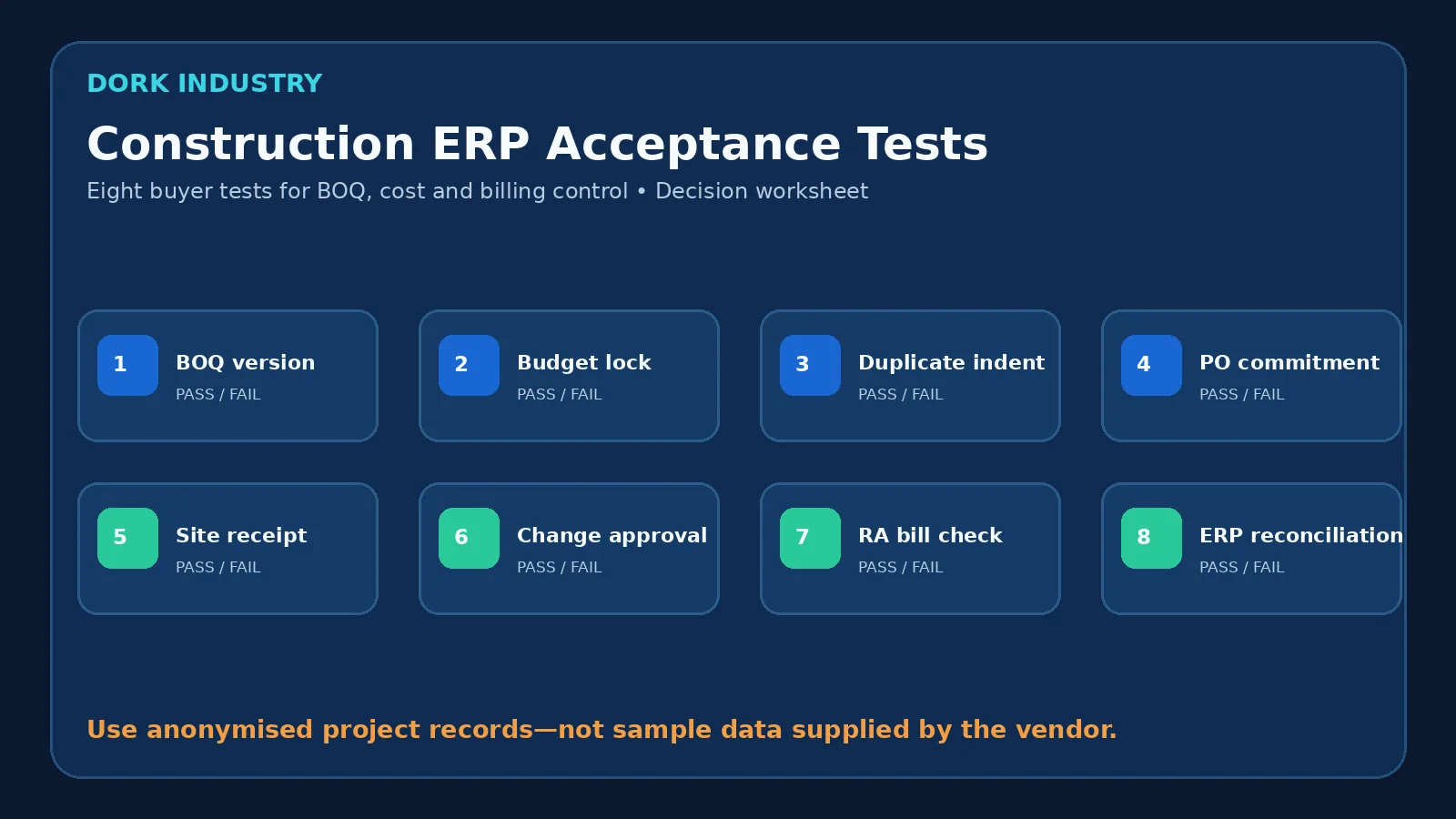
- BOQ revision: revise one item and confirm the system preserves the approved baseline, revised value, reason and approver.
- Budget lock: attempt an unauthorised change after approval and verify that access is blocked and logged.
- Duplicate indent: submit the same request twice and confirm the reviewer sees the duplicate risk before ordering.
- PO commitment: issue a partial PO and verify that budget availability reflects the open commitment before any invoice arrives.
- Site receipt: receive less than ordered, reject part of the delivery and trace the remaining open quantity.
- Change approval: create a scope change and verify that pending, approved and rejected values affect reports differently.
- Running bill check: certify partial work, apply an approved recovery and trace every amount to measurement and work order.
- ERP reconciliation: force an accounting-export failure, retry it and prove that no duplicate payable or invoice is created.
Recommended pilot thresholds: use at least 20 anonymised records across the eight scenarios; require 100% traceability from every certified amount to its source measurement and commitment; require zero duplicate postings during retry; and require 100% of failed interfaces to enter a visible, owned exception queue. These are Dork Industry’s proposed acceptance thresholds, not reported customer performance.
How should project cost exposure be calculated?
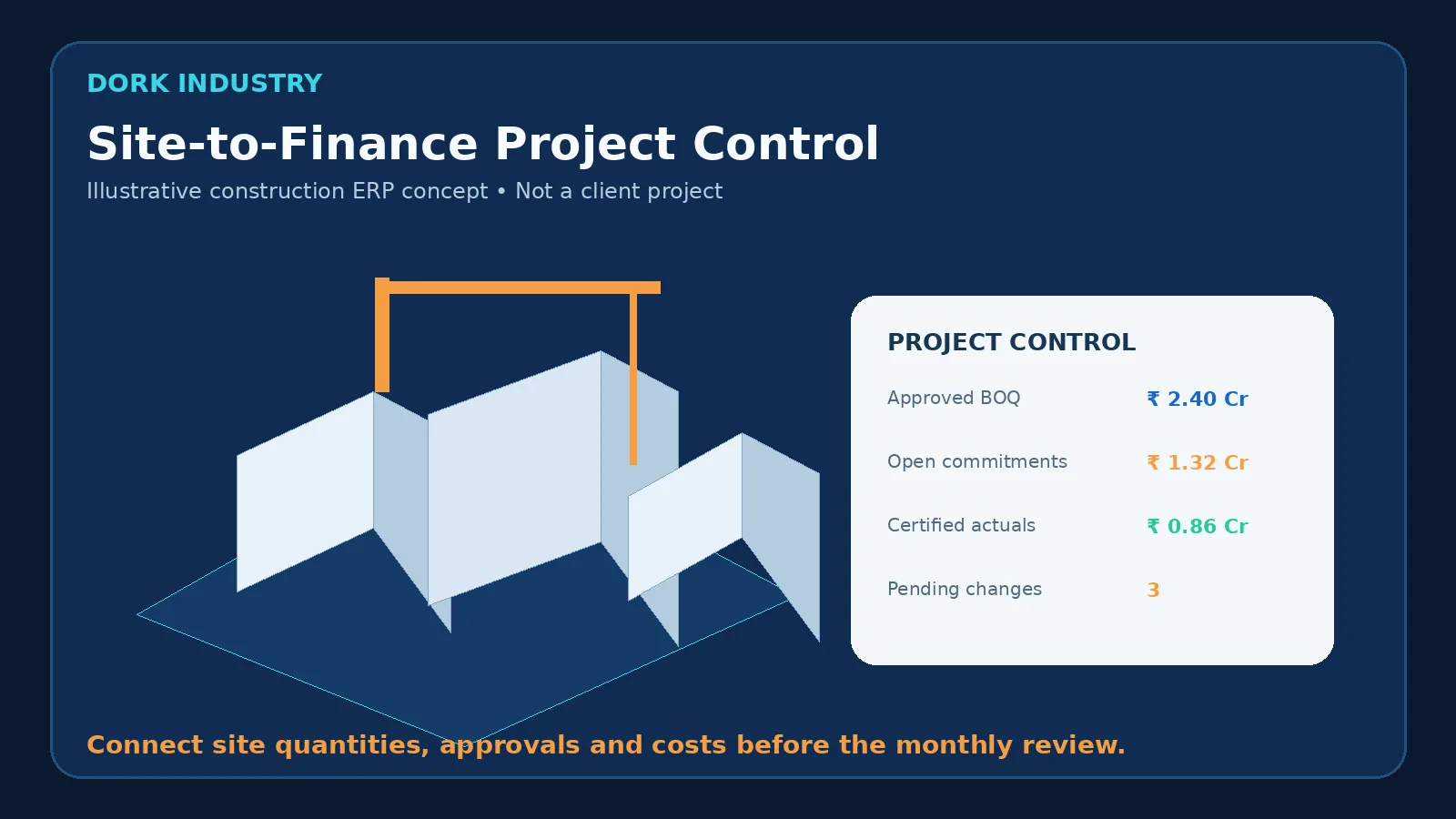
The following fictional worksheet demonstrates a control model. It is intentionally simplified and does not represent a client project or accounting advice.
| Illustrative project-control item | Amount | Evidence |
|---|---|---|
| Approved current budget | ₹2.40 crore | Baseline plus approved changes |
| Certified actual cost | ₹0.86 crore | Approved receipts and certified bills |
| Open commitments | ₹1.32 crore | Unconsumed PO and work-order value |
| Uncommitted forecast to complete | ₹0.34 crore | Quantity and rate assumptions for remaining work |
| Illustrative forecast final cost | ₹2.52 crore | ₹0.86 + ₹1.32 + ₹0.34 crore |
| Illustrative forecast variance | ₹0.12 crore over budget | ₹2.52 − ₹2.40 crore |
A useful ERP lets a project director open the ₹0.12-crore variance and inspect which packages, quantities, rates, commitments and pending changes produced it. The system should show definitions clearly; it should not present a single unexplained “project health” number.
How should construction ERP implementation be phased?
1. Which current workflows should be sampled?
Select one active project and anonymise recent BOQ changes, indents, orders, receipts, measurements, contractor bills and accounting entries. Include clean and disputed cases.
2. Who should own each master record?
Define owners for projects, cost codes, items, vendors, work packages, units, tax data and approval limits. Integration cannot correct unclear ownership.
3. What should the first pilot include?
Pilot one project or work package through the complete cost cycle. Do not call the pilot successful merely because procurement and site entry screens work.
4. How should integrations be reconciled?
For every interface, document the source, target, field map, unique identifier, trigger, retry behaviour, exception owner and reconciliation report.
5. When should the rollout expand?
Expand only when the eight tests pass, business owners accept the evidence, opening data reconciles and users can explain the budget, commitment, actual and forecast figures.
Dork Industry’s industry expertise, ERP solution capability and IT consulting approach can support requirements mapping, integration design and custom enterprise application decisions. The appropriate route may be product configuration, integration or custom development; it should follow the verified workflow.
Bring one real project-cost workflow to a consultation
Share an anonymised BOQ-to-billing process, the systems currently used and the point where cost visibility breaks. Dork Industry can help turn it into a requirements map, acceptance-test plan and integration scope.
What should buyers ask a construction ERP vendor?
- How does the system distinguish budget, commitment, actual and forecast?
- Can approved BOQ versions be reconstructed for any prior date?
- How are partial receipts, measurements and running bills reconciled?
- What happens when a change is pending but work must continue?
- How are duplicate imports and retries prevented?
- Can finance trace every posting back to project evidence?
- Can the business export its complete project and document history?
- What evidence will be produced for each acceptance test?
Frequently asked questions
What is construction ERP software?
Construction ERP software connects project commercial controls with procurement, site execution, subcontractor management, billing and finance. Its purpose is to make project quantities, commitments, costs, changes and forecasts traceable within one governed information model.
Is construction ERP the same as accounting software?
No. Accounting software records financial transactions. Construction ERP should also manage project-specific controls such as BOQ versions, cost codes, site indents, material receipts, work orders, measurements, running bills, commitments and forecasts, while integrating approved transactions with accounting.
Should contractors buy or build construction ERP?
Buy when a product fits the company’s project, billing and approval workflows with limited configuration. Consider custom development or an integration layer when the workflows, reporting definitions or system landscape materially differ from standard products. Decide through documented requirements and acceptance tests.
What data is needed before implementation?
Prepare projects, BOQ and budget versions, cost codes, item and vendor masters, approval limits, open orders, site stock, certified bills and integration mappings. Clean ownership and opening-balance reconciliation matter more than importing every old spreadsheet.
How should implementation success be measured?
Measure traceability, reconciliation accuracy, exception ageing, approval turnaround, user adoption by role and whether authorised managers can explain project variance from source records. Do not treat login counts or dashboard availability alone as proof of business improvement.
Editorial note: all monetary figures and dashboards in this guide are illustrative. Validate contractual, accounting and tax treatment with qualified professionals.