
Shopify product variants not showing on storefront usually means the variant exists in Admin but is being omitted by the product template, variant-picker JavaScript, availability logic, market context or an app. First prove whether the variant is absent, unavailable or merely hidden. Then trace the same variant ID from product data to the product form and cart.
This is a commercially important distinction. Recreating live variants too early can change variant IDs used by inventory systems, feeds, saved links and apps. A controlled diagnosis protects those connections while finding the smallest safe repair.

Why do Shopify product variants not showing on the storefront cost sales?
A customer who cannot select the required size, colour, pack or material cannot complete the intended order. The store may still display a product page, so ordinary uptime monitoring misses the defect. Support may treat the complaint as inventory trouble while the actual failure sits in theme rendering or JavaScript.
The commercial symptoms include a single option where several should appear, an unavailable label for an in-stock variant, a price or image that does not change, a variant URL that falls back to the default, or a cart containing a different option from the one selected. Each symptom points to a different layer and should be recorded separately.
What evidence should you capture before changing the Shopify theme?
- Copy the affected product URL and the exact variant ID from Shopify Admin.
- Record option names, values, SKU, inventory and availability for one working and one failing variant.
- Test the direct product URL with its
?variant=parameter. - Capture desktop and mobile screens, the selected option, displayed price and cart result.
- Note the active market, currency, customer or B2B context and sales channel.
- List recent theme publishes, app installs, app embeds, custom scripts and catalogue imports.
- Duplicate the active theme before editing code and reproduce the fault there.
According to Shopify’s theme architecture documentation, Liquid and HTML create storefront markup while CSS and JavaScript in theme assets control styling and interaction. That separation explains why correct Admin data can still produce a broken selector or stale product state in the browser.
Why are Shopify product variants not showing on storefront?
| Observed behaviour | Likely layer | Useful test |
|---|---|---|
| Option value is absent in Admin | Product data or import | Compare the source catalogue and product options |
| Variants exist, but no selector appears | Product template or variant-picker block | Preview a clean theme template |
| Selector changes, but price/media do not | Theme JavaScript or stale DOM state | Inspect console errors and selected variant ID |
| Only sold-out options disappear | Availability or app rule | Compare an available and unavailable variant |
| Only one market/customer fails | Market, catalogue or B2B eligibility | Repeat the same URL in both contexts |
| Issue began after an app/theme update | App embed, snippet or asset conflict | Test on a duplicated theme with controlled changes |
| Direct variant URL loads the default | URL handling or product-form code | Trace the selected variant through page load |
Do not assume every missing option is a theme bug. The variant might be unpublished from the relevant catalogue, genuinely unavailable, removed by an import, or intentionally hidden by merchandising logic. The diagnosis must compare product truth with storefront behaviour.
How should a developer diagnose Shopify product variants not showing?
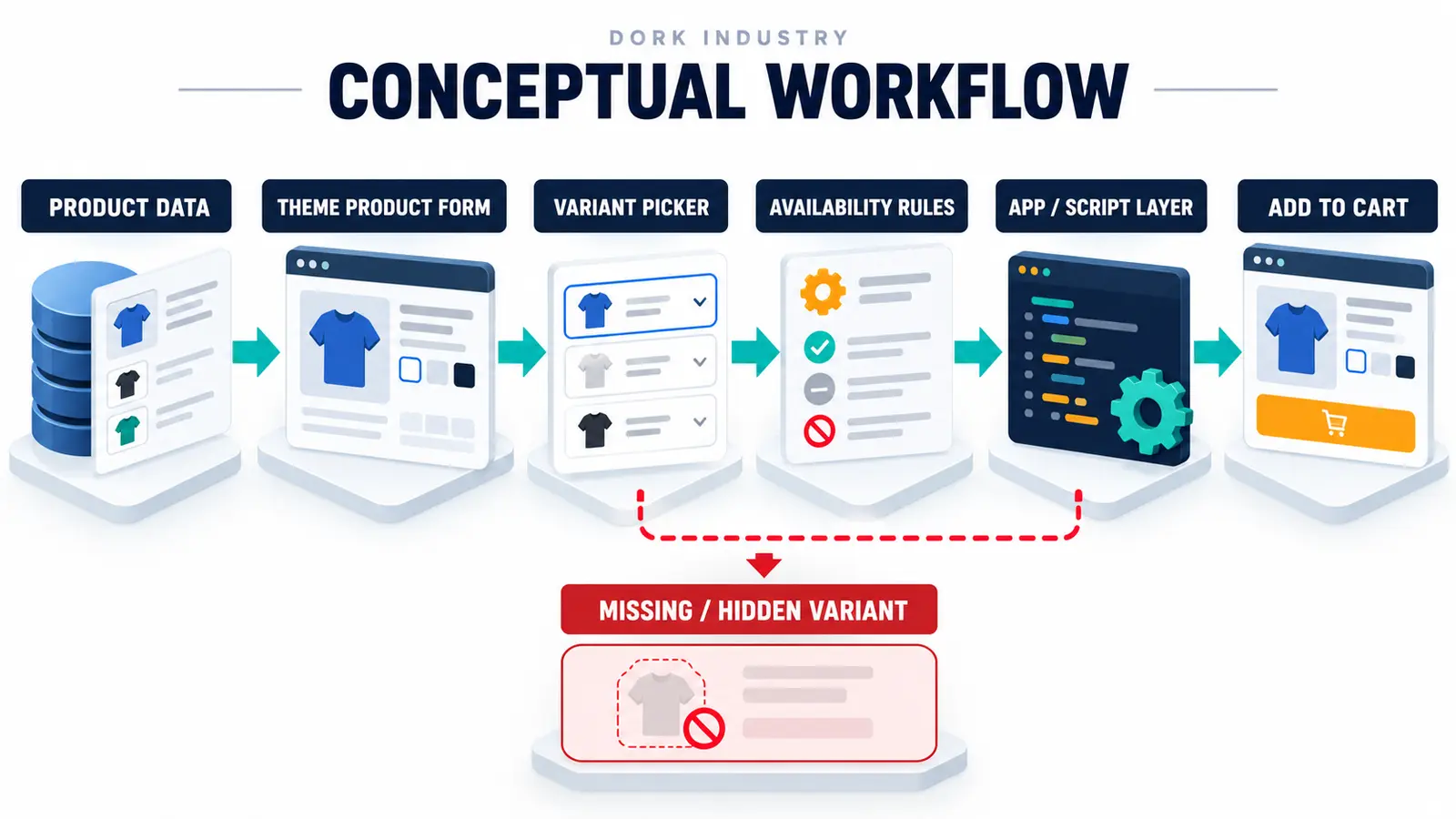
Start with product data, then move forward one layer at a time. Confirm the variant exists and is eligible. Inspect the rendered product form and option inputs. Verify that the selected variant ID changes when the shopper changes an option. Check whether price, media, availability and the Add to Cart payload all use that same ID.
Shopify’s official theme documentation explains that a product-type Liquid form enables customers to add products to a cart. If custom code visually changes an option without updating the form’s variant ID, the storefront can appear correct while the wrong item reaches the cart.
Next isolate app and script layers. Test a duplicated theme rather than disabling production features without a rollback plan. Preserve screenshots, console errors, network requests and the exact before/after variant payload. If the Add to Cart stage is also broken, use the related Shopify Add to Cart diagnostic guide. If a recent theme publish changed other shared elements, compare the process in the Shopify theme update guide.
Should you configure, repair or rebuild the variant experience?
Configure the existing theme when the standard product block or variant picker was removed, hidden or assigned to the wrong template. Repair the theme or app integration when selectors, URL state, price, media, inventory messaging or cart payload fall out of sync. Restructure the catalogue when the product model itself cannot represent the buying decision cleanly.
A rebuild is not the first response. The smallest safe change may be restoring a picker block, correcting Liquid output, repairing event handling, or narrowing an app rule. Catalogue restructuring needs mapping for SKUs, URLs, inventory, feeds, analytics and connected software before IDs change. Dork Industry’s web development service can handle theme repairs, while custom software development supports governed integrations and catalogue workflows.
How should a Shopify variant visibility repair be acceptance-tested?
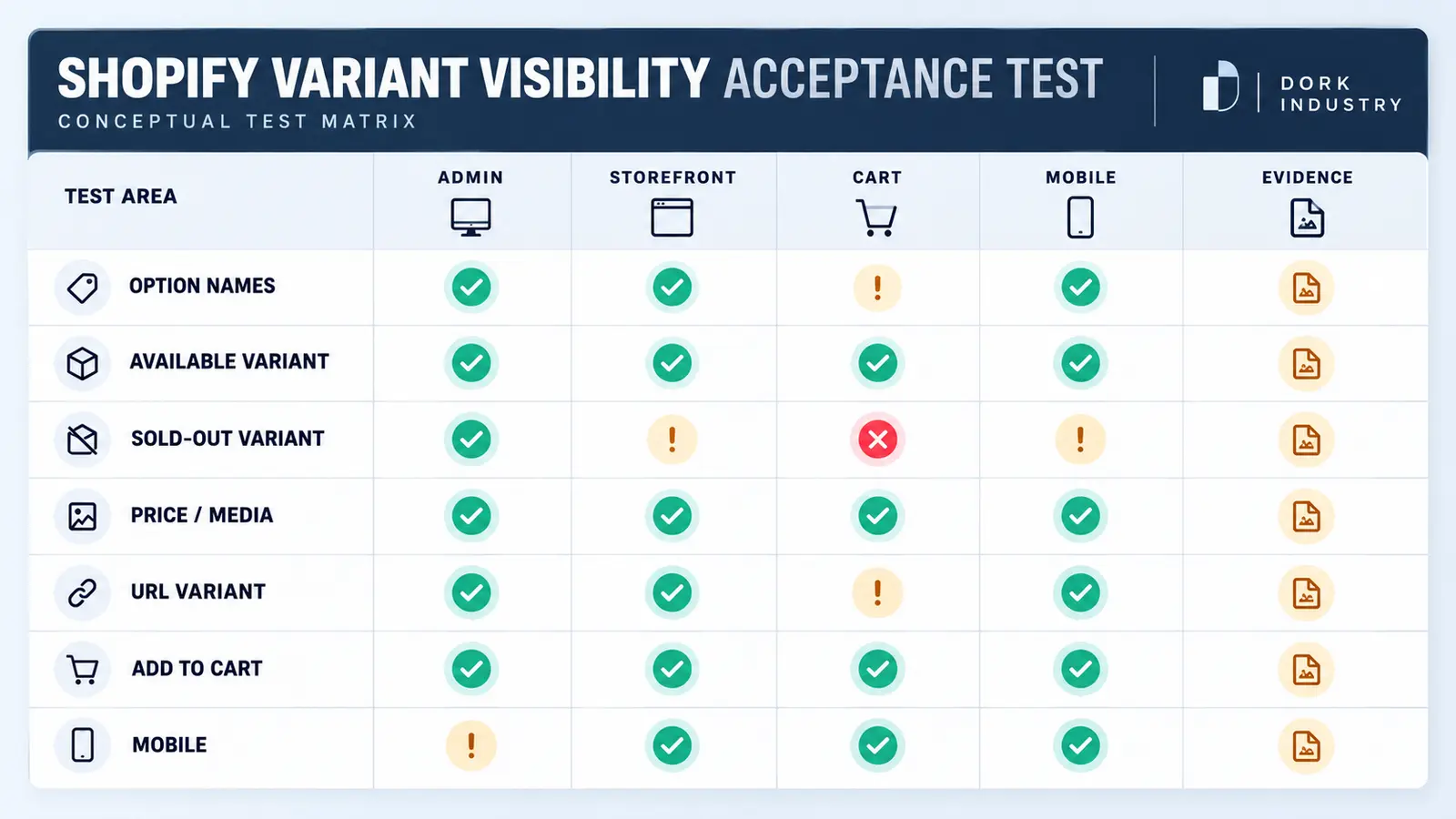
| Test | Expected result | Evidence |
|---|---|---|
| Available variant | Selectable with correct price, media and SKU | Screen and variant ID |
| Sold-out variant | Visible or hidden according to the approved rule | Inventory state and message |
| Direct variant URL | Loads the requested variant consistently | URL and selected ID |
| Add to Cart | Cart contains the exact selected option | Cart line and variant ID |
| Market/customer context | Only eligible variants appear | Test context without personal data |
| Mobile | Picker remains usable and state stays synchronized | Device, browser and screen capture |
| Regression | Related products and templates still work | Recorded test matrix |
Test at least one product that never failed as a control. Also verify cart, quick-add, featured-product sections, search results and any subscription or bundle path that reuses product-form code. Keep a rollback copy and document the changed template, snippet, asset or app setting.
When should you hire a Shopify developer for missing variants?
Professional work is warranted when multiple products or markets are affected, the variant ID changes incorrectly, console errors appear, an app or custom theme owns the picker, catalogue data is synchronized externally, or the defect returns after theme updates. A useful repair scope should include reproduction evidence, root cause, smallest safe change, regression tests and rollback.
If you need a dedicated developer to investigate or extend the store, Dork Industry provides developer staff augmentation. For another checkout-critical failure, see why a Shopify discount code may not work at checkout.
What do merchants ask about Shopify variant visibility?
Why do variants show in Shopify Admin but not on the product page?
Read the answer
The product template may lack a variant picker, custom JavaScript may not initialize it, or availability, market or app logic may filter the option. Compare the Admin variant ID with the rendered form before editing data.
Should I delete and recreate the missing variants?
Read the answer
Not as the first step. Recreating a variant can change identifiers used by inventory, feeds, URLs and apps. Preserve the current data, diagnose the storefront layer and plan any catalogue migration deliberately.
Why are only sold-out Shopify variants missing?
Read the answer
The theme or an app may intentionally hide unavailable options. Confirm the approved merchandising rule and distinguish “hidden” from “missing.” Customers should receive consistent availability information without being allowed to add an unavailable item.
Can an app hide Shopify variants?
Read the answer
Yes. Bundles, subscriptions, swatches, combined listings, catalogues and merchandising apps can alter option output or availability. Test their configured rules and storefront scripts on a duplicated theme with a controlled product.
What should I send a Shopify developer?
Read the answer
Send the product URL, working and failing variant IDs, screenshots, market/customer context, active theme version, app list, exact cart outcome and timeline of recent changes. Do not share payment or customer personal data.
How do I know the variant repair is complete?
Read the answer
The option must display as intended, update price and media, survive direct URLs, add the correct variant to cart, behave on mobile and pass affected market and availability scenarios without breaking control products.
Stuck with this issue?
Send us the error and the setup — we diagnose the cause, fix it, and show you how to prevent it from coming back.

[…] Theme code rarely controls the core hosted payment-method list, but custom carts, checkout extensions, payment customizations and apps can influence the journey or eligibility. If the cart itself is broken, use the Shopify Add to Cart repair guide. If a promotion changes the outcome, compare the Shopify discount diagnosis. […]